1. Bubuka
This manual provides essential information for the safe and efficient operation of your ONN 43-Inch Class 4K UHD (2160P) LED Smart TV. This television offers a 4K Ultra High Definition display, High Dynamic Range (HDR) compatibility, and integrated smart TV functionalities powered by Roku. It supports popular streaming services and voice assistants like Alexa and Google Assistant. Please read this manual thoroughly before using your television and retain it for future reference.

Image 1: ONN 43-Inch 4K UHD Smart TV in a typical living room environment.
2. Émbaran Kasalametan
Always follow basic safety precautions when using this product to reduce the risk of fire, electric shock, and injury. Keep this manual handy for reference.
- Sumber Daya: Sambungkeun TV ngan kana catu daya anu ditangtukeun.
- Ventilasi: Pastikeun ventilasi nyukupan sabudeureun TV. Ulah meungpeuk bukaan ventilasi.
- Cai sareng Uap: Ulah ngalaan TV ka hujan atawa beueus. Ulah nempatkeun objék ngeusi cairan dina TV.
- beberesih: Cabut colokan TV sateuacan dibersihkeun. Anggo lawon anu lemes sareng garing.
- Pamasangan témbok: If wall mounting, ensure the mount is compatible with VESA 400x400 standards and installed by qualified personnel.
- Barudak: Ngawaskeun barudak pikeun nyegah aranjeunna naek atanapi maén sareng TV.
3. Eusi Paket
Pariksa heula sadaya barang aya dina bungkusanna. Upami aya barang anu leungit atanapi ruksak, mangga hubungi padagang anjeun.
- ONN 43-Inch Class 4K UHD LED Smart TV
- Kadali jauh
- Wall Mount (Note: For renewed products, TV stands may not be included as a wall mount is provided for installation.)
- Kabel listrik
- Pituduh Mimiti Gancang (henteu kalebet dina manual ieu)

Image 2: The ONN 43-Inch 4K UHD Smart TV alongside its included wall mount.
4. Setélan
4.1 Pamasangan témbok Gunung
Your ONN 43-Inch Smart TV is designed for wall mounting using a VESA 400x400 compatible bracket. Follow these general steps for installation:
- Nyiapkeun Tembok: Locate wall studs and ensure the mounting area can support the TV's weight (approximately 16.9 pounds) plus the mount.
- Attach Mount Brackets to TV: Secure the wall mount brackets to the VESA holes on the back of the TV using appropriate screws.
- Pasang Plat Tembok: Mount the wall plate securely to the wall studs according to the wall mount manufacturer's instructions.
- Gantungkeun TV: Carefully lift the TV and attach it to the wall plate. Ensure it is securely locked in place.
Note: Always refer to the specific instructions provided with your wall mount for detailed installation steps. Professional installation is recommended.
4.2 Nyambungkeun périferal
TV ieu nawiskeun sababaraha port pikeun nyambungkeun alat éksternal:
- HDMI: 3 HDMI ports (including 1 eARC) for high-definition audio/video devices like Blu-ray players, gaming consoles, or cable boxes.
- USB: 1 USB port for media playback from USB drives.
- LAN: 1 port Ethernet pikeun sambungan internét kabel.
- Optik: 1 Optical digital audio output for connecting to soundbars or home theater systems.
- Komposit: 1 Composite video input for older devices.
- Kabel Koaksial/: 1 Coaxial input for antenna or cable TV connection.
- Headphone: 1 Headphone jack for private listening.
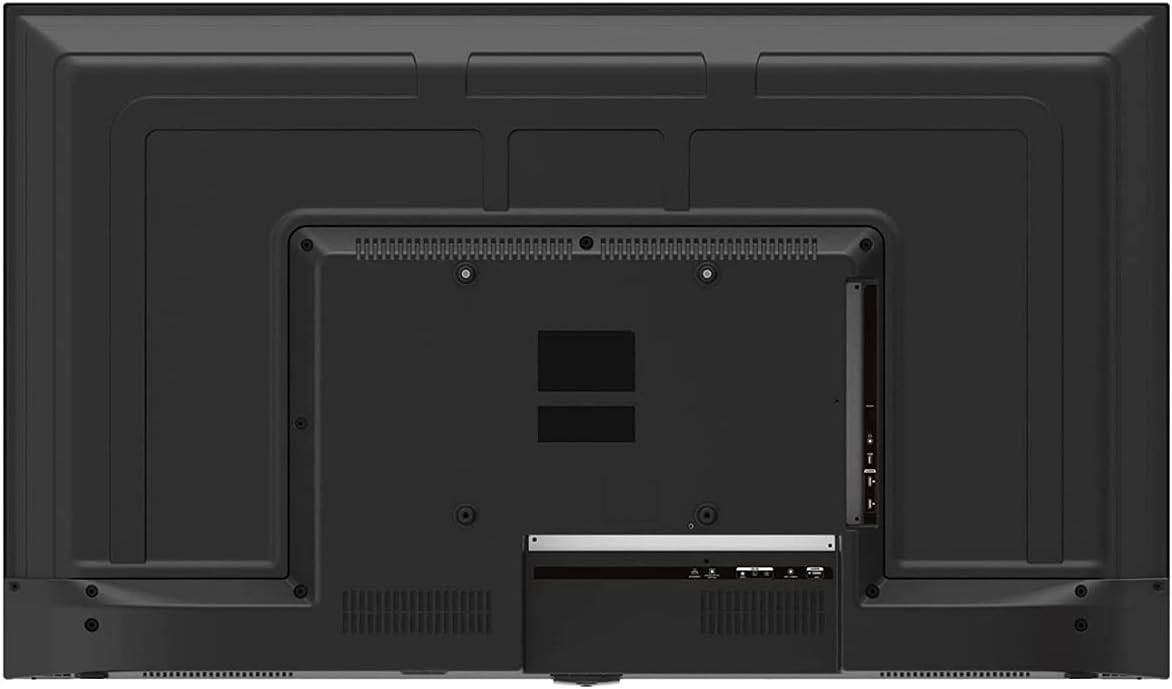
Image 3: Rear panel of the ONN 43-Inch Smart TV, highlighting the available connectivity ports.
4.3 Daya Awal Hurung sareng Setup Jaringan
- Daya Hurung: Connect the power cord to the TV and a power outlet. Press the power button on the remote control.
- Pilihan Basa: Turutan pituduh dina layar pikeun milih basa anu anjeun pikaresep.
- Sambungan jaringan: Select your Wi-Fi network from the list and enter the password. Alternatively, connect an Ethernet cable for a wired connection.
- Setelan Akun Roku: Follow the instructions to create or sign in to your Roku account. This is necessary to access streaming channels and features.
5. Ngoperasikeun TV Anjeun
5.1 Jauh Jauh
The included remote control provides easy access to all TV functions and streaming services. It features dedicated buttons for popular streaming apps like Netflix, Apple TV+, Paramount+, and HBO Max.
5.2 Smart TV Interface (Roku TV)
The Roku TV home screen provides a centralized hub for all your entertainment. You can easily navigate through streaming channels, live TV inputs, and device connections.

Image 4: The Roku TV home screen on the ONN 43-Inch Smart TV, showing available streaming applications.

Gambar 5: Hiji sudut view of the ONN 43-Inch Smart TV, showcasing the user interface from a different perspective.
- imah: Access the main Roku TV interface.
- TV langsung: Browse available live television channels.
- Toko streaming: Discover and add new streaming channels.
- Apps & Inputs: Select connected devices (e.g., HDMI 1, HDMI 2) or launch installed applications.
5.3 Pamaduan sora Asisten
The TV is compatible with Alexa and Google Assistant. You can use a compatible voice assistant device (sold separately) or the Roku mobile app to control your TV with voice commands, such as turning it on/off, changing channels, or launching apps.
5.4 Setélan Gambar
To adjust picture quality, navigate to Settings > Picture Settings on the Roku TV menu. Options typically include Brightness, Contrast, Color, Tint, Sharpness, and various picture modes (e.g., Movie, Sports, Vivid, Standard).
5.5 Setélan Sora
To adjust audio settings, navigate to Settings > Audio Settings. Options may include Volume Mode, Audio Delay, and various sound modes (e.g., Standard, Theater, Music).
6. Pangropéa
6.1 Ngabersihan TV
- Sok cabut TV samemeh beberesih.
- Anggo lawon anu lemes sareng henteu lint pikeun ngusap layar sareng kabinet.
- Pikeun tanda pengkuh, enteng dampen lawon jeung cai atawa hampang, non-abrasive cleaner layar. Ulah nyemprot cleaner langsung kana layar.
6.2 Apdet parangkat lunak
Your ONN Roku TV automatically receives software updates to improve performance and add new features. Ensure your TV is connected to the internet for these updates. You can manually check for updates via Setélan> Sistem> Apdet Sistem.
7. Cara ngungkulan
Upami anjeun ngalaman masalah sareng TV anjeun, tingal solusi umum ieu:
| Masalah | Solusi |
|---|---|
| Taya Daya | Pastikeun kabel listrik dicolokkeun sacara aman kana TV sareng stop kontak listrik. Coba outlet béda. |
| Taya Gambar / Sora | Check all cable connections (HDMI, coaxial). Ensure the correct input source is selected on the TV. |
| Jauh Teu Gawé | Ganti batré dina kadali jauh. Pastikeun teu aya halangan antara jauh sareng sénsor IR TV. |
| Teu Bisa Nyambung ka Wi-Fi | Verify your Wi-Fi password. Restart your router and modem. Move the TV closer to the router if possible. |
| Kualitas Gambar Miskin | Check the resolution settings of your connected device. Adjust picture settings on the TV. Ensure you are vieweusi 4K pikeun resolusi optimal. |
8. Spésifikasi
| Fitur | Rincian |
|---|---|
| Ukuran layar | 43 inci |
| Téknologi tampilan | LED |
| Resolusi | 4K Ultra HD (2160p) |
| Kasaluyuan HDR | Sumuhun |
| Smart TV Platform | Roku TV |
| Rojongan Asisten sora | Alexa, Asisten Google |
| Konektipitas | 3 HDMI (1 eARC), 1 Composite, 1 USB, 1 LAN, 1 Optical, 1 Coaxial/Cable, 1 Headphone |
| Rasio Aspék | 16:9 |
| Ukuran produk (D x W x H) | 7" x 38" x 23" |
| Item Beurat | 16.9 pon |
| Warna | Hideung |

Gambar 6: Sisi profile of the ONN 43-Inch Smart TV, illustrating its slim design.

Image 7: Energy Guide label providing estimated yearly energy cost and consumption for the television.
9. Garansi jeung Rojongan
For warranty information and technical support, please refer to the documentation included with your product or visit the official ONN support website. As this is a renewed product, specific warranty terms may vary. Please consult the seller or product listing for details regarding the renewed product warranty.


