1. Bubuka
Thank you for choosing the KAIDI KD-771 TWS Smart Touch V5.1 Wireless Earbuds. This manual provides essential information for the proper use, setup, and maintenance of your new earbuds. Please read it carefully before use and retain it for future reference.
Eusi pakét:
- 1 Pair of KAIDI KD-771 Wireless Earbuds
- 1 Ngecas Kasus
- 1 USB Charging Cable (Type-C)
- 1 Buku Panduan Pamaké

Image 1.1: KAIDI KD-771 Wireless Earbuds with their retail packaging.
2. Émbaran Kasalametan
- Do not disassemble, repair, or modify the product. This may cause fire, electronic breakdown, or complete product damage.
- Jauhkeun alat tina suhu anu ekstrim, sinar panonpoé langsung, sareng kalembaban anu luhur.
- Avoid exposing the earbuds to water or other liquids. While rated IPX4 for splash resistance, they are not waterproof and should not be submerged.
- Anggo ukur kabel ngecas anu disayogikeun atanapi anu sarimbag anu disertipikasi.
- Do not use the earbuds at excessively high volumes for extended periods to prevent hearing damage.
- Jauhkeun tina jangkauan barudak.
3. Produk Langkungview
The KAIDI KD-771 earbuds feature a compact design with intuitive touch controls and a portable charging case.

Image 3.1: The KAIDI KD-771 Wireless Earbuds alongside their closed charging case.

Gambar 3.2: Detil view of the earbuds and charging case, highlighting the USB Type-C charging port and earbud design.
komponén:
- Earbuds: Left and Right earbuds with Smart Touch sensors.
- Kasus ngecas: Stores and charges the earbuds. Features a battery indicator LED and a USB Type-C charging port.
- Mikropon: Integrated into each earbud for calls.
4. Setélan
4.1 Ngecas Earbuds sareng Case
Saméméh dipaké munggaran, eusian pinuh ku earbuds jeung wadah ngecas.
- Teundeun earbuds kana wadah ngecas. Pastikeun aranjeunna leres seated.
- Sambungkeun kabel ngecas USB Tipe-C kana port ngecas dina casing sareng tungtung anu sanésna kana sumber daya USB (contona, adaptor témbok, komputer).
- The LED indicator on the charging case will illuminate to show charging status. Once fully charged, the indicator may change color or turn off.
- A full charge provides approximately 4 hours of earbud usage, with additional charges available from the case.
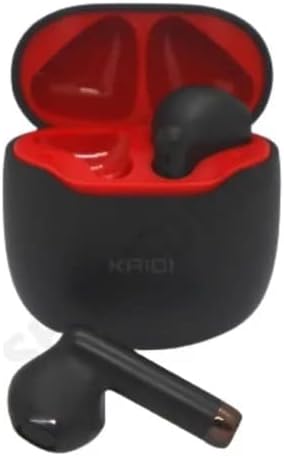
Image 4.1: Earbuds placed inside the charging case, ready for charging.
4.2 Nyapasangkeun sareng Alat
The earbuds use Bluetooth V5.1 for a stable and low-latency connection.
- Daya Hurung: Buka wadah ngecas. Earbud bakal otomatis hurung teras lebet kana modeu pairing. Anjeun tiasa ngadangu paréntah sora.
- Aktipkeun Bluetooth: On your smartphone or other Bluetooth-enabled device, go to the Bluetooth settings and ensure Bluetooth is enabled.
- Pilih Alat: In the list of available Bluetooth devices, locate and select "KD-771".
- Konfirmasi sambungan: Sakali disambungkeun, anjeun bakal ngadéngé sora konfirmasi, sarta earbuds bakal siap dipaké.
- Sambungan deui otomatis: After initial pairing, the earbuds will automatically connect to the last paired device when removed from the case, provided Bluetooth is active on the device.
5. Parentah Operasi
The KAIDI KD-771 earbuds feature Smart Touch controls for easy management of audio and calls.
5.1 Smart Touch Controls
- Puter / Reureuh: Ketok tunggal dina boh earbud.
- Lagu salajengna: Ketok dua kali dina earbud katuhu.
- Lagu Sateuacanna: Ketok dua kali dina earbud kénca.
- Ngajawab / mungkas Telepon: Ketok sakedap boh earbud salami sauran asup atanapi sauran aktip.
- Nolak Telepon: Pencet jeung tahan boh earbud salila 2 detik dina mangsa telepon asup.
- Aktipkeun Asisten Sora: Ketok tilu kali dina boh earbud (contona, Siri, Asisten Google).
- Kontrol volume: Volume adjustments must be made directly on the connected device (smartphone, tablet, etc.). The earbuds do not have integrated volume controls.
5.2 Daya Hurung/Pareuman
- Daya Hurung: Open the charging case, or press and hold the touch area on both earbuds for 3 seconds if they are outside the case and off.
- Pareum listrik: Lebetkeun deui earbud kana wadah ngecas teras tutupkeun. Alternatipna, pencét sareng tahan area toél dina dua earbud salami 5 detik.
6. Pangropéa
6.1 beberesih
- Ngusap earbuds sareng wadah ngecas ku lawon anu lemes, garing, teu aya serat.
- Ulah make cleaners abrasive, alkohol, atawa pangleyur kimiawi.
- Pastikeun ngecas kontak dina duanana earbuds jeung wadahna beresih jeung bébas tina lebu.
6.2 Panyimpenan
- Nalika henteu dianggo, simpen earbuds dina wadah ngecasna pikeun ngajagi sareng tetep dicas.
- Simpen di tempat anu tiis, garing, jauh tina sinar panonpoé langsung sareng suhu anu ekstrim.
6.3 Tahan cai
The KAIDI KD-771 earbuds are rated IPX4, meaning they are resistant to splashes of water from any direction. This makes them suitable for workouts or light rain. However, they are not designed for submersion in water, showering, or swimming. Avoid exposing them to heavy rain or direct streams of water.
7. Cara ngungkulan
| Masalah | Mungkin Cukang lantaranana | Solusi |
|---|---|---|
| Earbuds teu hurung. | batré lemah. | Ngecas earbuds sareng eusian wadah pinuh. |
| Earbuds henteu dipasangkeun sareng alat. | Bluetooth is off on device; earbuds not in pairing mode; device list cluttered. | Ensure Bluetooth is on. Place earbuds in case, close, then open to re-enter pairing mode. Forget "KD-771" on your device and try pairing again. |
| Taya sora tina earbuds. | Volume teuing leutik; earbud teu nyambung; média dieureunkeun. | Increase volume on your device. Check Bluetooth connection. Ensure media is playing. |
| Hiji earbud teu aya sora. | Earbud teu disinkronkeun kalawan bener; batréna lemah dina hiji earbud. | Place both earbuds back in the case, close the lid, then open again. Ensure both earbuds are charged. |
| Kasus ngecas teu ngecas. | Kabel lepat atanapi sumber listrik. | Try a different USB Type-C cable and/or power adapter. Ensure connections are secure. |
8. Spésifikasi
- Ngaran modél: KD-771
- Téknologi konektipitas: Nirkabel (Bluetooth V5.1)
- Téknologi Komunikasi Nirkabel: Bluetooth
- Métode kontrol: Toél
- Fitur husus: Volume control (via device), Lightweight, Microphone included, IPX4 Splash Resistant
- Penempatan Ceuli: Dina-Ceuli
- Bahan: palastik
- Tanggapan Frékuénsi: 20 Hz - 20 kHz (implied from 20000 Hz spec)
- Sound Responsiveness: 115 desibel
- Impedansi: 32 ohm
- Rentang Frékuénsi: 2.400 - 2.485 GHz
- Sumber Daya: Batré
- Average Battery Life (Earbuds): 4 Jam
- Komposisi batré: Litium-ion
- Port ngecas: USB Tipe-C
- Beurat produk: 100 g
- ANATEL Certification: 18583-21-14467
9. Garansi jeung Rojongan
9.1 Garansi Produsén
Produk ieu disayogikeun sareng garansi produsén ngeunaan 3 bulan ti tanggal pameseran. Garansi ieu ngawengku cacad manufaktur dina panggunaan normal. Éta henteu ngawengku karusakan anu disababkeun ku salah guna, kacilakaan, modifikasi anu teu sah, atanapi karusakan normal.
9.2 Rojongan Palanggan
For technical assistance, warranty claims, or further inquiries, please contact your retailer or the KAIDI customer support channel provided at the point of purchase. Please have your proof of purchase and product model number (KD-771) ready when contacting support.


