1. Bubuka jeung Leuwihview
The FOXWELL NT809BT Pro is an advanced wireless diagnostic scan tool designed for comprehensive automotive system analysis. This device offers full system diagnostics, bidirectional control capabilities, and over 30 specialized reset functions, making it suitable for various automotive service needs. It operates on an Android 9 OS with a 7-inch HD touchscreen and features a wireless VCI (Vehicle Communication Interface) for flexible operation.

Figure 1: The FOXWELL NT809BT Pro diagnostic scan tool.
Video 1: Leuwihview of the NT809BT Pro's simple and intuitive interface.
2. Naon dina Box
Saatos unboxing, pariksa yén sadaya komponén aya:
- NT809BT Main unit (tablet)
- VCI (Vehicle Communication Interface) dongle
- Kabel USB
- Manual Pamaké (ieu dokumén)
- Gancang Mimitian Guide
3. Setélan
3.1 Setup Alat Awal
- Power on the NT809BT Pro unit.
- Turutan pituduh dina layar pikeun milih basa sareng zona waktos anjeun.
- Connect the device to a Wi-Fi network to enable software updates.
3.2 Nyambungkeun ka Kandaraan
- Tangtukeun lokasi port OBD2 wahana, ilaharna di handapeun dasbor di sisi supir urang.
- Plug the VCI dongle into the vehicle's OBD2 port. Ensure a secure connection.
- The NT809BT Pro tablet will automatically establish a wireless Bluetooth connection with the VCI dongle. The connection range is up to 10 meters (33 feet).

Figure 2: Wireless connection between the NT809BT Pro tablet and the VCI dongle.
Video 2: Demonstration of the wireless diagnostic capabilities with the VCI dongle.
4. Parentah Operasi
4.1 Diagnostik Sistim pinuh
The NT809BT Pro can access and diagnose all available electronic control systems in a vehicle. This includes, but is not limited to, Engine, Transmission, ABS, SRS, SAS, Body Control Module, TPMS, and DPF systems. The tool performs an automatic VIN scan to identify the vehicle and then allows for reading/clearing diagnostic trouble codes (DTCs), viewdata hirup, sarta ngalakukeun tés aktif.

Gambar 3: Leuwihview of OE-level full system diagnostic capabilities.
Video 3: Demonstration of all systems car diagnostic scanning.
4.2 Kontrol Dua Arah (Tés Aktif)
This function allows the diagnostic tool to send commands to the vehicle's ECUs to perform specific component tests. This is crucial for pinpointing system malfunctions by directly activating components like fuel pumps, cooling fans, or individual injectors. Examples ngawengku:
- Turning on/off the A/C fan
- Modulasi throttle
- Turning on/off headlights
- Ngalaksanakeun tés injector

Figure 4: Bidirectional control in action, sending commands to vehicle systems.
Video 4: Guide on how to perform bidirectional diagnostics.
4.3 Service Reset Functions
The tool supports over 30 common maintenance and reset services, which include:
- Reset minyak
- EPB (Eléktronik Parkir marake) Reset
- ABS Ngaluarkeun getih
- SAS (Steering Angle sénsor) Calibration
- Injektor Coding
- Crank Sensor Relearn
- Pendaptaran batré
- Idle Relearn
- DPF Regenerasi
- TPMS Reset
- Inisialisasi Sunroof
- Adaptasi Transmisi
- Fuel Pressure Test
- Headlamp Reset
Note: The availability of specific functions may vary depending on the vehicle's make, model, and year.

Figure 5: A selection of the 30+ reset services offered by the tool.
Video 5: Demonstration of various reset functions on the FOXWELL NT809BT Pro.
4.4 Grafik Data Langsung
The NT809BT Pro allows for real-time graphing of live sensor data, enabling detailed analysis of vehicle performance. It supports 4-in-1 live data graphing, which helps in identifying intermittent issues and monitoring system parameters simultaneously.
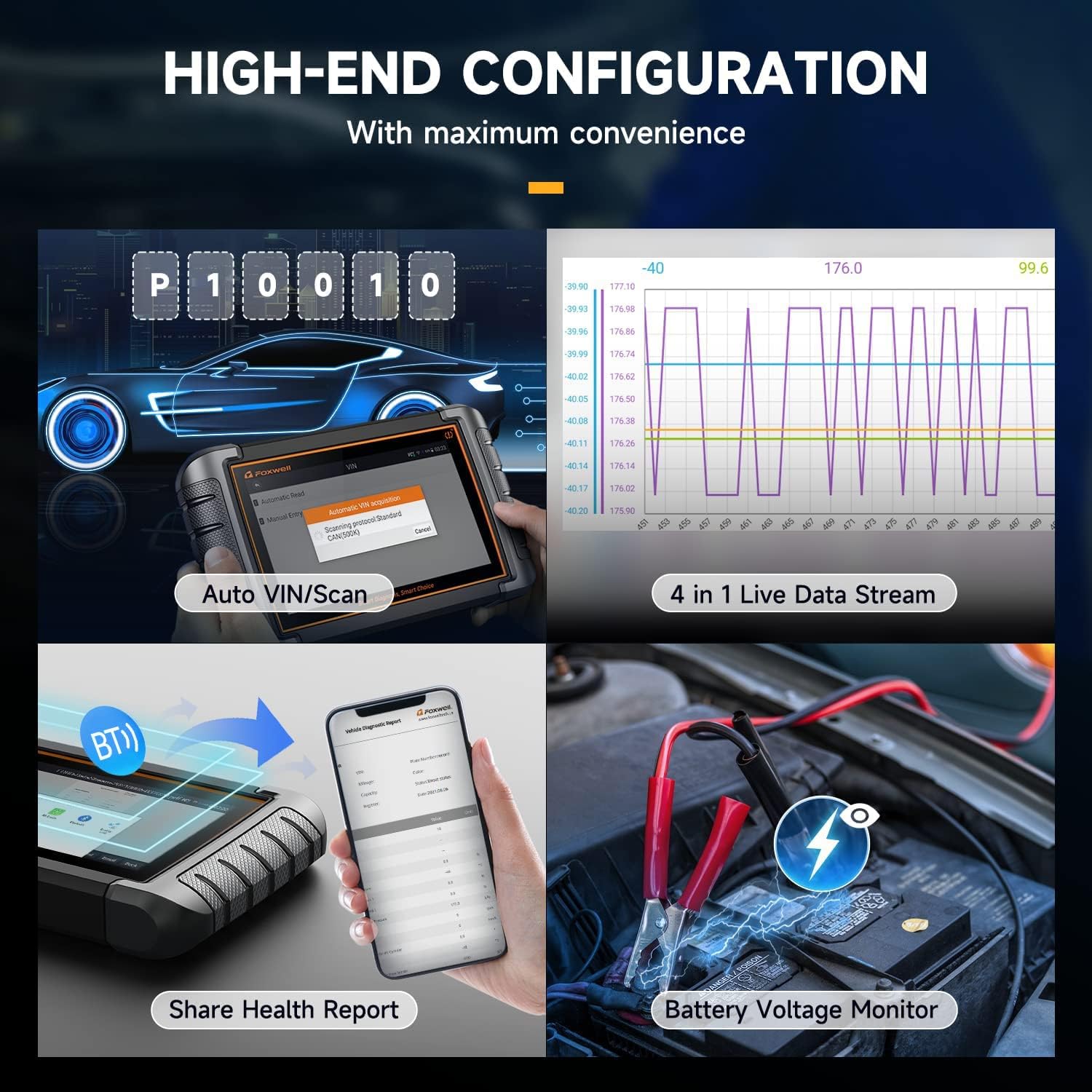
Figure 6: Live data stream and battery voltage monitoring interface.
4.5 Vehicle Coverage and Protocols
The tool supports over 150 car brands and 10,000+ car models from 1996 to 2024, covering US, European, and Asian markets. It is compatible with various diagnostic protocols, including CAN-FD, CAN, KWP, and DOIP. For FCA SGW (Security Gateway) vehicles, an additional 12+8 adapter may be required to access active tests and system diagnostics.

Figure 7: Extensive vehicle coverage and protocol support.
5. Pangropéa
5.1 Apdet parangkat lunak
The NT809BT Pro includes 3 years of free software updates via Wi-Fi. Regular updates ensure compatibility with new vehicle models and the latest diagnostic functions. Connect the device to a stable Wi-Fi network and navigate to the 'Update' section on the main menu to check for and install available updates.
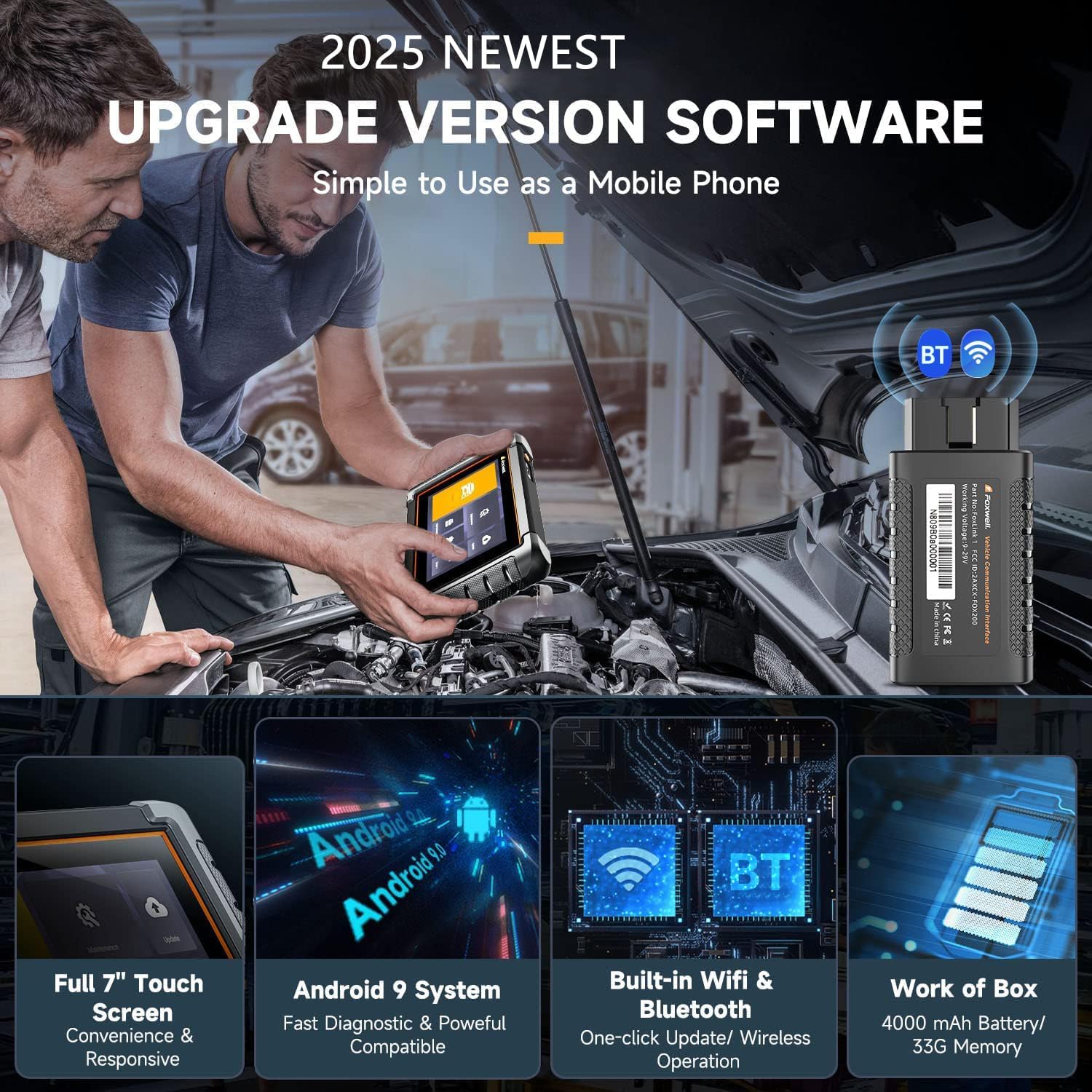
Figure 8: Key hardware and software features of the NT809BT Pro.
6. Cara ngungkulan
If you encounter issues with the NT809BT Pro, consider the following:
- Masalah sambungan: Ensure the VCI dongle is securely plugged into the OBD2 port and the vehicle's ignition is on. Verify Bluetooth is enabled on the tablet.
- Kasalahan parangkat lunak: Ensure the device has the latest software updates installed. A stable Wi-Fi connection is required for updates.
- Functionality Limitations: Some advanced functions may not be supported on all vehicle models or years. Refer to the vehicle coverage list or contact support for specific compatibility inquiries.
- Alat Teu Dihurungkeun: Ensure the device battery is charged. If the battery is low, connect the device to the charger.
7. Spésifikasi
| Fitur | Spésifikasi |
|---|---|
| Produsén | FOXWELL |
| Modél | FOXWELL NT809BT PRO |
| Item Beurat | 2.97 pon |
| Dimensi produk | 8.07 x 5.32 x 1.18 inci |
| Batré | 1 batré Litium Ion diperlukeun |
| Produsén Bagian Jumlah | NT809BT |
| Sumber Daya | Batré Powered |
| Sistem operasi | Android 9.0 |
| Ukuran layar | 7.1 inci |

Gambar 9: Tukangeun view of the NT809BT Pro unit with product information.
8. Garansi jeung Rojongan
FOXWELL provides a warranty for the NT809BT Pro. For specific warranty details, please refer to the documentation included with your product or contact FOXWELL customer support.
For any questions, technical assistance, or compatibility inquiries before or after purchase, please contact FOXWELL customer support. When contacting support, provide your product model, release year, and VIN (Vehicle Identification Number) for efficient assistance.
Contact information: amazonsupport@foxwelltech.com


