1. Bubuka
This manual provides detailed instructions for the proper use and maintenance of your TTArtisan 50mm F2 Full Frame Large Aperture Camera Lens. Please read this manual thoroughly before using the product to ensure optimal performance and longevity.

Figure 1: TTArtisan 50mm F2 Full Frame Lens
2. Fitur konci
- Desain kompak sareng portabel: Weighing approximately 200 grams, this full-frame lens is designed for ease of transport, reducing the burden during photography sessions.
- Large F2 Aperture: The wide F2 aperture allows for improved image quality in low-light conditions by reducing noise. It also enables the creation of pleasing background blur (bokeh).
- 50mm Standard Focal Length: The 50mm focal length provides a viewing angle that closely approximates natural human eyesight, minimizing distortion and maintaining realistic spatial representation. This makes it a versatile lens for various photographic applications.
- Manual Focus Operation: This lens features manual focus, offering precise control over focus for a deliberate photographic experience.
- Kasaluyuan lega: Designed for Fuji Fujifilm X-Mount cameras, including models such as X-A1, X-A10, X-A2, X-A3, X-A5, X-A7, X-M1, X-M2, X-H1, X-T1, X-T10, X-T2, X-T20, X-T3, X-T4, X-T100, X-T200, X-T30, X-PR01, X-PR02, X-PR03, X-E1, X-E2, X-E2S, X-E3, and XS10.

Figure 2: The compact and portable design of the TTArtisan 50mm F2 lens.

Gambar 3: Kelample of the beautiful bokeh achievable with the F2 aperture.
3. Produk Langkungview
The TTArtisan 50mm F2 lens features a robust metal construction and clearly marked focus and aperture rings for intuitive control.

Gambar 4: Sisi view of the lens with focus and aperture markings.

Gambar 5: Tukangeun view of the lens, highlighting the Fuji X mount.
Komponén Kaasup:
- TTArtisan 50mm F2 Lénsa
- Cap Lénsa Hareup
- Tutup Lénsa Rear
- Manual pamaké
- Kartu Garansi

Figure 6: Package contents of the TTArtisan 50mm F2 lens.
4. Pamasangan
- Siapkeun Kaméra Anjeun: Ensure your camera is powered off before attaching or detaching any lens.
- Cabut Tutup Lénsa: Carefully remove the rear lens cap from the TTArtisan 50mm F2 lens and the body cap from your Fuji X Mount camera.
- Align the Lens: Align the red dot on the lens barrel with the corresponding red dot on your camera's lens mount.
- Pasang lensa: Lebetkeun lénsa kana dudukan kaméra lalaunan teras puterkeun searah jarum jam dugi ka ngaklik kana tempatna. Tong maksakeun lénsa.
- Daya Hurung: Once the lens is securely attached, you may power on your camera.
5. Parentah Operasi
5.1. Fokus Manual
The TTArtisan 50mm F2 is a manual focus lens. To achieve sharp images, you will need to adjust the focus ring on the lens barrel. Many Fuji X Mount cameras offer focus peaking and magnification features to assist with manual focusing. Consult your camera's manual for details on enabling these aids.
5.2. Kontrol Apertur
The lens features a clicked aperture ring, allowing you to set the desired aperture (f-stop) directly on the lens. Rotate the aperture ring to select values from F2 to F16. The clicked stops provide tactile feedback for precise adjustments.

Figure 7: Adjusting the clicked aperture ring on the lens.
5.3. Camera Settings for Manual Lenses
For optimal use with your Fuji X Mount camera, ensure the following settings are configured:
- Shoot Without Lens: Enable the 'Shoot Without Lens' option in your camera's menu. This allows the camera to fire the shutter when a non-electronic lens is attached.
- Modeu fokus: Set your camera's focus mode to Manual Focus (MF).
- Modeu pangukuran: Experiment with different metering modes (e.g., Spot, Multi) to achieve desired exposure, as the lens does not communicate aperture information electronically to the camera.
5.4. Video Produk Resmi
Video 1: Hiji leuwihview of a TTArtisan 50mm lens, demonstrating its features and use. Note: This video features an f1.2 version of the 50mm lens, but general operation and design principles apply.
6. Perawatan sareng Pangropéa
- Ngabersihan lensa: Use a soft, lint-free microfiber cloth specifically designed for optics to clean the lens elements. For stubborn smudges, use a small amount of lens cleaning fluid applied to the cloth, not directly to the lens.
- Ngabersihan awak lensa: Wipe the lens body with a clean, dry cloth. Avoid using harsh chemicals or solvents.
- Panyimpenan: When not in use, store the lens with both front and rear caps attached in a dry, cool place away from direct sunlight and extreme temperatures. Consider using a dehumidifying cabinet or silica gel packets to prevent mold growth, especially in humid environments.
- Ngahindarkeun Dampak: Protect the lens from drops and impacts, which can damage the optical elements or mechanical components.
7. Cara ngungkulan
- Kaméra Teu Nyala: Ensure the 'Shoot Without Lens' option is enabled in your camera's menu.
- Gambar Kabur: Verify that the lens is correctly focused using your camera's focus peaking or magnification features. Ensure the aperture is set appropriately for your desired depth of field.
- Exposure Issues: As this is a manual lens, the camera's automatic metering may require adjustment. Experiment with different metering modes and manual exposure settings (ISO, shutter speed) to achieve correct exposure.
- Lénsa Teu Dipasang: Ensure the lens is correctly aligned with the camera's mount (red dot to red dot) and rotated until it clicks. Do not force the lens.
8. Spésifikasi
| merek | TTARTISAN |
| Nomer modél | TT-50MM-F2-FC |
| Panjang fokus | 50 mm |
| Aperture maksimum | F2 |
| Aperture Minimum | F16 |
| Tipe Lénsa | Standar |
| Mountings cocog | Fujifilm X |
| Dimensi produk | 1.9 x 1.6 x 1.6 inci |
| Item Beurat | 7.1 ons |
| Ukuran saringan | 43 mm |
| Diafragma wilah | 10 buah |
| Desain optik | 6 Unsur dina 5 Kelompok |
| Jarak Fokus Pangdeukeutna | 0.5m |
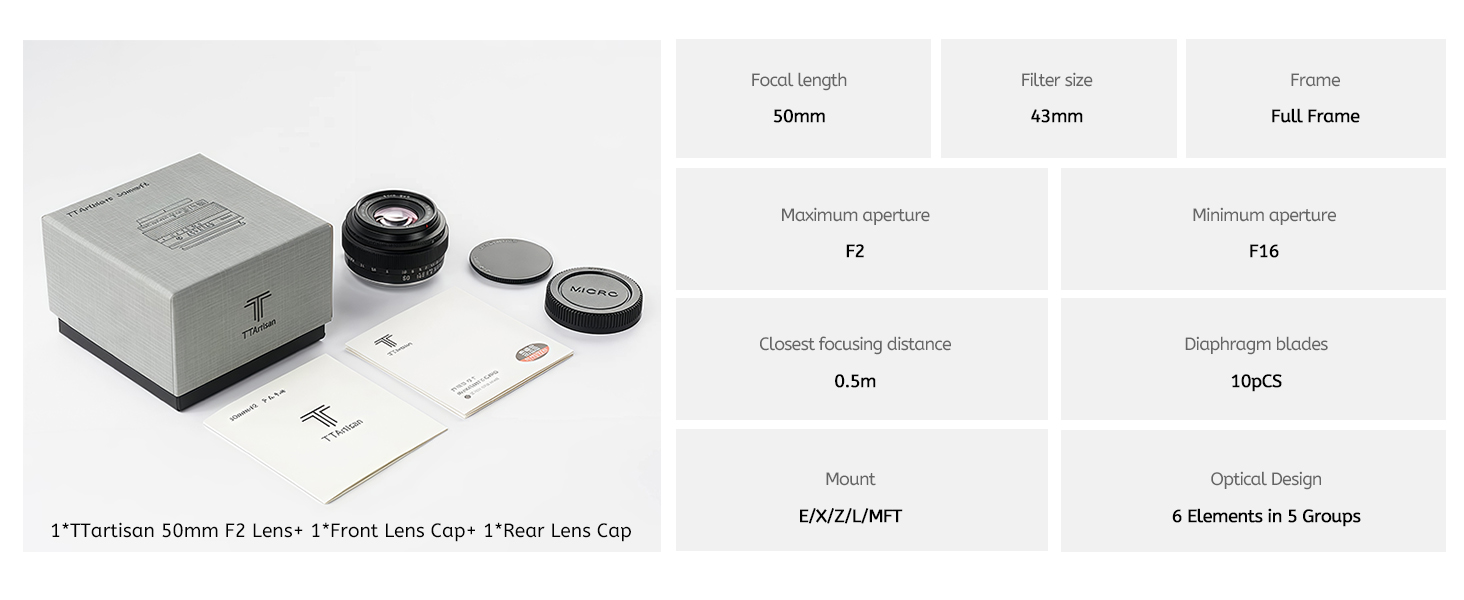
Figure 8: MTF chart and optical design diagram.
9. Garansi jeung Rojongan
For warranty information and customer support, please refer to the warranty card included in your product packaging or visit the official TTArtisan websitus. Simpen bukti pameseran anjeun pikeun klaim garansi.


