1. Bubuka
This manual provides essential instructions for the safe and efficient operation of your iDance FS400 Funky Skull portable karaoke party system. Please read this manual thoroughly before using the product and retain it for future reference.
2. Émbaran Kasalametan
- Ulah ngalaan unit ka hujan atawa Uap pikeun nyegah seuneu atawa shock listrik.
- Ulah muka casing. Henteu aya bagian anu tiasa dilayanan ku pangguna di jero. Rujuk sadayana jasa ka tanaga anu mumpuni.
- Ulah nempatkeun unit deukeut sumber panas kayaning radiators, registers panas, kompor, atawa alat sejenna (kaasup ampLiifiers) anu ngahasilkeun panas.
- Nangtayungan kabel listrik tina leumpang atawa diciwit, utamana dina colokan, wadah merenah, jeung titik dimana aranjeunna kaluar tina aparat.
- Ngan anggo kantétan/aksésori anu ditunjuk ku produsén.
- Cabut colokan alat ieu nalika badai kilat atanapi nalika henteu dianggo kanggo waktos anu lami.
3. Eusi Paket
Pastikeun yén sadaya item anu didaptarkeun di handap kalebet kana pakét anjeun:
- iDance FS400 Funky Skull Karaoke Speaker
- Gancang Mimitian Guide
- Kabel Ngecas USB
- Mikropon kabel
- Kadali jauh
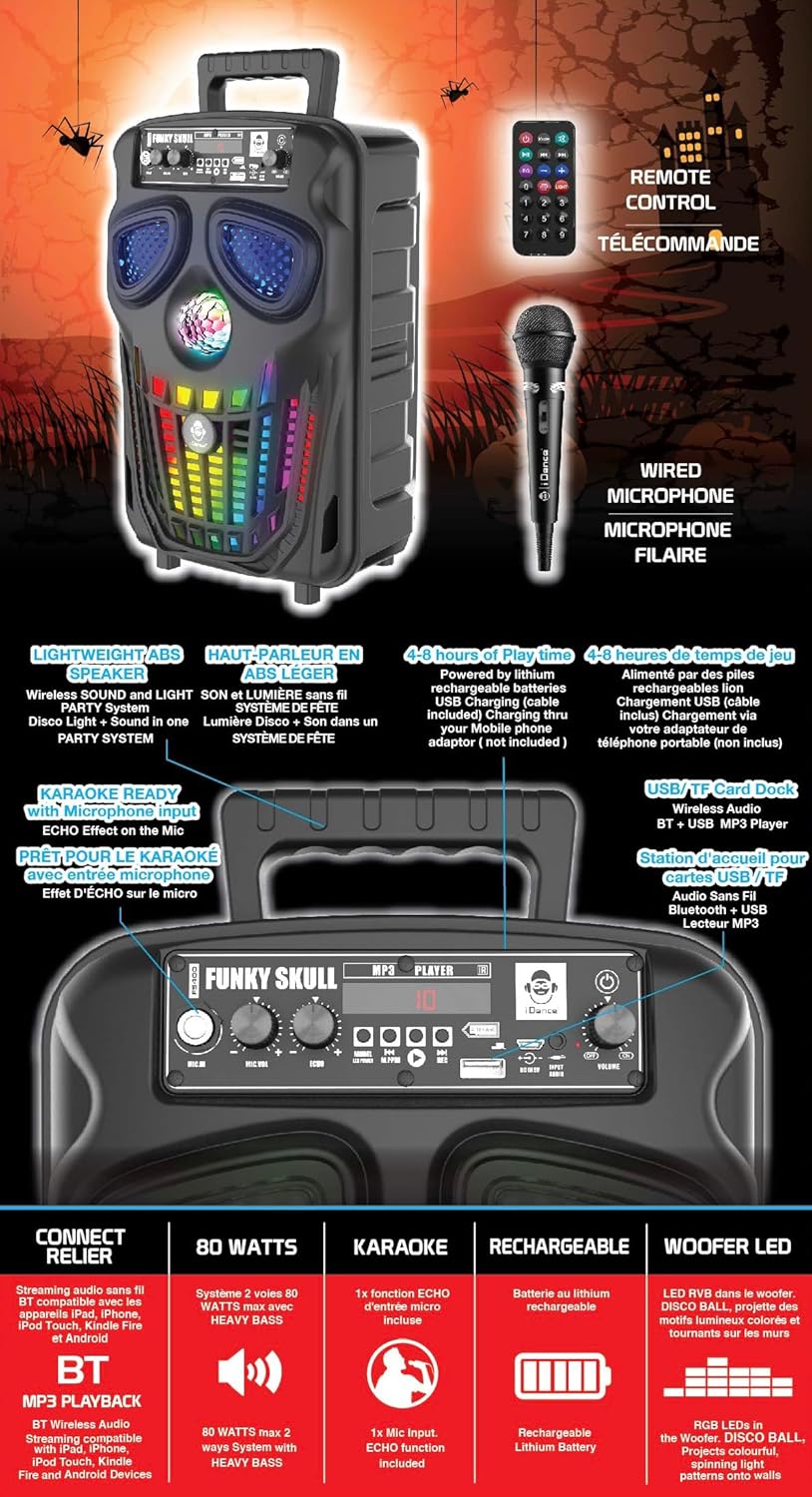
Gambar 3.1: iDance FS400 Funky Skull speaker with its accessories, including the wired microphone, remote control, and USB charging cable.
4. Produk Langkungview
The iDance FS400 Funky Skull is a portable karaoke party system featuring Bluetooth connectivity, integrated LED lights, and a wired microphone for karaoke functions. It is designed for ease of transport with an XXL rear handle.
4.1 Fitur konci
- Konektipitas Bluetooth: Ngalirkeun audio sacara nirkabel tina alat anu cocog.
- Karaoke Siap: Includes a wired microphone input with echo effect.
- Cahaya dinamis: Features a disco ball and multi-color LED lights in the woofer.
- Desain portabel: Equipped with an XXL rear handle for easy carrying.
- Batré anu tiasa dicas deui: Provides 4 to 8 hours of playtime on a single charge.
- Pamuter MP3: Supports playback from USB drives and TF cards.
4.2 Panel kontrol

Gambar 4.1: Diwincik view of the control panel on the iDance FS400 Funky Skull speaker.
Panel kontrol ngawengku:
- MIC.IN: jack input mikropon.
- MIC.VOL: Microphone volume control knob.
- ECHO: Echo effect control knob for the microphone.
- MODÉ: Button to switch between input modes (Bluetooth, USB, TF Card).
- PLAY/PAUSE/REC: Play/Pause button for media playback, also used for recording.
- Saméméhna/salajengna: Buttons for track navigation.
- Port USB: Pikeun playback USB drive.
- TF CARD Slot: Pikeun muterkeun kartu TF.
- DC 5V IN: Port ngecas.
- JILID: Kenop kontrol volume master.
- kakuatan: Power On / Pareum switch.
5. Setélan
5.1 Ngecas Awal
Before first use, fully charge the speaker. Connect the supplied USB charging cable to the DC 5V IN port on the speaker and the other end to a compatible USB power adapter (not included). The charging indicator will illuminate during charging and turn off or change color when fully charged.
5.2 Nyambungkeun Mikropon
Insert the wired microphone's plug into the MIC.IN jack on the control panel.
6. Parentah Operasi
6.1 Daya Hurung/Pareuman
Geser ka POWER switch to the 'ON' position to turn on the speaker. Slide it to 'OFF' to power down.
6.2 Nyapasangkeun Bluetooth
- Turn on the iDance FS400 speaker. It will automatically enter Bluetooth pairing mode.
- Aktipkeun Bluetooth dina alat sélulér anjeun (smartphone, tablet, jsb.).
- Milarian pikeun available devices and select "iDance FS400" from the list.
- Once connected, you will hear an audible confirmation. You can now stream audio wirelessly.
6.3 Fungsi Karaoke
- Ensure the wired microphone is connected to the MIC.IN jack.
- Play your desired music via Bluetooth, USB, or TF card.
- Saluyukeun volume mikropon nganggo tombol MIC.VOL kenop.
- Puterkeun ECHO knob to add an echo effect to your vocals.
6.4 USB / TF Card Playback
- Insert a USB drive into the Port USB or a TF card into the Slot kartu TF.
- The speaker will automatically detect and begin playing MP3 files. Upami henteu, pencét MODÉ button to switch to USB/TF mode.
- Ngagunakeun éta saméméhna jeung TERAS tombol pikeun skip lagu.
- Pencét éta MUTER / Reureuh tombol pikeun ngareureuhkeun atawa neruskeun playback.
6.5 Lampu LED
The iDance FS400 features a disco ball and multi-color LED lights in the woofer that activate automatically when the speaker is powered on and playing music, enhancing the party atmosphere.
6.6 Jauh Jauh
The included remote control allows for convenient operation of the speaker from a distance. Functions typically include power, mode selection, volume control, track navigation, and play/pause.
7. Ngecas Batré
The iDance FS400 is powered by a built-in rechargeable lithium-ion battery. To charge:
- Connect the USB charging cable to the DC 5V IN port dina spiker.
- Connect the other end of the USB cable to a standard USB power source (e.g., a USB wall adapter, computer USB port).
- Lampu indikator ngecas bakal nunjukkeun status ngecas.
- A full charge provides approximately 4 to 8 hours of playtime, depending on usage and volume levels.
8. Pangropéa
8.1 beberesih
Wipe the speaker with a soft, dry cloth. Do not use abrasive cleaners or solvents, as they may damage the finish. Ensure no liquids enter the speaker openings.
8.2 Panyimpenan
Upami teu dianggo salami lami, simpen spiker di tempat anu tiis, garing, sareng jauh tina sinar panonpoé langsung sareng suhu anu ekstrim. Disarankeun pikeun ngecas batré sacara berkala pikeun ngajaga umurna.
9. Cara ngungkulan
| Masalah | Mungkin Cukang lantaranana | Solusi |
|---|---|---|
| Speaker teu hurung. | Batré béak. | Sambungkeun spiker ka sumber daya nganggo kabel ngecas USB teras antepkeun ngecas. |
| Taya sora tina speaker. | Volumena leutik teuing atawa teu pati jelas. Modeu inputna salah. | Increase the master volume. Press the MODE button to select the correct input source (Bluetooth, USB, TF). |
| Alat Bluetooth teu tiasa dipasangkeun. | Spiker teu aya dina modeu papasangan. Alatna jauh teuing. | Ensure the speaker is on and in Bluetooth mode. Move the device closer to the speaker. Restart both devices. |
| Mikropon teu jalan. | Microphone not connected properly. MIC.VOL is too low. | Ensure the microphone is fully plugged into the MIC.IN jack. Increase the MIC.VOL knob. |
10. Spésifikasi

Gambar 10.1: Dimensions of the iDance FS400 Funky Skull speaker.
| Fitur | Spésifikasi |
|---|---|
| Nomer modél | FS400 FUNKY SKULL |
| Ukuran (H x W x D) | 36 x 23 x 19 cm |
| Beurat | 2 kg |
| Ukuran Speaker | 6 Inci (Woofer) |
| Daya Kaluaran Max | 200 Watt |
| Réspon Frékuénsi | 2000 Hz |
| Impedansi | 4 emh |
| Jenis Batré | Litium-ion (Tiasa dicas deui) |
| Waktu maén | 4 nepi ka 8 jam |
| Konektipitas | Bluetooth |
| Métode kontrol | Taktil |
| Komponén Kaasup | Speaker, Quick Start Guide, USB Charging Cable, Wired Microphone, Remote Control |
| Bahan | ABS |
11. Garansi jeung Rojongan
iDance International Limited guarantees the availability of spare parts for this product for a period of 2 taun from the date of purchase. For technical support or service inquiries, please refer to the contact information provided in your Quick Start Guide or visit the official iDance websitus.


