1. Bubuka
The Inrico B01 Wireless Bluetooth Speaker Microphone is designed to enhance communication for users of Android and iOS smart devices. This device pairs easily via Bluetooth 4.2 and offers features such as Push-to-Talk (PTT) and volume control, making it ideal for use with applications like Zello and RealPTT. Full functionality may vary depending on the specific application and its support for external devices.
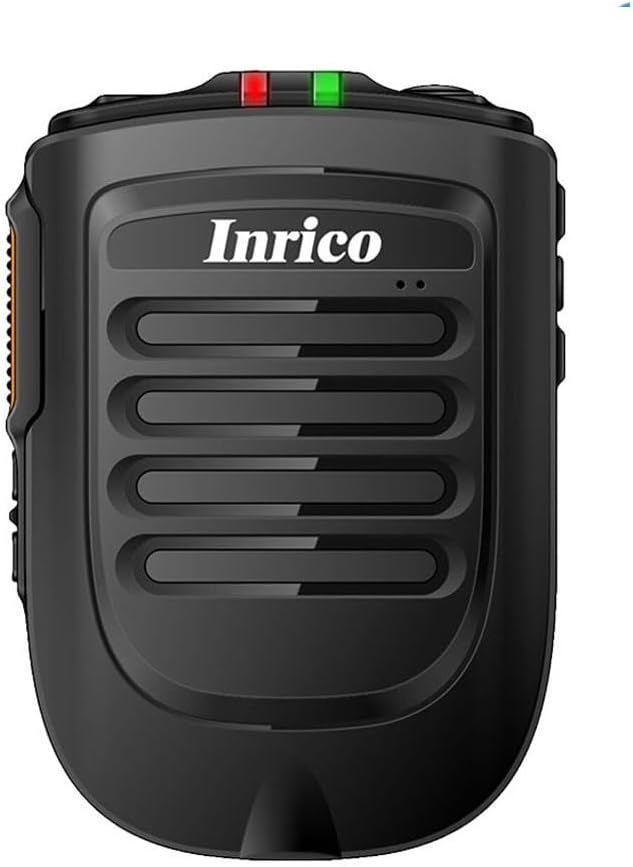
Gambar 1: Hareupeun view of the Inrico B01 Wireless Bluetooth Speaker Microphone. This image shows the sleek black design with the Inrico logo and speaker grille.
2. Fitur Produk
- Embedded PTT and Volume Control Buttons: Designed for easy access and operation, compatible with applications like Zello and other popular communication platforms.
- 3.5mm Earphone Jack: Allows for connection of external listen-only earpieces for private audio.
- Indikator LED: A discreet LED on the top of the speaker provides visual status in various environments.
- Kasaluyuan Aplikasi: Works effectively with Zello and RealPTT. Note that some features may not be fully supported by other applications.
- Desktop Charger Compatibility: Designed to be compatible with the B01 Desktop Charger (sold separately).
- Komponén Kaasup: Comes with a Micro USB Cable for charging.
3. Eusi Paket
Saatos muka bungkusan, mangga pariksa yén sadaya item di handap ieu kalebet:
- Inrico B01 Wireless Bluetooth Speaker Microphone
- USB carjer
- Kabel Data USB
- Manual Pitunjuk (dokumén ieu)
- Klip sabuk
- Batré Litium Ion (tos dipasang atanapi misah)
4. Tata Letak sareng Kontrol Alat
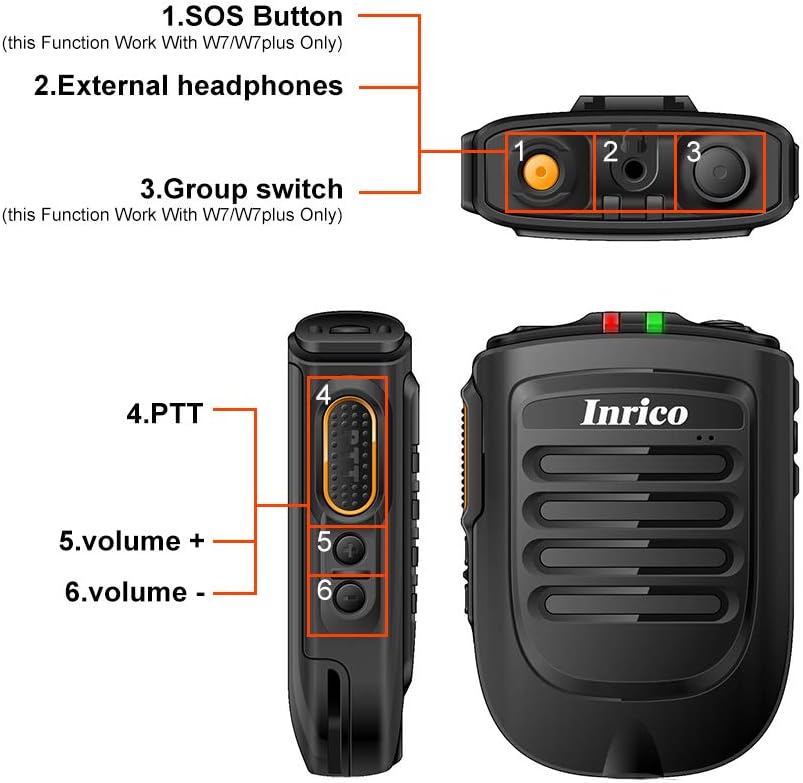
Figure 2: Detailed diagram illustrating the various buttons and ports on the Inrico B01.
- 1. SOS Button: (Functionality may depend on application and device compatibility, e.g., W7/W7plus).
- 2. External Headphones Jack: 3.5mm port for connecting an external earpiece.
- 3. Group Switch: (Functionality may depend on application and device compatibility, e.g., W7/W7plus).
- 4. PTT (Push-to-Talk) Button: Main communication button.
- 5. Volume + Button: Ngaronjatkeun volume audio.
- 6. Volume - Button: Ngurangan polumeu audio.
5. Setélan
5.1 Ngecas Alat
Before initial use, fully charge the Inrico B01. Connect the provided USB data cable to the device's charging port and the other end to a USB charger or a computer's USB port. The LED indicator will show charging status (refer to LED indicator section for details).

Figure 3: Illustration of the Inrico B01's 2000mAh battery capacity and estimated usage times. The image shows battery level indicators and approximate talking, PTT, and standby times.
| métrik | Perkiraan Waktos |
|---|---|
| Waktu ngobrol | ≈14 jam |
| PTT time | ≈14 jam |
| Waktu sayaga | > 90 jam |
5.2 Nyapasangkeun Bluetooth
- Ensure the Inrico B01 is powered on and in pairing mode (refer to device's LED indicator for pairing status, usually a blinking blue light).
- On your smartphone (Android or iOS), navigate to the Bluetooth settings.
- Milarian pikeun available devices. The Inrico B01 should appear in the list (e.g., "Inrico B01" or similar).
- Select the Inrico B01 to initiate pairing. If prompted for a passcode, enter "0000" (four zeros).
- Once paired, the LED indicator on the B01 will change to a solid blue light, indicating a successful connection.
6. Parentah Operasi
6.1 Using Push-to-Talk (PTT)
After successfully pairing the device with your smartphone and configuring it within your chosen communication application (e.g., Zello, RealPTT):
- Open your communication application on your smartphone.
- To transmit, press and hold the PTT button (labeled '4' in Figure 2) on the Inrico B01. Speak clearly into the microphone.
- Release the PTT button to stop transmitting and listen for replies.
6.2 Nyaluyukeun Volume
Use the Volume + (labeled '5' in Figure 2) and Volume - (labeled '6' in Figure 2) buttons on the side of the device to adjust the speaker's output volume.
6.3 Using the Earphone Jack
For private listening, connect a 3.5mm listen-only earpiece to the external headphones jack (labeled '2' in Figure 2) on the top of the device. Audio will be routed to the earpiece instead of the internal speaker.
6.4 Status Indikator LED
- Bulao LED Kedip-kedip: Device is in pairing mode or waiting for connection.
- Blue LED Solid: Device is successfully connected via Bluetooth.
- Red LED Solid: Paranti ngeusi batre.
- LED héjo padet: Alat dicas pinuh.
- Beureum LED Blinking: Peringatan batré lemah.
7. Pangropéa
- beberesih: Ngusap alat ku kaén anu lemes sareng garing. Ulah make bahan kimia kasar atawa cleaners abrasive.
- Panyimpenan: Simpen alat dina tempat anu tiis sareng garing jauh tina sinar panonpoé langsung sareng suhu anu ekstrim.
- Perawatan batré: Pikeun manjangkeun umur batre, ulah miceun batre pinuh. Ngeusi batre alat sacara rutin, sanajan henteu dianggo kanggo waktos anu lami.
- Tahan cai: Alat ieu henteu tahan cai. Hindarkeun kakeunaan cai atanapi kalembaban anu kaleuleuwihi.

Figure 4: Image showing the metal sheet on the battery cover, designed for compatibility with magnetic car holders. This feature allows for convenient mounting in vehicles.
8. Cara ngungkulan
| Masalah | Mungkin Cukang lantaranana | Solusi |
|---|---|---|
| Alat teu hurung. | Low atawa euweuh muatan batré. | Charge the device fully using the provided USB cable and charger. |
| Teu tiasa dipasangkeun sareng smartphone. | Bluetooth is off on smartphone; device not in pairing mode; too far from smartphone. | Ensure Bluetooth is enabled on your phone. Put the B01 into pairing mode. Keep devices within 10 meters. Try restarting both devices. |
| No audio from speaker/earpiece. | Volume too low; device not connected; application not configured correctly. | Increase volume. Verify Bluetooth connection. Check audio settings within your communication application. |
| PTT button not working. | Application not running or not configured to recognize the PTT button. | Ensure your communication application is active and properly configured to use the external PTT button. Some applications may require specific settings. |
9. Spésifikasi

Figure 5: Physical dimensions and weight of the Inrico B01. The image provides measurements in both millimeters and feet, and weight in grams and ounces.
| Parameter | Nilai |
|---|---|
| merek | Inrico |
| Ngaran modél | B01 |
| Vérsi Bluetooth | 4.2 |
| Protokol Bluetooth | HFP / HSP / A2DP / AVRCP / SPP |
| Rentang transmisi | 10m |
| Daya Transmisi | KELAS 2, 4dbm |
| Sensitipitas | 80dBm < 0.1%BER |
| Performance Audio | SBC Decode |
| Audio to Noise Ratio | ≥75dB |
| Kakuatan Speaker | 1W/8R (116dB) |
| Indikator LED | Blue/Green LED Indicator |
| Earphone Jack | 3.5 mm |
| Kapasitas batré | 2000mA @ 3.7V (Lithium Ion) |
| Ukuran (L * W * H) | 90 x 63 x 25.6 mm (kira-kira 3.54 x 2.48 x 1.01 inci) |
| Item Beurat | 8.8 ons (kira-kira 249 gram) |
| Alat nu cocog | Smartphone (Android sareng iOS) |
| UPC | 785582409181 |

Figure 6: The Inrico B01 is compatible with various mobile radios, such as the TM-7 7plus, expanding its utility beyond just smartphones.
10. Garansi jeung Rojongan
For warranty information and technical support, please refer to the official Inrico website or contact your point of purchase. Keep your purchase receipt as proof of purchase for warranty claims.
Pikeun pitulung salajengna, anjeun ogé tiasa ngarujuk kana kaca produk dina Amazon.


