1. Bubuka
The Tenmars TM-901N is a professional LAN cable tester designed for efficient and accurate diagnosis of network cable issues. It is capable of identifying various wiring faults such as discontinuity, short-circuits, incorrect connections, and split pairs in both Shielded Twisted Pair (STP) and Unshielded Twisted Pair (UTP) cables. This device can measure cable lengths up to 265 meters, making it an essential tool for network installers and technicians.
2. Émbaran Kasalametan
Mangga baca sareng pahami sadaya pitunjuk kaamanan sateuacan ngoperasikeun alat ieu. Upami henteu nuturkeun pitunjuk ieu tiasa nyababkeun cilaka atanapi karusakan kana alat ieu.
- Do not attempt to test live circuits or cables connected to active network equipment.
- Ensure the battery is correctly installed before use.
- Ulah ngalaan alat ka beueus atawa suhu ekstrim.
- Ulah muka alat casing, sabab ieu tiasa ngabatalkeun garansi sareng ngalaan anjeun kana bahaya listrik.
- Buang batré nurutkeun peraturan lokal.
3. Eusi Paket
Pastikeun yén sadaya item aya dina pakét anjeun:
- Tenmars TM-901N Main Unit
- Remote ID Locator (ID 1)
- Manual pangguna (dokumén ieu)
- Note: A 9V battery is typically required and may not be included.
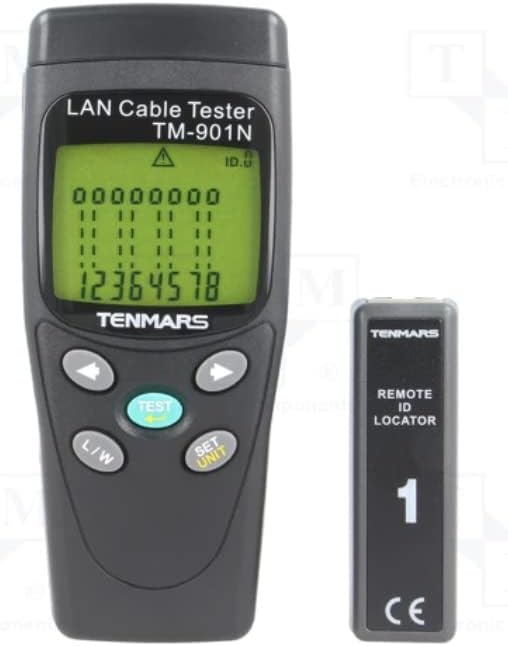
Image 3.1: Tenmars TM-901N Main Unit and Remote ID Locator.
4. Produk Langkungview
4.1 Unit Utama
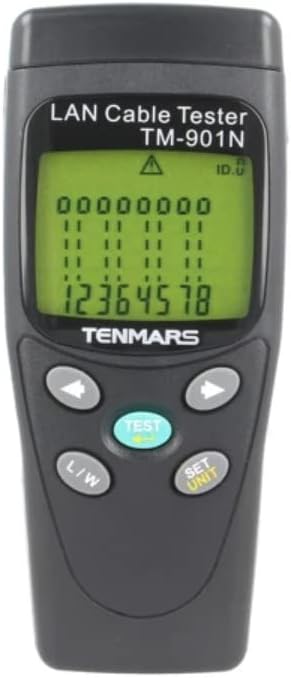
Gambar 4.1: Hareupeun view of the TM-901N Main Unit.
The main unit features an LCD display for showing test results and cable status. It includes several control buttons:
- Tombol TEST: Initiates a cable test.
- L/W Button: Toggles between Length measurement and Wiremap display modes.
- SET/UNIT Button: Used to enter settings mode and change measurement units (e.g., meters, feet).
- Arrow Buttons (Left/Right): Used for navigation in settings or for reviewdina hasil tés.
4.2 Remote ID Locator

Image 4.2: Remote ID Locator.
The remote ID locator is a passive unit used in conjunction with the main unit to test installed cables. It connects to one end of the cable while the main unit connects to the other. The remote unit is labeled "ID 1" for identification.
4.3 Rear Panel and Wiring Diagram

Gambar 4.3: Tukangeun view of the TM-901N Main Unit with wiring diagram.
The rear panel of the main unit includes the battery compartment and a printed wiring diagram for reference, showing standard T568A/B pin assignments for RJ45 connectors.
5. Setélan
5.1 Pamasangan batré
- Locate the battery compartment cover on the rear of the main unit.
- Slide the cover open or remove it as indicated.
- Selapkeun batré 9V anyar, mastikeun polaritasna bener (+/-).
- Ganti panutup kompartemen batré aman.
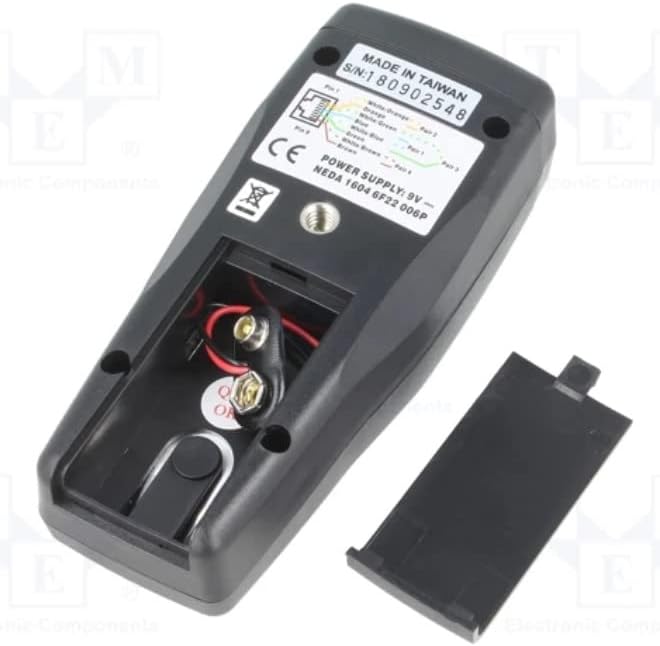
Image 5.1: Battery compartment with cover removed.
5.2 Connecting Cables for Testing
Before connecting any cables, ensure they are disconnected from all active network devices.
- For patch cables (uninstalled cables): Connect one end of the cable to the RJ45 port on the main unit and the other end to the RJ45 port on the remote ID locator.
- For installed cables: Connect the main unit to one end of the installed cable (e.g., a wall jack) and the remote ID locator to the other end of the cable (e.g., in a patch panel).
6. Parentah Operasi
6.1 Powering on / Pareum
The device typically powers on automatically when a cable is connected and the TEST button is pressed, or by pressing the TEST button. It usually powers off automatically after a period of inactivity to conserve battery.
6.2 Performing a Cable Test
- Ensure the cable is properly connected to the main unit and the remote ID locator.
- Pencét éta UJI kancing.
- The tester will automatically scan the cable and display the results on the LCD.
6.3 Interpreting Test Results (Wiremap)
The LCD will display the wiremap, indicating the connection status of each wire pair. Common indications include:
- Lulus: All wires are correctly connected (1-1, 2-2, etc. for straight-through, or appropriate cross-over mapping).
- Open/Discontinuity: A break in one or more wires. The display will show which wire(s) are open.
- Sirkuit pondok: Two or more wires are touching. The display will indicate the shorted wires.
- Incorrect Connection/Miswire: Wires are connected to the wrong pins at one or both ends. The display will show the incorrect mapping (e.g., 1-3, 2-6).
- Pasangan pamisah: A more complex fault where two pairs are swapped, but the wiremap appears correct. The tester is designed to detect this.
6.4 Measuring Cable Length
- After performing a test, press the L/W button to switch to Length measurement mode.
- The display will show the estimated length of the cable.
- To change the unit of measurement (meters, feet), press the SET/UNIT button while in Length mode and use the arrow buttons to select the desired unit. Press SET/UNIT deui pikeun mastikeun.
7. Pangropéa
7.1 beberesih
Wipe the device with a soft, dry cloth. Do not use abrasive cleaners or solvents. Ensure no moisture enters the device.
7.2 Ngagantian batré
When the battery low indicator appears on the display, replace the 9V battery as described in Section 5.1. Remove the battery if the device will not be used for an extended period to prevent leakage.
7.3 Panyimpenan
Store the device in a cool, dry place, away from direct sunlight and extreme temperatures. Keep it in its original packaging or a protective case when not in use.
8. Cara ngungkulan
| Masalah | Mungkin Cukang lantaranana | Solusi |
|---|---|---|
| Alat teu hurung. | Batré lemah atanapi pareum; batréna dipasang kalayan teu leres. | Replace the 9V battery; check battery polarity. |
| Pangukuran panjang anu teu akurat. | Cable not fully extended; incorrect cable type setting (if applicable); cable damage. | Ensure cable is straight; verify cable integrity; check if unit calibration is needed (refer to advanced settings if available). |
| "Open" or "Short" displayed for a new cable. | Faulty cable; improper connection to tester. | Re-seat the cable connectors firmly; try testing a known good cable; inspect cable for visible damage. |
| No display or erratic display. | Batré lemah; gangguan internal. | Replace battery. If problem persists, contact customer support. |
9. Spésifikasi
| Fitur | Spésifikasi |
|---|---|
| Modél | TM-901N |
| Type of Tester | LAN wiring |
| Measured Cable Length | Max. 265m |
| Resolusi Ngukur | 1m |
| Cable/Adapter Structure | RJ45 stop kontak |
| Fitur pangukuran | Connection map test: discontinuity, short circuit, incorrect connection, split pairs |
| Kabel dirojong | STP / UTP cables |
| Akurasi Pangukuran | ±10% ±1m |
| Sasayogian tanaga | Batré 9V x1 |
| Beurat | 160g |
| Diménsi | 130 x 58 x 35 mm |
| Produsén | TENMARS |
| Negara asal | Taiwan |
10. Garansi jeung Rojongan
For warranty information and technical support, please refer to the documentation provided with your purchase or contact your local distributor. Keep your proof of purchase for warranty claims.


