1. Bubuka
This manual provides instructions for the LogiLink ID0209 Wireless Keyboard. This keyboard is designed for comfortable, precise, and quiet typing, featuring an adjustable RGB backlight and a long-lasting battery. It connects wirelessly via 2.4 GHz radio technology and is compatible with various operating systems.

Figure 1: LogiLink ID0209 Wireless Keyboard
2. Eusi Paket
Mangga parios pakét kanggo barang-barang ieu:
- LogiLink ID0209 Wireless Keyboard
- Dongle Panarima USB 2.4 GHz
- USB-A to Micro USB Charging Cable
- Manual pangguna (dokumén ieu)
3. Setélan
3.1 Ngecas kibor
Before initial use, fully charge the keyboard. Connect the supplied USB-A to Micro USB cable to the keyboard's Micro USB port (located on the side) and the other end to a USB power source (e.g., computer USB port, USB wall adapter).
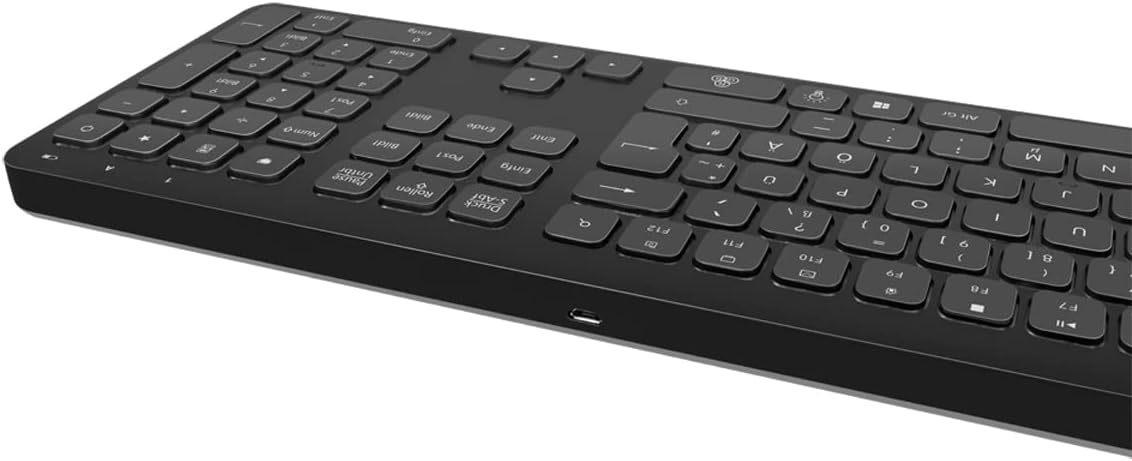
Figure 2: Keyboard side view with Micro USB charging port
3.2 Connecting the USB Receiver Dongle
Insert the 2.4 GHz USB receiver dongle into an available USB port on your computer or compatible device. The system will automatically detect and install the necessary drivers.

Figure 3: USB 2.4 GHz Receiver Dongle
3.3 Powering on / Pareum
Locate the ON/OFF switch on the back of the keyboard. Slide the switch to the 'ON' position to power on the keyboard. Slide it to 'OFF' when not in use to conserve battery life.
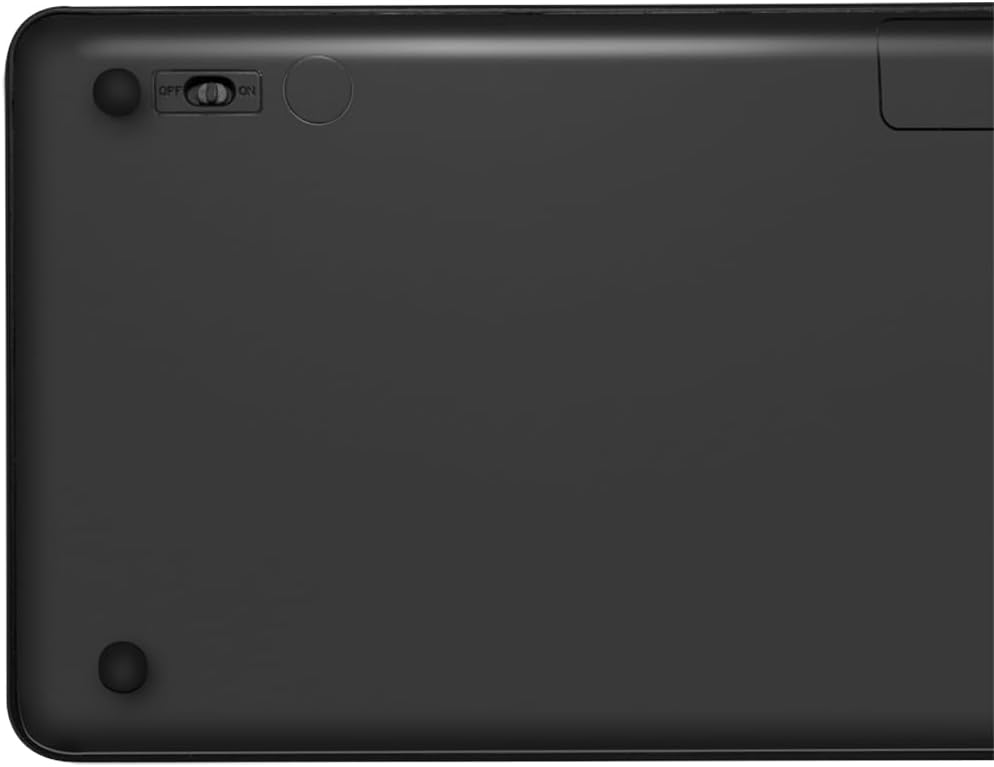
Figure 4: Keyboard back with ON/OFF switch
The keyboard should automatically connect to the USB receiver once both are powered on and within range (up to 10 meters).
4. Parentah Operasi
4.1 Kadali lampu tukang
The keyboard features an adjustable RGB backlight with 7 colors and 3 brightness levels, including a breathing mode.
- Ngarobah Warna: Pencét éta Fn + Light Bulb key to cycle through the 7 available colors (green, blue, yellow, purple, cyan, white, red).
- Nyaluyukeun Caang: Pencét éta Fn + Up Arrow key pikeun ngaronjatkeun kacaangan jeung Fn + Down Arrow key to decrease brightness. There are 3 brightness levels.
- Mode engapan: Pencét éta Fn + RGB Cycle key (often depicted as a swirling icon) to activate or deactivate the breathing backlight mode.

Figure 5: Keyboard with RGB backlight in use
4.2 Tombol potong kompas
The keyboard includes 17 shortcut keys for quick access to various functions. Some shortcut keys are specifically designed for Windows operating systems.
To use a shortcut key, press and hold the Fn key, then press the desired function key (e.g., F1-F12, multimedia keys).
- Kadali Multimedia: Play/Pause, Stop, Previous Track, Next Track, Volume Up, Volume Down, Mute.
- Produktivitas: Open Mail, Web Browser, My Computer, Search.
- Lain: Lock Screen, Calculator.

Figure 6: Close-up of keyboard keys, including numpad and function row
4.3 Automatic Energy-Saving Mode
The keyboard is equipped with an automatic energy-saving mode. After a period of inactivity, the keyboard will enter a sleep state to conserve battery. Press any key to wake it up.
5. Pangropéa
Pikeun mastikeun umur panjang sareng kinerja optimal keyboard anjeun, turutan tungtunan pangropéa ieu:
- beberesih: Anggo lawon anu lemes, garing, sareng henteu ngaganggu pikeun ngusap permukaan kibor. Pikeun kokotor anu bandel, radaampen lawon ku cai atawa solusi beberesih hampang. Hindarkeun Uap kaleuleuwihan.
- Panyimpenan: Simpen kibor di tempat anu tiis sareng garing jauh tina sinar panonpoé langsung sareng suhu anu ekstrim.
- Hindarkeun Cairan: Do not expose the keyboard to liquids. In case of accidental spills, immediately power off the keyboard and allow it to dry completely before use.
- Nanganan kalayan ati-ati: Ulah nepi ka ngalungkeun kibor atawa ngagebugan kibor kalawan tarik.
6. Cara ngungkulan
If you encounter issues with your LogiLink ID0209 keyboard, refer to the following common problems and solutions:
| Masalah | Mungkin Cukang lantaranana | Solusi |
|---|---|---|
| Keyboard teu ngabales | Keyboard is off batré lemah Panarima USB teu nyambung Di luar jangkauan | Ensure keyboard is ON Ngeusi batre kibor Plug USB receiver firmly into a working USB port Move keyboard closer to the receiver (within 10m) |
| Lampu tukang teu jalan | Lampu tukang pareum batré lemah | Press Fn + Light Bulb key to turn on/cycle Ngeusi batre kibor |
| Konci caket atanapi henteu ngaréspon | Kokotor atawa lebu handapeun kenop | Clean the keyboard as per maintenance instructions |
| Sambungan sering turun | gangguan Di luar jangkauan batré lemah | Pindah jauh tina alat nirkabel anu sanés Move keyboard closer to the receiver Ngeusi batre kibor |
7. Spésifikasi
| Fitur | Rincian |
|---|---|
| merek | LogiLink |
| Nomer modél | ID0209 |
| Téhnologi konektipitas | 2.4 GHz Wireless (High-frequency) |
| Range nirkabel | Nepi ka 10 méter |
| Jumlah konci | 111 konci |
| Tombol potong kompas | 17 (some Windows-specific) |
| Lampu tukang | Adjustable RGB (7 colors, 3 brightness levels, breathing mode) |
| Jenis konci | Flat keys |
| Alat nu cocog | Windows, Mac OS, Android, iOS, Smart TV systems |
| Fitur husus | Ergonomic, Backlit, Automatic Energy-Saving Mode |
| Port ngecas | Micro USB |
| Warna | Hideung |
| Bahan | palastik |
| Produsén | 2 langsung GmbH |
| Negara asal | Cina |
8. Garansi jeung Rojongan
For warranty information and technical support, please refer to the documentation provided with your purchase or visit the official LogiLink websitus. Simpen bukti pameseran anjeun pikeun klaim garansi.