Bubuka
Thank you for choosing the Varmilo MA Series V2 Summit R2 Mechanical Keyboard. This manual provides essential information for setting up, operating, maintaining, and troubleshooting your new keyboard. Please read this manual thoroughly to ensure optimal performance and longevity of your device.
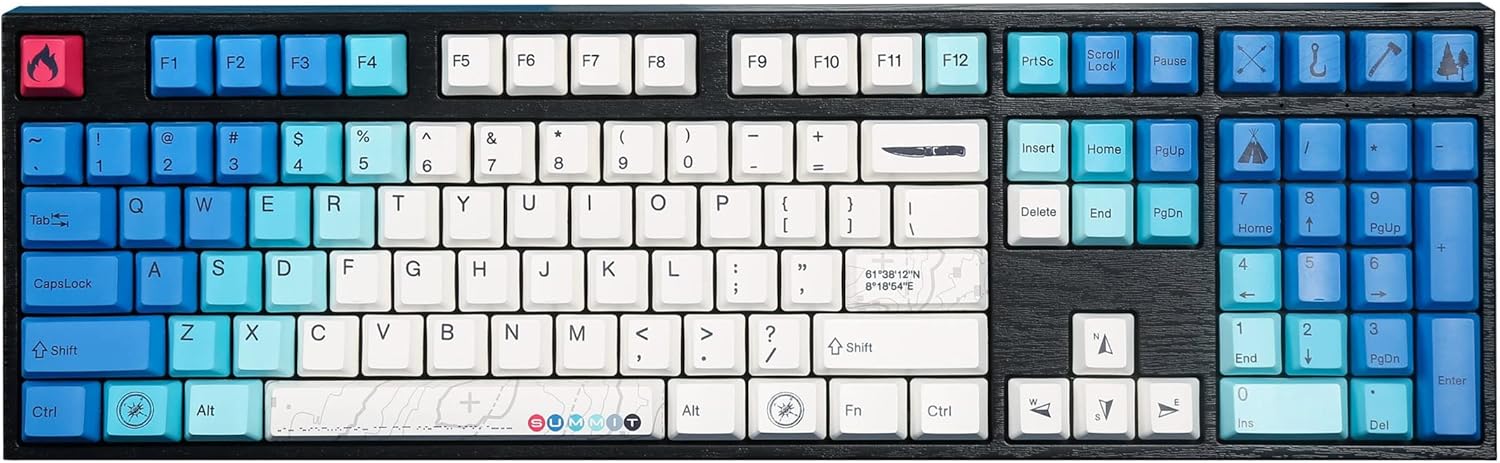
Image: The Varmilo MA Series V2 Summit R2 Mechanical Keyboard, showcasing its full layout and unique keycap design.
Disetél
1. Unboxing
Cabut kibor sareng sadaya asesoris tina bungkusna kalayan ati-ati. Pastikeun barang-barang ieu aya:
- Varmilo MA Series V2 Summit R2 Mechanical Keyboard
- Kabel USB-C
- Penarik Keycap (upami kalebet)
- Manual pangguna (dokumén ieu)
2. Nyambungkeun kibor
- Panggihan port USB-C di tukangeun kibor.
- Sambungkeun hiji tungtung kabel USB-C anu disayogikeun kana kibor.
- Sambungkeun ujung kabel USB-C nu sejen ka port USB nu sadia dina komputer Anjeun.
- Kibor éta plug-and-play sareng kedah otomatis dikenal ku sistem operasi anjeun.
3. Nyaluyukeun Sudut Kibor
The Varmilo MA Series V2 features a double-section kickstand, allowing for two different typing angles. Gently flip out the desired sections of the kickstand located on the underside of the keyboard to adjust its height and angle for ergonomic comfort.

Gambar: Sisi profile of the Varmilo keyboard, illustrating the adjustable kickstand in an extended position.
Parentah Operasi
1. Fungsi Konci Dasar
The keyboard features a standard full-size (104-key) layout. All alphanumeric and standard function keys operate as expected. The Varmilo EC Ivy V2 switches provide a smooth and responsive typing experience.
2. Function (Fn) Key Combinations
The Fn key (typically located near the right Alt key) allows access to secondary functions printed on certain keycaps. Hold down the Fn key and press the desired function key simultaneously.
- Fn + F1-F12: Multimedia controls (e.g., volume, play/pause, stop).
- Fn + kenop panah: LED brightness or effect control (refer to specific keycap legends).
- Fn + Meunang: Konci/Buka konci Windows.

Gambar: A close-up view of the right side of the Varmilo keyboard, highlighting the special function keys and their legends.
3. LED Backlighting Control
The keyboard features White LED backlighting. Use the Fn key combinations to adjust the brightness and switch between various lighting effects. Specific key legends will indicate the corresponding functions for LED control.
Pangropéa
1. Ngabersihan kibor
Pikeun ngajaga penampilan sareng fungsionalitas keyboard:
- Pegatkeun sambungan keyboard tina komputer Anjeun sateuacan beberesih.
- Make kaen nu lemes, teu aya lint rada dampdikumbah ku cai atanapi larutan pembersih anu hampang pikeun ngusap tutup tombol sarengasing.
- Pikeun lebu jeung lebu antara keycaps, make hawa dikomprés.
- Avoid using harsh chemicals, abrasives, or solvents, as these can damage the PBT keycaps and finish.
2. Ngaleupaskeun sareng Ngaganti Keycap
The keyboard features durable Dye Sub PBT keycaps. If you need to remove keycaps for deep cleaning or customization:
- Use the provided keycap puller (if applicable) or a similar tool.
- Gently attach the keycap puller to the keycap and pull straight up to remove it. Avoid twisting or excessive force.
- Pikeun masang deui, sajajarkeun tutup tombol sareng gagang sakelar teras pencét pageuh dugi ka ngaklik kana tempatna.

Image: A collection of individual Varmilo keycaps, including special design keycaps, demonstrating their PBT material and dye-sublimated legends.
Pamérésan masalah
If you encounter issues with your Varmilo keyboard, please refer to the following common solutions:
- Keyboard Teu Ngabales:
- Pastikeun kabel USB-C disambungkeun sacara aman ka kibor sareng komputer.
- Coba sambungkeun kibor ka port USB anu béda dina komputer anjeun.
- Nguji keyboard dina komputer sejen pikeun ngaluarkeun masalah husus sistem.
- Balikan deui komputer anjeun.
- LEDs Not Working or Incorrect:
- Ensure the LED brightness is not set to the lowest level using Fn key combinations.
- Check if any specific lighting modes are active that might turn off certain LEDs.
- Konci Teu Kadaptar:
- Remove the keycap and inspect the switch for any obstructions.
- Clean around the switch stem with compressed air.
Reset pabrik
If issues persist, a factory reset may resolve them. Consult the Varmilo official website or support for specific reset procedures for your model, as these can vary.
spésifikasi
The following are the technical specifications for the Varmilo MA Series V2 Summit R2 Mechanical Keyboard:
| Fitur | Rincian |
|---|---|
| merek | Varmilo |
| Modél | MA Series V2 Summit R2 |
| Tata perenah | Full-size (104 + 4 keys) |
| Pindah Tipe | Varmilo EC Ivy V2 Mechanical Switches |
| Bahan Keycap | Dye Sub PBT |
| Konektipitas | USB-C |
| Lampu tukang | LED bodas |
| Bahan | Polibutilena Tereftalat, Silikon |
| Sumber Daya | USB Powered |
| Alat nu cocog | Komputer (ngalangkungan USB-C) |
Garansi sareng Rojongan
Varmilo products are manufactured to high-quality standards. For information regarding warranty coverage, technical support, or service inquiries, please visit the official Varmilo websitus atanapi ngahubungan rojongan customer maranéhanana langsung. Simpen resi pameseran anjeun salaku bukti pameseran pikeun klaim garansi.
Official Varmilo Store: Varmilo Store on Amazon


