Bubuka
This manual provides detailed instructions for the Powerwave Switch Wireless Controller. Learn how to set up, operate, maintain, and troubleshoot your controller to enhance your gaming experience on Nintendo Switch, PC, Android, and iOS devices.

Hareupeun view of the Powerwave Switch Wireless Controller, showcasing its Star White design with blue grips and red shoulder buttons. The controller features standard button layouts including A, B, X, Y buttons, a D-pad, and dual analog sticks.
Fitur produk
- Konektipitas Bluetooth Nirkabel: Enjoy seamless gaming without cables.
- 3-Speed Dual-Motor Vibration: Experience immersive feedback with adjustable vibration intensity.
- Kadali gerak: Enhance gameplay with precise motion sensing capabilities.
- Kasaluyuan Multi-Platform: Works wirelessly with Nintendo Switch, PC, Android, and iOS 13 and above.
- 4 Tombol Makro anu Tiasa Diprogram: Customize complex inputs and activate them with a single button press.
- Modeu Turbo: Enable rapid-fire commands for quick actions in games.
- 8-Colour Rotating LED Lighting Effect: Adds a vibrant visual element to your gaming setup.

Visual representation of the controller's key features, including Wireless Bluetooth, 3-Speed Dual-Motor, PC/Android/iOS13 compatibility, 8-Colour Rotating LED, and Programmable Macro Buttons.
Guide Setup
1. Ngecas Awal
Before first use, fully charge the controller using the provided USB-C cable. Connect the cable to the controller's USB-C port and the other end to a USB power source (e.g., Nintendo Switch dock, PC, or USB wall adapter). The LED indicators will show charging status.
2. Ngapasangkeun sareng Nintendo Switch
- Tina Menu HOME Nintendo Switch, pilih Controllers, tuluy Robah Pakem / Orde.
- On the Powerwave controller, press and hold the Tombol HOME (house icon) for 3-5 seconds until the LED indicators start flashing rapidly.
- Once paired, the corresponding player LED(s) on the controller will light up solid.
3. Pairing with PC, Android, or iOS (Bluetooth)
- Ensure Bluetooth is enabled on your device (PC, Android phone/tablet, iOS device).
- On the Powerwave controller, press and hold the Tombol HOME for 3-5 seconds until the LED indicators flash rapidly.
- On your device, search for new Bluetooth devices. Select "Powerwave Controller" (or similar) from the list to pair.
- Once connected, the LED indicators on the controller will stop flashing and remain solid.
Parentah Operasi
Kadali dasar
The Powerwave Switch Wireless Controller features standard button layouts for intuitive gameplay. Refer to your game's specific control scheme for optimal use.
Programmable Macro Buttons (M1, M2, M3, M4)
The controller includes four programmable macro buttons on the back (M1, M2, M3, M4) for executing complex command sequences with a single press.
- Lebetkeun Modeu Pemrograman: Pencét jeung tahan tombol Tombol makro (usually a small button near the M buttons) until the indicator light flashes.
- Recording Macro: Press the desired M button (M1-M4) you wish to program. Then, input the sequence of buttons you want to record (e.g., A, B, X, Y, L, R, ZL, ZR, D-pad directions, analog stick movements).
- Kaluar Mode Programming: Pencét éta Tombol makro again to save the macro and exit programming mode. The indicator light will stop flashing.
- Using Macro: Simply press the programmed M button during gameplay to execute the recorded sequence.
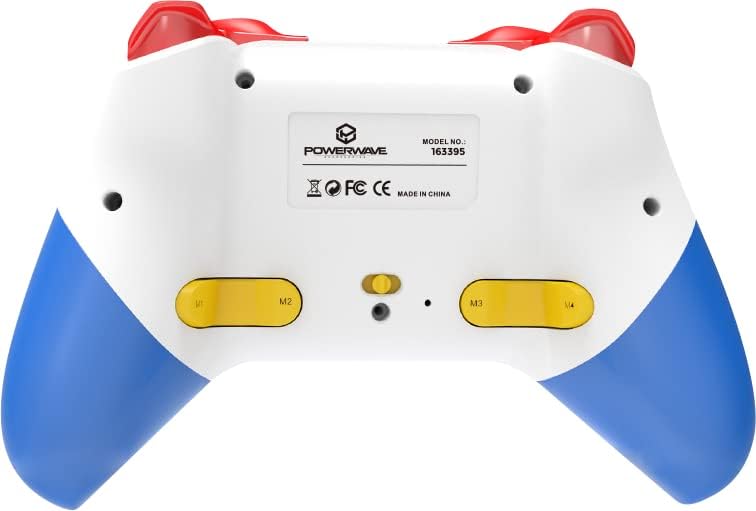
Tukangeun view of the Powerwave Switch Wireless Controller, highlighting the M1, M2, M3, and M4 programmable macro buttons, along with the model number and regulatory markings.
Modeu Turbo
Turbo mode allows a button to be pressed repeatedly as long as it is held down, providing a rapid-fire function.
- Ngaktipkeun Turbo: Pencét jeung tahan tombol Tombol Turbo (usually marked 'T') and then press the desired action button (e.g., A, B, X, Y, L, R, ZL, ZR). The button will now be in Turbo mode.
- Nyaluyukeun Speed Turbo: Bari nyekelan Tombol Turbo, move the Right Analog Stick Up or Down to cycle through different turbo speeds (slow, medium, fast).
- Nonaktipkeun Turbo: To remove Turbo from a specific button, press and hold the Tombol Turbo and then press the same action button again. To clear all Turbo settings, press and hold the Tombol Turbo salila 5 detik.
Adjustment Geter
The controller features 3-speed dual-motor vibration. To adjust vibration intensity, press and hold the Tombol geter (if available, or a combination like Turbo + D-pad Up/Down) to cycle through intensities (Off, Low, Medium, High).
Pangaruh Lampu LED
The 8-colour rotating LED lighting effect can be toggled or adjusted. Refer to the specific button combination for your controller model, often involving a dedicated LED button or a combination with the Turbo button.
Pangropéa
- beberesih: Paké kaen lemes, garing pikeun ngusap controller. Keur kokotor bandel, rada dampen lawon jeung cai. Ulah make bahan kimia kasar atawa cleaners abrasive.
- Panyimpenan: Nyimpen controller dina tiis, tempat garing jauh ti sinar panonpoé langsung jeung hawa ekstrim.
- Perawatan batré: Pikeun manjangkeun umur batre, ulah pinuh discharging controller remen. Ngeusi batre rutin, sanajan teu dipaké pikeun période nambahan.
- Hindarkeun tetes: Lindungi controller tina guncangan fisik sareng ragrag, anu tiasa ngaruksak komponén internal.
Pamérésan masalah
| Masalah | Solusi anu mungkin |
|---|---|
| Controller teu hurung. | Ensure the controller is fully charged. Connect it to a power source and allow it to charge for at least 30 minutes before attempting to turn it on again. |
| Controller gagal dipasangkeun sareng alat. |
|
| Input lag atanapi disconnection salila midangkeun. |
|
| Tombol atawa stik analog teu ngaréspon. |
|
spésifikasi
- Jumlah modél: 163395
- Ukuran produk: 15 x 6 x 10 cm
- beurat: 212 gram
- Konektipitas: Bluetooth nirkabel
- Kasaluyuan: Nintendo Switch, Nintendo Switch Lite, Nintendo Switch OLED, PC, Android, iOS 13+
- Fitur: 3-Speed Dual-Motor Vibration, Motion Controls, 4 Programmable Macro Buttons, Turbo Mode, 8-Colour Rotating LED Lighting Effect
- Unsupported Functions (Nintendo Switch): HD Rumble, NFC, IR Camera
Garansi sareng Rojongan
For warranty information and technical support, please refer to the official Powerwave websitus atanapi ngahubungan layanan palanggan maranéhna. Simpen bukti pameseran anjeun pikeun klaim garansi.
Powerwave Official Websitus: www.powerwave.com.au


