1. Bubuka
Thank you for choosing the WORKPRO Pink Cordless Drill Driver Set. This 12V electric power drill is designed for household tasks, offering versatility and ease of use for various DIY projects. Its lightweight design and adjustable settings make it suitable for tasks such as hanging pictures, assembling furniture, and tightening screws.

Image: The WORKPRO Pink Cordless Drill Driver Set, showcasing the drill, various drill bits, and the Type-C charging cable.
2. Émbaran Kasalametan
Salawasna perhatikeun pancegahan kaamanan dasar nalika nganggo alat listrik pikeun ngirangan résiko kahuruan, kejutan listrik, sareng tatu pribadi.
- Wear appropriate personal protective equipment, including eye protection (safety glasses or goggles) and hearing protection.
- Jaga wewengkon gawé anjeun beresih jeung cahayana alus. Wewengkon nu pabalatak atawa poek ngocorkeun kacilakaan.
- Ulah ngajalankeun parabot kakuatan dina atmosfir ngabeledug, kayaning ku ayana cair kaduruk, gas, atawa lebu.
- Jauhkeun murangkalih sareng jalma-jalma nalika ngajalankeun alat listrik. Distractions bisa ngabalukarkeun anjeun leungit kontrol.
- Hindarkeun ngamimitian teu kahaja. Pastikeun saklar dina posisi pareum samemeh nyambung ka pak batré, nyokot atawa mawa alat.
- Anggo alat anu leres pikeun aplikasi anjeun. Ulah maksakeun alat.
- Jaga alat-alat kalayan ati-ati. Tetep motong alat anu seukeut sareng bersih.
- Pegatkeun sambungan batré tina alat kakuatan samemeh nyieun sagala pangaluyuan, ngaganti asesoris, atawa nyimpen parabot kakuatan.
- Nyimpen parabot kakuatan dianggurkeun kaluar jangkauan sahiji barudak sarta ulah ngidinan jalma teu wawuh jeung alat kakuatan atawa parentah ieu pikeun beroperasi alat kakuatan.
3. Komponén jeung Eusi Paket
Your WORKPRO Pink Cordless Drill Driver Set includes the following items:
- 1 x WORKPRO 12V Supir Bor Tanpa Kabel
- 6 x Drill Bits (various sizes)
- 1 x Kabel Ngecas Tipe-C

Image: A detailed diagram of the WORKPRO Pink Cordless Drill, highlighting its key components such as the keyless chuck, torque adjustment collar, variable speed switch, LED light, and Type-C charging port. The included drill bits and screwdriver bits are also shown.
4. Setélan
4.1 Attaching Drill Bits / Screwdriver Bits
The drill features a 3/8-inch keyless chuck for quick and easy bit changes. To attach a bit:
- Ensure the drill is off and the forward/reverse switch is in the neutral (locked) position.
- Pulas cuk sabalikna jarum jam pikeun muka rahang.
- Selapkeun mata bor atanapi mata obeng anu dipikahoyong kana chuck, pastikeun éta dipasang pageuh.
- Twist the chuck clockwise to tighten the jaws securely around the bit. The automatic spindle lock assists in one-handed tightening.
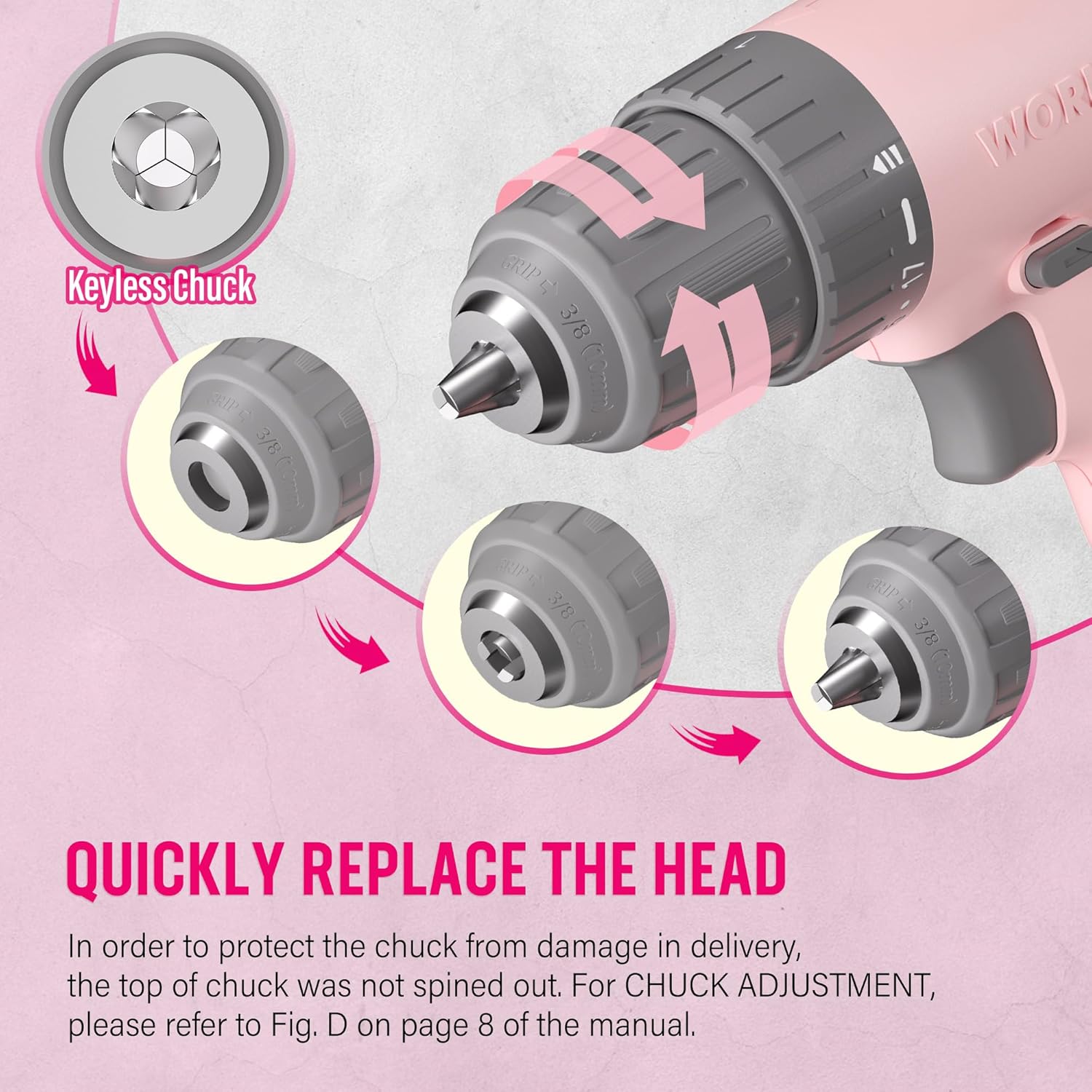
Image: A close-up illustration demonstrating the operation of the keyless chuck, showing how to open and close it to quickly replace drill or screwdriver bits.
4.2 Ngecas Batré
The drill is equipped with an integrated 12V Lithium-Ion battery and charges via a Type-C USB cable. Use a 5V/1A charger for optimal charging.
- Connect the Type-C end of the charging cable to the drill's charging port.
- Connect the USB-A end of the cable to any compatible USB power source (e.g., computer, power bank, USB wall adapter, car charger).
- Monitor the battery capacity indicator lights on the drill to check the charging status.
- A blinking light indicates the battery needs recharging. Multiple solid lights indicate charge level.

Image: The WORKPRO Pink Cordless Drill connected to a laptop via its Type-C charging cable, illustrating its USB rechargeable feature.
5. Parentah Operasi
5.1 Variabel Speed Control
The drill features a variable speed trigger, allowing you to control the rotational speed from 0 to 750 RPM based on the pressure applied.
- Tekanan cahaya: For slower speeds, ideal for starting holes or driving screws precisely.
- Heavy Pressure: For faster speeds, suitable for drilling into materials.
- Releasing the trigger will automatically stop the drill.

Image: A hand holding the WORKPRO Pink Cordless Drill, illustrating how the variable speed switch operates based on trigger pressure (0-750 RPM).
5.2 Setélan Torsi (17+1)
The 17+1 torque adjustable design allows you to select the appropriate torque for different tasks and materials, preventing over-driving screws or damaging surfaces. The maximum torque can reach 19 Newton Meters (168 IN-LBS).
- Rotate the torque adjustment collar located behind the chuck to select the desired setting.
- Lower settings are for driving small screws or working with soft materials.
- Higher settings are for driving larger screws or drilling into harder materials like wood, PVC, or metal.
- The "+1" setting is for drill mode, providing maximum torque for drilling applications.
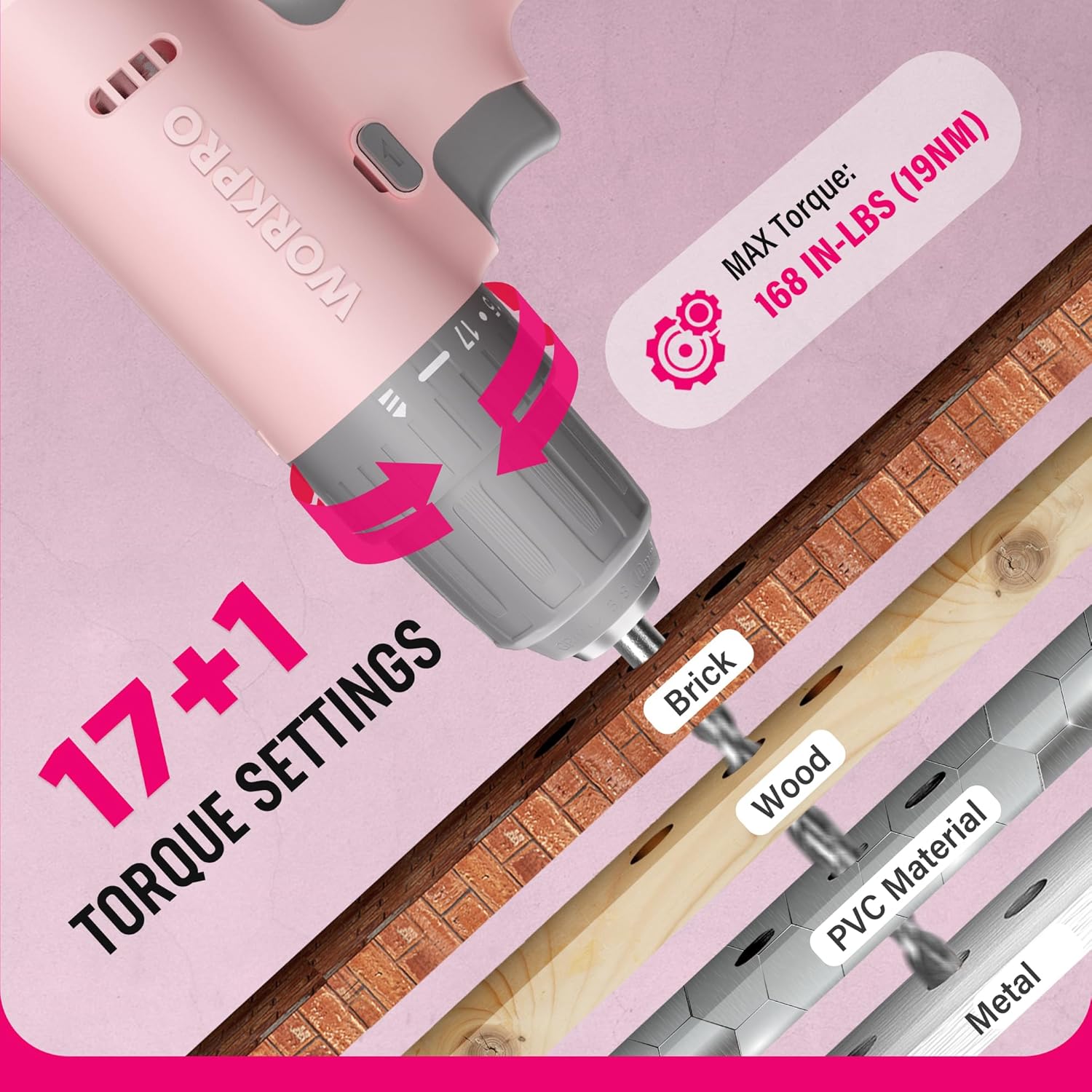
Gambar: A close-up view of the WORKPRO Pink Cordless Drill's 17+1 torque settings, indicating suitable materials like brick, wood, PVC, and metal for different torque levels.
5.3 Maju / Ngabalikeun Pindah
The forward/reverse switch allows you to change the direction of rotation for driving or removing screws and bits.
- Push the switch to the left for forward rotation (driving screws/drilling).
- Push the switch to the right for reverse rotation (removing screws/bits).
- Center the switch to lock the trigger and prevent accidental operation.
5.4 LED Gawé Lampu
The integrated LED light activates when the trigger is pressed, illuminating the work area for improved visibility in dark or confined spaces.

Image: The WORKPRO Pink Cordless Drill in use, with its LED work light brightly illuminating the area, making it easier to work in dark environments.
6. Pangropéa
Pangropéa anu leres mastikeun umur panjang sareng kinerja bor anjeun anu optimal.
- beberesih: Regularly wipe down the drill with a soft, damp lawon. Ulah make bahan kimia kasar atawa cleaners abrasive. Jaga bukaan ventilasi bersih tina lebu sareng lebu.
- Panyimpenan: Store the drill in a dry place, away from direct sunlight and extreme temperatures. Ensure the battery is partially charged before long-term storage.
- Perawatan batré: Avoid fully discharging the battery frequently. Recharge the battery before it is completely depleted to prolong its lifespan.
- Pangropéa Chuck: périodik ngabersihan rahang cuk pikeun mastikeun gripping ditangtoskeun tina bit.
7. Cara ngungkulan
| Masalah | Mungkin Cukang lantaranana | Solusi |
|---|---|---|
| Bor teu hurung. | Batré béak. Forward/reverse switch is in the locked (center) position. | Charge the battery using the provided Type-C cable. Pindahkeun saklar maju/mundur ka posisi maju atawa mundur. |
| Ngurangan kakuatan atawa speed. | Muatan batre lemah. Incorrect torque setting for the task. | Ngecas batré. Adjust the torque collar to a higher setting or switch to drill mode. |
| Bit slips dina chuck. | Chuck teu tightened cukup. Tangkai mata bor kotor atanapi ruksak. | Retighten the chuck firmly. Bersihkeun atanapi gentos mata borna. |
8. Spésifikasi
| Fitur | Rincian |
|---|---|
| merek | WORKPRO |
| Nomer modél | W122061 |
| Sumber Daya | Batré Powered |
| Voltage | 12 volt |
| Laju rotasi maksimum | 750 rpm |
| Torsi maksimum | 19 Newton Meters (168 IN-LBS) |
| Setélan torsi | 17 + 1 (Mode Bor) |
| Ukuran Amrik | 3/8 Inci (Tanpa konci) |
| Jenis Batré | Ion Litium (Kalebet) |
| Port ngecas | Type-C USB (5V-9V input) |
| Fitur husus | Speed Variabel, Lampu Gawé LED |
| Bahan | ABS Plastic + TPE |
| Item Beurat | 1.37 Kilogram (kira-kira 3.01 lbs) |
| Dimensi produk | 9.37 x 2.87 x 9.92 inci |
9. Garansi jeung Rojongan
For warranty information or technical support, please refer to the contact details provided with your product packaging or visit the official WORKPRO websitus. Simpen resi pameseran anjeun salaku bukti pameseran.
WORKPRO Tools is committed to quality and customer satisfaction. Additionally, a portion of this product's purchase supports the NATIONAL BREAST CANCER FOUNDATION, INC., aiding in early detection, education, and support services.


