1. Bubuka
This manual provides detailed instructions for the proper use and maintenance of your ATUMTEK 60" Selfie Stick Tripod. Please read this manual thoroughly before operating the device to ensure optimal performance and longevity.

Image 1.1: The ATUMTEK 60" Selfie Stick Tripod, showcasing its versatility as both a selfie stick and a tripod, along with its Bluetooth remote.
2. Naon dina Box
Pastikeun yén sadaya barang aya nalika ngabongkar:
- Tripod Tongkat Selfie 60"
- Rana Jarak Jauh Bluetooth anu Bisa Dicas Ulang
- Kabel USB
- Manual pamaké
3. Fitur Produk
- Tiang Teleskopik anu panjang pisan: Extends up to 60 inches with 7 adjustable sections, allowing for broader views in photos and videos.
- Dasar Tripod Stabil: Features a 10.6-inch tripod base with three non-slip silicone pads for enhanced stability.
- Desain Hiji-potong: Integrates selfie stick and tripod functions into a single unit, collapsing to 12.8 inches for portability.
- Pakem ergonomis: Handle designed with a lychee texture for comfortable and secure holding.
- Rotasi 360°: The phone holder allows for 360° rotation and 180° left/right tilt for optimal shooting angles.
- Pangwangunan Premium: Dijieun tina paduan aluminium kelas penerbangan pikeun daya tahan.
- Jepret Jauh Bluetooth: Detachable remote for hands-free operation, with a range of up to 33 feet (10 meters).
- Kasaluyuan lega: Supports most smartphones with widths between 2.2 and 3.5 inches (thick cases may not be suitable).

Image 3.1: Various height configurations of the selfie stick tripod, from compact (12.8") to fully extended (60").

Image 3.2: The ergonomic gripping handle and integrated one-piece design for ease of use and portability.
4. Parentah Setup
4.1 Unfolding Tripod
- Hold the handle of the selfie stick firmly.
- Locate the "PUSH" button on the side of the handle.
- Press the "PUSH" button to release the tripod legs. The handle will expand into three legs, forming a stable tripod base.
- Ensure the legs are fully extended and locked into position for maximum stability.

Image 4.1: The one-touch button mechanism for deploying the tripod legs.
4.2 Ngahubungkeun Smartphone Anjeun
- Gently pull apart the spring-loaded phone holder at the top of the stick.
- Carefully insert your smartphone into the holder, ensuring it is securely gripped. The holder supports devices from 2.2 to 3.5 inches wide.
- Awas: Be mindful of your fingers when attaching or removing the phone to avoid pinching.

Image 4.2: The phone holder's adjustable width and compatibility with various smartphone models.
4.3 Ngapasangkeun Remote Bluetooth
- Remove the Bluetooth remote from its slot on the selfie stick handle.
- Press and hold the button on the remote until the indicator light flashes, indicating it is in pairing mode.
- Dina telepon pinter anjeun, buka setélan Bluetooth teras milarian alat anu sayogi.
- Select "ATUMTEK" or a similar device name to pair. The indicator light will stop flashing once successfully paired.
- The remote will automatically reconnect to your phone once turned on after initial pairing.

Image 4.3: The detachable Bluetooth remote and its charging port.
5. Parentah Operasi
5.1 Extending the Pole
- With the phone securely in the holder, gently pull the top section of the pole upwards.
- Extend the pole to your desired length. The pole has multiple sections that can be extended individually.
- For selfie stick use, hold the handle firmly. For tripod use, ensure the legs are deployed and stable before extending the pole to its full height.
5.2 Adjusting Phone Angle and Orientation
- The phone holder can be rotated 360° horizontally. Loosen the knob if present, adjust, and tighten.
- The phone holder can also be tilted 180° vertically (forward and backward). Adjust to achieve the desired angle.
- Effortlessly switch between portrait and landscape modes by rotating the phone holder.
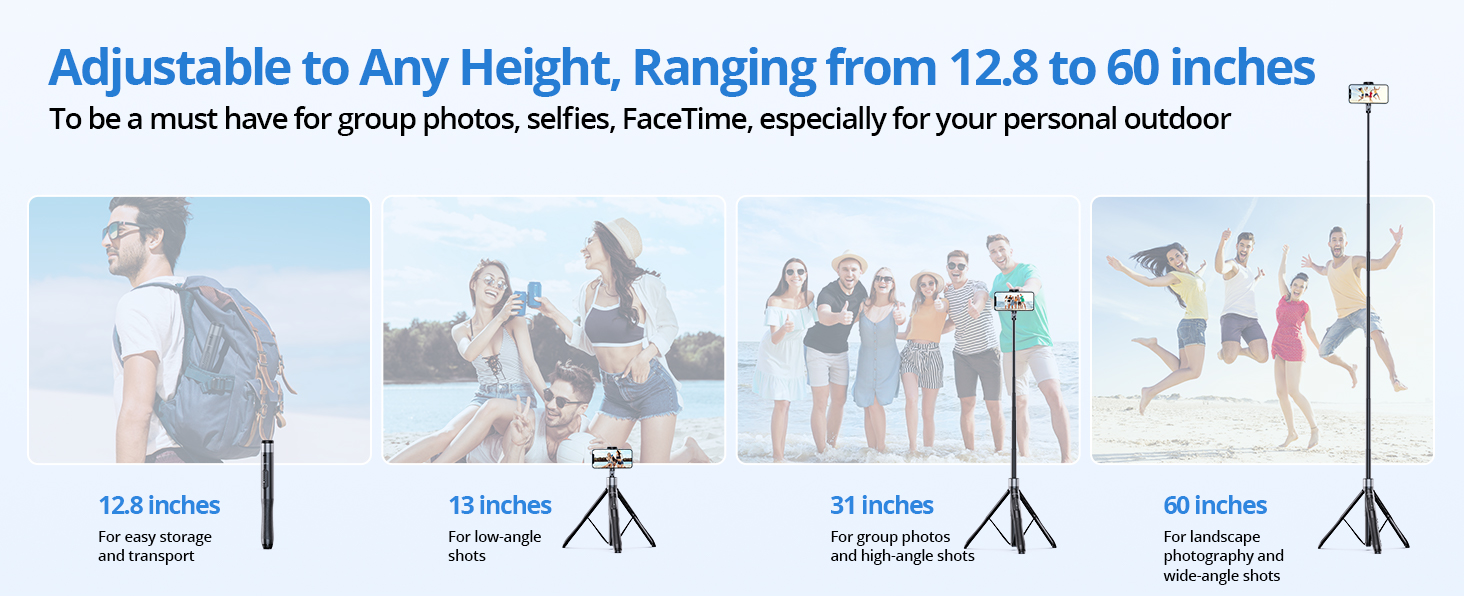
Image 5.1: Demonstrating the full range of motion for the phone holder.
5.3 Ngagunakeun Remote Bluetooth
- Once paired, open your smartphone's camera application.
- Press the button on the Bluetooth remote to trigger the camera shutter.
- The remote can be used for both photos and video recording (start/stop).

Image 5.2: The Bluetooth remote allows for hands-free capture of moments.
6. Pangropéa
- beberesih: Wipe the selfie stick tripod with a soft, dry cloth. Avoid using harsh chemicals or abrasive materials.
- Panyimpenan: Store the device in a cool, dry place away from direct sunlight and extreme temperatures. Ensure it is fully collapsed before storage.
- Batré: Recharge the Bluetooth remote regularly using the provided USB cable to maintain battery health.
- Hindarkeun Overloading: Do not exceed the recommended weight limit of 15 kg (33 lbs) for the tripod.
7. Cara ngungkulan
7.1 Bluetooth Remote Not Connecting
- Pastikeun remote dicas.
- Turn off and on the remote, then re-attempt pairing.
- Check your phone's Bluetooth settings to ensure it's enabled and visible.
- Upami sateuacanna parantos dipasangkeun, cobian hilapkeun alatna dina setélan Bluetooth telepon anjeun teras pasangkeun deui.
7.2 Remote Button Not Triggering Camera (Android Specific)
Some Android phones use the volume keys for functions other than shutter release (e.g., zoom). If your remote button is not triggering the camera:
- Open your phone's camera app.
- Go to Camera Settings (often represented by a gear icon).
- Look for "Shooting methods" or similar options.
- Find the "Press Volume keys to" setting and ensure it is set to "take picture or record video" or "shutter." Do not select zoom or focus.

Image 7.1: Adjusting Android camera settings for remote shutter functionality.
7.3 Kateustabilan Tripod
- Ensure the tripod legs are fully extended and locked.
- Teundeun tripod dina datar, permukaan stabil.
- Avoid extending the pole to its maximum height in windy conditions or on uneven terrain.
8. Spésifikasi
| Fitur | Spésifikasi |
|---|---|
| Ngaran modél | ATSS067 |
| Diménsi Produk (Diciutkeun) | 2.36 x 2.36 x 13.31 inci |
| Item Beurat | 14.1 ons (400 gram) |
| Jangkungna maksimum | 60 inci |
| Batesan Beurat | 15 Kilogram (33 lbs) |
| Bahan | Aluminium, Polikarbonat (PC) |
| Batré (Jauh) | 1 batré Litium Metal (kaasup) |
| Width Telepon cocog | 2.2 - 3.5 inci |
| Jarak Jauh Bluetooth | Nepi ka 33 suku (10 méter) |
| ID FCC | 2ASUP-ATSS055 |
9. Garansi jeung Rojongan
ATUMTEK provides a worry-free 3-year warranty for this product. For any questions, technical support, or warranty claims, please contact ATUMTEK customer service through their official channels or the retailer where the product was purchased.
You can also refer to the official ATUMTEK websitus pikeun rojongan tambahan sarta informasi produk.


