1. Bubuka
This manual provides essential information for setting up, operating, maintaining, and troubleshooting your Alienware X17 R2 Gaming Laptop. Please read this guide thoroughly to ensure optimal performance and longevity of your device.
The Alienware X17 R2 is designed for high-performance gaming and demanding tasks, featuring advanced cooling technologies, powerful processors, and dedicated graphics.
2. Produk Langkungview
The Alienware X17 R2 is engineered to deliver an immersive gaming experience in a thin 17-inch form factor. Key features include:
- Powerful Intel CPUs: Experience high-performance action across all your favorite games with 12th Gen Intel Core processors.
- Next-Gen GPUs: Game unrestrained with NVIDIA GeForce RTX 3070Ti graphics, Dynamic Boost 2.0, and Deep Learning Super Sampling technology.
- Patented Quad Cooling: An industry-first design uses four intelligently controlled and programmable fans to dissipate heat.
- Dipanjangkeun Playtime: Improve battery life with Advanced Optimus technology from NVIDIA—now available on all display options.
- Legend 2.0 Industrial Design: A fresh evolution in design with a high-endurance finish and customizable AlienFX lighting.

Gambar 2.1: Hareupeun view of the Alienware X17 R2 Gaming Laptop displaying a game.
3. Setélan
3.1 Unboxing sareng Inspeksi Awal
- Cabut laptop sareng sadaya asesoris sacara saksama tina bungkusan.
- Pastikeun yén sadaya item anu didaptarkeun dina bagian "Naon dina Kotak" aya.
- Inspect the laptop for any physical damage. If damage is found, contact your retailer immediately.
3.2 Nyambungkeun Daya
- Connect the power adapter to the charging port located at the rear of the laptop.
- Colokkeun kabel listrik kana stop kontak témbok.
- The power indicator light will illuminate, indicating the laptop is receiving power.
3.3 Boot munggaran sareng Setup Sistem Operasi
- Press the Alienware head power button to turn on the laptop.
- Turutan parentah dina layar pikeun ngalengkepan prosés setelan Windows 11 Home. Ieu kalebet milih wilayah anjeun, nyambung ka jaringan Wi-Fi, sareng ngadamel akun pangguna.
- Allow the system to download and install any necessary updates.
4. Ngoperasikeun Laptop Anjeun
4.1 Kibor sareng Touchpad
The Alienware X17 R2 features a backlit keyboard and a responsive touchpad. The AlienFX lighting allows for customizable colors and effects across the keyboard and other zones.

Gambar 4.1: Detil view of the backlit keyboard and touchpad.
4.2 Tampilan sareng Grafik
Enjoy stunning visuals on the 17.3-inch FHD display with a 480Hz refresh rate and 3ms response time. The NVIDIA GeForce RTX 3070Ti graphics card ensures smooth gameplay and high-fidelity rendering. The laptop supports Dolby Vision for optimized color profiles.
4.3 Audio
Experience immersive 3D sound via Dolby Atmos, designed to deliver audio as studios intended.
4.4 Port sareng Konéktivitas
The laptop offers a variety of ports for peripherals and external displays:

Gambar 4.2: Tukangeun view ngagambarkeun rupa-rupa palabuhan konektipitas.
- Port USB 3.0: 3 ports for connecting various USB devices.
- Port USB-C: For versatile connectivity, including Thunderbolt 4.
- HDMI2.1: Supports up to 4K/120Hz output for external displays.
- Ethernet: Killer E3100 RJ45 Ethernet for stable wired network connections.
- Nirkabel: Killer Wi-Fi 6 (802.11ax) and Bluetooth for wireless connectivity.
5. Pangropéa
5.1 beberesih
- Anggo lawon anu lemes sareng henteu buluan pikeun ngabersihkeun layar sareng permukaan luar.
- Hindarkeun ngagunakeun bahan kimia anu kasar atanapi bahan abrasive.
- Regularly clean the cooling vents to prevent dust buildup, which can affect performance.
5.2 Apdet parangkat lunak
Ensure your operating system and drivers are kept up-to-date. Windows Update will handle OS updates, and Alienware Command Center can assist with driver and firmware updates.
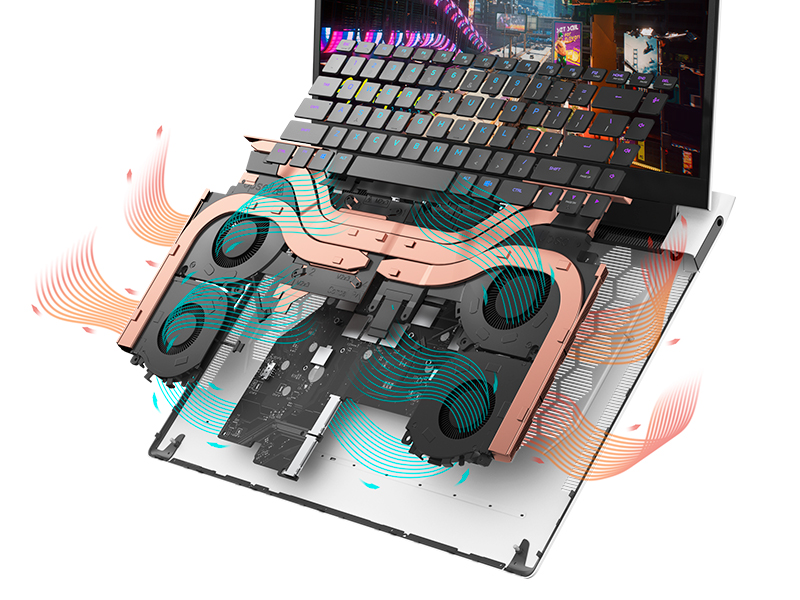
Figure 5.1: Alienware Command Center for system management.
6. Cara ngungkulan
If you encounter issues with your Alienware X17 R2, consider the following basic troubleshooting steps:
- Henteu aya kakuatan: Pastikeun adaptor kakuatan disambungkeun sacara aman ka laptop sareng stopkontak listrik anu tiasa dianggo. Pariksa lampu indikator kakuatan.
- Masalah tampilan: If the screen is black, try connecting an external monitor to verify if the issue is with the laptop's display or the graphics card. Update graphics drivers.
- Overheating: Ensure cooling vents are clear of obstructions. Use Alienware Command Center to monitor temperatures and adjust fan profiles.
- Ngalambatkeun kinerja: Tutup aplikasi anu teu perlu. Pariksa prosés latar tukang anu ngonsumsi CPU atanapi RAM anu luhur. Pastikeun rohangan kosong anu cekap dina SSD.
- Masalah parangkat lunak: Restart the laptop. If issues persist, consider performing a system restore or reinstalling the problematic software.
7. Spésifikasi
| Fitur | Spésifikasi |
|---|---|
| Ukuran layar | 17.3 inci |
| Resolusi layar | 1920 x 1080 piksel (FHD) |
| Prosesor | Intel Core i9-12900H (3.8 GHz, 14 Core) |
| Ram | 16 GB DDR5 (4800 MHz) |
| Hard Drive | 1 TB SSD (Solid State) |
| Grafik Coprocessor | NVIDIA GeForce RTX 3070 Ti (8 GB GDDR6) |
| Sistem operasi | Windows 11 Imah |
| Tipe Wireless | 802.11ax (Killer Wi-Fi 6), Bluetooth |
| USB 3.0 palabuhan | 3 |
| Item Beurat | 6.82 pon |
| Dimensi produk | 11.79 x 15.72 x 0.58 inci |
8. Naon dina Box
- Alienware X17 R2 kaulinan Laptop
- Adaptor kakuatan
- Kabel listrik
- Dokuméntasi
9. Video Produk Resmi
Alienware X17 R2 Gaming Laptop Overview
Video 9.1: Pajabat parantos réngséview of the Alienware X17 R2 Gaming Laptop, highlighting its design, cooling, and performance features.
About Alienware X17 R2 Gaming Laptop
Video 9.2: A detailed look at the Alienware X17 R2 Gaming Laptop, showcasing its features and design elements.
10. Garansi jeung Rojongan
Your Alienware X17 R2 Gaming Laptop comes with a standard manufacturer's warranty. For detailed warranty information, please refer to the documentation included with your product or visit the official Alienware support websitus.
For technical support, driver downloads, and service requests, please visit the Alienware support portal. You can also find FAQs and community forums for additional assistance.


