Bubuka
Thank you for choosing the Dyzeryk 4GB MP3 Player. This portable device is designed to provide high-fidelity lossless sound, allowing you to enjoy your favorite music anytime, anywhere. It features a compact design, ample storage, and easy connectivity. Please read this manual carefully to ensure proper use and maintenance of your device.
Eusi pakét

Image: The Dyzeryk MP3 Player in pink, shown alongside a pair of white earphones and a 4GB memory card.
- 1 x Dyzeryk MP3 Music Player
- 1 x Earphone
- 1 x Lanyard
Fitur produk
- Kualitas Sora Lossless HIFI: Equipped with a professional intelligent digital noise reduction chip for high sound sampling rate and quality.
- Long Time Playback: Up to 10 hours of music playback on a full charge. Quick charge feature provides 1 hour of use from 1 minute of charging.
- Portabel sareng Ringan: Compact design measuring 3.3*0.9*0.4 inches and weighing 33.2g for easy portability.
- Mémori Internal 4GB: Built-in 4GB storage, expandable up to 64GB with a TF card (not included). Can also function as a USB flash drive.
- Versatile Playback Modes: Supports sequential, random, and single loop playback modes.
- Sababaraha Pilihan Ngecas: Can be charged via computer, mobile phone charger, or portable power bank.

Image: A pink MP3 player against a background suggesting high-fidelity audio, emphasizing its sound quality.

Image: A black MP3 player surrounded by musical notes, illustrating its compatibility with various features like memory card support and folder playback.

Image: A collage showing people engaged in activities like running, cycling, and weightlifting, with the pink MP3 player in the center, highlighting its suitability for active lifestyles.
Disetél
Ngecas Alat
Before first use, fully charge your MP3 player. The device must be turned on to charge. When the battery is low, the player will stop playing and shut down automatically. Connect the player to a power source using a USB cable (not included).
- During charging, the red light will flash.
- Once charging is complete, the red light will remain steadily on.
- A full charge typically takes 60-90 minutes.

Image: Illustrations of various charging methods for the MP3 player, including connecting to a computer, a mobile phone charger, and a portable power bank.
Mindahkeun Musik Files
The MP3 player functions as a USB flash drive. To transfer music:
- Connect the MP3 player to your computer via a USB port.
- The computer will recognize the device as a removable disk.
- Drag and drop your MP3, WMA, or WAV audio files directly into the player's storage.
- Safely eject the device from your computer once files are transferred.
Parentah Operasi
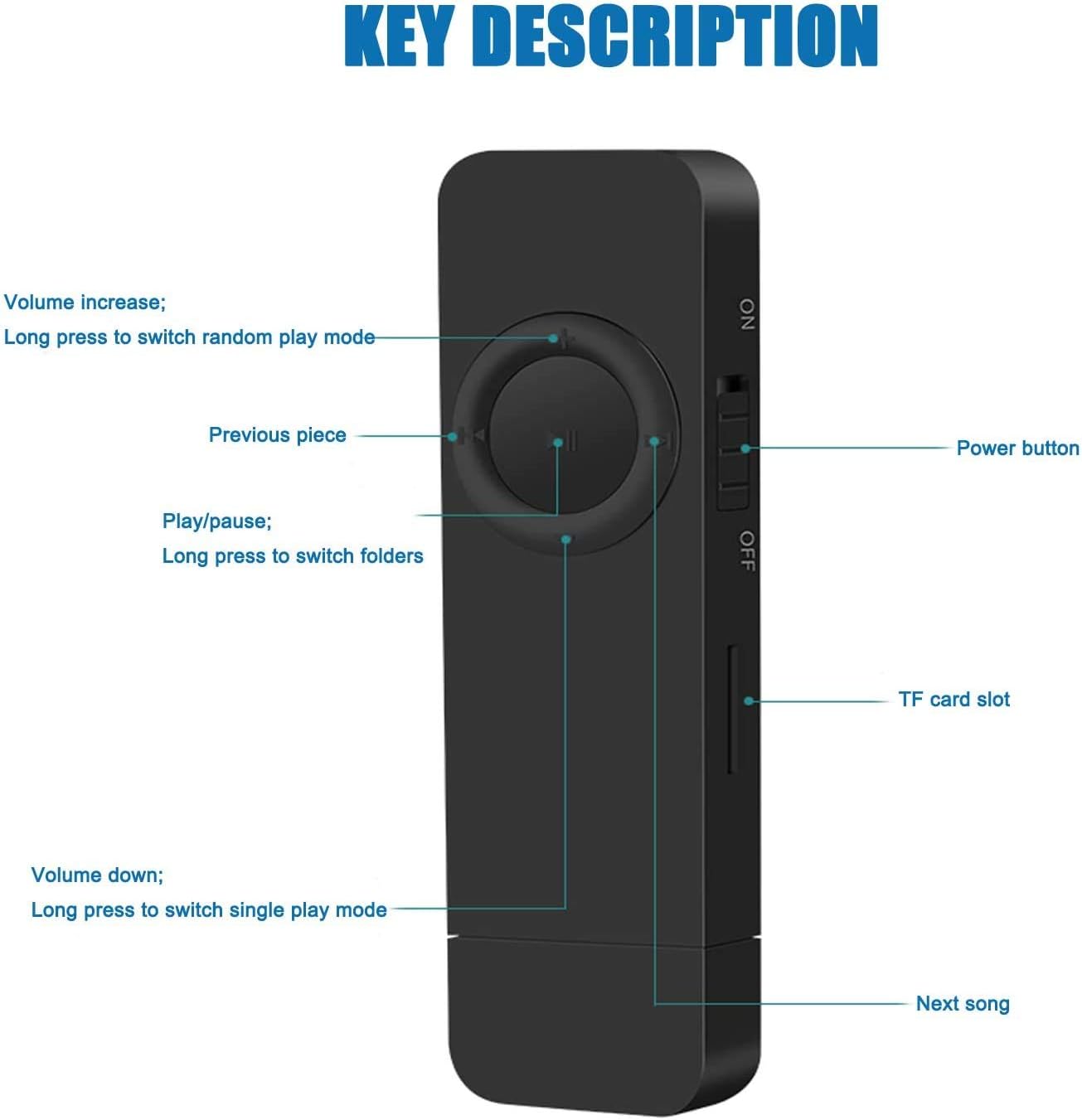
Image: A detailed diagram of the MP3 player's buttons, labeling the power switch, TF card slot, and the functions of the circular control pad (volume, previous/next track, play/pause, folder switching).
Kadali dasar
- Hurungkeun/Pareuman: Use the ON/OFF switch located on the side of the device.
- Puter / Reureuh: Pencét sentral Play / Reureuh kancing.
- Lagu salajengna: Pencét éta Lagu salajengna button (right arrow).
- Lagu saméméhna: Pencét éta Lagu saméméhna button (left arrow).
- Volume Up: Pencét éta + kancing.
- Volume Turun: Pencét éta - kancing.
Modeu Playback
The device supports different playback modes indicated by LED light behavior:
- Sequential Playback Mode: The green light flashes.
- Random Play Mode: The red light flashes. To switch to random play mode, long press the Volume Up (+) button.
- Single Loop Mode: The green and red lights alternately flash. To switch to single loop mode, long press the Volume Down (-) button.
Napigasi polder
- To switch between folders, long press the Play / Reureuh kancing.
Pangropéa
- Tetep alat tetep garing. Hindarkeun paparan ka Uap atanapi cair.
- Bersihkeun alat ku kaen anu lemes sareng garing. Ulah make bahan kimia kasar atawa cleaners abrasive.
- Simpen alat dina tempat anu tiis sareng garing upami henteu dianggo.
- Hindarkeun ragrag atanapi ngagentoskeun alat kana tabrakan anu kuat.
Pamérésan masalah
| Masalah | Mungkin Cukang lantaranana | Solusi |
|---|---|---|
| Alat henteu hurung. | Batré béak. | Charge the device for at least 1 hour. Ensure the ON/OFF switch is in the 'ON' position. |
| Teu bisa mindahkeun files kana alat. | Sambungan anu teu leres atanapi alatna teu dikenal. | Pastikeun kabel USB nyambung pageuh. Coba port USB atanapi komputer anu béda. Pareuman terus hurungkeun deui komputer anjeun. |
| Taya sora tina earphone. | Earphones not properly connected or faulty. Volume too low. | Ensure earphones are fully plugged in. Increase the volume. Test with another pair of earphones if available. |
| Player shuts down unexpectedly. | batré lemah. | Ngecas alat. |
spésifikasi

Image: A pink MP3 player with its dimensions (3.3 inches length, 0.9 inches width) overlaid, emphasizing its stylish and compact design.
- model: JS-01
- ukuran: 3.3 x 0.9 x 0.4 inci (8.38 x 2.29 x 1.02 cm)
- beurat: 33.2g (1.17 ons)
- Mémori internal: 4GB
- Mémori anu tiasa dilegakeun: Ngarojong kartu TF dugi ka 64GB
- Konektipitas: Hi-Speed USB 2.0 (FS) Flash disk
- Batré: 180mAh Lithium Ion (kaasup)
- Format Musik Dirojong: MP3, WMA, WAV
- warna: Pink
Garansi sareng Rojongan
The Dyzeryk MP3 Player comes with a 12-garansi sasih. If you encounter any problems or require assistance, please do not hesitate to contact our professional after-sales service team directly. We are committed to providing quick responses and satisfactory solutions to ensure your satisfaction.
For support, please refer to the contact information provided with your purchase or visit the official Dyzeryk websitus.


