Produk Leuwihview
The Baseus Bowie WM05 True Wireless Earbuds are designed to provide a superior audio experience by effectively eliminating ambient noise and offering seamless transitions between various listening modes. These earbuds feature a low-latency mode for synchronized audio and video, making them ideal for gaming and media consumption. With a large-capacity battery and efficient wireless technology, they offer extended usage throughout the day. An intelligent AI neural network algorithm enhances voice clarity during calls by filtering out surrounding noise, ensuring your conversations are loud and clear. The earbuds are available in a cream white finish.
fitur konci ngawengku:
- Effective ambient noise isolation and seamless mode switching.
- Low-latency mode for smooth audio and video synchronization.
- Large capacity battery with low-power wireless technology for extended use.
- Quick charging: up to two hours of battery life with only 10 minutes of charging.
- AI neural network algorithm for clear call quality by filtering ambient noise.

Image: Baseus Bowie WM05 True Wireless Earbuds shown inside their charging case, highlighting their compact and sleek design.
Eusi pakét
Punten pastikeun sadaya barang aya dina pakét:
- 1 x Pair of Baseus Bowie WM05 True Wireless Earbuds
- 1 x Kasus Ngecas
- 1 x Kabel Ngecas USB-C
- 3 x Pairs of Eartips (Small, Medium, Large)
- 1 x Manual Pamaké

Image: The retail packaging of the Baseus Bowie WM05 earbuds, displaying the product and key features.
Guide Setup
1. Ngecas Awal
Before first use, fully charge the earbuds and the charging case. Connect the provided USB-C cable to the charging port on the case and a power source. The indicator light on the case will show charging status.

Gambar: Top view of the Baseus Bowie WM05 charging case, showing the Baseus logo and smooth finish.
2. Nyapasangkeun sareng Alat
- Pastikeun yén earbuds aya dina wadah ngecas sareng tutup wadahna dibuka.
- Dina alat Anjeun (smartphone, tablet, jsb), aktipkeun Bluetooth.
- Milarian pikeun new Bluetooth devices. The earbuds should appear as "Baseus Bowie WM05".
- Select "Baseus Bowie WM05" to pair. Once connected, a voice prompt will confirm successful pairing.
- The earbuds will automatically connect to the last paired device when removed from the case and Bluetooth is enabled on the device.
Parentah Operasi
Ngagem Earbuds
Choose the correct size eartips for a comfortable and secure fit. Insert the earbuds into your ears and gently twist them until they feel snug and the sound quality is optimal.
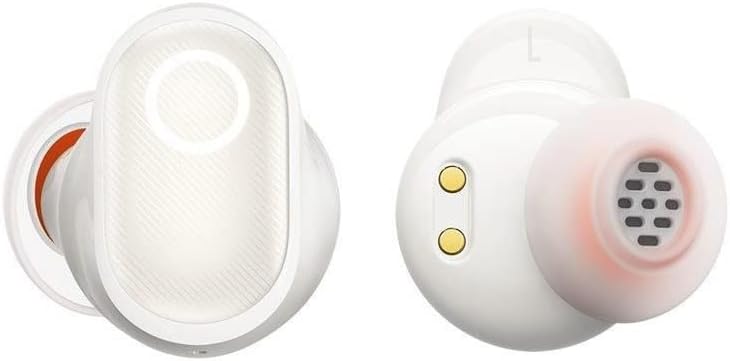
Gambar: Detil view of the Baseus Bowie WM05 earbuds, showing the in-ear design and charging contacts.
Toél Kontrol
The Baseus Bowie WM05 earbuds feature touch-sensitive areas for easy control of music playback, calls, and modes.
| Aksi | Kontrol |
|---|---|
| Play / Reureuh | Ketok dua kali boh earbud |
| Lagu salajengna | Triple-tap right earbud |
| Lagu saméméhna | Triple-tap left earbud |
| Ngajawab / mungkas Telepon | Ketok dua kali boh earbud |
| Nolak Telepon | Pencét jeung tahan boh earbud salila 2 detik |
| Aktipkeun Modeu Latensi Rendah | Pencét jeung tahan earbud kénca salila 2 detik |
| Toggle Noise Control (ANC/Transparency) | Pencét jeung tahan earbud katuhu salila 2 detik |
| Aktipkeun Asisten Sora | Quadruple-tap either earbud |
Pangropéa sareng Perawatan
Proper maintenance ensures the longevity and optimal performance of your Baseus Bowie WM05 earbuds.
- beberesih: Rutin ngabersihkeun earbuds sareng wadah ngecas ku lawon anu lemes, garing, teu aya lint. Ulah make cleaners abrasive atawa pangleyur.
- Eartips: Cabut eartips sareng bersihkeun ku sabun sareng cai anu hampang upami diperyogikeun. Pastikeun aranjeunna tos rengse garing saméméh reattaching.
- Ngecas Kontak: Gently wipe the charging contacts on both the earbuds and inside the case with a dry cotton swab to prevent accumulation of dirt or debris.
- Panyimpenan: Nalika teu dianggo, simpen earbud dina wadah ngecasna pikeun ngajaga sareng ngajaga daya tetep dicas. Hindarkeun suhu anu ekstrim.
- Tahan cai: The earbuds are not waterproof. Avoid exposure to excessive moisture, rain, or submersion in water.
Pamérésan masalah
Upami anjeun ngalaman masalah sareng earbud anjeun, tingali solusi umum ieu:
- Henteu aya sora:
- Pastikeun earbuds dieusi.
- Pariksa sambungan Bluetooth dina alat anjeun.
- Naékkeun volume dina earbud sareng alat anjeun.
- Coba pasangkeun deui earbuds.
- Earbuds Teu Nyapasangkeun:
- Ensure earbuds are in pairing mode (open case lid).
- Pareuman sareng aktipkeun Bluetooth dina alat anjeun.
- Forget "Baseus Bowie WM05" from your device's Bluetooth list and try pairing again.
- Pastikeun teu aya alat sanés anu nyambung ka earbuds.
- Masalah ngecas:
- Check if the USB-C cable is properly connected.
- Coba kabel USB-C atanapi adaptor kakuatan anu sanés.
- Bersihkeun kontak pangisi daya dina earbud sareng wadahna.
- Kualitas Telepon goréng:
- Pastikeun earbuds dipasang leres dina ceuli anjeun.
- Pariksa sinyal Bluetooth anu kuat (tetep caket kana alat anjeun).
- Pastikeun mikropon teu ngahalangan.
If problems persist, please contact Baseus customer support.
spésifikasi
| Fitur | Rincian |
|---|---|
| merek | Baseus |
| Ngaran modél | Bowie WM05 |
| Nomer Modél Item | NGTW200002 |
| Warna | Krim Bodas |
| Panempatan Ceuli | Dina-Ceuli |
| Kontrol bising | Pembatalan Noise aktip |
| Téhnologi konektipitas | Nirkabel |
| Téknologi Komunikasi Nirkabel | Bluetooth |
| Dimensi produk | 10 x 5 x 3 cm |
| Item Beurat | 230 gram |
| Batré | 1 Non-standard battery required. (Included) |
| Tanggal Sadia munggaran | 8 Séptémber 2022 |
Garansi sareng Rojongan
Baseus products are manufactured to the highest quality standards. For information regarding warranty coverage, please refer to the warranty card included in your product packaging or visit the official Baseus websitus.
For technical support, troubleshooting assistance, or any product-related inquiries, please contact Baseus customer service through their official channels. Contact information can typically be found on the product packaging or their official websitus.


