1. Bubuka
This manual provides essential information for the proper setup, operation, and maintenance of your Sharp 32FG6EA 32-inch HD Android TV. The Sharp 32FG6EA offers a wide range of connection options and features the Android TV operating system, providing a modern and intuitive television experience. It functions as an all-in-one entertainment hub, integrating Google Assistant for a smarter viewing experience. Users can quickly access entertainment, control smart devices, and obtain on-screen information using voice commands.
2. Émbaran Kasalametan
Mangga baca sadaya pitunjuk kaamanan kalayan saksama sateuacan nganggo televisi. Simpen buku panduan ieu kanggo rujukan ka hareup.
- Sasayogian tanaga: Pastikeun TV disambungkeun ka sumber listrik kalayan voltase anu lerestage. Ulah overload outlet listrik.
- Ventilasi: Ulah meungpeuk bukaan ventilasi. Ngidinan spasi nyukupan sabudeureun TV pikeun aliran hawa ditangtoskeun pikeun nyegah overheating.
- Cai sareng Uap: Do not expose the TV to rain, moisture, or excessive humidity. Avoid placing objects filled with liquids on or near the TV.
- beberesih: Cabut colokan TV sateuacan dibersihkeun. Anggo lawon anu lemes sareng garing. Entong nganggo pembersih cair atanapi semprotan aerosol.
- panempatan: Teundeun TV dina permukaan datar anu stabil. Upami dipasang dina témbok, pastikeun yén éta dipasang sacara aman sareng tiasa ngadukung beurat TV.
- Palayanan: Ulah nyobian ngalayanan TV sorangan. Rujuk sadayana jasa ka tanaga jasa anu mumpuni.
3. Eusi Paket
Pastikeun yén sadaya barang aya dina bungkusan:
- Sharp 32FG6EA 32-inch HD Android TV
- Remote Control (kalayan 2 batré AAA)
- Stand Type Base
- Instruksi Manual
- Kabel Daya
4. Setélan
4.1 Ngabongkar bungkusan
Carefully remove the TV and all accessories from the packaging. Retain the packaging materials for future transport or servicing.
4.2 Ngagantelkeun Stand
If you are not wall-mounting the TV, attach the included stand base:
- Teundeun layar TV ka handap dina tempat nu datar tur lemes pikeun nyegah karuksakan.
- Sejajarkeun dasar nangtung sareng liang pamasangan di handapeun TV.
- Ngamankeun stand ngagunakeun screws disadiakeun. Pastikeun nangtung napel pageuh.
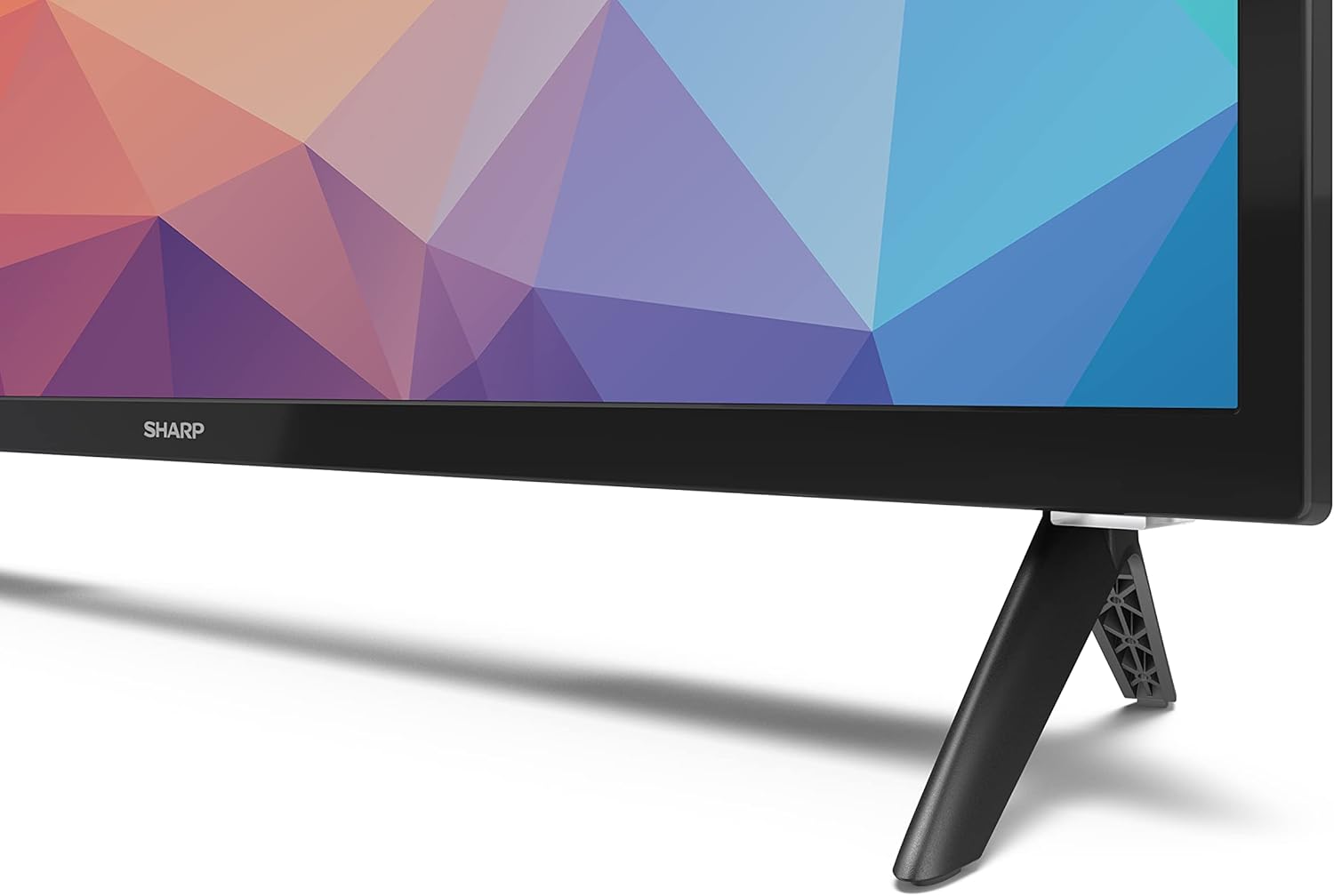
Image: Close-up of the TV stand attachment.
4.3 Pamasangan témbok
The Sharp 32FG6EA supports VESA wall mounts with dimensions of 75 x 75 mm. Wall mount hardware is not included. Follow the instructions provided with your wall mount kit.
4.4 Nyambungkeun Alat éksternal
TV anjeun gaduh sababaraha palabuhan pikeun nyambungkeun sababaraha alat:
- HDMI: Connect Blu-ray players, game consoles, or set-top boxes to the 2 HDMI ports.
- USB: Sambungkeun alat panyimpenan USB pikeun muterkeun média ka 2 port USB.
- Antena/Kabel: Sambungkeun anteneu atanapi sumber TV kabel pikeun saluran siaran.
- Ethernet: Pikeun sambungan internét kabel.
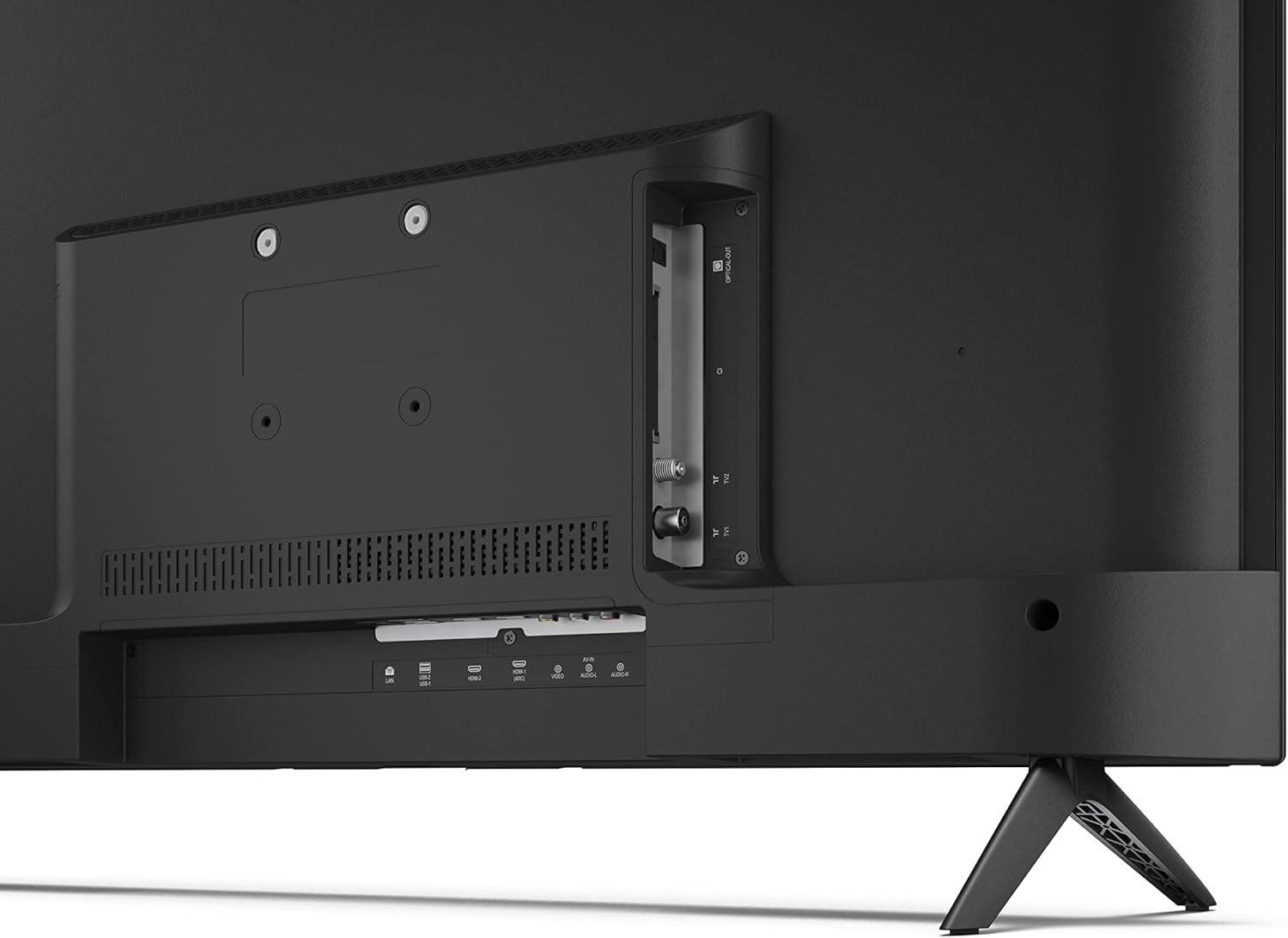
Gambar: Tukangeun view tina TV jeung palabuhan sambungan.
4.5 Sambungan Daya
After connecting all necessary devices, plug the power cable into the TV and then into a wall outlet.
4.6 Wizard Setup Awal
Saatos diaktipkeun heula, TV bakal ngabimbing anjeun dina prosés pangaturan awal. Ieu ngawengku:
- Pilihan basa.
- Sambungan jaringan (Wi-Fi atanapi Ethernet).
- Google account sign-in (required for full Android TV features).
- Panyeken saluran.
5. Nyuping
5.1 Jauh Control Leuwihview
The included remote control allows you to navigate the TV's features. Insert the 2 AAA batteries into the remote control before use.
- Tombol Daya: Ngahurungkeun atawa mareuman TV.
- Pad Arah (D-Pad) & Tombol OK: Napigasi ménu sareng konpirmasikeun pilihan.
- Tombol Balik: Mulih ka layar saméméhna.
- Tombol imah: Ngaksés layar utama Android TV.
- Volume Kaluhur/Turun: Saluyukeun polumeu audio.
- Saluran luhur/handap: Robah saluran TV.
- Tombol Asisten Google: Ngaktipkeun kadali sora.
- Tombol potong kompas aplikasi: Tombol khusus pikeun jasa streaming populér sapertos Netflix, Prime Video, sareng YouTube.
5.2 Android TV Interface Navigation
The Android TV home screen provides access to your installed apps, recommended content, and settings. Use the directional pad on your remote to navigate through the interface.
5.3 Asistén Google
Pencét tombol Google Assistant dina remot anjeun teras nyarios kana mikropon pikeun:
- Milarian pikeun pilem, acara, atawa informasi.
- Ngontrol alat-alat bumi pinter.
- Buka aplikasi.
- Adjust TV settings.
5.4 Chromecast Diwangun-di
The TV includes Chromecast built-in, allowing you to cast content from compatible apps on your smartphone, tablet, or computer directly to the TV screen.
5.5 Konektipitas Bluetooth
Connect Bluetooth devices such as headphones or speakers to your TV for a personalized audio experience. Navigate to the TV's settings menu to pair new Bluetooth devices.
5.6 Setélan Audio
The TV supports Dolby Audio with 2 x 6 W RMS speakers. You can adjust audio settings, including sound modes and equalizer, through the TV's settings menu.
6. Pangropéa
6.1 Ngabersihan TV
Pikeun ngabersihan layar TV sareng kabinet:
- Cabut kabel listrik tina stop kontak témbok.
- Use a soft, lint-free cloth to gently wipe the screen and surfaces.
- Pikeun tanda nekad, rada dampen lawon kalawan cai atawa cleaner layar husus (larapkeun kana lawon, teu langsung ka layar).
- Ulah make cleaners abrasive, lilin, atawa pangleyur.
6.2 Apdet parangkat lunak
TV Android anjeun tiasa nampi apdet parangkat lunak sacara périodik pikeun ningkatkeun kinerja sareng nambihan fitur énggal. Pastikeun TV anjeun nyambung ka internét pikeun nampi apdet ieu. Anjeun tiasa mariksa apdet sacara manual dina menu setélan TV.
7. Cara ngungkulan
Upami anjeun ngalaman masalah sareng TV anjeun, tingal masalah sareng solusi umum ieu:
- Henteu aya kakuatan: Pastikeun kabel daya dicolokkeun aman kana TV sareng stop kontak tembok anu tiasa dianggo. Coba outlet béda.
- Taya Gambar/Sora: Check that the correct input source is selected. Verify all cables (HDMI, antenna) are properly connected.
- Remote Control Teu Gawé: Check the batteries and ensure they are inserted correctly. Point the remote directly at the TV's IR sensor.
- Kualitas Gambar goréng: Check antenna/cable connections. Adjust picture settings in the TV menu. For streaming content, ensure a stable internet connection.
- Henteu aya sambungan internét: Verify Wi-Fi password or Ethernet cable connection. Restart your router and the TV.
- Apps Not Working: Ensure the TV's software is up to date. Try clearing the app's cache or reinstalling the app.
If problems persist, consult the Sharp support websitus atanapi ngahubungan layanan palanggan.
8. Spésifikasi
| Fitur | Spésifikasi |
|---|---|
| Nomer modél | 32FG6EA |
| merek | Seukeut |
| Ukuran layar | 32 Inci (81 cm diagonal) |
| Téknologi tampilan | LED |
| Resolusi | 720p (1366 x 768 piksel) |
| Rasio Aspék | 16:9 |
| Refresh Laju | 50 Hz |
| Sistem operasi | Android TV 11 |
| Fitur husus | Android TV, Google Assistant, Chromecast built-in |
| Kaluaran Audio | 2 x 6 W RMS, Dolby Audio |
| Palabuhan HDMI | 2 |
| palabuhan USB | 2 |
| Konektipitas | Wi-Fi, Bluetooth, Ethernet |
| VESA Wall Mount | 75 x 75 mm |
| Ukuran jeung Stand (W x H x D) | 731 x 486 x 177 mm |
| Ukuran tanpa Stand (W x H x D) | 731 x 433 x 68 mm |
| Ukuran produk (D x W x H) | 16 x 73 x 46.4 cm (approximate, with stand) |
| Beurat | 3.9 kg |
| Kelas Énergi Énergi | E |

Image: TV dimensions diagram.

Image: Energy Label. For more details, visit Pangkalan data EPREL.
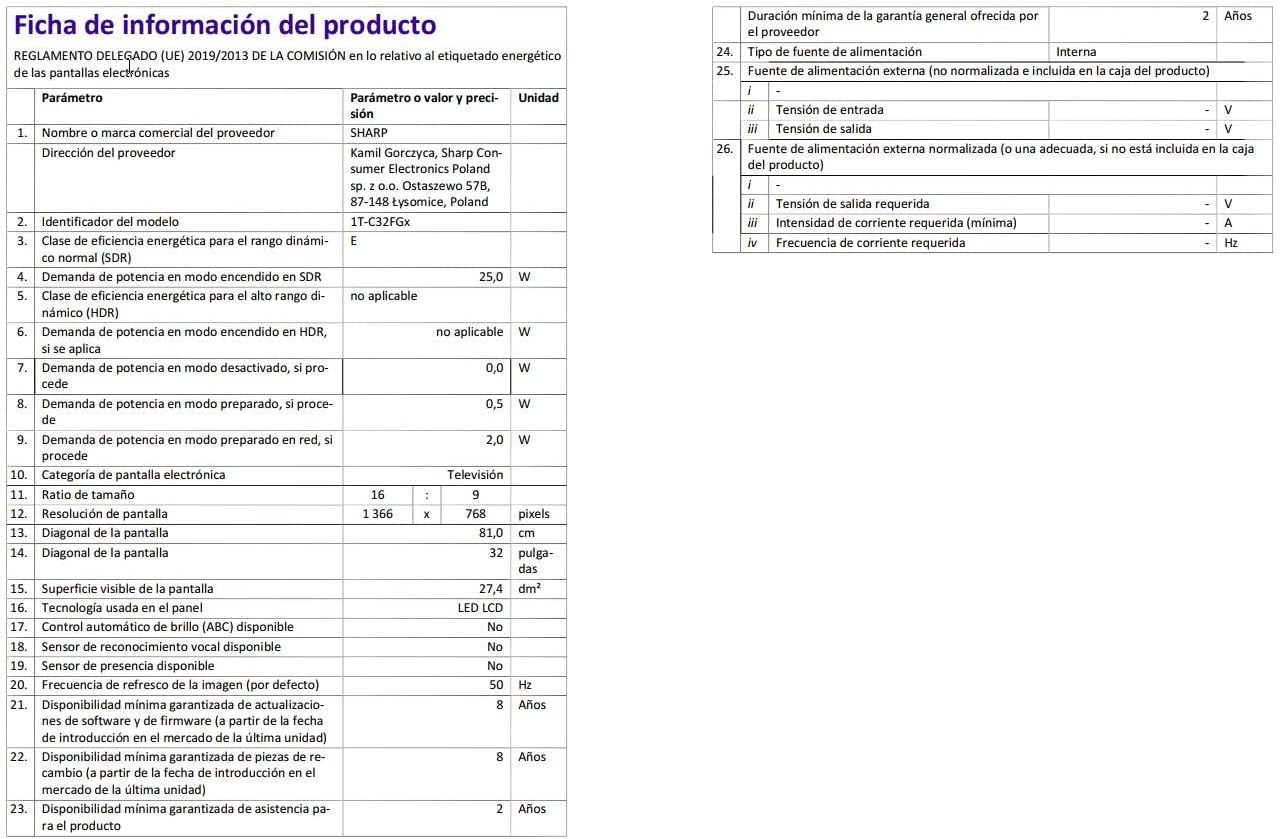
Image: Detailed product information sheet.
9. Garansi jeung Rojongan
The Sharp 32FG6EA television comes with a minimum general warranty duration of 2 years from the provider.
For technical support, warranty claims, or further assistance, please refer to the contact information provided with your purchase documentation or visit the official Sharp support websitus pikeun wewengkon Anjeun.


