1. Produk Langkungview
The BLACK+DECKER Kitchen Wand is a versatile 6-in-1 cordless kitchen multi-tool designed to assist with various food preparation tasks. This kit includes a wand base with an adjustable speed dial and battery indicator lights, along with several attachments for blending, whisking, frothing, can opening, wine opening, and spice grinding. It features a built-in rechargeable battery for cordless convenience.

Figure 1: The BLACK+DECKER Kitchen Wand 6-in-1 Multi-Tool Set, showcasing the main unit and various attachments in its packaging.
2. Émbaran Kasalametan
Mangga baca sagala parentah taliti saméméh ngagunakeun alat. Gagalna nuturkeun parentah ieu bisa ngakibatkeun shock listrik, seuneu, atawa tatu serius.
- Always ensure the appliance is switched off and unplugged (if applicable) before assembling, disassembling, or cleaning.
- Jauhkeun leungeun, rambut, pakean, sareng perkakas tina bagian anu obah nalika operasi pikeun nyegah tatu.
- Ulah neuleumkeun unit motor dina cai atawa cairan séjén. Bersih sareng iklanamp lawon wungkul.
- Alat ieu henteu dimaksudkeun pikeun dianggo ku jalma anu kakurangan kamampuan fisik, indrawi, atanapi mental, atanapi kirang pangalaman sareng pangaweruh, kecuali aranjeunna dipasihan pangawasan atanapi petunjuk ngeunaan panggunaan alat ku jalma anu tanggung jawab kana kasalametanana.
- Barudak kedah diawaskeun pikeun mastikeun yén aranjeunna henteu maén sareng alatna.
- Paké ngan kantétan jeung asesoris dianjurkeun ku produsén.
- Entong ngoperasikeun alat naon waé anu nganggo kabel atanapi colokan anu rusak, atanapi saatos alatna gagal atanapi parantos turun atanapi ruksak dina cara naon waé.
3. Eusi Paket
Pastikeun yén sadaya item anu didaptarkeun di handap aya dina pakét anjeun:
- Black wand base
- Immersion Blénder Attachment
- Immersion Blender Guard
- Ngagantelkeun Whisk
- Gagantél Frother Susu
- Wine Opener Attachment with Foil Cutter
- Spice Grinder Attachment with Lid
- Measuring Cup with Lid
- 2 Storage Cases with Tray Insert
- Charging Dock with Cord

Figure 2: The main unit of the BLACK+DECKER Kitchen Wand with the immersion blender attachment connected.
4. Setup jeung Ngecas
4.1 Muatan Awal
Before first use, fully charge the Kitchen Wand base. Place the wand base onto the charging dock and connect the power cord to an electrical outlet. The battery state-of-charge indicator lights on the wand base will illuminate to show charging progress. A full charge provides up to 30 minutes of continuous runtime.

Figure 3: The charging dock with its power adapter, used to recharge the Kitchen Wand base.
4.2 Ngalampirkeun Asesoris
To attach any accessory, align the accessory with the wand base and twist until it locks securely into place. Ensure the attachment is firmly connected before operation.
5. Parentah Operasi
5.1 Operasi Umum
The wand base features an adjustable speed dial for precise control over power. Rotate the dial to select your desired speed setting. Press and hold the power button to operate the appliance. Release the button to stop.
5.2 Immersion Blender Attachment
Attach the immersion blender to the wand base. Insert the blender into liquids or soft foods in a pot or container. Use a gentle up-and-down motion to blend ingredients until desired consistency is achieved. The immersion blender guard (Figure 4) should be used to protect the blades and prevent splashing.

Figure 4: A man is using the BLACK+DECKER Kitchen Wand with the immersion blender attachment to blend soup in a pot.
5.3 Whisk Attachment
Connect the whisk attachment to the wand base. Use for whipping cream, beating eggs, or mixing batters. Start at a low speed and gradually increase as needed.

Figure 5: A man is using the BLACK+DECKER Kitchen Wand with the whisk attachment to mix ingredients in a bowl.
5.4 Lampiran Pangembang Susu
Attach the milk frother. Insert into milk or other beverages to create foam. Move the frother gently up and down to achieve desired frothiness.

Figure 6: A woman is using the BLACK+DECKER Kitchen Wand with the milk frother attachment to create foam in a glass.
5.5 Can Opener Attachment
Secure the can opener attachment. Place the can opener on the rim of the can, ensuring the cutting wheel is positioned correctly. Press the power button and allow the opener to rotate around the can until it completes a full circle. Lift the can opener to remove the lid.

Figure 7: A woman is shown using the BLACK+DECKER Kitchen Wand to open a can, demonstrating the can opener attachment.
5.6 Wine Opener Attachment
Attach the wine opener. Use the included foil cutter (Figure 8) to remove the foil from the wine bottle. Place the wine opener over the bottle neck, ensuring it is centered. Press the power button to extract the cork. Reverse the operation to release the cork from the opener.

Figure 8: A man is using the BLACK+DECKER Kitchen Wand with the wine opener attachment to open a wine bottle.
5.7 Spice Grinder Attachment
Attach the spice grinder. Fill the transparent chamber with whole spices like salt or pepper. Press the power button to grind. Adjust the coarseness if applicable (refer to specific grinder instructions if provided with the attachment).

Figure 9: A woman is using the BLACK+DECKER Kitchen Wand with the spice grinder attachment to season a salad.
6. Pangropéa jeung beberesih
Proper maintenance ensures the longevity and performance of your Kitchen Wand.
- Wand Base: Wipe the wand base with a damp lawon. Ulah beuleum dina cai.
- Kantétan: Most attachments (immersion blender shaft, whisk, milk frother, measuring cup, storage cases) are dishwasher safe or can be washed by hand with warm, soapy water. Refer to individual attachment instructions for specific cleaning guidelines.
- Can Opener, Wine Opener, Spice Grinder: These attachments may have specific cleaning requirements. Generally, wipe clean with a damp cloth. Avoid immersing electrical components.
- Panyimpenan: Use the provided storage cases with tray inserts (Figure 10) to keep all components organized and protected when not in use.
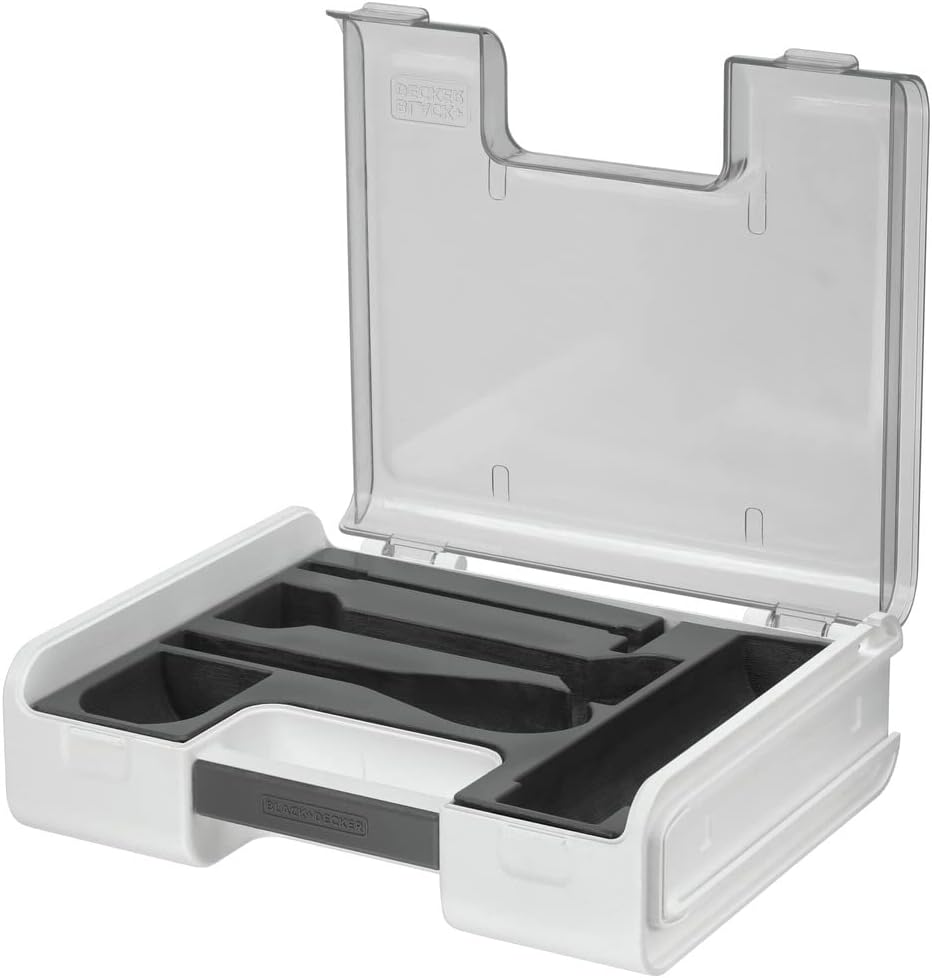
Figure 10: Two clear storage cases with custom-fit tray inserts to organize the various Kitchen Wand attachments.
7. Cara ngungkulan
If you encounter issues with your BLACK+DECKER Kitchen Wand, refer to the following common solutions:
- Alat henteu hurung: Ensure the wand base is fully charged. Check that the attachment is securely connected to the wand base.
- Attachments not working effectively: Verify that the attachment is correctly assembled and locked into place. Ensure the speed dial is set to an appropriate level for the task.
- Batré teu ngecas: Confirm the charging dock is properly connected to a working electrical outlet and the wand base is correctly seated on the dock.
- Geter kaleuleuwihan atawa noise: Discontinue use immediately. Check for any obstructions in the attachment or damage to components.
Pikeun masalah anu henteu direngsekeun ku léngkah-léngkah ieu, mangga ngahubungi dukungan palanggan.
8. Spésifikasi
| merek | HIDEUNG + DECKER |
| Nomer modél | BCKM1016KS10 |
| Warna | Hideung |
| Fitur husus | Tanpa kabel |
| Kapasitas (Gelas ukur) | 700 mililiter |
| Dimensi produk | 18.86 "D x 11.3" W x 7.25" H |
| Sumber Daya | Batré Powered |
| Voltage | 230 volt |
| Bahan Sabeulah | palastik |
| Tipe Kontrol | Variabel Speed Dial |
| Bahan Wadahna | palastik |
| Item Beurat | 7.8 pon |
9. Garansi jeung Rojongan
9.1 Émbaran jaminan
This BLACK+DECKER Kitchen Wand is covered by a Garansi kawates. Please refer to the warranty card included in your product packaging for specific terms, conditions, and duration of coverage. Keep your proof of purchase for warranty claims.
9.2 Rojongan Palanggan
For technical assistance, replacement parts, or any questions regarding your product, please visit the official BLACK+DECKER website or contact their customer service department. Contact information can typically be found in the warranty documentation or on the manufacturer's websitus.