1. Bubuka
This manual provides essential information for the safe and efficient operation of your Gearlux SP184 18 LED 10 Watt RGBW PAR Stage Light. Please read this manual thoroughly before installation and use, and retain it for future reference.
2. Émbaran Kasalametan
- Pastikeun catu daya voltage cocog vol dieusiantage dina alat.
- Always disconnect the power before cleaning or servicing the unit.
- Entong jalankeun alat upami kabel listrik rusak.
- Hindarkeun paparan panon langsung kana sumber cahaya.
- This device is for indoor use only. Protect it from moisture and extreme temperatures.
- Pastikeun ventilasi nyukupan di sabudeureun unit pikeun nyegah overheating.
3. Produk Langkungview
3.1 Fitur konci
- Quad-Color LEDs: Equipped with 18x10-watt RGBW (Red, Green, Blue, White) LEDs for versatile color mixing and high output.
- Cooling efisien: Features a quiet cooling fan for effective heat dissipation, contributing to a longer product lifespan.
- RDM Functionality: Supports RDM (Remote Device Management) via 8 DMX channels for simplified configuration and control.
- Pamasangan fleksibel: Includes an adjustable metal handle/bracket for easy installation on walls, trusses, or for ground placement.
3.2 Komponén
Familiarize yourself with the main components of the Gearlux SP184 PAR light:

Gambar 1: Hareupeun view of the Gearlux SP184 PAR Stage Light, showing the 18 RGBW LED lenses.

Gambar 2: Tukangeun view of the control panel, featuring DMX In/Out, Power In/Out, digital display, and control buttons.
- Susunan LED: 18 individual 10-watt RGBW LEDs on the front panel.
- Panél kontrol: Located on the rear, includes a digital display and four control buttons (MENU, UP, DOWN, ENTER).
- Sambungan DMX: XLR 3-pin DMX In and DMX Out ports for linking with DMX controllers and other fixtures.
- Sambungan Kakuatan: Power In and Power Out ports for daisy-chaining power to multiple units. Includes a fuse holder.
- Ningkatna bracket: An adjustable metal bracket for secure positioning.
4. Setup jeung Instalasi
4.1 Ngabongkar bungkusan
Carefully remove the fixture from its packaging. Inspect the unit for any signs of damage during transit. Retain the packaging for future transport or storage.
4.2 Pamasangan
The Gearlux SP184 can be mounted in various positions using its adjustable bracket:
- Lantai dipasang: Place the unit on a stable, level surface. Adjust the bracket to direct the light as desired.
- Tembok Gunung: Securely attach the bracket to a sturdy wall using appropriate hardware (not included). Ensure the mounting surface can support the weight of the fixture.
- Pemasangan Rangka: Attach the bracket to a lighting truss using a suitable clamp (not included). Always use a safety cable when mounting overhead.
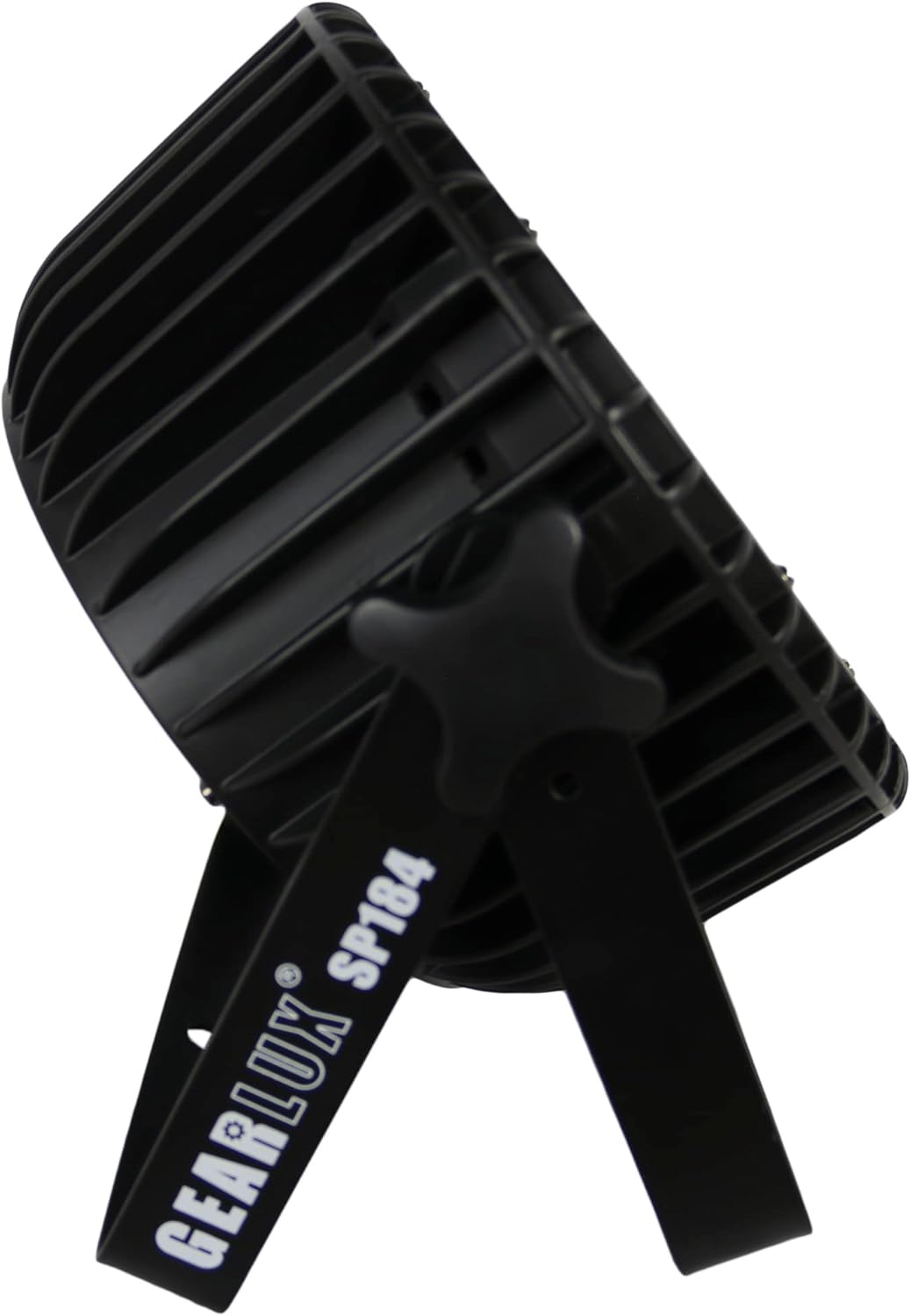
Gambar 3: Samping view illustrating the adjustable mounting bracket and knob for angle adjustment.
4.3 Sambungan Daya
Connect the provided power cable to the "Power In" port on the rear of the unit and then to a suitable power outlet (AC 100-240V, 50/60Hz). Multiple units can be daisy-chained using the "Power Out" port, but ensure the total current draw does not exceed the circuit's capacity.

Gambar 4: Detail of the Power In port with a connected power cable.
4.4 Sambungan DMX
For DMX control, connect a DMX cable from your DMX controller's output to the "DMX In" port of the first fixture. For multiple fixtures, connect the "DMX Out" of the first fixture to the "DMX In" of the next, and so on. Use a DMX terminator on the last fixture in the chain for optimal signal integrity.
5. Parentah Operasi
5.1 Napigasi Panel Control
The digital display and four buttons on the rear panel allow you to navigate menus and select operating modes:
- MENU: Ngagulung pilihan ménu utama.
- NAEK TURUN: Navigates through sub-menu options or adjusts parameter values.
- Asupkeun: Confirms a selection or saves a setting.
5.2 Modeu operasi
The Gearlux SP184 typically offers several operating modes:
- Modeu DMX: Allows external control via a DMX controller. Set the DMX address for the fixture. The unit uses 8 DMX channels.
- Modeu Otomatis: The fixture runs through pre-programmed light shows automatically.
- Modeu Aktip Sora: The light reacts to sound detected by its built-in microphone.
- Mode Master/Budak: Link multiple units where one acts as the master (controlling) and others as slaves (following).
- Modeu Warna statik: Select and display a single static color (Red, Green, Blue, White, or mixed colors).

Gambar 5: The PAR light displaying a white output, demonstrating its RGBW capabilities.

Gambar 6: The PAR light displaying a pink/magenta output, showcasing color mixing.

Gambar 7: The PAR light displaying a green output.
5.3 RDM Function
The RDM (Remote Device Management) function allows for two-way communication between the DMX controller and the fixture. This enables remote setting of DMX addresses, mode changes, and monitoring of fixture status directly from an RDM-compatible DMX controller, simplifying setup and troubleshooting.
6. Pangropéa
6.1 beberesih
To maintain optimal light output and cooling efficiency, regularly clean the fixture's lenses and cooling vents. Use a soft, lint-free cloth and a mild glass cleaner for the lenses. Ensure the unit is powered off and disconnected before cleaning.
6.2 Ngagantian sekering
If the unit does not power on, check the fuse located near the power input. Disconnect power, unscrew the fuse holder, and replace the fuse with one of the same type and rating (e.g., T2A 250V). Never use a fuse with a higher rating.
6.3 Panyimpenan
When not in use, store the fixture in its original packaging or a suitable case in a dry, dust-free environment.
7. Cara ngungkulan
| Masalah | Mungkin Cukang lantaranana | Solusi |
|---|---|---|
| Fixture teu daya on. | No power supply; Blown fuse; Damaged power cable. | Check power connection; Replace fuse; Inspect/replace power cable. |
| Taya kontrol DMX. | Incorrect DMX address; Faulty DMX cable; No DMX signal; Missing terminator. | Verify DMX address; Check DMX cables; Ensure DMX controller is active; Add DMX terminator. |
| Kaluaran lampu taram atanapi teu konsisten. | Dirty lenses; Overheating; Incorrect mode/settings. | Clean lenses; Ensure proper ventilation; Check operating mode and dimmer settings. |
| Fixture is overheating. | Ventilasi tersumbat; Aliran udara teu cekap. | Clear all obstructions from vents; Ensure adequate space around the unit. |
8. Spésifikasi
| Fitur | Rincian |
|---|---|
| Modél | SP184 |
| merek | Gearlux |
| Sumber Cahaya | 18 x 10 Watt RGBW LEDs |
| Sumber Daya | Kabel Listrik |
| Masukan Voltage | AC 100-240V, 50/60Hz |
| Wattage | 10 Watt (per LED) |
| Saluran DMX | 8 Saluran |
| Sudut Beam | 25 darajat |
| Bahan | Logam (Aluminium) |
| Tipe rengse | Aluminium, Metal |
| Tipe Pamasangan | Dinding Gunung, Lantai Gunung |
| Dimensi produk | 11.61 "L x 6.1" W x 11.81" H |
| Item Beurat | 7.67 pon |
9. Garansi jeung Rojongan
Kanggo inpormasi garansi atanapi dukungan téknis, mangga tingal dokuméntasi anu disayogikeun nalika mésér atanapi hubungi pangecér anjeun. Simpen bukti pameseran anjeun pikeun klaim garansi naon waé.