Bubuka
This manual provides comprehensive instructions for the installation, operation, and maintenance of your STRONG SRT 3030 Digital HD Cable Receiver. The SRT 3030 is designed to deliver high-quality digital cable television directly to your home, offering superior image and sound. It features a convenient front USB port for file playback and software updates, an electronic program guide, 32 favorite lists for personalized channel sorting, multilingual audio tracks, and subtitle support. Please read this manual carefully before using the device to ensure optimal performance and safety.
Eusi pakét
Please check the package contents carefully. If any items are missing or damaged, contact your dealer immediately.
- 1x STRONG SRT 3030 HD Cable Receiver
- 1x Kadali Jauh
- 2 x Batré AAA
- 1x Power Adapter (PSU 12V/1A/12W)
Fitur produk
- Receives free digital SD and HD channels on all cable networks.
- Exceptional image and sound quality.
- Front USB port for media playback, channel list backup, and software updates.
- Electronic Program Guide (EPG) for program information.
- 32 customizable favorite lists for TV and radio stations.
- Supports Dolby Digital Plus audio.
- Parental control features.
- Multilingual menu support.
- 8 event timers with 3 modes.
- 800 program memory capacity.
Produk Leuwihview
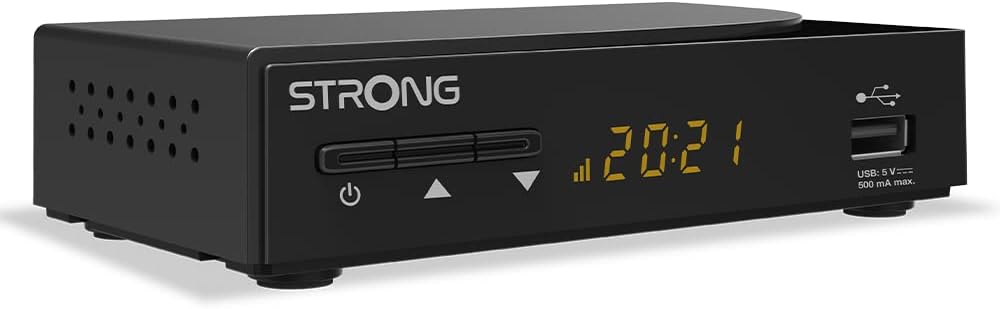
Gambar 1: Gemblengna view of the STRONG SRT 3030 Digital HD Cable Receiver. This image shows the compact black unit with its front panel display and USB port.

Gambar 2: Hareupeun view of the receiver, highlighting the power button, channel navigation buttons, digital display, and the accessible USB port.

Gambar 3: Tukangeun view of the receiver, showing the "CABLE IN" port, HDMI output, TV SCART connector, and the power input.

Gambar 4: Samping view of the receiver, illustrating the ventilation holes designed for heat dissipation.
Disetél
- Nyambung ka TV: Use an HDMI cable to connect the HDMI OUT port on the receiver to an HDMI IN port on your television. Alternatively, use a SCART cable if your TV does not have an HDMI port.
- Connect to Cable Network: Connect your cable network's coaxial cable to the "CABLE IN" port on the back of the receiver.
- Sambungkeun Kakuatan: Plug the provided power adapter into the DC IN port on the receiver and then into a wall outlet.
- Daya Hurung: Press the power button on the front panel of the receiver or on the remote control.
- Wizard Setup Awal: Follow the on-screen instructions for the initial setup, which typically includes language selection, country, and automatic channel scanning. Allow the receiver to complete the channel scan to find all available digital channels.
Parentah Operasi
Fungsi Dasar
- Hurungkeun/Pareuman: Pencét éta POWER tombol dina kadali jauh atanapi panel hareup.
- Pilihan Saluran: Ngagunakeun éta CH +/- tombol pikeun ngarobah saluran sequentially, atawa asupkeun nomer channel langsung maké keypad numerik.
- Kontrol volume: Ngagunakeun éta VOL +/- tombol pikeun nyaluyukeun polumeu.
- Jempé: Pencét éta BISA tombol pikeun mareuman sora samentawis.
- Pituduh Program Éléktronik (EPG): Pencét éta EPG tombol pikeun view program information and schedule recordings.
Menu Napigasi
Pencét éta MENU button on the remote control to access the main menu. Use the arrow keys (Luhur / turun / kénca / katuhu) to navigate through options and OK pikeun mastikeun pilihan. Pencét KALUAR pikeun balik ka hirup TV.
Manajemén saluran
- Channel Sorting: In the menu, navigate to "Channel Management" to sort channels by name, LCN, or other criteria.
- Daptar Karesep: Create and manage up to 32 favorite lists to quickly access your preferred TV and radio stations.
Fungsi USB
Insert a USB storage device into the front USB port. You can use it for:
- Puterkeun Média: Play back various media files (e.g., photos, music, videos) stored on the USB device.
- Pembaruan parangkat lunak: Update the receiver's firmware by placing the update file on a USB drive and following the instructions in the system settings menu.
- Channel List Backup: Save your customized channel list to the USB device.
Pangropéa
To ensure the longevity and optimal performance of your STRONG SRT 3030 receiver, follow these maintenance guidelines:
- beberesih: Disconnect the power before cleaning. Use a soft, dry cloth to wipe the exterior of the receiver. Do not use liquid cleaners, aerosols, or abrasive materials.
- Ventilasi: Ensure that the ventilation openings on the receiver are not blocked. Do not place the receiver on soft surfaces like carpets or blankets that may obstruct airflow.
- panempatan: Place the receiver in a well-ventilated area, away from direct sunlight, heat sources, and excessive moisture.
Pamérésan masalah
Upami anjeun ngalaman masalah sareng receiver anjeun, tingali tabel di handap ieu pikeun masalah umum sareng solusina.
| Masalah | Mungkin Cukang lantaranana | Solusi |
|---|---|---|
| Taya gambar atawa sora |
|
|
| "No Signal" pesen |
|
|
| Kadali jauh teu jalan |
|
|
| Cannot play USB media |
|
|
Spésifikasi teknis
| Fitur | Spésifikasi |
|---|---|
| merek | Kuat |
| Nomer modél | SRT3030 |
| Warna | Hideung |
| Téhnologi konektipitas | HDMI |
| Panganteur | HDMI, USB 2.0 |
| Total palabuhan HDMI | 1 |
| Mode Kaluaran Audio | Stereo |
| Konfigurasi Saluran Sakuliling Sora | 2.0 |
| Video Encoding | H.264, H.265/HEVC, VP9, AV1, MPEG-4 |
| Alat nu cocog | TV, personal computer, tablet, smartphone, game console, amplifier, speaker |
| Komposisi batré (Jauh) | Alkali |
| Produsén | KUAT |
| Negara asal | Cina |
Garansi sareng Rojongan
For warranty information and technical support, please refer to the documentation included with your product or visit the official Strong websitus. Simpen resi pameseran anjeun salaku bukti pameseran pikeun klaim garansi.
Dukungan Online: For further assistance, FAQs, and software updates, please visit the official Strong support page.


