1. Bubuka
This manual provides detailed instructions for the safe and efficient use of your Intenso Video Scooter BT MP3 Player. Please read this manual thoroughly before operating the device and retain it for future reference. This device allows you to play music (MP3), videos (MP4), and view images on its 1.8-inch color display, with the added convenience of Bluetooth connectivity.
2. Produk Langkungview
The Intenso Video Scooter BT is a compact and portable media player designed for on-the-go entertainment. It features a 1.8-inch color display, 16 GB of internal storage, and Bluetooth for wireless audio streaming.

Gambar 2.1: The Intenso Video Scooter BT MP3 Player in blue, shown with the included headphones connected. The microUSB port for charging and data transfer, and the microSD card slot for expandable storage, are visible on the side.
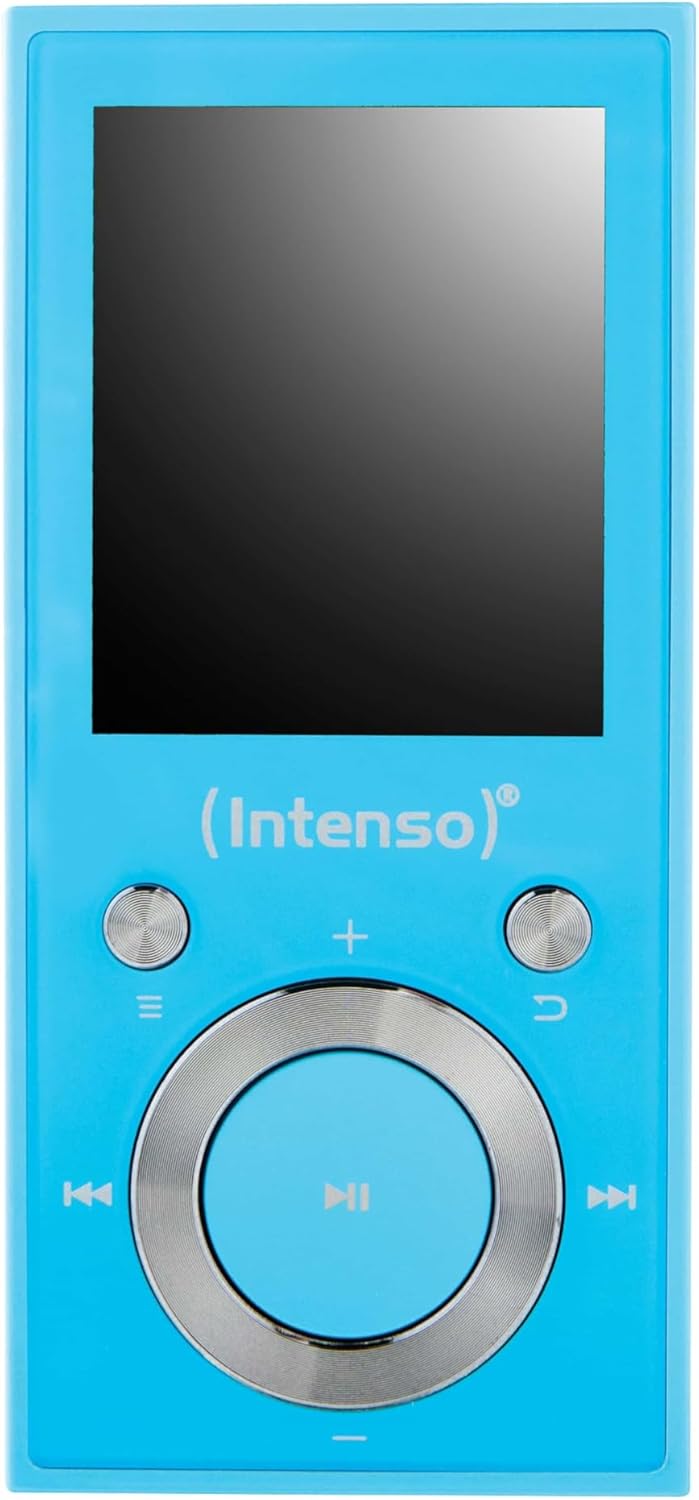
Gambar 2.2: A nutup-up view of the Intenso Video Scooter BT MP3 Player's front panel, displaying the 1.8-inch screen and the navigation buttons. The central button is for play/pause/confirm, surrounded by directional controls, and dedicated buttons for menu, back, and volume.
Eusi pakét:
- Intenso Video Scooter BT MP3 Player
- Headphone
- Kabel USB
- Manual pangguna (dokumén ieu)
3. Setélan
3.1 Ngecas Alat
- Connect the small end of the included USB cable to the microUSB port on the player.
- Connect the large end of the USB cable to a powered USB port on a computer or a compatible USB wall adapter (not included).
- Indikator batré dina layar bakal némbongkeun status ngecas. Ngecas pinuh biasana peryogi waktos sakitar 2-3 jam.
3.2 Nyelapkeun Kartu MicroSD
The device supports microSDHC cards for expanded storage. To insert a card:
- Pilari slot kartu microSD di sisi pamuter.
- Gently insert the microSD card into the slot with the gold contacts facing down until it clicks into place.
- Pikeun nyabutna, pencét kartu sakedik ka jero dugi ka kaluar.
3.3 Connecting to a Computer and Transferring Files
- Pastikeun pamuter diaktipkeun.
- Connect the player to your computer using the supplied USB cable.
- Pamuter éta bakal némbongan salaku drive disk anu tiasa dicabut dina komputer anjeun.
- Drag and drop your desired MP3 music, MP4 videos, or image files into the appropriate folders on the player or inserted microSD card.
- Cabut alat tina komputer anjeun kalayan aman sateuacan nyabut kabel USB.
4. Parentah Operasi
4.1 Daya Hurung/Pareuman
- Pikeun Ngahurungkeun: Press and hold the power button (often integrated with the play/pause button or a dedicated side button) for a few seconds until the screen illuminates.
- Pikeun mareuman: Pencét terus tahan tombol daya deui nepi ka alat pareum.
4.2 Navigasi Menu
Use the directional buttons around the central 'Play/Pause/Confirm' button to navigate through menus. The 'Menu' button (often represented by three horizontal lines) typically brings up options or returns to the main menu. The 'Back' button (often a curved arrow) returns to the previous screen.
4.3 Puterkeun Musik
- Tina ménu utama, pilih 'Musik'.
- Browse through your music library by artist, album, genre, or all songs.
- Select a song and press the central 'Play/Pause' button to begin playback.
- Use the left/right directional buttons to skip tracks.
- Use the volume buttons (often '+' and '-') to adjust the audio level.
- Pencét 'Play / Reureuh' tombol pikeun ngareureuhkeun atawa neruskeun playback.
4.4 Puterkeun Pidéo
- Tina ménu utama, pilih 'Pidéo'.
- Browse and select the desired video file.
- Press the central 'Play/Pause' button to start playback.
4.5 Konektipitas Bluetooth
To pair your Intenso Video Scooter BT with Bluetooth headphones or speakers:
- From the main menu, navigate to 'Bluetooth'.
- Pastikeun alat audio Bluetooth anjeun aya dina modeu papasangan.
- Pilih 'Milarian pikeun Devices' on the player.
- Once your device appears in the list, select it to pair.
- After successful pairing, audio will be routed to the connected Bluetooth device.
5. Pangropéa
- beberesih: Anggo lawon anu lemes sareng garing pikeun ngabersihkeun alat. Entong nganggo pembersih cair atanapi pangleyur.
- Panyimpenan: Nyimpen pamuter dina tiis, tempat garing jauh ti sinar panonpoé langsung jeung hawa ekstrim.
- Perawatan batré: Pikeun manjangkeun umur batre, ulah miceun batre pinuh. Ngeusi batre alat sacara rutin, sanajan henteu dianggo kanggo waktos anu lami.
- Apdet parangkat lunak: Check the official Intenso websitus sacara périodik pikeun apdet firmware anu sayogi pikeun mastikeun kinerja anu optimal.
6. Cara ngungkulan
Alat Teu Hurung:
- Pastikeun batréna tos dicas. Sambungkeun pamuter ka sumber daya teras antepkeun ngecas sahenteuna 30 menit sateuacan nyobian hurungkeun deui.
- If the device is unresponsive, locate the 'RESET' pinhole (if present, often on the side or back) and gently press it with a thin object (e.g., a paperclip) to restart the device.
Henteu aya sora:
- Pariksa tingkat polumeu.
- Ensure headphones are properly connected or that Bluetooth headphones/speakers are paired and connected.
- Coba nganggo headphone anu béda-béda pikeun nyingkahan pasangan anu rusak.
Masalah Sambungan Bluetooth:
- Ensure both the player and the Bluetooth audio device are sufficiently charged.
- Make sure both devices are within close proximity (typically within 10 meters) and free from obstructions.
- Coba cabut pasangan sareng pasangkeun deui alat.
- Restart both the player and the Bluetooth audio device.
Files Not Appearing or Playing:
- Pariksa yén files are in a supported format (MP3 for audio, MP4 for video).
- Mastikeun files were transferred correctly to the device's internal storage or the microSD card.
- If using a microSD card, ensure it is properly inserted and not corrupted.
7. Spésifikasi
| Ngaran modél | Video Scooter BT |
| Nomer Modél Item | 3717474 |
| merek | Intenso |
| Kapasitas Panyimpenan Mémori | 16 GB |
| Ukuran layar | 1.8 inci |
| Téhnologi konektipitas | USB, Bluetooth |
| Alat nu cocog | Alat Bluetooth |
| Jenis Média | MP3, MP4 |
| Fitur husus | MP3 Playback, Video Playback |
| Dimensi produk | 6.3 x 3.54 x 1.97 inci |
| Item Beurat | 0.917 ons |
| Batré | 1 batré Litium Polimér (kaasup) |
8. Garansi jeung Rojongan
For warranty information and technical support, please refer to the documentation included with your product or visit the official Intenso websitus. Simpen bukti pameseran anjeun pikeun klaim garansi.


