1. Bubuka
Thank you for choosing the Gembird USB-C Gigabit Network Adapter with 3-Port USB 3.1 Hub. This device is designed to expand the connectivity of your USB-C enabled laptop, tablet, or computer, providing both high-speed Gigabit Ethernet and additional USB 3.1 ports. This manual provides essential information for setting up, operating, and maintaining your device.
2. Fitur Produk
- Konektipitas USB-C: Connects to your host device via a reversible USB-C port.
- Port Ethernet Gigabit: Provides a stable and fast wired network connection up to 1000 Mbps.
- 3-Port USB 3.1 Hub: Adds three USB 3.1 ports for connecting peripherals such as external hard drives, flash drives, keyboards, and mice.
- Transfer Data Kecepatan Tinggi: USB 3.1 ports support data transfer rates up to 5 Gbps.
- Nyolok sareng Puter: No driver installation required for most modern operating systems.
3. Eusi Paket
Please ensure the following items are included in your package:
- Gembird USB-C Gigabit Network Adapter with 3-Port USB 3.1 Hub (Model A-CMU3-LAN-01)
4. Produk Langkungview
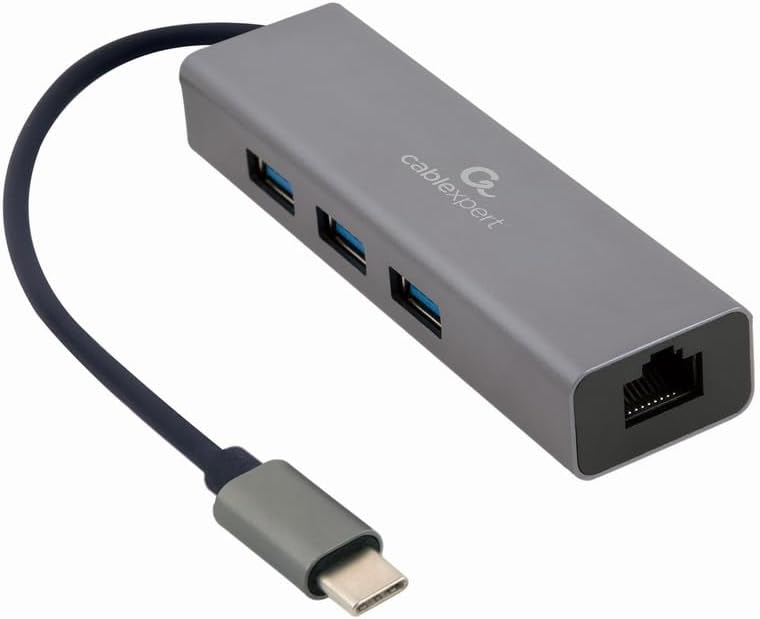
Gambar 1: Hareupeun view of the Gembird USB-C Gigabit Network Adapter, showing the USB-C cable, three USB 3.1 ports, and the RJ45 Gigabit Ethernet port.

Gambar 2: Retail packaging for the Gembird USB-C Gigabit Network Adapter, highlighting key features like USB Type-C, USB 3.1 x 3, RJ45, Gigabit, 1000 Mbps, and Plug & Play.
5. Setélan
Follow these steps to set up your Gembird USB-C Gigabit Network Adapter:
- Nyambung ka Alat Host: Plug the USB-C connector of the adapter into an available USB-C port on your laptop, tablet, or computer.
- Nyambung kana Jaringan: Insert an Ethernet cable (RJ45) from your router or modem into the Gigabit Ethernet port on the adapter.
- Sambungkeun Periferal USB: Plug your USB devices (e.g., flash drives, external hard drives, mouse, keyboard) into the three available USB 3.1 ports on the adapter.
- Pamasangan supir: The adapter is typically plug-and-play. Your operating system (Windows, macOS, Linux, Chrome OS) should automatically detect and install the necessary drivers. If prompted, allow the system to install drivers.
6. Parentah Operasi
Once connected, the adapter functions automatically:
- Aksés jaringan: Your host device should now have a wired network connection. You can verify this in your operating system's network settings.
- USB Device Access: Connected USB peripherals will be recognized by your host device and function as if directly connected.
7. Cara ngungkulan
Upami anjeun mendakan masalah, tingal masalah sareng solusi umum ieu:
- Henteu aya sambungan jaringan:
- Pastikeun yén kabel Ethernet disambungkeun sacara aman ka adaptor sareng router/modem anjeun.
- Pariksa router/modem anjeun pikeun operasi anu leres.
- Pariksa setelan jaringan dina alat host anjeun.
- Try connecting the adapter to a different USB-C port on your host device.
- Alat USB Teu Dipikawanoh:
- Ensure USB devices are properly plugged into the adapter's USB 3.1 ports.
- Try connecting the USB device directly to your host computer to confirm it is functional.
- Some high-power USB devices may require an external power source if your host device's USB-C port does not provide sufficient power (this adapter does not have a dedicated power input).
- Lambat Jaringan:
- Ensure your Ethernet cable is rated for Gigabit speeds (Cat5e or higher).
- Verify your internet service provider's speed and your router's capabilities.
- Ensure your host device's USB-C port supports USB 3.0/3.1 speeds.
8. Spésifikasi
| Nomer modél | A-CMU3-LAN-01 |
| Panganteur Hardware | USB-C (Host), USB 3.1 (Hub), RJ45 (Ethernet) |
| Total palabuhan USB | 3 (USB 3.1) |
| palabuhan Ethernet | 1 (Gigabit RJ45) |
| Data Transfer Rate (USB) | Nepi ka 5 Gbps (USB 3.1) |
| Data Transfer Rate (Ethernet) | 10/100/1000 Mbps |
| Dimensi produk | 10 x 2 x 2.7 inci |
| Item Beurat | 2.46 ons |
9. Pangropéa
Pikeun mastikeun umur panjang sareng kinerja optimal adaptor anjeun:
- beberesih: Anggo lawon anu lemes sareng garing pikeun ngabersihkeun bagian luar alat. Hindarkeun pembersih cair atanapi pangleyur.
- Panyimpenan: Simpen adaptor di tempat anu tiis sareng garing jauh tina sinar panonpoé langsung sareng suhu anu ekstrim nalika henteu dianggo.
- Penanganan: Avoid dropping or subjecting the device to strong impacts. Do not attempt to disassemble the adapter.
10. Garansi jeung Rojongan
This Gembird product comes with a garansi dua taun ngalawan cacad pabrik. Punten tahan bukti pameseran anjeun pikeun klaim garansi.
For technical support or warranty inquiries, please contact your retailer or visit the official Gembird websitus pikeun inpo kontak.


