Bubuka
The RESTMO Water Flow Meter is designed to accurately measure water consumption and flow rate for various outdoor watering needs. Featuring a durable brass inlet and an easy-to-read LCD screen, it provides precise data to help manage water usage efficiently and prevent over-watering.

Figure 1: RESTMO Water Flow Meter
This image displays the main unit of the RESTMO Water Flow Meter, highlighting its compact design, digital display, and brass inlet connection. The device is green and black with a gold-colored brass connector.
Setup sareng Instalasi
The RESTMO Water Flow Meter is designed for easy installation with standard garden hoses and faucets. Ensure all connections are hand-tight to prevent leaks.
- Pamasangan batré: The device is powered by a CR2032 battery. Locate the battery compartment on the side of the meter. Use a small tool (or coin) to open the compartment, insert the battery with the correct polarity, and securely close the cover. Ensure your hands are dry during installation.
- Nyambung ka Faucet: Attach the brass inlet of the flow meter to your outdoor faucet. The brass inlet features a 360-degree rotatable design for enhanced durability and easy installation.
- Sambungkeun selang: Connect your garden hose to the outlet (male thread) of the flow meter. The meter is compatible with all standard 3/4" NH thread outdoor faucets and garden hoses.

Gambar 2: Pamasangan batré
This image shows a CR2032 coin cell battery being inserted into the battery compartment of the water flow meter. The compartment is located on the side of the device and is secured by a twist-lock cap.

Figure 3: Connecting to Faucet
The image illustrates the water flow meter connected to an outdoor faucet. The brass inlet is visible, emphasizing its robust construction and swivel capability for easy attachment to the water source.

Figure 4: Connecting to Hose
This image shows the water flow meter installed between a faucet and a garden hose, demonstrating its compatibility with standard connections. A person and child are shown watering plants in the background, illustrating a typical use case.
Parentah Operasi
The water flow meter features a single push button for easy operation and mode selection.
Modeu pangukuran
Short press the button to cycle through the four different measurement modes:
- Modeu Aliran: Displays the real-time water flow rate (e.g., Gallons per Minute or Liters per Minute).
- Consumption Mode: Shows the water usage from the last operation.
- Average Mode: Provides the daily average water usage over the last seven days (counts from the next day after activation).
- Total Mode: Accumulates the total water usage since the device was last reset.

Figure 5: Flow Mode Display
This image shows the water flow meter displaying "1.07 GAL/Min" in Flow Mode, indicating the real-time water flow rate. A person is watering plants with a hose and nozzle in the background.

Figure 6: Consumption Mode Display
The image displays the water flow meter showing "149 GAL" in Consumption Mode, representing the total water used in the last session. The meter is connected to a faucet near a swimming pool, suggesting its use for pool filling.

Figure 7: Average Mode Display
This image shows the water flow meter displaying "10.67 GAL/D" in Average Mode, indicating the daily average water consumption over the past week. A lawn sprinkler is active in the background.
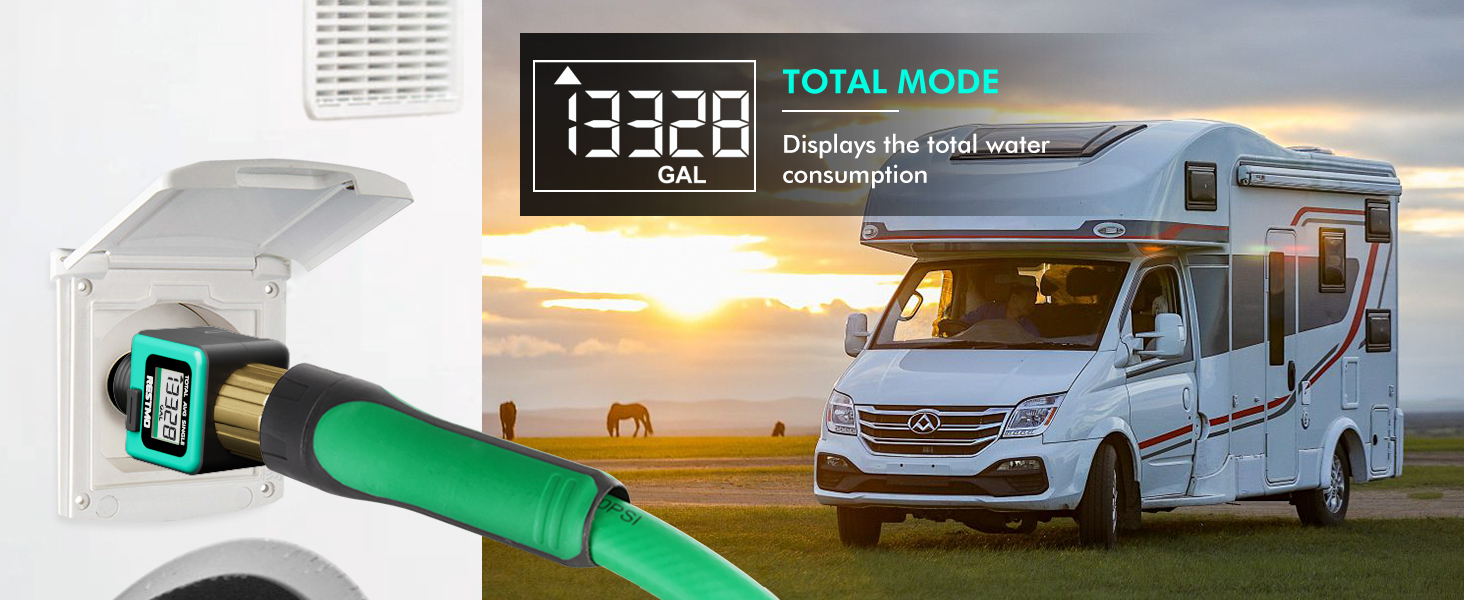
Figure 8: Total Mode Display
The image shows the water flow meter displaying "13328 GAL" in Total Mode, indicating the cumulative water consumption. The meter is connected to an RV's water inlet, suggesting its use for RV tank filling.
Unit Conversion and Reset
- Saklar Unit: In Flow Mode, long press the button to switch the unit between US Gallons and Liters.
- Reset Data: In Consumption, Average, or Total Modes, long press the button to reset the displayed data to zero.
Fungsi Saré Otomatis
The LCD screen will automatically go to sleep if there is no operation or water flow detected for 1 minute, conserving battery life.
Pangropéa
- Ngagantian batré: When the low battery symbol appears on the LCD screen, replace the CR2032 battery promptly. Ensure hands are dry and the battery is installed with correct direction.
- Filter Washer Cleaning: Regularly check and clean the metal filter washer located in the brass inlet to prevent dirt, sediment, and other particles from affecting measurement accuracy.

Gambar 9: Indikasi Batré Lemah
The image shows the water flow meter with a low battery indicator on its LCD screen, prompting the user to replace the battery.

Figure 10: Metal Filter Washer
Gambar ieu nyadiakeun close-up view of the water flow meter's brass inlet, highlighting the integrated metal filter washer designed to prevent debris from entering the device and affecting accuracy.
Pamérésan masalah
If you encounter issues with your RESTMO Water Flow Meter, refer to the following common problems and solutions:
Water Measurement Not Correct
- Ensure the counting unit (liter/gallon) is correct.
- Maximize the faucet water flow (> 1 GAL/MIN).
- Reset the TOTAL mode and use the TOTAL mode to measure the water flow.
Video 1: Troubleshooting Water Flow Meter - Measurement Accuracy
This video demonstrates solutions for incorrect water measurement, including checking units, maximizing flow, and resetting the total mode. It shows the meter connected to a faucet and a sprinkler system.
LCD Screen Does Not Work Properly / Is Dead
- Replace with a brand-new battery and install it with correct direction.
- DO NOT moisten the battery and battery compartment. Keep your hands dry.
- If the LCD screen has condensation, leave it under sunshine for a period of time; the fog will disappear.
Cai Bocor
- Check if the filter washer is clean and undamaged.
- Check if the filter washer is in place.
- Ensure connections are hand-tight.
- Verify proper connection to a 3/4" NH faucet thread.
Water Pressure is Restricted
- Clean or replace the filter washer regularly.
- Check if stones or dirt block the flywheel, or if the flywheel is damaged. If so, invert the water flow meter and flush the outlet.
spésifikasi
| Fitur | Rincian |
|---|---|
| Nomer modél | O-WM-2-GN |
| Dimensi produk | 1.6"D x 1.6"W x 3.4"H (4.23 ounces / 120 Grams) |
| Bahan | Metal (Brass Inlet), ABS Plastic |
| Warna | White (with green and black accents) |
| Sumber Daya | CR2032 Battery (Batteries included) |
| Toleransi Pangukuran | Kurang ti 5% |
| Water Flow Rate Range | 0.3~12 GPM (1~45.5 LPM) |
| Kelas waterproof | IPX6 |
| Negara asal | Cina |
Garansi sareng Rojongan
For any product inquiries, technical support, or warranty claims, please contact Restmo customer service. Refer to the official Restmo websitus atanapi dokuméntasi pameseran anjeun pikeun detil kontak.
Additional resources, including a detailed User Manual (PDF) and Troubleshooting Guide (PDF), are available for download:


