Bubuka
This manual provides detailed instructions for the Dyzeryk JS-01 MP3 Player. Please read this manual thoroughly before using the device to ensure proper operation and to maximize its features. Keep this manual for future reference.

Gambar 1: Dyzeryk JS-01 MP3 Player, showing the device, a pair of white earphones, and a 4GB Micro SD card. The player is black and compact.
spésifikasi
The Dyzeryk JS-01 MP3 Player offers a compact design and essential features for portable audio playback.
- ukuran: 3.3 x 0.9 x 0.4 inci (8.38 x 2.29 x 1.02 cm)
- beurat: 33.2g (1.17 ons)
- Mémori internal: 4GB
- Mémori anu tiasa dilegakeun: Supports TF card (Micro SD) from 128MB up to 64GB
- Konektipitas: Hi-Speed USB 2.0 (functions as a flash disk)
- Batré: 180mAh Lithium Ion (kaasup)
- Kahirupan batré: Nepi ka 10 jam playback musik
- Format audio: MP3, WMA, WAV
- Komponén Kaasup: Music Player, Earphones, Lanyard
Eusi pakét
Pastikeun yén sadaya item aya dina bungkusan:
- 1 x Dyzeryk JS-01 MP3 Player
- 1 x Earphone
- 1 x Lanyard
Disetél
1. Ngecas Alat
Before initial use, fully charge the MP3 player. The device must be turned on for charging to occur. When the battery is low, the player will stop playing and shut down automatically, indicating that charging is required.
- Connect the MP3 player to a USB power source (e.g., computer USB port, mobile phone charger, power bank) using a compatible USB cable.
- During charging, a lampu beureum bakal flash.
- Once charging is complete, the lampu beureum will remain steadily on.
- Charging typically takes 60-90 minutes for a full charge, providing up to 10 hours of playback.
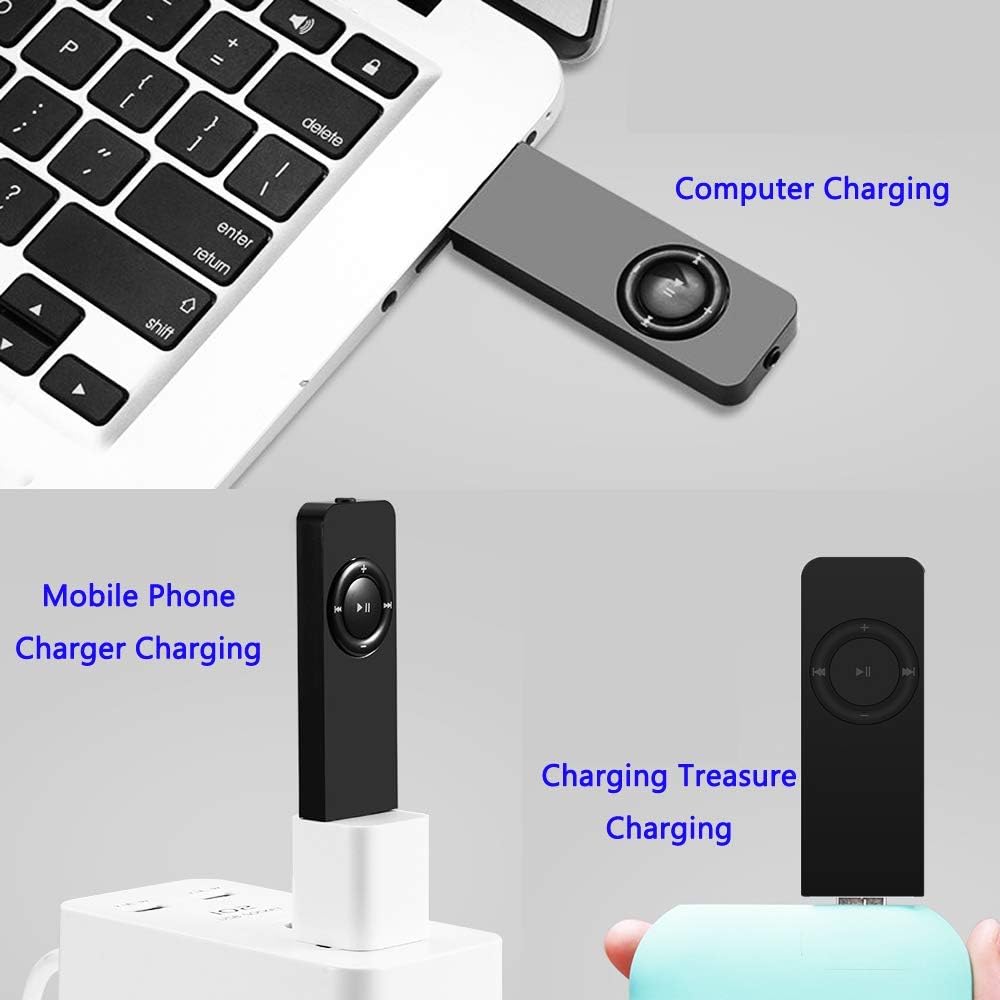
Gambar 2: Various charging methods for the Dyzeryk JS-01 MP3 Player, including connection to a computer's USB port, a mobile phone charger, and a portable power bank.
2. Connecting to a Computer and Transferring Files
The MP3 player functions as a USB flash drive, allowing for easy file mindahkeun.
- Ensure the MP3 player is powered on.
- Connect the MP3 player to your computer's USB port using a USB cable.
- The computer will recognize the device as a removable disk.
- Drag and drop your desired MP3, WMA, or WAV audio files into the player's storage folder.
- sakali files ditransferkeun, kaluarkeun alat tina komputer anjeun sacara aman sateuacan megatkeun kabel USB.
3. Inserting a TF Card (Micro SD)
The device supports external memory expansion via a TF card (Micro SD card) up to 64GB.
- Pilari slot kartu TF di sisi pamuter MP3.
- Gently selapkeun kartu TF kana slot nepika clicks kana tempat. Pastikeun kartu berorientasi leres.
- Pikeun nyabutna, pencét kartu sacara lalaunan ka jero dugi ka kaluar.
Parentah Operasi

Gambar 3: Key description for the Dyzeryk JS-01 MP3 Player, illustrating the location and function of each button and port.
1. Daya Hurung / Pareum
- Pikeun nganonaktipkeun, geser tombol ON / OFF switch kana posisi "ON".
- Pikeun mareuman, geser tombol ON / OFF switch to the "OFF" position.
2. Kontrol Playback Dasar
- Puter / Reureuh: Pencét sentral ►▮▮ tombol pikeun muter atawa ngareureuhkeun lagu ayeuna.
- Lagu salajengna: Pencét éta ►►| tombol pikeun skip ka lagu salajengna.
- Lagu saméméhna: Pencét éta |◀◀ tombol pikeun balik deui ka lagu saméméhna.
- Volume Up: Pencét éta + tombol pikeun ngaronjatkeun polumeu.
- Volume Turun: Pencét éta - tombol pikeun ngurangan polumeu.
3. Modeu Playback
The device supports three playback modes, indicated by LED light patterns:
- Sequential Playback Mode: The lampu héjo kedip.
- Random Play Mode: The lampu beureum flashes. To switch to this mode, long press the Volume Naik (+) kancing.
- Single Loop Mode: The green and red lights alternately flash. To switch to this mode, long press the Volume Turun (-) kancing.
4. Folder Playback
To switch between folders containing music files, long press the central ►▮▮ (Play / Reureuh) tombol.
5. Nyambungkeun Earphones
Insert the 3.5mm jack of your earphones into the earphone port located on the device. Ensure a secure connection for optimal audio output.
Pangropéa sareng Perawatan
- beberesih: Anggo kaén anu lemes sareng garing pikeun ngabersihan alat. Hindarkeun pembersih cair atanapi bahan abrasive.
- Panyimpenan: Store the MP3 player in a cool, dry place away from direct sunlight and extreme temperatures.
- Paparan cai: Alat ieu henteu tahan cai. Hindarkeun kakeunaan cai atanapi kalembaban anu luhur.
- Dampak: Jaga alat tina tetes sareng tabrakan, anu tiasa ngaruksak komponén internal.
- Perawatan batré: Pikeun manjangkeun umur batre, ulah miceun batre pinuh. Ngeusi batre alat sacara rutin, sanajan henteu dianggo kanggo waktos anu lami.
Pamérésan masalah
| Masalah | Mungkin Cukang lantaranana | Solusi |
|---|---|---|
| Alat teu hurung. | Batré béak. | Charge the device for at least 60-90 minutes. Ensure the ON/OFF switch is in the "ON" position during charging. |
| Taya sora tina earphone. | Headphone teu nyambung kalawan bener; Volume teuing leutik; Audio rusak file. | Ensure earphones are fully plugged in. Increase volume using the '+' button. Try playing a different audio file. Tes nganggo earphone anu sanés. |
| Teu bisa mindahkeun files kana alat. | Incorrect USB connection; Device not recognized by computer; Corrupted device storage. | Ensure the USB cable is securely connected to both the player and the computer. Try a different USB port or cable. Ensure the device is powered on. Reformat the device if necessary (this will erase all data). |
| Player shuts down unexpectedly. | batré lemah. | Ngecas deui alat. |
| Tombol-tombolna teu ngaréspon atanapi hésé dipencet. | Physical obstruction or manufacturing variation. | Ensure no debris is lodged around the buttons. Apply firm, direct pressure. If issues persist, contact customer support. |
Garansi sareng Rojongan
The Dyzeryk JS-01 MP3 Player comes with a 12-garansi sasih ti tanggal beuli.
If you encounter any problems or have questions regarding your device, please contact our professional after-sales service team. You will receive a quick response and a satisfactory resolution.
For support, please refer to the contact information provided with your purchase or visit the official Dyzeryk support websitus.


