1. Bubuka
This manual provides detailed instructions for the setup, operation, and maintenance of your Wings Phantom 850 Low Latency Wireless Earbuds. Please read this manual thoroughly before using the product to ensure optimal performance and longevity.

Image: The Wings Phantom 850 Wireless Earbuds shown inside their open charging case, highlighting their design and readiness for use.
2. Eusi Paket
Pastikeun yén sadaya barang aya dina bungkusan produk anjeun:
- Wings Phantom 850 Earbuds
- Kasus Ngecas Nirkabel
- Kabel Ngecas USB
- Bantalan Ceuli (rupa-rupa ukuran)
- Manual pangguna (dokumén ieu)
3. Setélan
3.1. Ngecas Earbuds jeung Case
Saméméh dipaké munggaran, eusian pinuh ku earbuds jeung wadah ngecas.
- Lebetkeun earbud kana wadah ngecas. Pastikeun éta dipasang kalayan leres.
- Sambungkeun kabel ngecas USB ka port ngecas dina case jeung ka sumber kakuatan (misalna adaptor témbok USB, port USB komputer).
- Indikator LED dina wadahna bakal némbongkeun status ngecas. Ngecas pinuh biasana peryogi waktos sakitar 1-2 jam.

Image: The Wings Phantom 850 Earbuds in their charging case, illustrating the charging process with illuminated LED lights.
3.2. Papasangan Bluetooth
Pikeun nyambungkeun earbud anjeun ka alat:
- Pastikeun yén earbuds dieusi sareng di jero wadah ngecas.
- Buka wadah ngecas. Earbud bakal otomatis asup kana modeu pairing (ditunjukkeun ku lampu LED anu kedip-kedip dina earbud).
- Dina alat anjeun (smartphone, tablet, laptop), aktipkeun Bluetooth sareng milarian alat anu sayogi.
- Select "Wings Phantom 850" from the list of devices.
- Sakali disambungkeun, LEDs earbud bakal eureun kedip-kedip, sarta anjeun bakal ngadéngé sora konfirmasi.
Fitur earbuds Open and On Tech™ for quick connection upon opening the case.
3.3. Wings Sync App Installation
Enhance your experience by installing the Wings Sync App. The app allows for custom controls, EQ modes, and locating misplaced earbuds.
- Download the "Wings Sync" app from your device's app store (App Store for iOS, Google Play Store for Android).
- Open the app and follow the on-screen instructions to connect your Phantom 850 earbuds.

Image: A visual representation of the Wings Sync App dashboard, showing options for touch controls, game mode, EQ modes, and locating earbuds.
Video: A demonstration of the Wings Sync App features, including custom touch controls, EQ modes, and the earbud locator function. This video illustrates how to personalize your earbud settings and find them if misplaced.
4. Parentah Operasi
4.1. Toél Kontrol
The Wings Phantom 850 earbuds feature intuitive touch controls. These can be customized via the Wings Sync App.
| Aksi | Fungsi (Baku) |
|---|---|
| Ketok Tunggal (L/R) | Naékkeun/Turunkeun Volume (Tiasa Disaluyukeun) |
| Ketok dua kali (L/R) | Play/Pause (Customizable) |
| Ketok Tilu Kali (L) | Previous Track (Customizable) |
| Ketok Tilu Kali (R) | Next Track (Customizable) |
| Long Press (L) | Voice Assistant (Customizable) |
| Long Press (R) | Game Mode ON/OFF (Customizable) |
| Incoming Call (Single Tap) | Ngajawab Telepon |
| Telepon Lebet (Pencét Panjang) | Nolak Telepon |
Note: Default functions may vary. Refer to the Wings Sync App for current settings and customization options.
4.2. modeu kaulinan
Activate Gaming Mode for ultra-low latency audio (40ms) during gameplay. This mode is designed to synchronize audio with on-screen action, providing a competitive edge.
- Aktipkeun: Long press the right earbud (default setting) or activate via the Wings Sync App.
- Nonaktipkeun: Balikan deui léngkah aktivasina.

Gambar: Hiji leuwihview of key features including the dedicated Gaming Mode with 40ms ultra-low latency, Bluetooth 5.3, IPX5 water resistance, and ENC Quad Mic technology.
4.3. Pangurangan Bising Lingkungan (ENC)
The Quad ENC Mics reduce environmental noise during calls, ensuring clear communication.
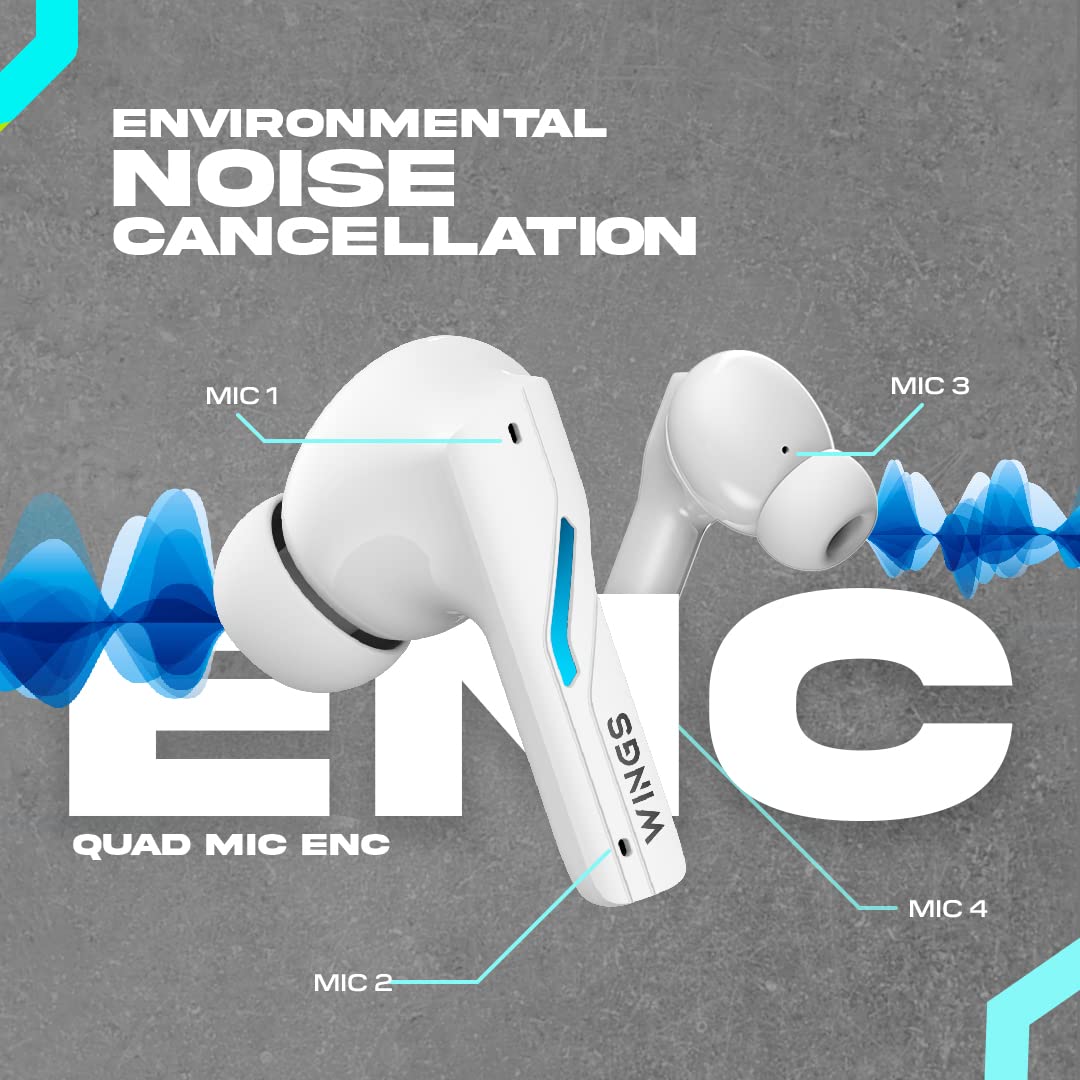
Image: A diagram illustrating the four Environmental Noise Cancellation (ENC) microphones on the Wings Phantom 850 earbuds, designed for clear call quality.
5. Pangropéa
5.1. beberesih
Pembersihan rutin ngabantosan ngajaga kualitas sora sareng kabersihan:
- Lembut usap earbuds sareng wadah ngecas ku lawon anu lemes, garing, teu aya serat.
- Cabut tip ceuli sareng bersihkeun ku sabun sareng cai anu hampang, teras garing sateuacana dipasang deui.
- Anggo kapas garing pikeun ngabersihkeun kontak ngecas dina earbud sareng wadahna.
5.2. Tahan cai
The Wings Phantom 850 earbuds are rated IPX5 water resistant, meaning they can withstand splashes and sweat. They are not designed for submersion in water.
- Do not expose the earbuds to running water or wear them while swimming or showering.
- Pastikeun earbud garing sateuacan disimpen deui kana wadah ngecas pikeun nyegah karusakan.
6. Cara ngungkulan
If you encounter issues with your Wings Phantom 850 earbuds, refer to the following common solutions:
- Teu Aya Masalah Sora/Konéktivitas:
- Pastikeun kadua earbuds dicas.
- Verify Bluetooth is enabled on your device and the earbuds are selected.
- Cobi pegatkeun sambungan sareng pasangkeun deui earbud sareng alat anjeun.
- Balikan deui alat anjeun.
- Hiji Earbud Teu Gawé:
- Lebetkeun deui dua earbud kana wadah ngecas, tutup tutupna, antosan sababaraha detik, teras buka sareng cobian deui.
- Bersihkeun kontak anu ngecas dina earbud sareng dina wadahna.
- Masalah ngecas:
- Pastikeun kabel ngecas disambungkeun aman.
- Cobi nganggo port USB atanapi adaptor ngecas anu béda.
- Bersihkeun kontak nu ngecas.
- Volume Leutik/Kualitas Sora Goréng:
- Saluyukeun polumeu dina alat anjeun sareng earbuds.
- Pastikeun tungtung ceuli ditutup pageuh dina liang ceuli anjeun. Coba ukuran tungtung ceuli anu béda-béda.
- Bersihkeun sagala lebu tina bolong spiker earbud.
- Check EQ settings in the Wings Sync App.
Pikeun pitulung salajengna, mangga ngahubungan rojongan customer.
7. Spésifikasi
| Fitur | Rincian |
|---|---|
| Ngaran modél | Phantom 850 |
| Téhnologi konektipitas | Nirkabel (Bluetooth 5.3) |
| Rentang Bluetooth | 15 Méter |
| Tipe Supir Audio | Dynamic Driver (13mm Composite Drivers) |
| Kahirupan Batré (Earbuds) | Nepi ka 10 Jam |
| Total Playtime (kalawan Case) | Nepi ka 50 Jam |
| Téknologi ngecas | Bullet Charge™ (15 mins charge = 100 mins playtime) |
| Fitur husus | ENC Quad Mic, Dedicated Gaming Mode (40ms Low Latency), App Support, Open and On Tech™ |
| Tingkat Résistansi Cai | IPX5 (Tahan Késang sareng Cai) |
| Métode kontrol | Toél, Sora |
| Alat nu cocog | Telepon Sélulér, Desktop, Konsol Kaulinan, Laptop, Tablet |
| Item Beurat | 150 gram |
| Dimensi produk | 10 x 10 x 4 cm |

Gambar: Hiji ngabeledug view diagram illustrating the 13mm composite drivers responsible for high-fidelity audio output in the earbuds.

Image: Information detailing the battery life, showing 50 hours of total playtime with the charging case and 10 hours of playtime on the earbuds alone.
8. Garansi jeung Rojongan
Your Wings Phantom 850 Wireless Earbuds come with a 1-Taun Garansi ti tanggal beuli.
For warranty claims, technical support, or any other inquiries, please refer to the contact information provided on the official Wings websitus atanapi dokuméntasi pameseran Anjeun.


