1. Bubuka
Thank you for choosing the Nexxt Indoor Smart Camera. This manual provides essential information for the safe and efficient use of your new device. Please read it thoroughly before installation and operation, and retain it for future reference.
This 1080p HD fixed room camera is designed to provide reliable indoor surveillance with features such as night vision, two-way audio communication, motion detection, and seamless integration with smart home ecosystems like Amazon Alexa and Google Assistant.
2. Émbaran Kasalametan
- Ensure the camera is powered by the provided power adapter. Using unauthorized adapters may damage the device and void the warranty.
- Do not expose the camera to water, moisture, or extreme temperatures. It is designed for indoor use only.
- Hindarkeun nempatkeun kaméra dina sinar panonpoé langsung atanapi caket sumber panas.
- Entong nyobian ngabongkar atanapi ngalereskeun kaméra nyalira. Rujuk sadayana jasa ka tanaga anu mumpuni.
- Keep the camera and its accessories out of reach of children and pets.
- Ensure stable Wi-Fi connectivity for optimal performance.
3. Eusi Paket
Pastikeun yén sadaya item aya dina bungkusan:
- NEXXT Indoor Smart Camera (NHC-I710)
- Adaptor kakuatan
- Nangtung
- Manual pangguna (dokumén ieu)

Image: The retail packaging of the NEXXT Indoor Smart Camera, showing the camera and key features.
4. Produk Langkungview
The Nexxt Indoor Smart Camera offers a range of features for comprehensive home monitoring:
- Resolusi Full HD 1080p: Nyadiakeun foo video jelas tur lengkeptage.
- Automatic Night Vision: Integrated infrared LEDs enable clear monitoring in low-light conditions up to 30 feet.
- Komunikasi dua arah: Built-in microphone and speaker allow for real-time audio interaction.
- Deteksi gerak: Ngabéjaan anjeun ngeunaan gerakan anu kadeteksi dina widang kaméra view.
- Panyimpenan Lokal sareng Awan: Supports microSD cards (sold separately) and Microsoft Azure cloud storage (subscription sold separately) for recording.
- Integrasi Smart Home: Compatible with Amazon Alexa and Google Assistant for voice control and integration into smart routines.
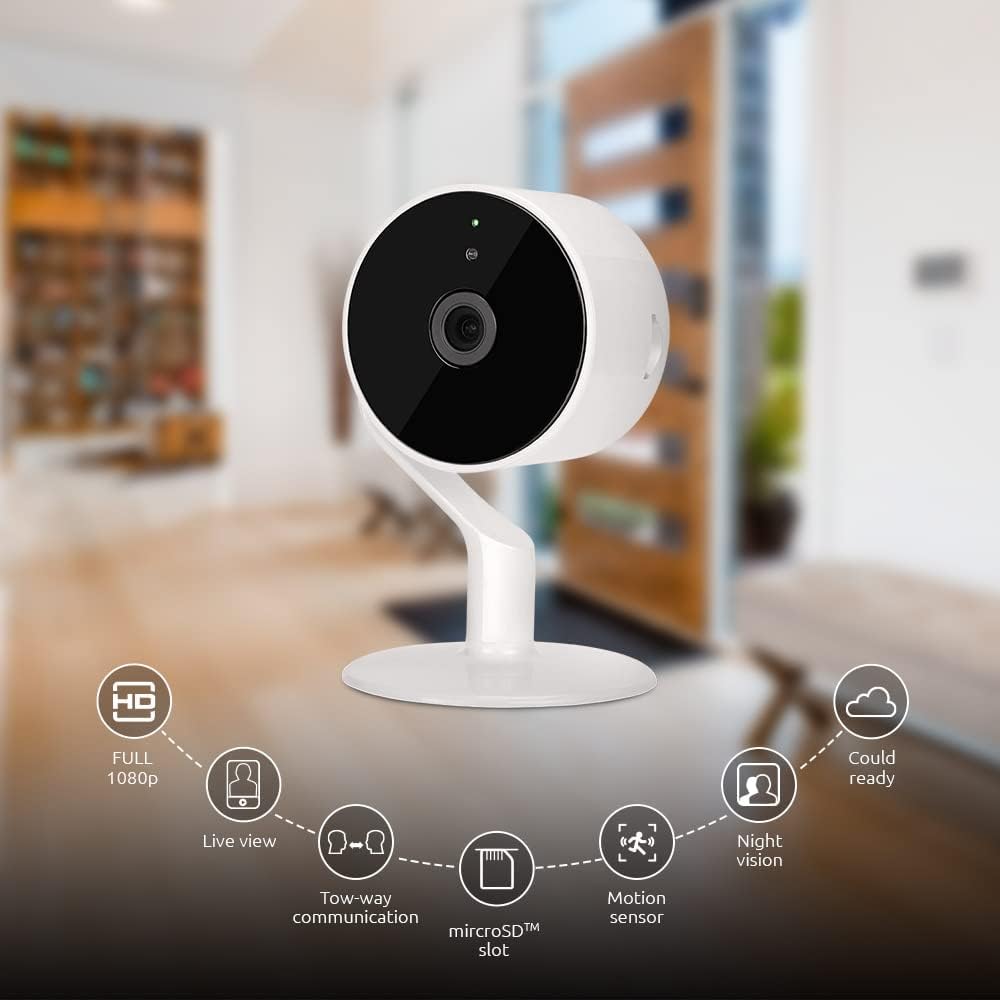
Image: The NEXXT Indoor Smart Camera highlighting its key features: Full HD 1080p, Live View, Two-way communication, microSD slot, Motion sensor, Night vision, and Cloud ready.
5. Setélan
5.1 Powering On
- Place the camera on a stable, flat surface or mount it using appropriate hardware (not included).
- Sambungkeun adaptor daya ka port input daya kaméra.
- Plug the power adapter into a standard electrical outlet. The camera will power on and its indicator light will begin to flash, indicating it's ready for pairing.
5.2 Pamasangan Aplikasi sareng Papasangan
To control and monitor your camera, you need to download the Nexxt Home App:
- Unduh Nextxt Imah App ti éta Google Play Store (for Android devices) or the Apple App Store (for iOS devices).
- Open the Nexxt Home App and create a new account or log in if you already have one.
- Ketok ikon "+" atawa "Tambahkeun Alat" pikeun ngamimitian prosés papasangan.
- Select "Camera" or the specific camera model from the list of devices.
- Follow the on-screen instructions in the app to connect the camera to your home Wi-Fi network. This typically involves scanning a QR code displayed on your phone with the camera.
- Once connected, the camera's indicator light will turn solid, and you will see the camera added to your app.

Image: Illustration showing the NEXXT Indoor Smart Camera being set up to function as a webcam, connecting to a laptop.
6. Parentah Operasi
6.1 Hirup View
From the Nexxt Home App, tap on your camera's name to access the live video feed. You can view real-time footage of your monitored area.

Image: The NEXXT Indoor Smart Camera on a desk, with text indicating "Full HD resolution" and its ability to provide 1080p high-quality video day or night.
6.2 Obrolan Dua Arah
Nalika hirup view, tap the microphone icon in the app to enable two-way audio. You can speak through your phone, and your voice will be projected through the camera's speaker. Tap the icon again to end communication.

Image: An illustration depicting communication between a person using a phone and another person near the camera, symbolizing the two-way talk feature.
6.3 Visi Peuting
The camera automatically switches to night vision mode in low-light conditions. You can also manually toggle night vision on/off within the app settings for the camera.

Image: A split image showing a room in daylight on one side and the same room in night vision on the other, demonstrating the camera's night vision capability.

Image: A smartphone screen displaying the Nexxt Home app interface with a night vision toggle switch, overlaid on a room scene, indicating active night vision monitoring.
6.4 Deteksi & Peringatan Gerakan
Configure motion detection sensitivity and alert preferences in the app. When motion is detected, you will receive notifications on your smartphone.

Image: A person sleeping in bed with a motion detection icon overlaid, indicating advanced motion detection with an effective range of up to 30 feet.

Image: A woman holding a smartphone displaying the Nexxt Home app, with text indicating that advanced human identification technology helps reduce false alarms and unwanted notifications.
6.5 Rékam & Panyimpenan
The camera supports local storage via a microSD card (up to 128GB, not included) and cloud storage via Microsoft Azure (subscription required, sold separately). Insert the microSD card into the designated slot on the camera. Manage recording settings and view dirékam footage through the Nexxt Home App.
6.6 Aksés Babagi
You can securely share your camera's security feed with multiple approved devices, allowing family members or trusted individuals to also monitor your home.

Image: Two smartphones displaying the Nexxt Home app, with text stating "Everyone Can Keep Watch" and explaining that the security feed can be securely shared with multiple approved devices.
6.7 Pamaduan Smart Home
The Nexxt Indoor Smart Camera is compatible with Amazon Alexa and Google Assistant. Follow the instructions in your Alexa or Google Home app to link your Nexxt Home account and enable voice commands for your camera.
7. Pangropéa
- beberesih: Anggo kaén anu lembut sareng garing pikeun ngabersihan lensa sareng awak kaméra. Ulah make cleaners cair atawa aerosol.
- Panyimpenan: If storing the camera for an extended period, disconnect it from power and store it in a cool, dry place.
- Pembaruan firmware: Regularly check the Nexxt Home App for available firmware updates to ensure optimal performance and security.
8. Cara ngungkulan
- Kaméra teu nyambung ka Wi-Fi:
- Pastikeun jaringan Wi-Fi anjeun 2.4GHz. Kaméra henteu ngadukung Wi-Fi 5GHz.
- Pariksa sandi Wi-Fi anjeun pikeun akurasi.
- Pindahkeun kaméra ngadeukeutan ka router Wi-Fi anjeun.
- Balikan deui router anjeun sareng kaméra.
- Teu hirup view or choppy video:
- Pariksa laju sambungan internét anjeun.
- Pastikeun kaméra gaduh sinyal Wi-Fi anu kuat.
- Close and reopen the Nexxt Home App.
- Bewara gerakan teu ditampi:
- Pariksa yén deteksi gerak diaktipkeun dina setélan aplikasi.
- Check your phone's notification settings for the Nexxt Home App.
- Saluyukeun sensitipitas deteksi gerak.
- Audio dua arah teu jalan:
- Ensure your phone's microphone is enabled for the Nexxt Home App.
- Pariksa setélan volume dina telepon anjeun sareng dina aplikasi.
9. Spésifikasi
| Fitur | Spésifikasi |
|---|---|
| Ngaran modél | NHC-I710 |
| Resolusi Capture Video | 1080p HD |
| Pamakéan jero rohangan / outdoor | jero rohangan |
| Téhnologi konektipitas | Nirkabel (Wi-Fi) |
| Protokol konektipitas | Wi-Fi (2.4GHz) |
| Sumber Daya | Kabel Listrik |
| Wengi Sawangan Sawangan | 30 suku |
| Tipe Controller | Amazon Alexa, Asisten Google |
| Tipe Pamasangan | Tabletop Gunung |
| Ukuran barang (L x W x H) | 3 x 7 x 3 inci |
| Item Beurat | 6.7 ons (0.19 Kilogram) |
| UPC | 798302056152 |
| Peunteun Protection Internasional | IP65 |
10. Garansi jeung Rojongan
The Nexxt Indoor Smart Camera comes with a garansi 2 taun ti tanggal beuli. Punten tahan bukti pameseran anjeun pikeun klaim garansi.
For technical support, troubleshooting assistance, or warranty inquiries, please visit the official Nexxt Solutions website or contact their customer support through the Nexxt Home App.
Solusi Nextxt Websitus: www.nexxtsolutions.com


