1. Bubuka
This manual provides essential information for the safe and efficient operation of your KLIM K9000 Portable Air Conditioner. Please read it thoroughly before use and retain it for future reference. The KLIM K9000 is a versatile 3-in-1 unit offering cooling, dehumidification, and fan functions.
2. Parentah Kasalametan
To reduce the risk of fire, electrical shock, or injury, always follow these basic precautions:
- Baca sadaya parentah sateuacan nganggo alat.
- Pastikeun catu daya cocog sareng voltage dieusian dina labél rating.
- Ulah ngajalankeun unit ku kabel ruksak atawa colokan.
- Jauhkeun alat tina sumber panas sareng sinar panonpoé langsung.
- Ulah meungpeuk inlets hawa atawa outlet.
- Salawasna cabut colokan unit sateuacan beberesih atanapi ngalayanan.
- Alat ieu henteu dimaksudkeun pikeun dianggo ku jalma (kalebet murangkalih) anu ngirangan kamampuan fisik, indrawi atanapi mental, atanapi kirang pangalaman sareng pangaweruh, kecuali aranjeunna dipasihan pangawasan atanapi petunjuk ngeunaan panggunaan alat ku jalma anu tanggung jawab kana kasalametanana.
- Ulah make alat di lingkungan baseuh atawa deukeut cai.
- Paké ngan asesoris dianjurkeun ku produsén.
3. Eusi Paket
Pastikeun yén sadaya item aya dina bungkusan:
- KLIM K9000 Air Conditioner Unit
- Kadali jauh
- Selang knalpot
- Palabuhan knalpot
- Panyambung Selang knalpot
- Selang drainase
- Window Seal Fixing Plate
- Window Cover Extension
- 2 AAA Alkaline Batteries (for remote control, if included)
4. Produk Langkungview
The KLIM K9000 is a compact and efficient portable air conditioner designed to provide comfort in various environments. It integrates three primary functions: cooling, dehumidification, and fan operation.

Gambar 4.1: KLIM K9000 Portable Air Conditioner unit with remote control, illustrating air circulation.
Its 3-in-1 functionality allows it to cool rooms, circulate air as a fan, and reduce humidity levels, making it suitable for various climate control needs.

Gambar 4.2: The KLIM K9000 offers 3-in-1 comfort: cooling, dehumidifying, and fan functions, with a 9000 BTU cooling capacity.
5. Setup jeung Instalasi
Proper installation is crucial for optimal performance. Follow these steps for quick setup:
- Posisi: Place the unit on a flat, stable surface, ensuring at least 30 cm (12 inches) of space around it for proper airflow.
- Pasang selang knalpot: Connect the exhaust hose to the unit's exhaust port. Extend the hose and connect the window seal fixing plate or window cover extension.
- Pamasangan jandela: Secure the window seal fixing plate or extension in a compatible window opening (sliding windows). For tilt windows, a separate seal kit is required and sold separately. Ensure the hot air is expelled outdoors.
- Sambungan Daya: Colokkeun kabel listrik kana stop kontak listrik grounded.
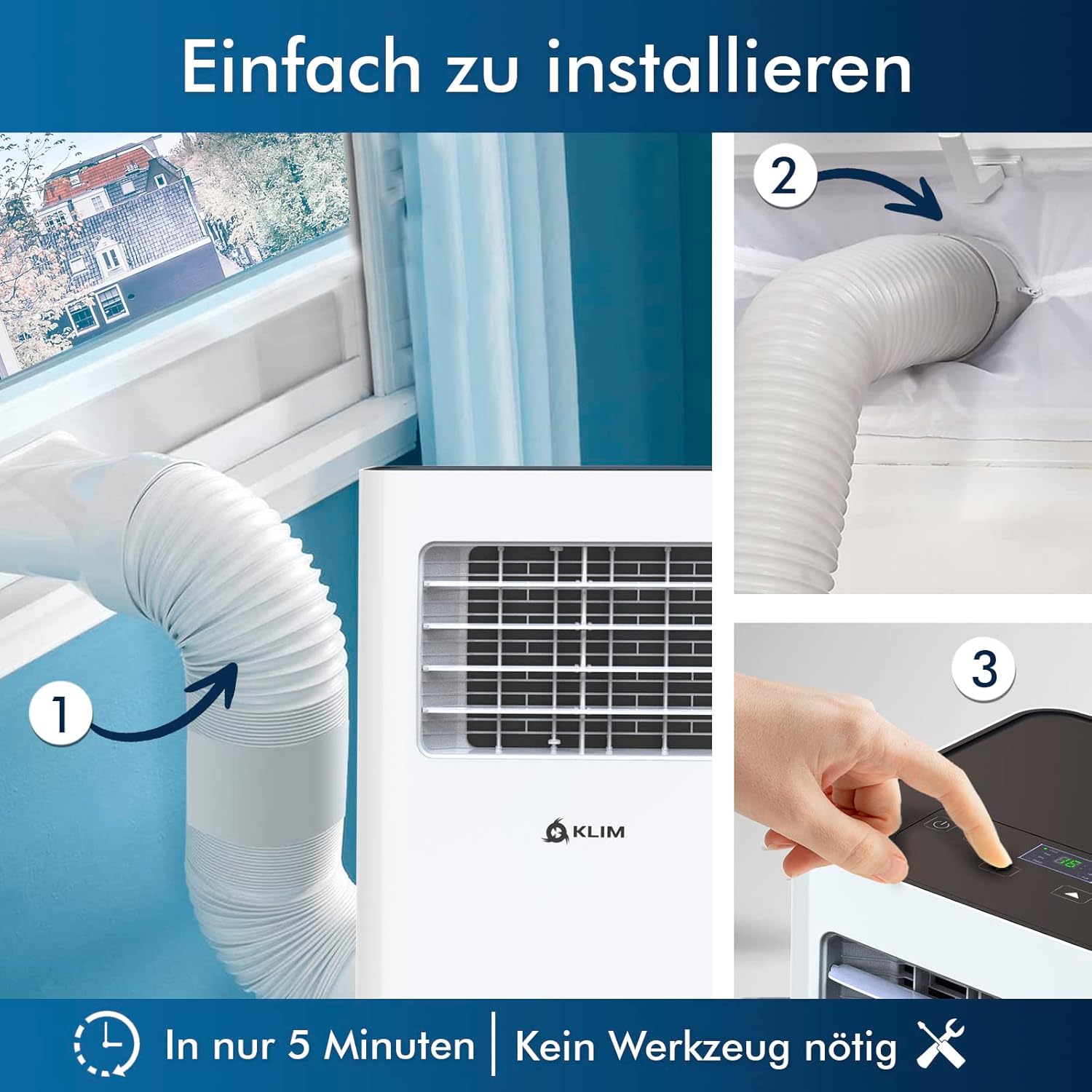
Gambar 5.1: Visual guide for quick installation, typically completed in 5 minutes without special tools.

Gambar 5.2: Illustration of window kit compatibility, showing options for sliding windows and mentioning a separate seal for tilt windows.
6. Parentah Operasi
The KLIM K9000 can be operated via the control panel on the unit or the included remote control.
6.1. Control Panel jeung Remote Control
The remote control allows convenient operation from a distance. Ensure AAA batteries are correctly inserted. The control panel on the unit provides direct access to all functions.
6.2. Modeu Operasi
- Modeu tiis: Activates the compressor to cool the room. Set your desired temperature (down to 16°C). This mode is effective for rooms up to 20 m² (80 m³).
- Modeu kipas: Circulates air without cooling. Adjustable fan speeds are available.
- Modeu Dehumidifier: Removes excess moisture from the air. In this mode, the unit collects water, which will need to be drained.
- Modeu Bobo: Designed for quiet operation during rest. The unit operates at a reduced noise level (approx. 65 dB) and may adjust temperature settings automatically for comfort.

Gambar 6.1: The sleep mode provides a cool and quiet environment for restful sleep, operating at approximately 65 dB.
To switch between modes, press the "Mode" button on the control panel or remote control.
7. Pangropéa
Regular maintenance ensures the longevity and efficiency of your KLIM K9000.
7.1. Ngabersihan Saringan Udara
The air filter should be cleaned every two weeks or more frequently depending on usage. A dirty filter can reduce cooling efficiency and airflow.
- Cabut colokan AC tina stop kontak listrik.
- Panggihan tur cabut saringan hawa (biasana di tukang atanapi sisi unit).
- Ngumbah saringan ku cai haneut, sabun. Bilas sacara saksama sareng ngantepkeun hawa dugi ka garing sateuacan diselapkeun deui.
- Pasang deui saringan garing teras colokkeun deui unitna.
7.2. Saluran cai
The unit features an auto-evaporation system in cooling mode, reducing the need for frequent drainage. However, in high humidity or dehumidifier mode, water will accumulate and needs to be drained.
- Drainase kontinyu: For continuous dehumidification, attach the drainage hose to the drain outlet and direct it to a suitable container or floor drain.
- Saluran Manual: When the internal water tank is full, the unit may stop operating and display an indicator. To drain manually, unplug the unit, place a shallow pan or tray under the drain plug, and remove the plug. Be aware that the internal water container can be cumbersome to empty, and it may require two people to safely tilt the unit for complete drainage if using the bottom drain.
8. Cara ngungkulan
Tingali kana bagian ieu pikeun masalah umum sareng solusina.
| Masalah | Mungkin Cukang lantaranana | Solusi |
|---|---|---|
| Unit teu hurung. | Taya kakuatan, tripped circuit breaker, tank cai pinuh. | Pariksa kabel kakuatan, reset breaker, tank cai solokan. |
| Cooling teu cukup. | Dirty air filter, blocked air intake/outlet, open windows/doors, room too large, exhaust hose not properly installed. | Clean filter, clear obstructions, close windows/doors, ensure proper exhaust hose installation. |
| Unit ribut. | Normal operation sound (compressor/fan), unit not on a level surface. | The unit operates at approximately 65 dB, which is normal. Ensure it is on a flat surface. |
| Leak cai. | Drain plug not securely closed, drainage hose improperly connected. | Check drain plug, ensure drainage hose is securely attached and not kinked. |
Lamun masalah persists sanggeus nyobian solusi ieu, mangga ngahubungan rojongan customer.
9. Spésifikasi
| merek | KLIM |
| Nomer modél | K9000WH |
| Kamampuh cooling | 9000 BTU |
| Disarankeun Ukuran Kamar | Nepi ka 20 m² (80 m³) |
| Fungsi | Cooling, Dehumidifier, Fan |
| Kelas Énergi Énergi | A |
| Konsumsi Listrik Taunan | 960 Watt |
| Tingkat Noise | 65 desibel |
| Refrigerant | R-290 (Natural Refrigerant) |
| Ukuran (L x W x H) | 29.5 x 32.5 x 70.4 cm |
| Beurat | 25.58 kg |
| Bahan | ABS |
| Sumber Daya | Kabel Listrik |

Gambar 9.1: The KLIM K9000's high energy efficiency (Class A) contributes to cost savings and environmental protection.
10. Garansi jeung Rojongan
The KLIM K9000 Portable Air Conditioner comes with a garansi 5 taun, mastikeun katengtreman pikiran ngeunaan kualitas sareng kinerjana.
For technical assistance, warranty claims, or any questions not covered in this manual, please contact KLIM customer support through their official website or the retailer where the product was purchased. Please have your model number (K9000WH) and purchase date ready.


