1. Bubuka
This manual provides detailed instructions for the amazon basics Wired Gaming Mouse, Model ABIM03. This mouse is designed to enhance your gaming and computing experience with its adjustable DPI, customizable RGB lighting, and programmable buttons. Please read this manual thoroughly before use to ensure proper operation and longevity of your device.
2. Fitur Produk
- DPI adjustable: Up to 6400 DPI for precise cursor control and quick movements.
- Lampu RGB anu tiasa disaluyukeun: Personalize your mouse with various RGB lighting modes and driver customization options for PC.
- Tombol anu tiasa diprogram: Equipped with multiple programmable buttons for assigning custom functions or macros.
- Gaming-Grade Sensor: Ensures accurate tracking and rapid response for gaming.
- Desain awét: Features extra durable switches and enhanced build quality for extended use.
- Honeycomb Grip: Ergonomic honeycomb design provides a comfortable and secure grip.

Image: The amazon basics Wired Gaming Mouse highlighting its adjustable DPI settings, ranging from 1200 to 7200 (though product states up to 6400).
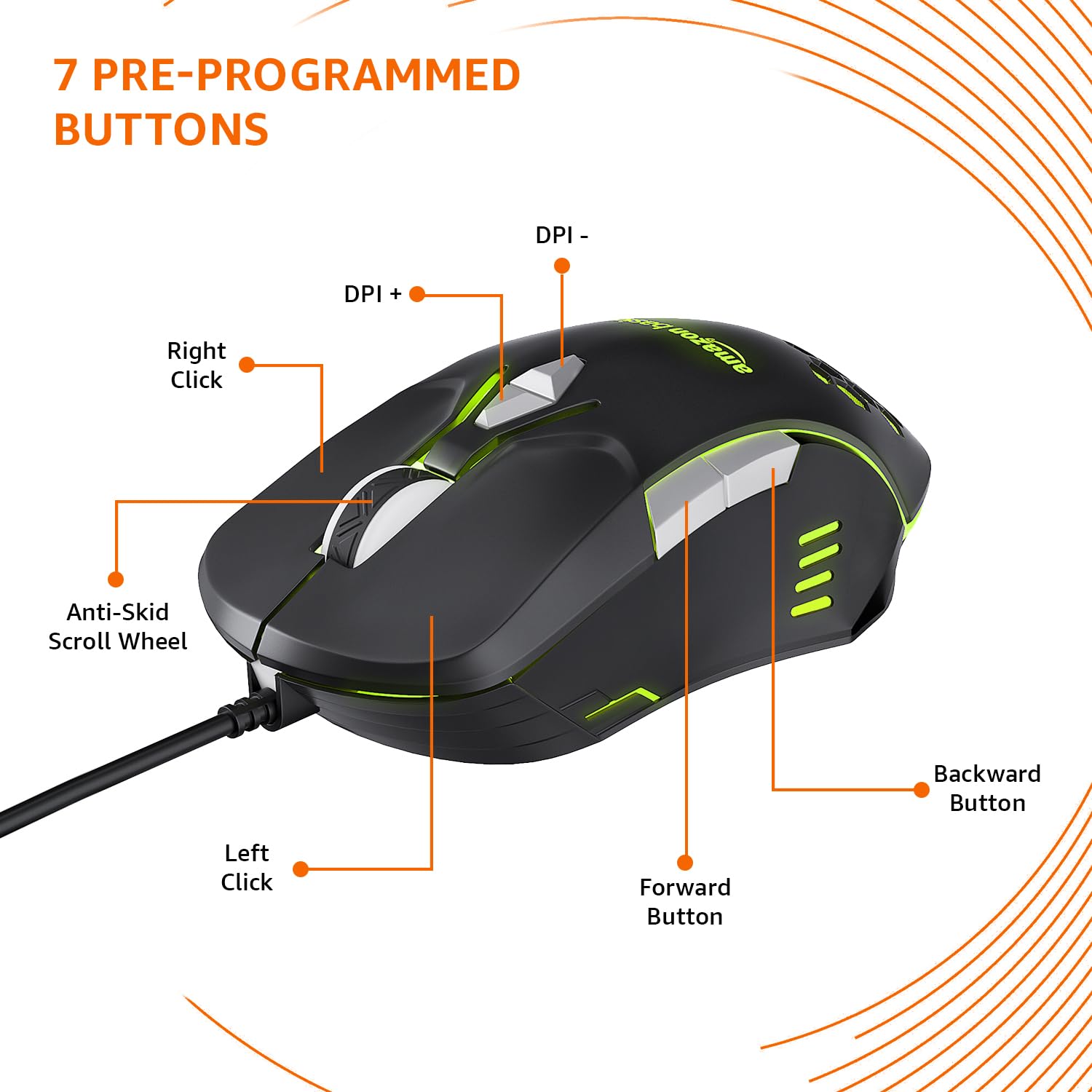
Image: The amazon basics Wired Gaming Mouse showing its 7 pre-programmed buttons, including Left Click, Right Click, Anti-Skid Scroll Wheel, DPI+, DPI-, Forward Button, and Backward Button.

Gambar: A luhur-handap view of the amazon basics Wired Gaming Mouse, emphasizing its honeycomb-designed surface for improved grip and airflow.

Image: The amazon basics Wired Gaming Mouse illuminated with red RGB lighting, showcasing its light and comfortable design.
3. Parentah Setup
- Buka bungkus Beurit: Carefully remove the gaming mouse from its packaging.
- Nyambung ka PC: Colokkeun konektor USB mouse ka port USB nu sadia dina komputer Anjeun.
- Pamasangan supir: Your operating system (Windows, Linux) should automatically detect and install the necessary drivers. If prompted, follow the on-screen instructions. For advanced customization of RGB and programmable keys, refer to the manufacturer's website for specific driver software.
- panempatan: Teundeun beurit dina tempat anu datar, bersih atawa alas beurit pikeun pagelaran optimal.
4. Parentah Operasi
4.1 Fungsi Dasar
- Klik Kénca: Aksi primér, seleksi.
- Klik katuhu: Peta sekundér, menu kontéks.
- Gulung kabayang: Scroll up/down pages. Pressing the scroll wheel often acts as a middle click.
- Tombol Maju / Mundur: Biasana dianggo pikeun navigasi di web browser atawa file penjelajah.
4.2 Adjusting DPI (Dots Per Inch)
The mouse features dedicated DPI adjustment buttons (DPI+ and DPI-) to change cursor sensitivity on the fly. Press these buttons to cycle through different DPI levels up to 6400. A higher DPI setting results in faster cursor movement across the screen with less physical mouse movement.
4.3 Customizing RGB Lighting
The mouse includes customizable RGB lighting. Specific lighting modes can often be cycled through using a dedicated button (if present) or through the optional driver software. Refer to the driver software for advanced customization options, including color selection, effects, and brightness.
4.4 Programming Buttons
The mouse is equipped with programmable buttons. To assign custom functions, macros, or key combinations to these buttons, you will need to install and use the specific driver software provided by the manufacturer. This software typically allows you to create profiles pikeun aplikasi atawa kaulinan béda.
Video: A short product highlight video demonstrating the key features of the amazon basics Wired Gaming Mouse, including adjustable DPI, RGB lighting, programmable buttons, and durable design.
5. Pangropéa
- beberesih: Anggo kaén anu lembut sareng garing pikeun ngabersihan bagian luar beurit. Pikeun kokotor nekad, a rada damp cloth can be used, ensuring no liquid enters the mouse.
- Sensor beberesih: Occasionally, use a cotton swab lightly dampened with isopropyl alcohol to gently clean the optical sensor on the underside of the mouse. Ensure the mouse is disconnected before cleaning.
- Hindarkeun Cairan: Do not immerse the mouse in water or any cleaning solutions.
- Panyimpenan: Simpen beurit di tempat anu tiis sareng garing jauh tina sinar panonpoé langsung sareng suhu anu ekstrim.
6. Cara ngungkulan
| Masalah | Solusi |
|---|---|
| Beurit teu ngabales. |
|
| Gerakan kursor henteu teratur atanapi luncat. |
|
| Tombol programmable teu jalan. |
|
| Lampu RGB henteu jalan atanapi macét. |
|
7. Spésifikasi
| Fitur | Rincian |
|---|---|
| merek | dasar amazon |
| Nomer modél | ABIM03 |
| Téhnologi konektipitas | Kabel (USB) |
| Téhnologi Deteksi Gerakan | Optik |
| Rentang DPI | Nepi ka 6400 DPI |
| Tombol Programmable | 4 (in addition to standard left/right click and scroll) |
| cahayaan | RGB |
| Warna | Hideung |
| Item Beurat | 145 g |
| Ukuran produk (L x W x H) | 15.8 x 10.4 x 5.4 cm |
| Platform hardware | PC |
| Kasaluyuan System Operasi | Linux, Windows 7 and above |
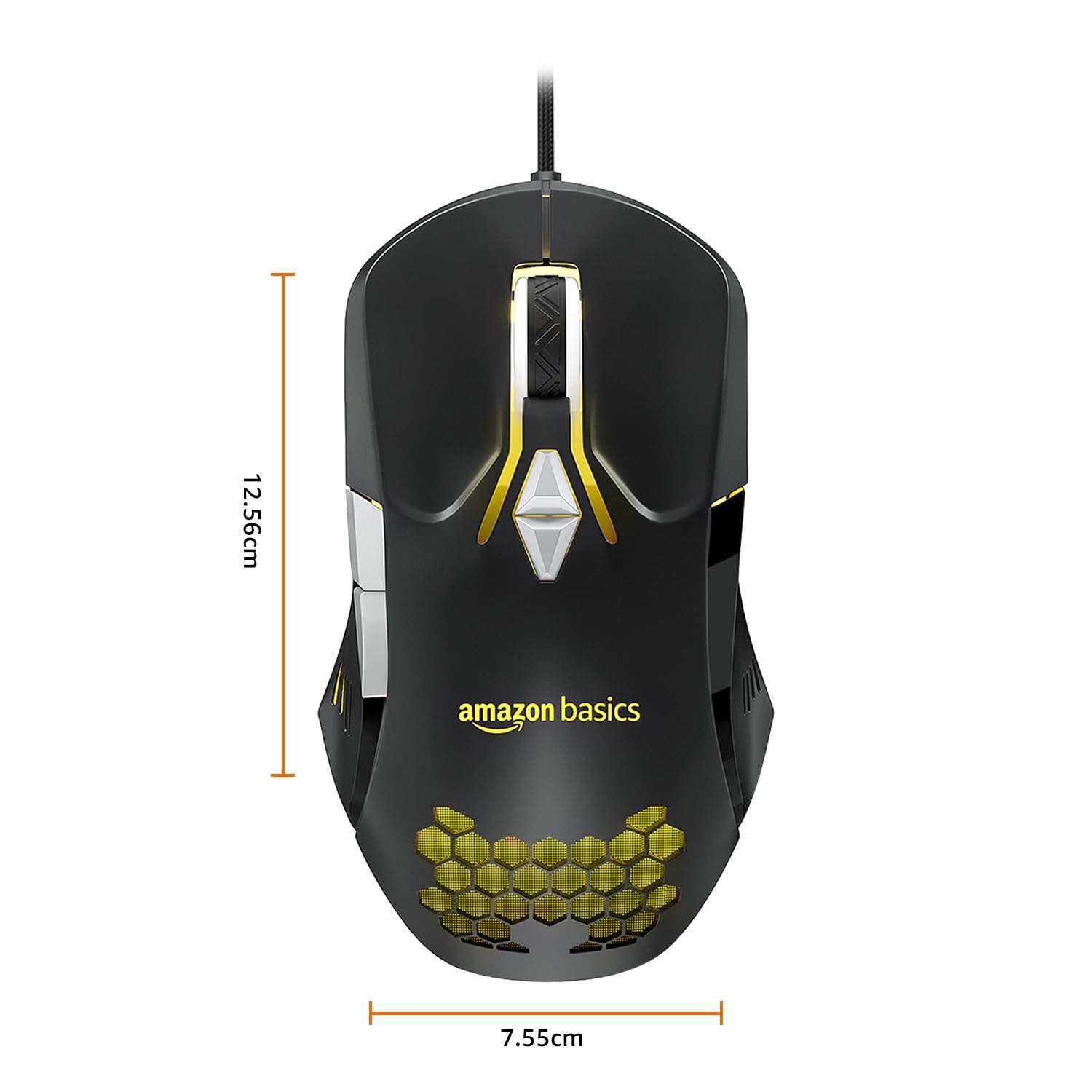
Image: The amazon basics Wired Gaming Mouse with its length (12.56cm) and width (7.55cm) dimensions indicated.
8. Émbaran jaminan
This amazon basics Wired Gaming Mouse comes with a Garansi 1 Taun from the date of purchase. This warranty covers manufacturing defects and issues arising from normal use. It does not cover damage caused by misuse, accidents, unauthorized modifications, or normal wear and tear. Please retain your proof of purchase for warranty claims.
9. Rojongan
For further assistance, technical support, or warranty claims, please visit the official amazon basics support page or contact customer service through your purchase platform. Ensure you have your product model number (ABIM03) and proof of purchase ready when contacting support.
Sumberdaya Online:
- Halaman Produk: amazon.in/dp/B0BTD2YN6Y
- amazon basics Store: Toko dasar amazon


