1. Bubuka
This manual provides instructions for the safe and effective operation of the Huepar S120-G Green Laser Distance Meter. This device is designed for precise distance, area, volume, and angle measurements using a highly visible green laser beam. Please read this manual thoroughly before using the device.
2. Parentah Kasalametan
Kasalametan laser: This device emits a Class 2 laser (505-530 nm, <1 mW). Avoid direct eye exposure to the laser beam. Do not stare into the beam or view it directly with optical instruments. Always ensure the laser beam is not aimed at people or reflective surfaces that could redirect the beam into eyes.
- Entong nyobian ngarobih atanapi ngabongkar alat.
- Jauhkeun alat tina jangkauan barudak.
- Use only specified batteries and charging methods.
- Ulah ngoperasikeun alat ieu dina lingkungan anu gampang ngabeledug atanapi caket bahan anu gampang kaduruk.
- Lindungi alat tina suhu anu ekstrim, kalembaban, sareng benturan anu kuat.
3. Produk Langkungview
The Huepar S120-G is a compact and robust laser distance meter. It features a large LCD display, intuitive buttons, and a durable casing.
3.1 Komponén

Gambar: The Huepar S120-G Laser Distance Meter shown with its included accessories: wrist strap, USB Type-C charging cable, two NiMH rechargeable batteries, and the user manual.
- aperture laser: Emits the green laser beam.
- Lénsa Panarima: Ngadeteksi sinar laser anu dipantulkeun.
- Layar LCD: Shows measurement results, mode indicators, and battery status.
- Papan tombol: Buttons for various functions and operations.
- Port ngecas USB-C: For recharging the NiMH batteries.
- Kompartemen batré: Nyayogikeun batré AA.
- 1/4 "Tripod Thread: Tempatna di handap pikeun dipasang dina tripod.

Gambar: A nutup-up view of the Huepar S120-G's large, easy-to-use buttons and the LCD display, highlighting the intuitive interface for various functions.
3.2 Ikon tampilan
The LCD displays various icons to indicate the current mode, status, and measurement results. Refer to the on-screen indicators for operational feedback.
4. Setélan
4.1 Pamasangan batré
The S120-G operates with two AA batteries. It supports both the included NiMH rechargeable batteries and standard alkaline AA batteries (not included).
- Buka panutup kompartemen batré dina tonggong alat.
- Pasangkeun dua batré AA, pastikeun polaritasna bener (+/-).
- Tutup panutup kompartemen batré aman.
4.2 Charging (for NiMH batteries)
The included NiMH batteries can be recharged directly within the device using the provided USB Type-C cable.

Gambar: Illustration showing the Huepar S120-G being charged via a USB-C cable and depicting the compatibility with both standard AAA (alkaline) and rechargeable NiMH batteries.
- Sambungkeun kabel USB Tipe-C kana port ngecas dina alat.
- Sambungkeun tungtung kabel anu sanés ka sumber daya USB (contona, komputer, adaptor témbok).
- Indikator batré dina tampilan bakal nembongkeun status ngecas.
Catetan: The device can be used while charging, even if batteries are removed, when connected to a direct power source.
4.3 Daya Hurung/Pareuman
- Pikeun ngaktipkeun, pencét tombol ON/MEAS kancing.
- Pikeun pareum, pencét jeung tahan Pareum button. The device will also automatically power off after 180 seconds of inactivity to conserve energy.
5. Parentah Operasi
5.1 Pangukuran Dasar (Jarak Tunggal)
- Pastikeun alat diaktipkeun.
- Arahkan laser ke titik target.
- Pencét éta ON/MEAS tombol sakali. Jarak anu diukur bakal muncul dina tampilan.
5.2 Pangukuran Kontinyu (Min/Maks)
This mode allows for tracking minimum and maximum distances as the device is moved.

Gambar: An illustration demonstrating the continuous measurement mode, showing how the device tracks both minimum and maximum distances as it is moved along a surface.
- Pencét éta ON/MEAS button and hold it for a few seconds until the continuous measurement icon appears.
- Move the device slowly. The display will show the current, minimum, and maximum distances.
- Pencét éta ON/MEAS pencét tombol deui pikeun ngeureunkeun pangukuran anu terus-terusan.
5.3 Ngalihkeun Unit
To switch between measurement units (meters, feet, inches), press the UNIT pencét tombol sababaraha kali dugi ka unit anu dipikahoyong némbongan.
5.4 Pilihan Titik Réferénsi
The measurement can be taken from the front, middle, or rear of the device. Press the RUJUKAN button to cycle through the reference points.
- Hareup: Measurement starts from the top edge of the device.
- Tengah: Measurement starts from the tripod thread (useful when mounted).
- Tukangeun: Measurement starts from the bottom edge of the device.
5.5 Pangukuran Wewengkon
Pikeun ngitung luas rohangan pasagi panjang:

Gambar: Visual representation of the Huepar S120-G performing Area, Volume, and various Pythagorean measurements within a room setting.
- Pencét éta MODÉ button until the area icon appears.
- Ukur sisi kahiji (panjangna) ku cara mencét ON/MEAS.
- Ukur sisi kadua (lébar) ku cara mencét ON/MEAS.
- Alat éta bakal otomatis ngitung sareng nampilkeun daérah éta.
5.6 Pangukuran Volume
Pikeun ngitung volume rohangan pasagi panjang:
- Pencét éta MODÉ button until the volume icon appears.
- Ukur panjang, lébar, sareng jangkungna sacara berurutan ku mencét ON/MEAS saatos unggal pangukuran.
- Alat bakal otomatis ngitung sareng nampilkeun volume.
5.7 Pangukuran Pythagoras
The S120-G supports three types of Pythagorean measurements for indirect height or distance calculations.
- Pencét éta MODÉ button until the desired Pythagorean icon appears.
- Follow the on-screen prompts to measure the required sides (hypotenuse, base, etc.) by pressing ON/MEAS pikeun tiap.
- Alat éta bakal ngitung sareng nampilkeun sisi anu teu dipikanyaho.
5.8 Angle Measurement (Dual Angle Display)
The device can measure angles in two directions (X and Y axes), providing real-time angle feedback.

Gambar: An illustration showing the Huepar S120-G's dual angle display feature, indicating how it measures angles along both X and Y axes, useful for leveling and alignment tasks.
- Activate the angle measurement mode (refer to the manual for specific button sequence if not directly available via MODE button).
- Place the device on a surface or hold it to measure the angle. The display will show the angles for X and Y axes.
5.9 Panyimpenan sareng Pangélingan Data
Alat ieu tiasa nyimpen dugi ka 30 sét data pangukuran.
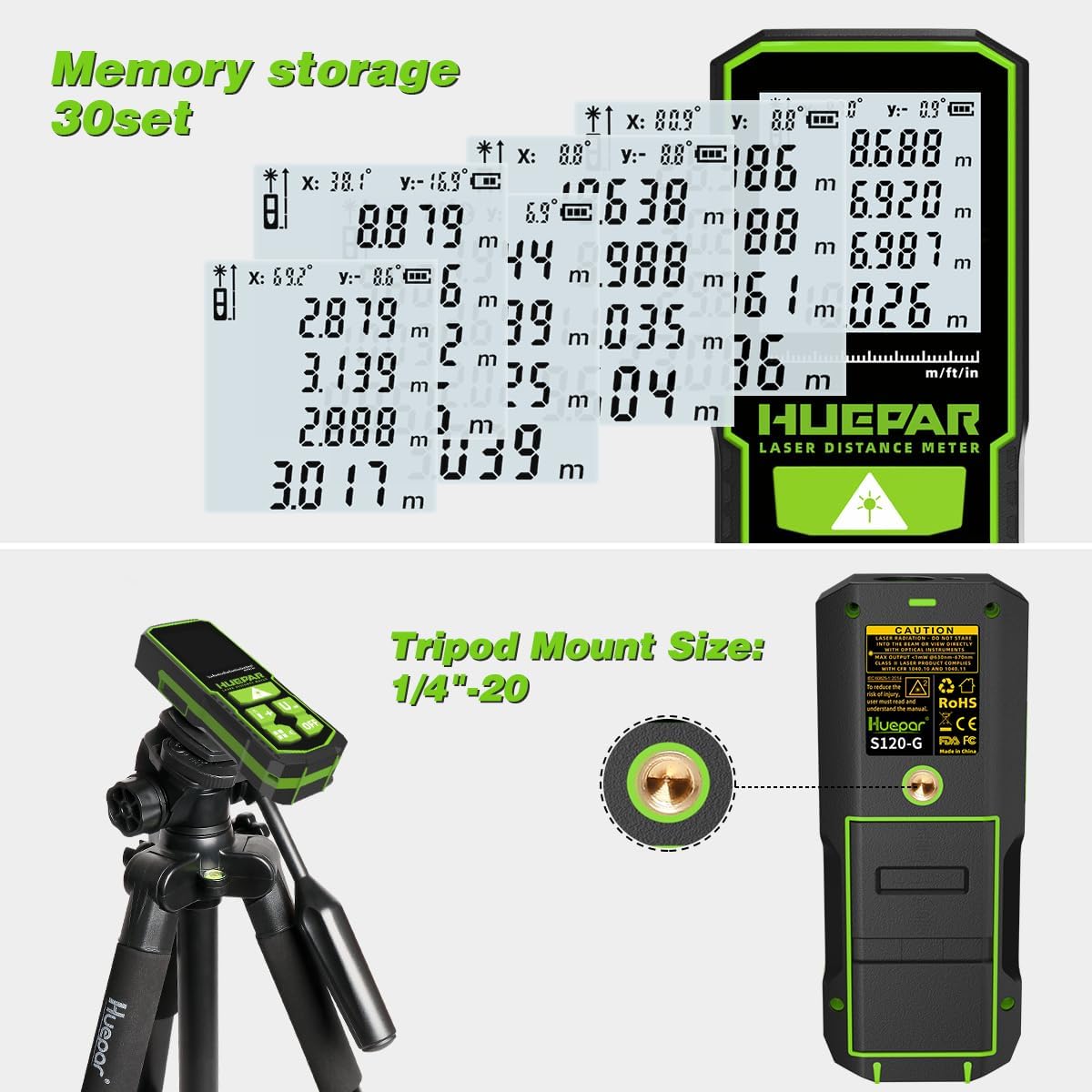
Gambar: The Huepar S120-G display showing multiple stored measurements (up to 30 sets) and a detailed view of the 1/4-inch tripod mount located at the bottom of the device.
- Pangukuran disimpen sacara otomatis.
- Pikeun nginget deui data anu disimpen, pencét ENGÉLING button. Use the arrow keys to navigate through the stored values.
- To clear data, refer to the specific instructions in the full user manual.
5.10 Modeu jempé
The device features a silent mode to disable audible feedback for measurements.
- Pencét éta BISA button (often indicated by a speaker icon) to toggle silent mode on or off.
6. Pangropéa
- beberesih: Ngagunakeun lemes, damp cloth to clean the device. Do not use abrasive cleaners or solvents. Clean the laser aperture and receiver lens with a soft cloth, similar to cleaning camera lenses.
- Panyimpenan: Simpen alat ieu di tempat anu garing sareng tiis, jauh tina sinar panonpoé langsung sareng suhu anu ekstrim. Upami disimpen kanggo waktos anu lami, cabut batréna pikeun nyegah bocor.
- Perawatan batré: Recharge NiMH batteries regularly to maintain their lifespan. Do not overcharge.
7. Cara ngungkulan
| Masalah | Mungkin Cukang lantaranana | Solusi |
|---|---|---|
| Alat teu hurung. | batré lemah atawa maot; pamasangan batré salah. | Replace or recharge batteries. Check battery polarity. |
| Pangukuran anu teu akurat. | Unstable surface; obstructed laser path; dirty lens; incorrect reference point. | Ensure stable measurement. Clear laser path. Clean lens. Verify reference point setting. |
| Sinar laser teu katingali. | Bright ambient light; laser malfunction. | Use in lower light conditions. Contact support if issue persists. |
| Layar nunjukkeun "Kasalahan". | Measurement out of range; strong interference. | Ensure target is within range (120m). Move to an area with less interference. |
8. Spésifikasi
| Fitur | Rincian |
|---|---|
| Modél | S120-G |
| Rentang pangukuran | 0.05m - 120m (0.16 kaki - 393 kaki) |
| Akurasi Pangukuran | ± 2 mm |
| Kelas laser | Kelas 2 |
| Jenis laser | 505-530 nm, <1 mW (Green Laser) |
| Unit pangukuran | m / ft / inci |
| Modeu pangukuran | Distance, Area, Volume, Pythagoras (3 types), Continuous, Angle |
| Ukuran Angle | Dual Angle Display (X & Y axes) |
| Panyimpenan Data | 30 susunan |
| Titik Rujukan | Front, Middle, Rear |
| Sasayogian tanaga | 2 x AA NiMH rechargeable batteries (included) or 2 x AA alkaline batteries (not included) |
| Port ngecas | USB Tipe-C |
| Pareuman otomatis | Laser: 30s, Alat: 180s |
| Peunteun IP | IP54 (tahan lebu sareng cipratan) |
| Bahan | Acrylonitrile Butadiene Styrene (ABS) |
| Ukuran (L x W x H) | 12.1 x 2.6 x 4.8 cm (4.76 x 1.02 x 1.89 inci) |
| Beurat | 270 gram (0.6 lbs) |
9. Garansi jeung Rojongan
Huepar products are designed for reliability and durability. For warranty information, technical support, or service inquiries, please refer to the contact details provided with your purchase or visit the official Huepar websitus.
Pabrikan: Huepar


