Bubuka
Thank you for choosing the iGear Spectrum Mini Bluetooth Speaker. This portable speaker is designed to deliver a rich, immersive audio experience with dynamic lighting. Please read this manual carefully before use to ensure proper operation and to maximize your enjoyment of the product.
Naon dina Box
- 1 x iGear Spectrum Mini Bluetooth Speaker
- 1 x kabel AUX
- 1 x Kabel Ngecas (Tipe-C)
- 1 x Kartu Garansi
- 1 x Pituduh Pamaké
Fitur produk
The iGear Spectrum Mini Bluetooth Speaker offers a range of features designed for an enhanced audio and visual experience:
- Sora Imersif 360-Derajat: Experience audio from all directions with powerful 15W output.
- Lampu LED dinamis: Features 9 light modes and 180-degree pulsating lights to complement your music.
- Dipanjangkeun Playtime: Ngarasakeun nepi ka 12 jam playback musik kontinyu dina muatan tunggal.
- Téknologi True Wireless Stereo (TWS): Connect two Spectrum Mini speakers wirelessly for a stereo sound experience.
- Sababaraha Pilihan Konektipitas: Supports Bluetooth, AUX input, USB input, and TF card slot.
- Ngecas Tipe-C gancang: Convenient and quick charging via a Type-C port.
- Desain portabel: Enteng 650 gram, janten gampang dibawa.

Image: The iGear Spectrum Mini Bluetooth Speaker showcasing its dynamic lighting effects.

Image: An illustration highlighting the 15W stereo speaker and extra bass feature.
Disetél
1. Ngecas Awal
Before first use, fully charge the speaker. Connect the provided Type-C charging cable to the speaker's charging port and the other end to a USB power adapter (not included). The charging indicator will show the charging status. A full charge takes approximately 2 hours.
2. Powering on / Pareum
Pencét jeung tahan tombol daya (⏻) for 2-3 seconds to turn the speaker on or off. A sound prompt will indicate the power status.
Operasi
1. Papasangan Bluetooth
- Hurungkeun speaker. Spiker bakal otomatis asup kana modeu pasangan Bluetooth, dituduhkeun ku lampu LED anu kedip-kedip.
- Aktipkeun Bluetooth dina alat Anjeun (smartphone, tablet, jsb).
- Milarian pikeun "iGear Spectrum Mini" in your device's Bluetooth list and select it to connect.
- Once connected, the LED light will become solid, and you will hear a confirmation sound.
2. Kadali dasar
- Puter / Reureuh: Pencét tombol Puter / Jeda (▶‖) sakali.
- Volume Up: Pencét tombol Volume Naék (+).
- Volume Turun: Pencét tombol Volume Turun (-).
- Lagu salajengna: Pencét terus tahan tombol Volume Naék (+).
- Lagu Sateuacanna: Pencét terus tahan tombol Volume Turun (-).
3. Light Mode Control
Press the Light Mode button (💡) to cycle through the 9 available light modes. Press and hold to turn the lights off or on.
4. Leres Wireless Stereo (TWS) papasangan
To pair two iGear Spectrum Mini speakers for TWS stereo sound:
- Pastikeun duanana speaker dipareuman sareng henteu nyambung ka alat Bluetooth naon waé.
- Hurungkeun duanana spiker.
- On one speaker (this will be the primary speaker), double-press the Play/Pause button (▶‖). It will search for the secondary speaker.
- Once paired, you will hear a confirmation sound, and the LED indicators on both speakers will synchronize.
- Sambungkeun alat Anjeun ka speaker primér liwat Bluetooth sakumaha dijelaskeun dina lengkah 1.
Pilihan konektipitas
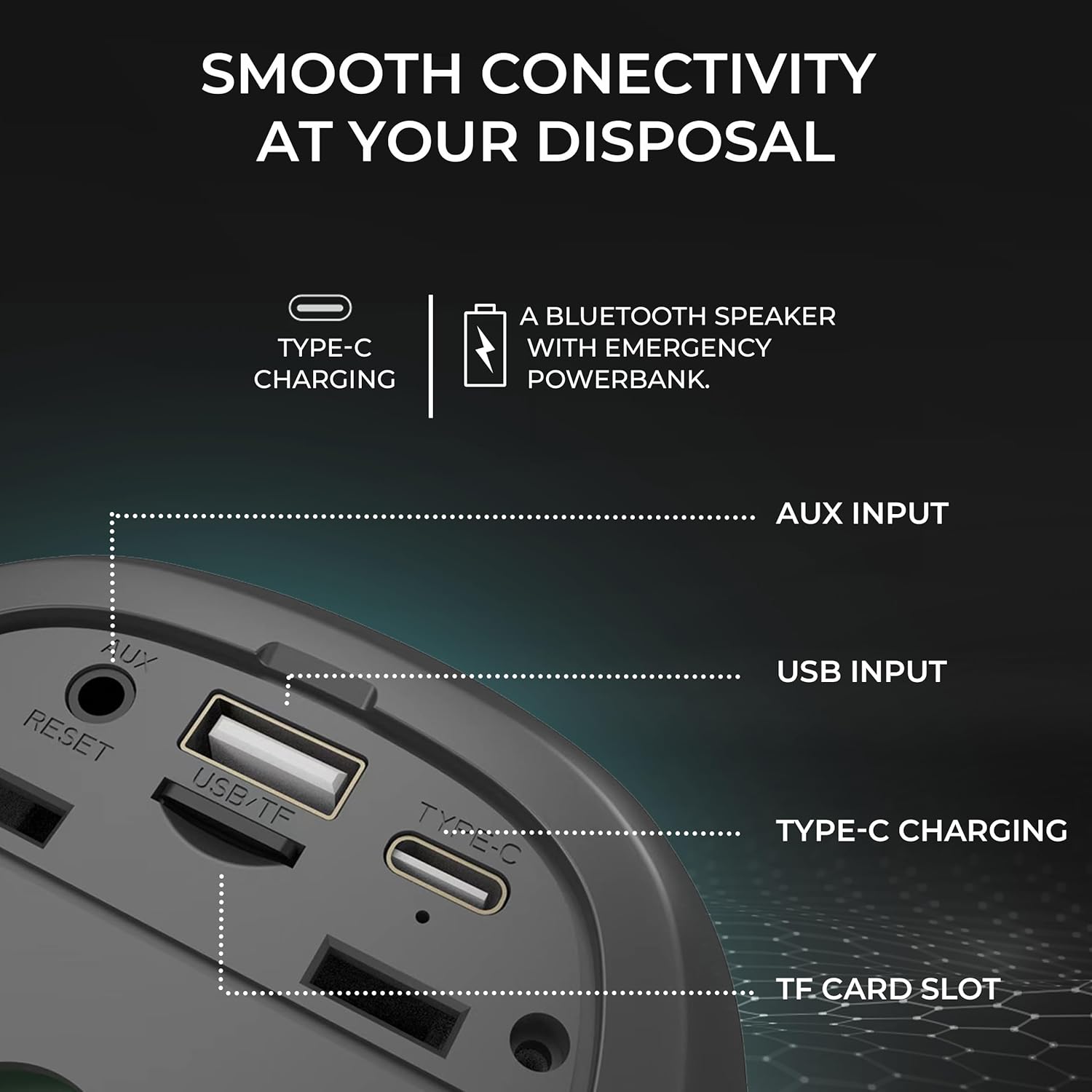
Gambar: Detil view of the speaker's input ports for various connectivity options.
- Bluetooth: Connect wirelessly to your devices.
- Input AUX: Use the provided AUX cable to connect to devices without Bluetooth capabilities. Insert the 3.5mm jack into the AUX port on the speaker and your audio source.
- Input USB: Selapkeun USB flash drive kalawan audio files into the USB port to play music directly.
- Slot Kartu TF: Lebetkeun kartu TF (MicroSD) anu nganggo audio files into the TF card slot to play music directly.
Ngecas
The iGear Spectrum Mini speaker is powered by a built-in Lithium Ion battery. To charge the speaker:
- Connect the Type-C charging cable to the speaker's Type-C port.
- Connect the other end of the cable to a standard USB power source (e.g., wall adapter, computer USB port).
- Waktu ngecas kirang langkung 2 jam kanggo ngeusi pinuh.
- A fully charged speaker provides up to 12 hours of playtime, depending on volume and light usage.

Image: The speaker highlighting its 12-hour playtime capability.
Pangropéa
To ensure the longevity and optimal performance of your iGear Spectrum Mini speaker, follow these maintenance guidelines:
- beberesih: Anggo lawon anu lemes sareng garing pikeun ngusap permukaan spiker. Entong nganggo pembersih anu abrasif, alkohol, atanapi pangleyur kimia.
- Panyimpenan: Simpen spéker dina tempat anu tiis sareng garing jauh tina sinar panonpoé langsung sareng suhu anu ekstrim.
- Paparan cai: The product is not waterproof. Avoid exposing it to water or high humidity to prevent damage.
- Perawatan batré: Upami teu dianggo kanggo waktos anu panjang, ngecas spéker sahenteuna sakali unggal tilu bulan pikeun ngajaga kaséhatan batré.
Pamérésan masalah
| Masalah | Solusi anu mungkin |
|---|---|
| Speaker teu hurung | Ensure the speaker is charged. Connect it to a power source using the Type-C cable. |
| Taya sora | Check volume levels on both the speaker and your connected device. Ensure the device is properly paired via Bluetooth or connected via AUX/USB/TF card. |
| Nyapasangkeun Bluetooth gagal | Ensure the speaker is in pairing mode (flashing LED). Turn off and on Bluetooth on your device. Move the speaker closer to your device. Disconnect from other Bluetooth devices. |
| Papasangan TWS gagal | Ensure both speakers are off and not connected to any device before initiating TWS pairing. Follow TWS pairing steps carefully. |
| Lampu teu jalan | Press the Light Mode button (💡) to cycle through modes or turn lights on. |
spésifikasi
| Fitur | Rincian |
|---|---|
| Ngaran modél | Spéktrum Mini |
| Nomer Modél Item | iG-1149 |
| Audio Wattage | 15 Watt |
| Téhnologi konektipitas | Bluetooth |
| Range nirkabel | Nepi ka 10 méter |
| Jenis Batré | Litium Ion |
| Waktu maén | Nepi ka 12 Jam |
| Waktu Ngecas | Kurang leuwih 2 Jam |
| Port ngecas | Tipe-C |
| Métode kontrol | Toél |
| Bahan | ABS + lawon |
| Item Beurat | 650 gram |
| Dimensi produk | 10D x 10W x 12.3H Sentimeter |
| Tahan cai | No |
Garansi sareng Rojongan
The iGear Spectrum Mini Bluetooth Speaker comes with a 1 Year Carry-In Warranty. For warranty claims or technical support, please refer to the contact information provided on your warranty card or visit the official iGear websitus.
Pabrikan / Importer: iGear Tech Private Limited, Goregaon west, Mumbai 400063, Contact: 9327667193


