1. Bubuka
This manual provides essential information for the proper installation and operation of your HUPEJOS Type-C Hardwire Kit with Radar Detection. This kit is designed to provide continuous power to your compatible dash cam, enabling advanced parking monitoring features and battery protection. Please read this manual thoroughly before installation and use.
2. Naon dina Box
The HUPEJOS LD-001 Hardwire Kit package includes the following components:
- 1x Hardwire Kit with integrated Radar Detection module
- Various fuse taps for installation
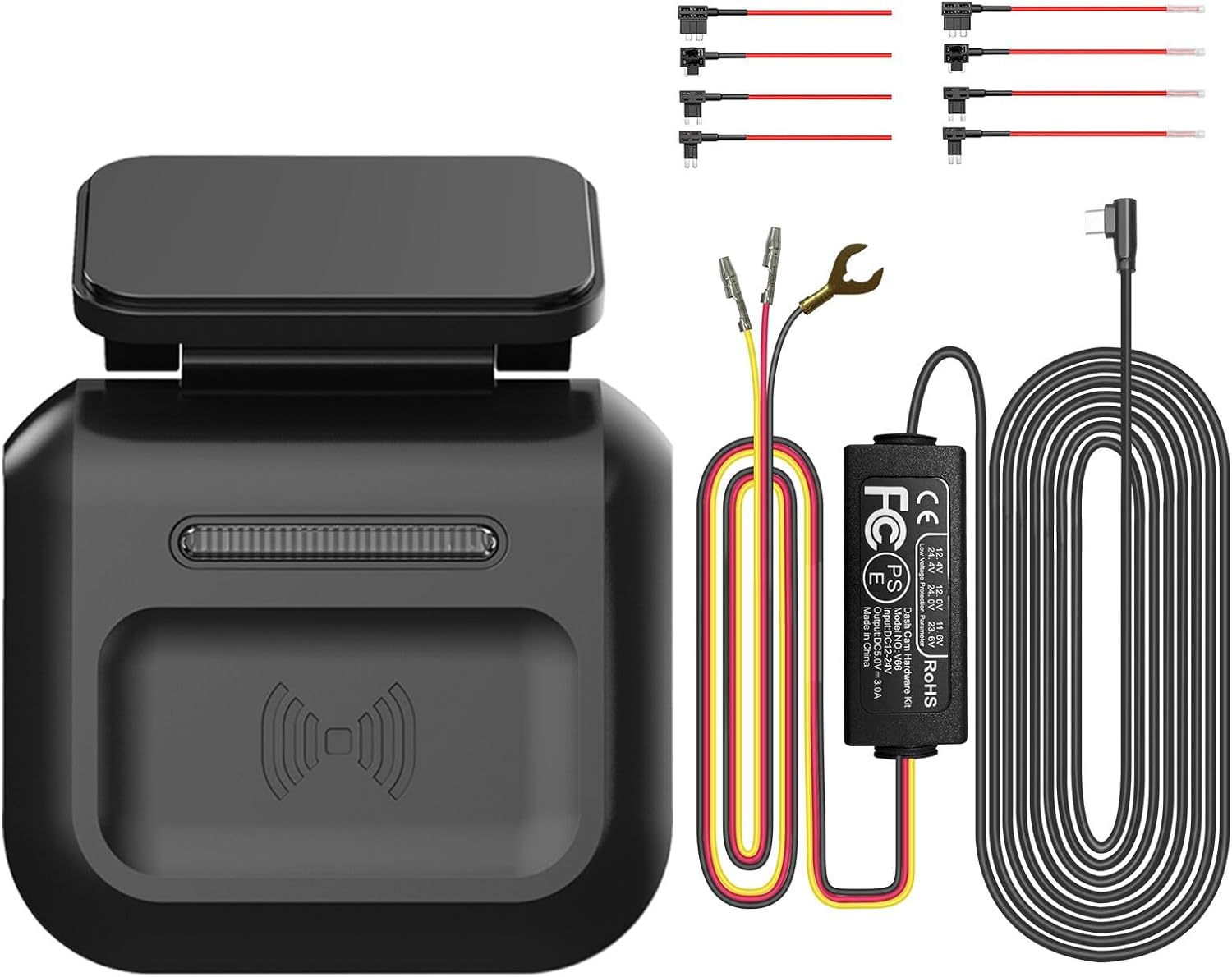
Figure 1: Components of the HUPEJOS Type-C Hardwire Kit.
3. Spésifikasi
| Nomer modél | LD-001 |
| merek | HUPEJOS |
| Masukan Voltage | 12V-24V (DC) |
| Kaluaran Voltage / Ayeuna | 5V / 2.5A |
| Low Voltage panyalindungan | Automatically cuts off power after 60s if voltage is below 11.8V (±0.2V) |
| Pangimeutan Parkir | 24-Hour Radar Intelligent Monitoring System |
| Alat nu cocog | HUPEJOS V7, HUPEJOS V7PRO, HUPEJOS V80, and other Type-C USB dash cams |
| Item Beurat | 5.6 ons |
| Dimensi produk | 4.7 x 2 x 2.76 inci |
| Garansi | 1 taun |
4. Setup & Instalasi
Proper installation of the hardwire kit is crucial for optimal performance and to prevent vehicle battery drain. Follow these steps carefully:
4.1. Pancegahan Kasalametan
- Before connecting the hardwire kit, ensure the vehicle engine is OFF.
- Disconnect the negative terminal of the car battery to prevent electrical shorts.
- If you are unsure about any steps, consult a professional auto technician.
4.2. Connecting the Hardwire Kit to the Fuse Box
The hardwire kit connects directly to your vehicle's fuse box, providing a permanent and discreet power source for your dash cam.
- Identipikasi Kotak Sekring: Locate your vehicle's fuse box, typically found under the dashboard on the driver's side.
- Sambungkeun Kawat ACC (Beureum): The red wire from the hardwire kit must be connected to an ACC (Accessory) fuse. An ACC fuse provides power only when the vehicle's ignition is on. Use the provided fuse tap to connect the red wire to an appropriate ACC fuse slot.
- Connect BAT+ Wire (Yellow): The yellow wire from the hardwire kit must be connected to a BAT+ (Battery) fuse. A BAT+ fuse provides continuous power even when the vehicle is turned off, which is essential for parking monitoring. Use a fuse tap to connect the yellow wire to a suitable BAT+ fuse slot.
- Sambungkeun Kawat GND (Hideung): The black wire from the hardwire kit is the ground wire. Connect it to a metal part of the vehicle's chassis, such as a screw or bolt, to ensure a proper ground connection.
- General Wiring Diagram: For a visual guide on connecting the hardwire kit to your fuse box, refer to the diagram below.

Figure 2: Connecting the red ACC wire to an accessory fuse slot.

Figure 3: Connecting the yellow BAT+ wire to a constant power fuse slot.

Figure 4: Connecting the black ground wire to a metal part of the car.

Figure 5: General wiring diagram for the hardwire kit.
4.3. Cable Routing & Radar Unit Mounting
Once the hardwire kit is connected, route the cables neatly to the dash cam and mount the radar detection unit.
- Kabel Rute: Carefully tuck the power cable along the vehicle's interior trim, headliner, and A-pillars to conceal it and ensure a clean installation.
- Mount Radar Unit: The radar detection unit should be mounted on the windshield, typically near the dash cam, ensuring it has a clear view forward. Use the provided 3M adhesive tape to secure it. The radar unit should be perpendicular to the ground for optimal detection.
- Nyambung ka Dash Cam: Plug the Type-C connector from the hardwire kit into your compatible HUPEJOS dash cam.

Gambar 6: Kelample of routing cables along the vehicle's interior for a discreet installation.

Figure 7: The radar detection module of the hardwire kit.
4.4. Instalasi Pidéo
For visual guidance on the installation process, please refer to the following seller-provided videos:
- Installation of Hardwire Kit: This video demonstrates the general steps for installing the hardwire kit.
Video 1: General installation steps for the hardwire kit.
- How to Install Hardwire Kit with Radar: A specific guide on installing the hardwire kit with the radar module.
Video 2: Detailed installation guide for the hardwire kit with radar.
- Installation of 24H Parking Mode Radar Detection: This video focuses on setting up the radar detection for 24-hour parking mode.
Video 3: Setup for 24-hour parking mode with radar detection.
5. Parentah Operasi
5.1. 24-Hour Radar Intelligent Parking Monitoring
The hardwire kit's integrated radar system provides continuous surveillance even when your vehicle is parked and the engine is off. This intelligent system helps conserve power and memory by only recording when necessary.
- Rentang deteksi: The radar monitors objects within a 3 to 4-meter range in front of the vehicle.
- Rékam otomatis: If an object is detected approaching the car while parked, the dash cam will automatically record a 1-minute video.
- Rékam Kontinyu: If movement persists after the initial 1-minute recording, the system will continue to record until the object leaves the detection zone.
- Power & Memory Saving: The system automatically stops recording and shuts down when no movement is detected, optimizing power consumption and memory card usage.

Figure 8: Diagram illustrating the radar intelligent monitoring system.

Figure 9: Benefits of radar sensor recording for parking monitoring.
Video 4: Demonstration of 24-hour parking mode with radar system monitoring.
5.2. Lemah Voltage panyalindungan
The hardwire kit is equipped with multiple security protections to safeguard your vehicle's battery and the dash cam:
- Pareum Daya Otomatis: If the vehicle's voltage drops below 11.8V (±0.2V), the hardwire kit will automatically cut off power to the dash cam after 60 seconds. This prevents the car battery from being completely drained.
- Fitur kaamanan: Ngawengku panyalindungan tina arus leuwih, sirkuit pondok, sambungan tibalik, sareng panas teuing.
- Catetan kasaluyuan: This hardwire kit is not applicable for trucks with voltage luhur 24V.

Figure 10: Illustration of the low-voltage battery drain protection feature.
6. Cara ngungkulan
If you encounter any issues with your HUPEJOS Hardwire Kit, please consider the following general troubleshooting steps:
- No Power to Dash Cam: Check all fuse box connections (ACC, BAT+, GND) to ensure they are secure and correctly wired. Verify that the fuses are not blown.
- Solokan batré: Pastikeun vol lowtage protection is functioning correctly. If the dash cam continues to drain the battery, re-check the BAT+ connection and ensure it's not drawing excessive power.
- Parking Mode Not Activating: Verify that the radar unit is correctly mounted and has a clear view. Check the dash cam settings to ensure parking mode is enabled and configured to work with the hardwire kit.
- Operasi intermittent: Inspect all cable connections for looseness or damage. Ensure the Type-C connector is fully inserted into the dash cam.
7. Jaminan & Dukungan
The HUPEJOS LD-001 Type-C Hardwire Kit comes with a garansi 1 taun ti tanggal beuli. Garansi ieu nyertakeun cacad manufaktur sareng gangguan dina panggunaan normal.
For technical support, warranty claims, or any questions regarding your product, please contact HUPEJOS customer service through the retailer where you purchased the product or visit the official HUPEJOS websitus.


