1. Bubuka
This manual provides detailed instructions for the safe and effective use of your Technaxx TX-219 4-in-1 Multifunction Device. This versatile unit combines a jump starter, an air compressor, a power bank, and an LED light, designed for automotive and portable power needs. Please read this manual thoroughly before operation and retain it for future reference.
2. Parentah Kasalametan
Salawasna perhatikeun tindakan pencegahan kaamanan ieu pikeun nyegah tatu atanapi karusakan kana alat atanapi kendaraan:
- Baca sadaya parentah sateuacan dianggo.
- Jauhkeun tina jangkauan barudak.
- Wear eye protection when operating the jump starter.
- Ulah ngalaan alat ka hujan atawa beueus.
- Do not operate if the device or cables are damaged.
- Pastikeun ventilasi anu leres nalika dianggo.
- Sambungkeun starter luncat clamps correctly: positive to positive, negative to negative. Avoid short-circuiting.
- Ulah nyobian luncat ngamimitian batré beku.
- Disconnect the jump starter from the vehicle battery within 30 seconds after the engine starts.
- Do not use the air compressor continuously for more than 10 minutes to prevent overheating. Allow it to cool down.
- Simpen alat dina tempat anu tiis sareng garing upami henteu dianggo.
3. Eusi Paket
Pastikeun yén sadaya item aya dina bungkusan:
- Technaxx Jump Starter TX-219 Unit
- Adapter Cable with Battery Clamps
- Adaptor AC
- Compressed Air Hose
- Kabel USB
- Kabel Adaptor Mobil
- Manual pamaké

Gambar 3.1: Leuwihview of the Technaxx TX-219 package contents, showing the main unit, battery clamps, various charging cables, and the air hose.
4. Produk Langkungview
Familiarize yourself with the components of your Technaxx TX-219 device.

Gambar 4.1: Angled view of the Technaxx TX-219 unit, showing the digital display, control buttons, USB ports, and LED light.
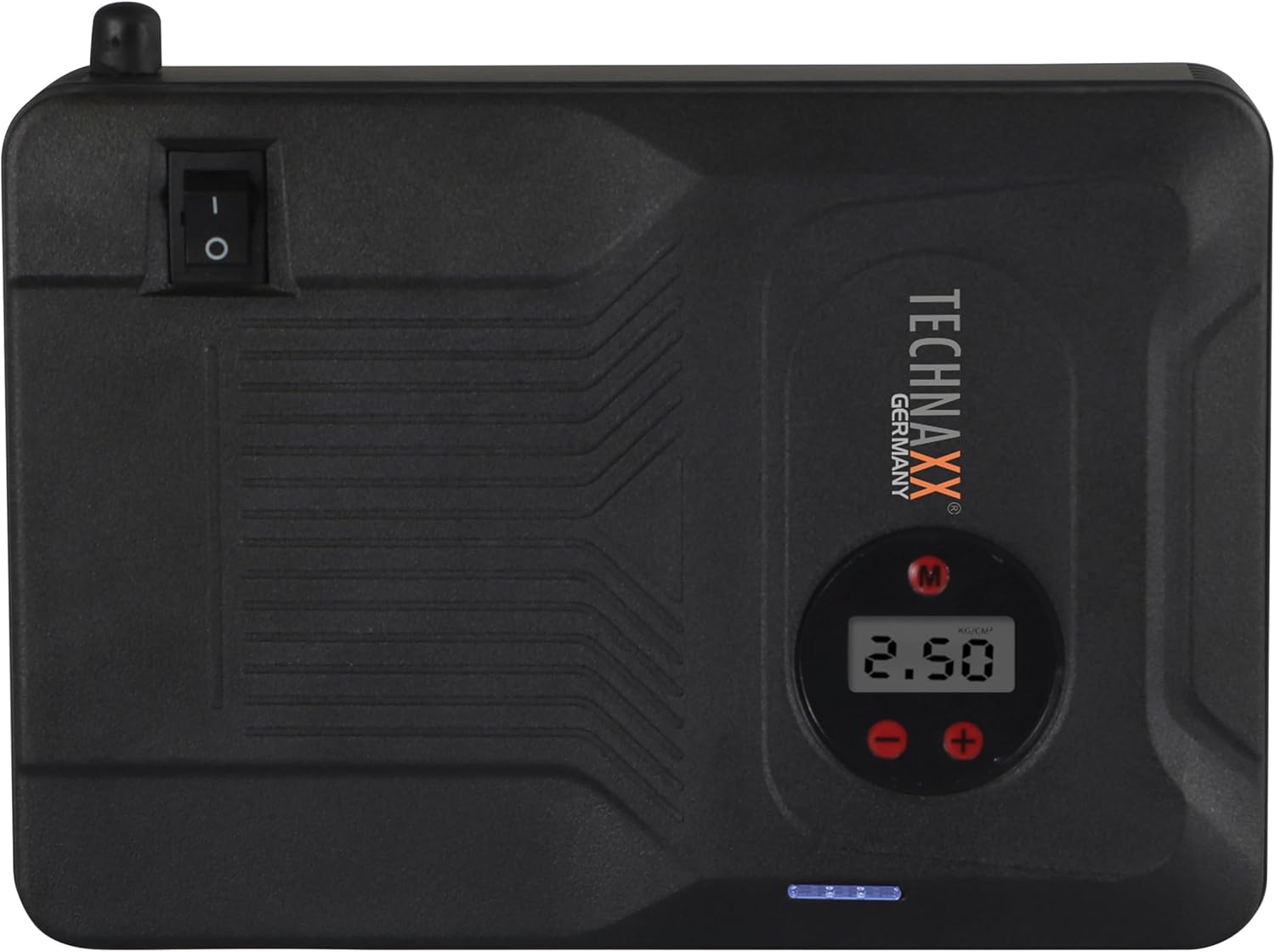
Gambar 4.2: Puncak view of the device, highlighting the power switch and the digital display for pressure readings.

Gambar 4.3: Hareupeun view of the device, showing the digital display, pressure adjustment buttons, and the power indicator lights.
Komponén konci:
- Digital tampilan: Shows air pressure for the compressor and battery status.
- Tombol kontrol: For adjusting pressure settings and operating the device.
- USB-A Output Ports (5V/1A, 5V/2A): For charging external electronic devices.
- 15V/0.4A Input Port: For charging the internal battery of the TX-219.
- Jump Start Output Port: Connects to the battery clamp kabel.
- Lampu LED: Nyadiakeun katerangan.
- Saklar kakuatan: Kontrol hurung/pareum pikeun alat éta.
- Sambungan Selang Udara: For the air compressor function.
5. Nyetél sareng Ngecas Alat
Before first use, fully charge the Technaxx TX-219 unit. It is recommended to recharge the device every 3 months to maintain battery health.
- Connect the AC adapter to the 15V/0.4A input port on the TX-219.
- Colokkeun adaptor AC kana stop kontak standar.
- The battery indicator lights on the device will illuminate to show charging progress. All lights will be solid when fully charged.
- Alternatively, use the car adapter cable to charge the device from a vehicle's 12V accessory socket.

Gambar 5.1: The Technaxx TX-219 unit being charged or used as a power bank to charge a smartphone.
6. Parentah Operasi
6.1. Ngahurungkeun Kandaraan sacara Langsung
The TX-219 can jump start gasoline engines up to 4.0L and diesel engines up to 3.0L.
- Ensure the TX-219 is sufficiently charged (at least 75% battery indicated).
- Pareuman konci kontak kendaraan sareng sadaya asesorisna.
- Sambungkeun beureum (+) clamp ka terminal positif (+) batré kendaraan.
- Sambungkeun hideung (-) clamp kana bagian logam anu bersih sareng teu acan dicét tina blok mesin atanapi rangka kendaraan, jauh tina batréna. Do not connect to the negative (-) battery terminal directly unless specified by vehicle manufacturer.
- Connect the adapter cable to the jump start output port on the TX-219.
- Start the vehicle's engine. If it doesn't start immediately, wait 30 seconds before trying again. Do not crank for more than 3 seconds per attempt.
- Once the engine starts, immediately disconnect the adapter cable from the TX-219.
- Teras, pegatkeun sambungan kabel hideung (-)amp, dituturkeun ku cl beureum (+)amp tina batré kendaraan.

Gambar 6.1: The Technaxx TX-219 connected to a vehicle battery using the provided clamps for jump starting.

Gambar 6.2: A close-up of the jump starter connected to a car battery, illustrating the process of jump starting.
6.2. Ngagunakeun Kompresor Udara
The integrated air compressor can inflate tires up to 3.5 Bar (approximately 50 PSI) and features an automatic shut-off.
- Connect the compressed air hose to the air hose connection port on the TX-219.
- Attach the other end of the hose to the tire valve.
- Turn on the TX-219. The digital display will show the current tire pressure.
- Use the '+' and '-' buttons to set the desired pressure. The display supports Bar, KPA, kg/cm², and PSI units.
- Press the compressor start button to begin inflation.
- Kompresor bakal otomatis eureun nalika tekanan prasetél ngahontal.
- Disconnect the air hose from the tire valve and the TX-219.

Gambar 6.3: The Technaxx TX-219 being used to inflate a car tire, demonstrating the air compressor function.

Gambar 6.4: A user inflating a tire with the TX-219, showing the digital display and the air hose connection.
6.3. Ngagunakeun salaku Power Bank
The 14000 mAh battery can charge various USB-powered devices.
- Connect your device's USB charging cable to one of the USB-A output ports (5V/1A or 5V/2A) on the TX-219.
- The TX-219 will automatically begin charging your device.
- Monitor your device's charging status. Disconnect once fully charged.

Gambar 6.5: The Technaxx TX-219 connected to a smartphone via USB, illustrating its power bank functionality.

Gambar 6.6: The TX-219 acting as a portable power bank, charging a mobile device.
6.4. Ngagunakeun Lampu LED
The integrated LED light can be used for illumination in dark environments.
- Locate the LED light button on the device.
- Pencét tombol sakali pikeun ngahurungkeun lampu LED.
- Press again to cycle through different light modes (e.g., steady, strobe, SOS, if available).
- Press and hold the button to turn off the LED light.

Gambar 6.7: The TX-219's LED light providing illumination in a vehicle's engine compartment.
7. Spésifikasi
| Fitur | Spésifikasi |
|---|---|
| Modél | TX-219 |
| Jenis Batré | Litium Beusi Fosfat |
| Kapasitas batré | 14000 mAh |
| Mimitian Ayeuna | 350 A (Maks. 600 A) |
| Luncat Mimitian Voltage | 12 volt |
| Engine Compatibility (Gasoline) | Nepi ka 4.0 L |
| Kompatibilitas Mesin (Solar) | Nepi ka 3.0 L |
| USB-A Kaluaran 1 | 5 V, 2 A |
| USB-A Kaluaran 2 | 5 V, 1 A |
| Komprési hawa | 12 V / 100 W, Max 3.5 Bar (approx. 50 PSI) |
| Ngecas Input | 15 V, 0.4 A (Max) |
| Lampu LED | Sababaraha fungsi |
| Ukuran (L x W x H) | 19 x 13 x 5.5 cm |
| Beurat | 1.16 kg |
| Sertifikasi | CE |
8. Pangropéa
- beberesih: Ngusap alat ku kaén anu lemes sareng garing. Ulah make bahan kimia kasar atawa cleaners abrasive.
- Panyimpenan: Store the TX-219 in a cool, dry place, away from direct sunlight and extreme temperatures.
- Ngecas: Recharge the unit every three months, even if not in use, to prolong battery life.
- Pamariksaan kabel: Regularly inspect all cables and clamppikeun tanda-tanda karusakan, karusakan, atanapi korosi. Ganti upami diperyogikeun.
9. Cara ngungkulan
| Masalah | Mungkin Cukang lantaranana | Solusi |
|---|---|---|
| Alat henteu hurung. | Batré béak. | Charge the TX-219 fully. |
| Kandaraan teu luncat ngamimitian. | Lepat clamp connection; TX-219 battery too low; vehicle battery severely damaged. | Pastikeun clamps are connected correctly (+ to +, - to chassis). Recharge TX-219. Consult a mechanic if vehicle battery is faulty. |
| Kompresor hawa teu inflating. | Hose not securely connected; desired pressure already reached; device battery low. | Check hose connections. Verify desired pressure setting. Recharge TX-219. |
| Ngecas USB teu jalan. | USB cable faulty; device not compatible; TX-219 battery low. | Try a different USB cable. Ensure your device is compatible. Recharge TX-219. |
| Lampu LED teu jalan. | Battery depleted; light button not pressed correctly. | Recharge TX-219. Press the LED button firmly. |
10. Garansi jeung Rojongan
For warranty information and technical support, please refer to the warranty card included with your product or visit the official Technaxx websitus. Simpen resi pameseran anjeun salaku bukti pameseran.
Pabrikan: Technaxx
Jumlah modél: 5031


