1. Bubuka
The ETOE Smart Projector D2 Pro is a compact and versatile home entertainment device designed to deliver a high-quality viewing experience. Featuring Android TV 10.0, built-in Chromecast, and a native 1080P resolution with 4K support, it provides access to a wide range of streaming content and connectivity options. This manual provides essential information for setting up, operating, and maintaining your projector.

Image: The ETOE Smart Projector D2 Pro, showcasing its compact design, included remote control, and a projection of the Android TV interface with Netflix and other apps.
2. Naon dina Box
Punten parios eusi bungkusan nalika unboxing pikeun mastikeun yén sadaya barang aya:
- ETOE D2 Pro Projector (x1)
- Remote Control (x1, batteries not included)
- DC 19V Adapter (x1)
- Kabel Daya (x1)
- User Manual + Quick Guide (x1)
3. Leuwih fisikview
Familiarize yourself with the projector's ports and controls for optimal use.

Gambar: Tukangeun view of the ETOE D2 Pro Projector, highlighting the DC power input, USB port, HDMI port, and Aux audio output.
Palabuhan sareng Sambungan:
- DC for Power: Sambungkeun adaptor kakuatan anu disayogikeun di dieu.
- USB: For connecting USB drives to play media or connect compatible accessories.
- HDMI: For connecting external devices such as laptops, gaming consoles (PS5/PS4, X-Box ONE), TV boxes, or Fire TV sticks.
- Aux: For connecting external audio devices like headphones or speakers via a 3.5mm audio cable.
4. Setélan
4.1 Panempatan sareng Ukuran Layar
Position the projector on a stable, flat surface. The optimal projection distance will vary based on your desired screen size. The projector supports screen sizes from 40 inches to 120 inches, with 100 inches being the recommended size for a balanced viewpangalaman.
4.2 Powering On
- Connect the DC 19V adapter to the projector's DC input port.
- Colokkeun kabel listrik kana stop kontak témbok.
- Pencét tombol daya dina proyektor atawa kadali jauh pikeun ngahurungkeun alat.
4.3 Fokus jeung Keystone adjustment
To ensure a clear and rectangular image, adjust the focus and keystone correction.

Image: Diagram illustrating the manual focus, digital 4D & 4P keystone correction, and digital zoom features of the ETOE D2 Pro Projector.
- Fokus Manual: Puterkeun ring pokus dina lénsa proyektor nepi ka gambar nembongan seukeut tur jelas.
- Digital Keystone Correction (4D & 4P): If the projected image is trapezoidal or tilted, use the digital keystone correction feature to adjust it into a perfect rectangle. This can be done through the projector's settings menu.
- Digital Zoom (50% - 100%): Adjust the projection size without physically moving the projector using the digital zoom function in the settings.
5. Ngoperasikeun Projector
5.1 Android TV 10.0 panganteur
The projector runs on Android TV 10.0, providing access to over 8000 apps from Google Play, including Netflix, YouTube, Disney+, HBO Max, and Spotify. Navigate the interface using the remote control.

Image: A comparison showing the rich Android TV 10.0 interface of the ETOE D2 Pro System on the left, with numerous app icons, versus a simpler, less feature-rich interface of other projectors on the right.
- Use the directional buttons on the remote to navigate through menus and select apps.
- Pencét tombol 'OK' pikeun mastikeun pilihan.
- Utilize the voice control feature (Google Assistant) on the remote for hands-free content search and control.
5.2 Casting with Chromecast Built-in
The built-in Chromecast allows for seamless content casting from your Android, iOS devices, or laptops.
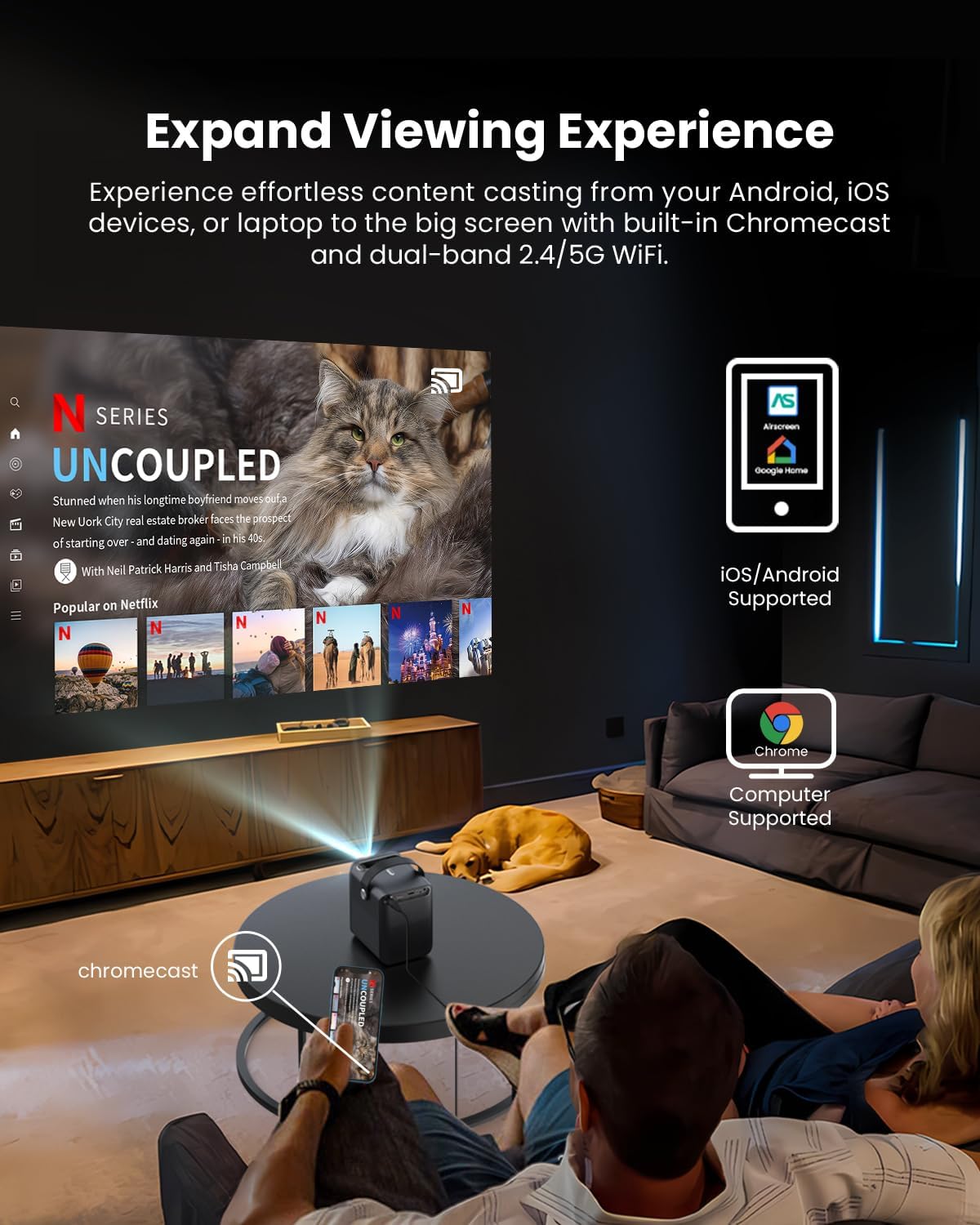
Image: A person relaxing on a couch, casting content from their smartphone to the ETOE D2 Pro Projector, demonstrating the Chromecast feature for an expanded viewpangalaman.
- Ensure your mobile device or computer is connected to the same Wi-Fi network as the projector.
- Open a Chromecast-enabled app (e.g., YouTube, Netflix) on your device.
- Ketok ikon Cast (usually a rectangle with a Wi-Fi symbol) and select your ETOE D2 Pro Projector from the list of available devices.
5.3 Nyambungkeun Alat éksternal
Proyéktor ieu nawiskeun sababaraha pilihan konektivitas pikeun rupa-rupa alat.

Image: The ETOE D2 Pro Projector displayed with various compatible accessories, including a TV stick, USB stick, external speaker, and headphones, illustrating its versatile connectivity options.
- HDMI: Connect TV sticks, gaming consoles, laptops, or other HDMI-enabled devices to the HDMI port. Select the HDMI input source from the projector's menu.
- USB: Selapkeun drive USB kana port USB pikeun muterkeun média lokal files (pidéo, poto, musik).
- Bluetooth: Pair Bluetooth speakers or headphones for wireless audio output. Go to the projector's Bluetooth settings to search for and connect to devices.
- Aux: Use a 3.5mm audio cable to connect wired headphones or external speakers to the Aux port.
5.4 Setélan Gambar sareng Audio
Saluyukeun setelan gambar sareng sora pikeun ngaoptimalkeun anjeun viewpangalaman.

Image: The ETOE D2 Pro Projector projecting a vibrant city scene, highlighting its native 1080P Full HD resolution, 4K support, 400 ANSI lumens brightness, and HDR 10 compatibility for stunning image quality.
- Modeu Gambar: Select from preset picture modes (e.g., Standard, Vivid, Movie) or customize settings like brightness, contrast, and color temperature.
- Modeu Sora: Choose from various sound modes (e.g., Standard, Music, Movie) or adjust equalizer settings for the built-in dual 3W speakers or connected audio devices.
- Modeu proyéksi: Adjust the projection mode (e.g., Front, Rear, Ceiling Front, Ceiling Rear) based on your projector's placement.
6. Pangropéa
6.1 Desain Bebas Lebu
The ETOE D2 Pro features a fully-sealed optical engine designed to prevent dust from entering the lens area, ensuring long-term performance and reducing the need for frequent internal cleaning.

Image: An illustration of the ETOE D2 Pro Projector's sealed optical engine, showing how it prevents dust from entering the internal components, ensuring long-lasting performance.
6.2 beberesih umum
- Luar: Wipe the exterior of the projector with a soft, dry, lint-free cloth. Do not use abrasive cleaners or solvents.
- Lensa: Gently clean the projector lens with a lens cleaning cloth or a soft brush designed for optical surfaces. Avoid touching the lens directly with your fingers.
- Pastikeun projector dicabut colokan saméméh beberesih.
7. Cara ngungkulan
Upami anjeun mendakan masalah sareng proyektor anjeun, tingal masalah sareng solusi umum ieu:
| Masalah | Mungkin Cukang lantaranana | Solusi |
|---|---|---|
| Taya gambar | Power cable loose; Incorrect input source; Device not connected | Check power connection; Select correct HDMI/USB input; Ensure external device is properly connected and powered on. |
| Gambar kabur | Focus not adjusted; Keystone not corrected | Adjust the manual focus ring; Use digital keystone correction in settings. |
| Taya sora | Volume too low; Muted; Incorrect audio output; External device audio issue | Increase volume; Unmute; Check audio output settings (internal speakers, Bluetooth, Aux); Verify audio settings on connected device. |
| Kadali jauh teu jalan | Batré lemah/pareum; Halangan antara remot sareng proyéktor | Ganti batré; Pastikeun garis panon jelas ka panarima IR projector. |
| Teu bisa nyambung ka Wi-Fi | Incorrect password; Router issue; Projector too far from router | Double-check Wi-Fi password; Restart router; Move projector closer to router. |
If the problem persists after trying these solutions, please contact ETOE customer support.
8. Spésifikasi
| Fitur | Rincian |
|---|---|
| Modél | D2 Pro |
| Sistem operasi | Android TV 10.0 |
| Resolusi tampilan | Native 1920 x 1080 (1080P Full HD), 4K video supported |
| Caang | 400 ANSI Lumens |
| Babandingan Kontras | HDR 10 support |
| Ukuran proyéksi | 40" - 120" (100" recommended) |
| Koréksi Keystone | Digital 4D & 4P Keystone |
| Fungsi Zum | Digital Zoom (50% - 100%) |
| Konektipitas | HDMI, USB, Chromecast, 5G WiFi, Bluetooth, Aux |
| Audio | Speaker Dual 3W |
| Mesin optik | Fully-sealed (Dust-proof) |
| Item Beurat | 3.58 pon |
| Dimensi produk | 5.31 x 4.45 x 5.83 inci |
9. Garansi jeung Rojongan
ETOE provides comprehensive support for your D2 Pro projector:
- Garansi: A 12-month after-sales service is provided from the date of purchase.
- Bantosan Téknis: Lifetime technical support is available for all ETOE D2 Pro users.
For any questions, technical assistance, or warranty claims, please contact ETOE customer support directly. There is no need to return the projector without prior contact.


