Bubuka
This manual provides essential information for the proper setup, operation, and maintenance of your ONN 55-Inch Series 1 Class 4K Smart TV. Please read this manual thoroughly before using your television and retain it for future reference. This television offers a 4K (2160p) resolution display, smart TV functionalities with access to various streaming services, and compatibility with Alexa and Google Assistant.
Émbaran Kasalametan
Pitunjuk Kasalametan Penting:
- Ulah meungpeuk sagala bukaan ventilasi. Pasang saluyu sareng parentah produsén.
- Entong dipasang di deukeut sumber panas sapertos radiator, register panas, kompor, atanapi aparat sanésna (kalebet ampLiifiers) anu ngahasilkeun panas.
- Nangtayungan kabel listrik tina leumpang atawa diciwit, utamana dina colokan, wadah merenah, jeung titik dimana aranjeunna kaluar tina aparat.
- Ngan anggo kantétan/aksésori anu ditunjuk ku produsén.
- Cabut colokan alat ieu nalika badai kilat atanapi nalika henteu dianggo kanggo waktos anu lami.
- Rujuk sadayana jasa ka tanaga jasa anu mumpuni. Diperlukeun ngalayanan nalika aparatur ruksak ku cara naon waé, sapertos kabel catu daya atanapi colokan rusak, cairan tumpah atanapi barang murag kana aparatur, aparatur parantos kakeunaan hujan atanapi lembab, henteu beroperasi normal. , atawa geus turun.
Naon dina Box
Saatos ngabongkar bungkusan, pastikeun sadaya barang aya:
- ONN 55-Inch Series 1 Class 4K Smart TV
- Remote Control (kalayan batré)
- Rak TV (2)
- Screws pikeun TV Stand
- Kabel listrik
- Gancang Mimitian Guide
Note: Speakers are integrated into the television unit.
Disetél
1. Ngagantelkeun Stand TV
Carefully place the TV screen-down on a soft, clean surface to prevent damage. Align each stand with the corresponding screw holes on the bottom of the TV. Secure the stands using the provided screws.

Gambar: Hareupeun view of the ONN 55-Inch 4K Smart TV with its stands properly attached, displaying a vibrant screen. This illustrates the TV's appearance after stand installation.
2. Pamasangan Tembok (Opsional)
If you choose to wall mount your TV, ensure you use a VESA-compatible wall mount kit (sold separately) that supports the TV's weight and size. Follow the instructions provided with your wall mount kit. Do not attempt to wall mount the TV with the stands attached.
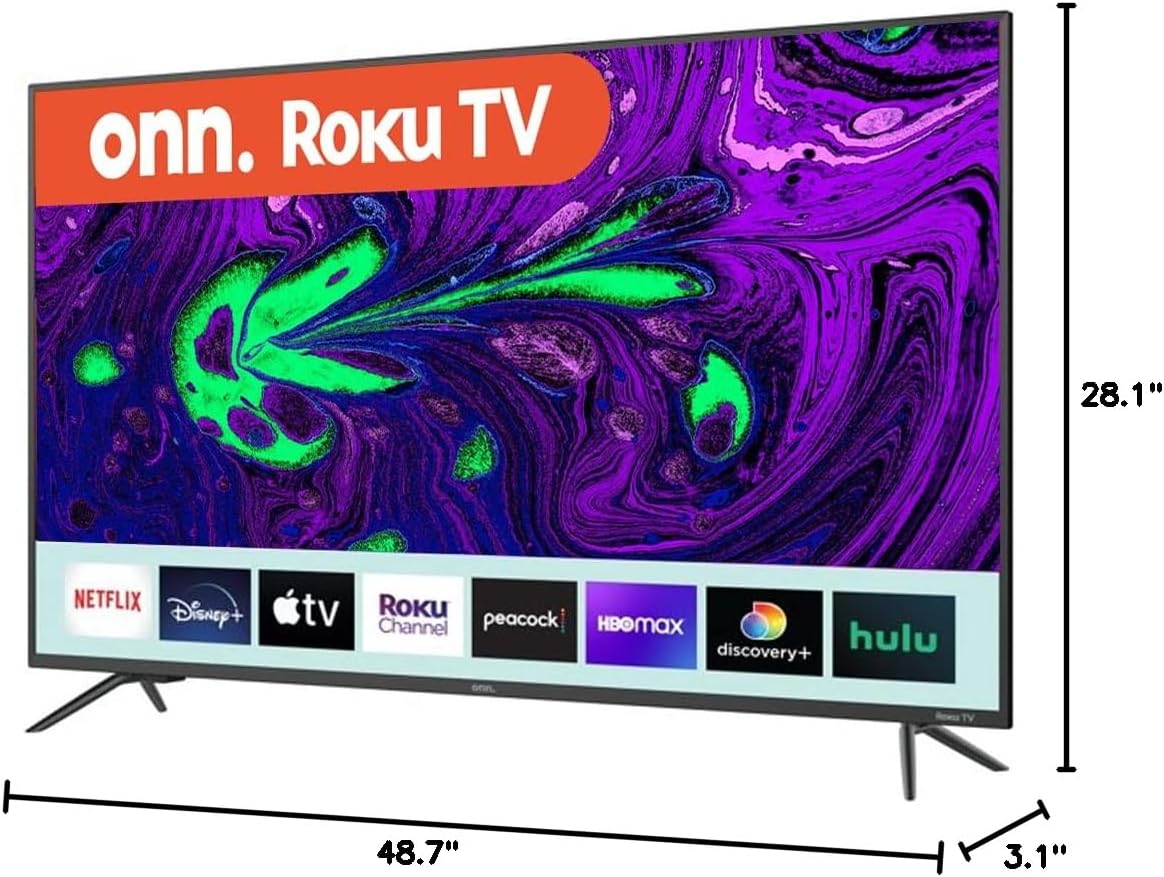
Image: Diagram showing the dimensions of the ONN 55-Inch 4K Smart TV, including width (48.7 inches), height (28.1 inches), and depth (3.1 inches). This is crucial for planning installation space or selecting a compatible wall mount.
3. Nyambungkeun périferal
Connect your external devices (e.g., cable box, Blu-ray player, gaming console) to the appropriate ports on the back or side of the TV. Refer to the 'Connections' section for port details.
4. Ngahurungkeun sareng Setup Awal
- Colokkeun kabel listrik kana TV teras kana stop kontak témbok.
- Pencét tombol daya dina kadali jauh atawa dina TV sorangan.
- Follow the on-screen instructions to select your language, connect to your Wi-Fi network, and complete the initial setup process. This includes channel scanning (if using an antenna) and linking your smart TV account.
Ngoperasikeun TV Anjeun
Kadali dasar
- kakuatan: Press the power button on the remote or TV to turn the TV on or off.
- Volume: Anggo tombol 'Volume Naék' sareng 'Volume Turun' dina remot.
- Saluran: Anggo tombol 'Channel Up' sareng 'Channel Down' pikeun siaran TV.
- Input: Press the 'Input' button to switch between connected devices (HDMI 1, HDMI 2, USB, etc.).
Fitur TV Smart
Your ONN Smart TV provides instant access to a selection of apps from top streaming services. Navigate through the smart TV interface using your remote control. You can customize your home screen by adding or removing apps.
Kasaluyuan Asistén Sora
This TV is compatible with Alexa and Google Assistant. Once configured, you can use voice commands to control various TV functions such as power, volume, channel changes, and app launching. Refer to the respective voice assistant's setup guide for integration instructions.
Mobile App Control
A mobile app is available for controlling your ONN Smart TV. This app can be used as an alternative remote control, offering features like channel browsing and voice control directly from your smartphone.
Sambungan
The ONN 55-Inch Smart TV offers a variety of connection ports for your entertainment needs:

Gambar: Tukangeun view of the ONN 55-Inch 4K Smart TV, highlighting the arrangement of various input and output ports. This image helps users identify where to connect their external devices.
| Palabuhan Tipe | kuantitas | Katerangan |
|---|---|---|
| HDMI | 3 | Connect high-definition devices like Blu-ray players, game consoles, or cable boxes. |
| USB | 1 | Sambungkeun alat panyimpenan USB pikeun playback media. |
| Komposit (AV) | 1 | Connect older devices using RCA cables (red, white, yellow). |
| Optical (Digital Audio Out) | 1 | Sambungkeun ka soundbar atanapi sistem home theater kanggo audio digital. |
| Coaxial/Cable (RF) | 1 | Sambungkeun anteneu atawa feed TV kabel. |
| LAN (Ethernet) | 1 | Connect to a wired network for internet access. |
| Headphone | 1 | Sambungkeun headphone pikeun ngupingkeun swasta. |
Pangropéa
Ngabersihkeun TV
- Sok cabut TV samemeh beberesih.
- Anggo lawon anu garing sareng lemes pikeun ngusap layar sareng kabinet.
- Pikeun tanda pengkuh, enteng dampen lawon jeung cai atawa hampang, non-abrasive cleaner layar. Ulah nyemprot cleaner langsung kana layar.
- Hindarkeun nganggo pembersih abrasive, lilin, atanapi pangleyur sabab tiasa ngaruksak finish TV.
Software Apdet
Your Smart TV may receive periodic software updates to improve performance and add new features. Ensure your TV is connected to the internet to receive these updates automatically. You can also manually check for updates through the TV's settings menu.
Pamérésan masalah
Upami anjeun ngalaman masalah sareng TV anjeun, tingal masalah sareng solusi umum ieu:
| Masalah | Solusi anu mungkin |
|---|---|
| Taya kakuatan | Pariksa naha kabel listrik parantos dipasang pageuh kana TV sareng stop kontak. Uji stop kontakna nganggo alat anu sanés. |
| Henteu aya gambar, tapi aya sora | Ensure the correct input source is selected. Check all cable connections to external devices. |
| Henteu aya sora, tapi aya gambar | Check the volume level and mute settings. Verify audio cable connections if using external speakers. |
| Kadali jauh teu jalan | Ganti batré dina rémot. Pastikeun teu aya halangan antara jauh sareng sénsor IR TV. |
| Teu bisa nyambung ka Wi-Fi | Pariksa sandi Wi-Fi anjeun. Balikan deui router anjeun sareng TV. Pastikeun TV aya dina jangkauan sinyal Wi-Fi anjeun. |
| Smart features are slow or unresponsive | Check your internet connection speed. Try restarting the TV. Clear app caches if available in settings. |
spésifikasi
Key technical specifications for the ONN 55-Inch Series 1 Class 4K Smart TV:
| Fitur | Spésifikasi |
|---|---|
| Nomer modél | ONN551E018 |
| Ukuran layar | 55 Inci (140 cm katempo diagonal) |
| Téknologi tampilan | LED |
| Resolusi | 4K (2160p) |
| Refresh Laju | 60 Hz |
| Rasio Aspék | 16:9 |
| Konektipitas | 3 HDMI, 1 USB, 1 Composite, 1 Optical, 1 Coaxial/Cable, 1 LAN, 1 Headphone, Wi-Fi |
| Fitur pinter | Smart Home Ready - Works with Apple Home, Amazon Alexa, and Google Home |
| Diménsi Produk (W x D x H) | 54 x 6 x 33 inches (approximate, with stands) |
| Item Beurat | 33.2 pon |
| Warna | Hideung |
| Voltage | 1.1E + 2 Volt (AC) |
Émbaran jaminan
This ONN television is covered by a limited warranty. For specific details regarding warranty coverage, duration, and terms, please refer to the warranty card included with your product or visit the official ONN support websitus. Simpen bukti pameseran anjeun pikeun klaim garansi.
Ngarojong
If you require further assistance or have questions not covered in this manual, please contact ONN customer support. Support contact information can typically be found on the manufacturer's websitus atanapi dina bungkusan produk.
For online resources, visit the official ONN support page.


