Bubuka
Thank you for choosing the Joysico Stereo-to-Mono Single Earbud Headset. This wired earphone is designed for comfort and convenience, allowing you to enjoy audio while maintaining awareness of your surroundings. It features an in-line microphone for clear calls and integrated controls for media management. This manual provides detailed instructions for setup, operation, maintenance, and troubleshooting to ensure optimal performance of your device.
Naon dina Box
- 1 x Joysico Stereo-to-Mono Single Earbud (Right Ear Only)
- 1 x Memory Foam Ear Cushion
- 3 x Silicone Ear Cushions (S, M, L)
- 1 x Pelindung Mawa Case
- 1 x Shirt Clip
- 1 x Manual Pamaké (dokumén ieu)

Image: The Joysico Stereo-to-Mono Single Earbud, showcasing the earbud, in-line controls, 3.5mm jack, and the included protective carrying case.
Produk Leuwihview Video
Video: Hiji leuwihview of the Joysico YS3 Single Earbud Headphone, highlighting its key features and design.
Guide Setup
Follow these steps to set up your Joysico earbud for comfortable and effective use.
1. Choosing the Right Ear Tip
The earbud comes with three sizes of silicone ear tips (Small, Medium, Large) and one memory foam ear cushion. Select the tip that provides the most comfortable and secure fit for your ear canal. A good seal is essential for optimal sound quality.

Image: Illustration showing the three sizes of silicone ear tips (S, M, L) and a memory foam ear cushion included with the earbud, designed for long-term comfort.
2. Wearing the Earbud
This earbud is designed for the right ear only and features an over-ear hook design for a secure fit. Gently place the earbud into your right ear canal and loop the ear hook over the top of your ear. Adjust until it feels snug and comfortable. The wrap-around design helps the earbud stay in place during movement, making it suitable for sports or active use.

Image: A person wearing the Joysico earbud, demonstrating how the earhook design keeps the earbud securely in place during activities like running or workouts.
Parentah Operasi
Learn how to connect your earbud and utilize its in-line controls.
1. Nyambungkeun ka Alat Anjeun
The Joysico earbud connects via a standard 3.5mm audio jack. Simply insert the 3.5mm plug into the audio port of your compatible device. This earbud converts stereo audio into a single mono output, allowing you to hear both left and right channels in one ear.

Image: A visual representation of the earbud's stereo-to-mono conversion feature, enabling full audio experience in a single earpiece, beneficial for individuals with single-sided hearing.
2. Using In-Line Controls
The earbud features an in-line remote with a microphone and control buttons for easy access to various functions without needing to reach for your device.
- Volume Up: Pencét tombol '+'.
- Volume Turun: Pencét tombol '-'.
- Puter / Reureuh: Pencét tombol tengah sakali.
- Luncat ka Lagu Salajengna: Click the center button twice.
- Skip to Previous Track: Click the center button three times.
- Ngajawab / mungkas Telepon: Click the center button once during a call.
- Aktipkeun Asisten Sora: Long press the center button.
- Mikropon: The built-in microphone allows for clear hands-free calls, blocking out background noise.

Image: Detailed diagram illustrating the functions of the in-line remote control buttons, including volume adjustment, track control, call management, and voice assistant activation.
Pangropéa sareng Perawatan
Proper care will extend the lifespan of your Joysico earbud.
- beberesih: Gently wipe the earbud and ear tips with a soft, dry cloth. For ear tips, you may use a slightly damp cloth with mild soap, then dry thoroughly before reattaching. Do not submerge the earbud in water.
- Panyimpenan: When not in use, store the earbud in the provided protective carrying case to prevent tangling and damage.
- Perawatan kabel: The earbud features a tangle-free cord. Avoid excessive pulling or sharp bends to prevent internal wire damage. Use the included shirt clip to secure the cable and reduce strain.
- tahan kesang: The earbud is designed with sweatproof construction, making it suitable for workouts. However, it is henteu tahan cai; avoid exposure to heavy rain or submersion.
Pamérésan masalah
If you encounter issues with your earbud, refer to the following common problems and solutions.
| Masalah | Mungkin Cukang lantaranana | Solusi |
|---|---|---|
| Teu aya sora atanapi volume handap |
|
|
| Mikropon teu jalan |
|
|
| Kadali teu ngabales |
|
|
Spésifikasi produk
| Fitur | Rincian |
|---|---|
| merek | Joysico |
| Ngaran modél | YS2 BLUE |
| Téhnologi konektipitas | Dikabel |
| Headphone Jack | 3.5 mm Jack |
| Panempatan Ceuli | In Ear (Right Ear Only) |
| Faktor Bentuk | Dina Ceuli kalayan Pangait Di Luhur Ceuli |
| Tipe Kontrol | Tombol Control |
| Fitur kabel | Gratis kusut |
| Item Beurat | 40 Gram (1.41 ons) |
| Dimensi produk | 3.74 x 3.74 x 1.97 inci |
| Tingkat Résistansi Cai | Not Water Resistant (Sweatproof) |
| Rentang Frékuénsi | 20 Hz - 20,000 Hz |
| Bahan | palastik |
| Warna | Biru |
Kasaluyuan
The Joysico Stereo-to-Mono Single Earbud is widely compatible with devices featuring a 3.5mm audio jack.
- Smartphone: Compatible with iPhone (6s & previous versions), Android phones (e.g., Samsung), and other cell phones with a 3.5mm audio jack. (Note: iPhone 7 and above require a Lightning adapter, not included).
- Tablets & Laptops: Works with iPad, tablets, Macbook, and other laptops/PCs.
- Media Players: Compatible with iPod, MP3, and MP4 players.
- Konsol Kaulinan: Connects to PS4, PS5, and Nintendo Switch.
- Alat séjén: Also compatible with Kindle, radio, and other devices with a 3.5mm audio output.

Image: A diagram illustrating the universal compatibility of the earbud with various devices that have a 3.5mm audio jack, including smartphones, tablets, laptops, and gaming consoles.
Kasalametan jeung Panungtun Pamakéan
The single-ear design of this earbud offers a safety advantage dina lingkungan nu tangtu.
- Kasadaran Lingkungan: By keeping one ear free, you can remain aware of your surroundings, which is crucial for activities such as driving, cycling, running near traffic, or walking in busy areas.
- nyetir: This earbud is a safer option for phone calls while driving, as it allows you to hear ambient sounds and traffic.
- Tingkat volume: To prevent hearing damage, avoid listening at excessively high volumes for prolonged periods.
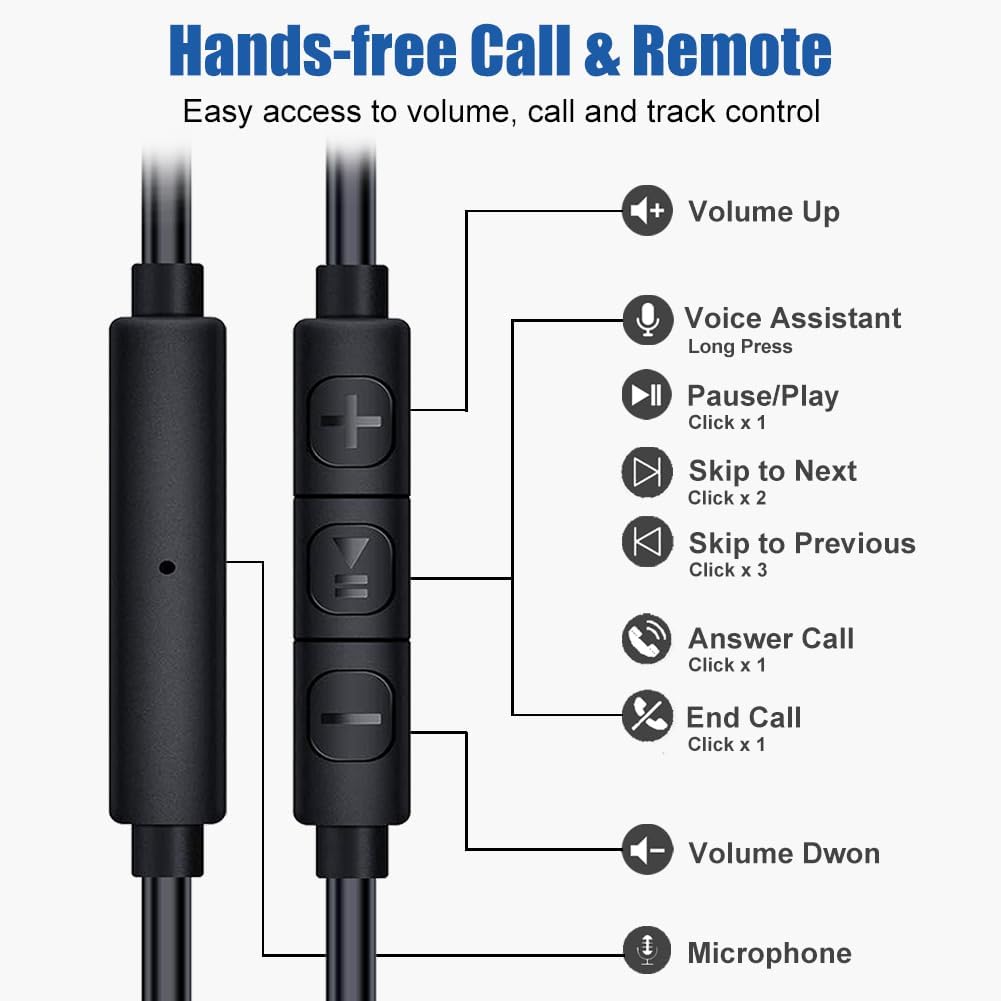
Image: A man cycling while wearing the single earbud, highlighting the benefit of having one ear open for increased safety and awareness of surroundings during outdoor activities or driving.
Garansi sareng Rojongan
Joysico stands behind the quality of its products.
- Garansi: Produk ieu hadir kalawan a 1-Taun Garansi ti tanggal beuli. Punten tahan bukti pameseran anjeun pikeun klaim garansi.
- Rojongan: For any questions, technical assistance, or warranty claims, please contact Joysico customer support through the retailer's platform or the official Joysico websitus.

Image: A visual representation of the 1-Year Warranty badge, alongside the earbud, cord, and various ear tips, indicating product quality and support.


