1. Bubuka
Hatur nuhun pikeun meuliasing the Aspen 40-inch Washable Tower Fan. This manual provides important information regarding the safe operation, installation, maintenance, and troubleshooting of your new fan. Please read this manual thoroughly before use and retain it for future reference.
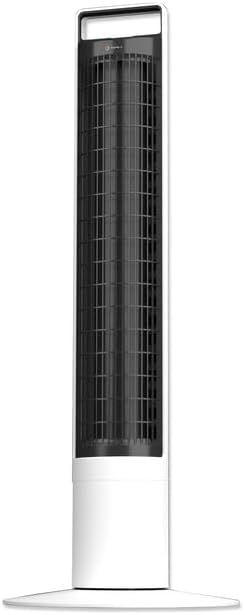
Gambar: Hareupeun view of the Aspen 40-inch Washable Tower Fan.
2. Émbaran Kasalametan
Salawasna turutan pancegahan kaamanan dasar nalika nganggo alat-alat listrik pikeun ngirangan résiko kahuruan, kejutan listrik, sareng tatu pikeun jalma.
- Entong nganggo kipas nganggo kabel atanapi colokan anu rusak.
- Ulah ngajalankeun ari handapeun karpét. Ulah nutupan ari ku karpet lémparan, runners, atawa panutup sarupa. Atur tali jauh ti wewengkon lalulintas sarta dimana eta moal tripped leuwih.
- Salawasna cabut heula kipasna sateuacan mindahkeun, ngabersihkeun, atanapi ngalaksanakeun pangropéa.
- Do not immerse the main unit (base) in water or other liquids. Only the detachable tower is designed for washing.
- Ensure the fan is completely dry before reassembling and plugging in after cleaning.
- Kipas ieu kanggo dianggo di jero rohangan hungkul.
3. Eusi Paket
Pastikeun yén sadaya komponén aya dina bungkusan:
- Aspen 40-inch Tower Fan (Main Unit and Detachable Tower)
- Base Assembly (2 parts)
- Kadali Jauh (kalayan batré 1 CR2 kalebet)
- Manual pangguna (dokumén ieu)
4. Setélan
Turutan léngkah-léngkah ieu pikeun ngarakit sareng masang kipas menara anjeun:
- Majelis Dasar: Connect the two halves of the base assembly. Align the fan tower with the assembled base and twist clockwise to secure it. A screwdriver may be needed for initial base assembly.
- panempatan: Place the fan on a firm, level surface. Ensure there is adequate space around the fan for proper airflow and oscillation.
- Sambungan Daya: Colokkeun kabel listrik kana stop kontak listrik standar.

Image: Illustration of the fan base assembly process.
5. Parentah Operasi
Your Aspen Tower Fan can be operated using the control panel on top of the unit or the included magnetic RF remote control.
Panel Kontrol sareng Fungsi Jauh:

Image: Close-up of the fan's top control panel and the magnetic remote control, showing button functions.
- Hurungkeun/Pareuman: Pencét tombol kakuatan (⏻) pikeun ngahurungkeun atanapi mareuman kipas.
- Laju kipas: Cycle through 4 fan speeds (Low, Medium, High, Turbo) by pressing the fan speed button (⇋).
- Osilasi: Pencét tombol osilasi (↻) to activate or deactivate the 60-degree narrow-angle oscillation feature. This provides a consistent, focused breeze.

Image: Visual representation of the fan's 60-degree narrow-angle oscillation, showing airflow.
- Timer: Set the auto-off timer for up to 8 hours by pressing the timer button (◷). Each press adds an hour to the timer.
- Lampu wengi: Activate the 3-color LED nightlight by pressing the nightlight button (💡). Cycle through colors or turn off the light.

Image: The Aspen Tower Fan with its base illuminated by the built-in nightlight.
Fitur merenah:
- Mawa cecekelan: The integrated handle on top of the fan allows for easy transport.

Image: A hand holding the fan by its convenient top carry handle.
- Remot Magnetik: The remote control magnetically attaches to the top of the fan for convenient storage.
6. Pangropéa
The Aspen Tower Fan features an easy-wash design for convenient cleaning. Regular cleaning ensures optimal performance and extends the life of your fan.
Cleaning the Detachable Fan Tower:
- Cabut Jauh: First, remove the magnetic remote control from the top of the fan.
- Detach Tower: Twist the fan tower counter-clockwise from the base and gently pull it up to detach.
- nyeuseuh: The detached fan tower can be washed or rinsed with soap and water. You can soak it or spray it with a water nozzle.
- Garing lengkep: Allow the fan tower to dry completely before reassembling. Ensure no moisture remains inside.
- Pasang deui: Align the line on the fan tower with the unlock symbol on the base, then push down and twist clockwise to lock it into place. Reinsert the remote.

Image: A person rinsing the detached fan tower with a shower head in a bathtub.

Image: A visual sequence showing a dusty fan, the rinsing process, and a clean, fresh fan.
Video Pangajaran:
Video: Official Aspen video demonstrating how to clean the tower fan. This video shows the steps for detaching the tower, washing it, and reassembling it.
7. Cara ngungkulan
If you encounter issues with your Aspen Tower Fan, refer to the following common problems and solutions:
| Masalah | Mungkin Cukang lantaranana | Solusi |
|---|---|---|
| Kipas angin teu hurung. | No power, loose connection, remote battery low. | Check power cord connection. Ensure outlet is working. Replace remote battery (CR2). |
| Ngurangan aliran hawa. | Dust buildup in tower. | Clean the detachable fan tower as per Maintenance section. |
| Kipas nyieun sora anu teu biasa. | Obstruction, improper assembly. | Ensure no foreign objects are inside. Check if the tower is securely locked into the base. |
| Kadali jauh teu jalan. | Battery depleted, obstruction between remote and fan. | Replace the CR2 battery in the remote. Ensure no objects are blocking the signal path. |
If the problem persists after trying these solutions, please contact Aspen customer support.
8. Spésifikasi
| Fitur | Rincian |
|---|---|
| merek | Aspen |
| Ngaran modél | Aspen Tower Fan Black (ASTF-A40-BLK) |
| Dimensi produk | 12 "D x 12" W x 41" H |
| Item Beurat | 9.9 pon |
| Warna | Bodas |
| Sumber Daya | Kabel Listrik |
| Jumlah Tingkat Daya | 4 Laju |
| Métode kontrol | Jauh |
| Fitur husus | Lightweight, Oscillating, Detachable for Washing, 3-Color Nightlight, 4 Timers, Magnetic RF Remote |
| Tipe Kamar | Pangkeng, Ruang Tamu, Kantor Imah |
| Komponén Kaasup | Jauh |
| Pamakéan jero rohangan / outdoor | jero rohangan |
| Batré | 1 batré CR2 diperlukeun (kaasup) |
9. Garansi jeung Rojongan
Specific warranty details are not provided in this manual. For warranty information, product support, or to purchase replacement parts, please contact Aspen customer service.
You can visit the official Aspen store on Amazon for more information: Aspen Store


