1. Bubuka
The JYX 66PRO Karaoke Machine is a versatile PA system designed for various entertainment needs. It features 2 wireless microphones, vibrant RGB lighting, and comprehensive sound controls including treble and bass adjustments. This Bluetooth speaker supports live broadcasting, monitoring, and various sound effects, making it suitable for both adults and children.
Fitur konci:
- Spectacular Light Display: Captivating and vibrant light ring for an electrifying ambiance.
- Hiburan portabel: Lightweight design with a handle and shoulder strap for easy transport.
- Precise Sound Control: Sensitive microphones with background noise filtering, plus extra microphone input holes.
- Dipanjangkeun Playtime: Powerful 5200mAh battery provides up to 12 hours of use and recharges in 6 hours. Features a 5.25-inch subwoofer and 2-inch tweeter.
- Stereo Sound Bliss: TWS (True Wireless Stereo) capability to connect two 66Pro machines for immersive stereo sound. Supports AUX, TF, and USB audio inputs.
2. Eusi Paket
Mangga pastikeun sadaya barang aya nalika muka kotak:
- JYX 66PRO Karaoke Machine (Main Unit)
- 2 x Mikropon Nirkabel
- Tali taktak
- Kabel Ngecas (USB-C)
- Kabel Auxiliary
- Kadali jauh
- Manual pamaké

Image: The JYX 66PRO Karaoke Machine, two wireless microphones, and a remote control are displayed on a wooden table.
3. Setélan
3.1 Ngecas Awal
Before first use, fully charge the karaoke machine and both wireless microphones. Use the provided charging cable for the main unit. Microphones are typically charged by inserting them into designated slots on the main unit or via separate charging ports if available.
3.2 Powering on / Pareum
- Unit Utama: Locate the power button on the control panel and press and hold it to turn the unit on or off.
- Mikropon: Press and hold the power button on each wireless microphone to turn it on or off. The microphones will automatically attempt to pair with the main unit.
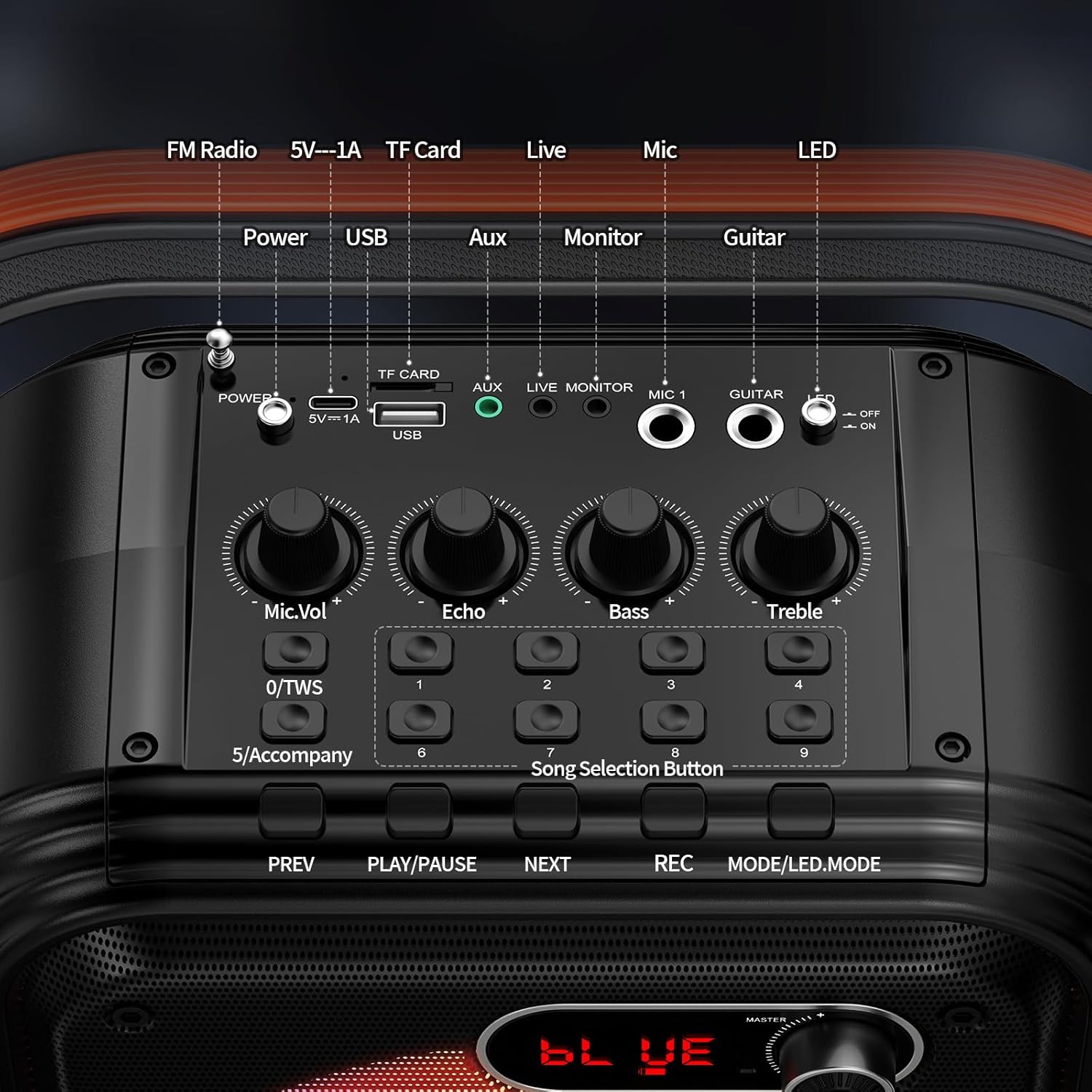
Image: A close-up of the JYX 66PRO's top control panel, highlighting the power button, USB, TF card, AUX, microphone inputs, and various control knobs for mic volume, echo, bass, and treble.
4. Parentah Operasi
4.1 Nyapasangkeun Bluetooth
- Turn on the JYX 66PRO Karaoke Machine. The display should show "BLUE" indicating Bluetooth mode.
- Activate Bluetooth on your smartphone, tablet, or other audio device.
- Milarian pikeun "JYX-66PRO" in the list of available Bluetooth devices and select it to pair.
- Once connected, you can stream music wirelessly from your device to the karaoke machine.
4.2 Pamakéan Mikropon
- kakuatan: Press and hold the power button on the microphone to turn it on/off.
- Volume: Use the '+' and '-' buttons on the microphone to adjust its individual volume.
- Echo/Effects: The main unit's control panel has an "Echo" knob to adjust the echo effect for the microphones.
- Vocal Cut/Accompaniment: Some models feature a "5/Accompany" button to remove vocals from a song, allowing you to sing along to the instrumental track.
4.3 Kontrol Sora
The main unit features dedicated knobs for fine-tuning your audio:
- Mic Vol: Adjusts the overall volume of the microphones.
- Gema: Controls the intensity of the echo effect on the vocals.
- Bass: Saluyukeun kaluaran audio frekuensi rendah.
- Treble: Saluyukeun kaluaran audio frekuensi luhur.
- Master Vol: Controls the overall output volume of the karaoke machine.
4.4 Modeu Lampu
The JYX 66PRO features a spectacular RGB light ring. Use the "O/LED" button on the control panel to cycle through different light modes or turn the lights off.
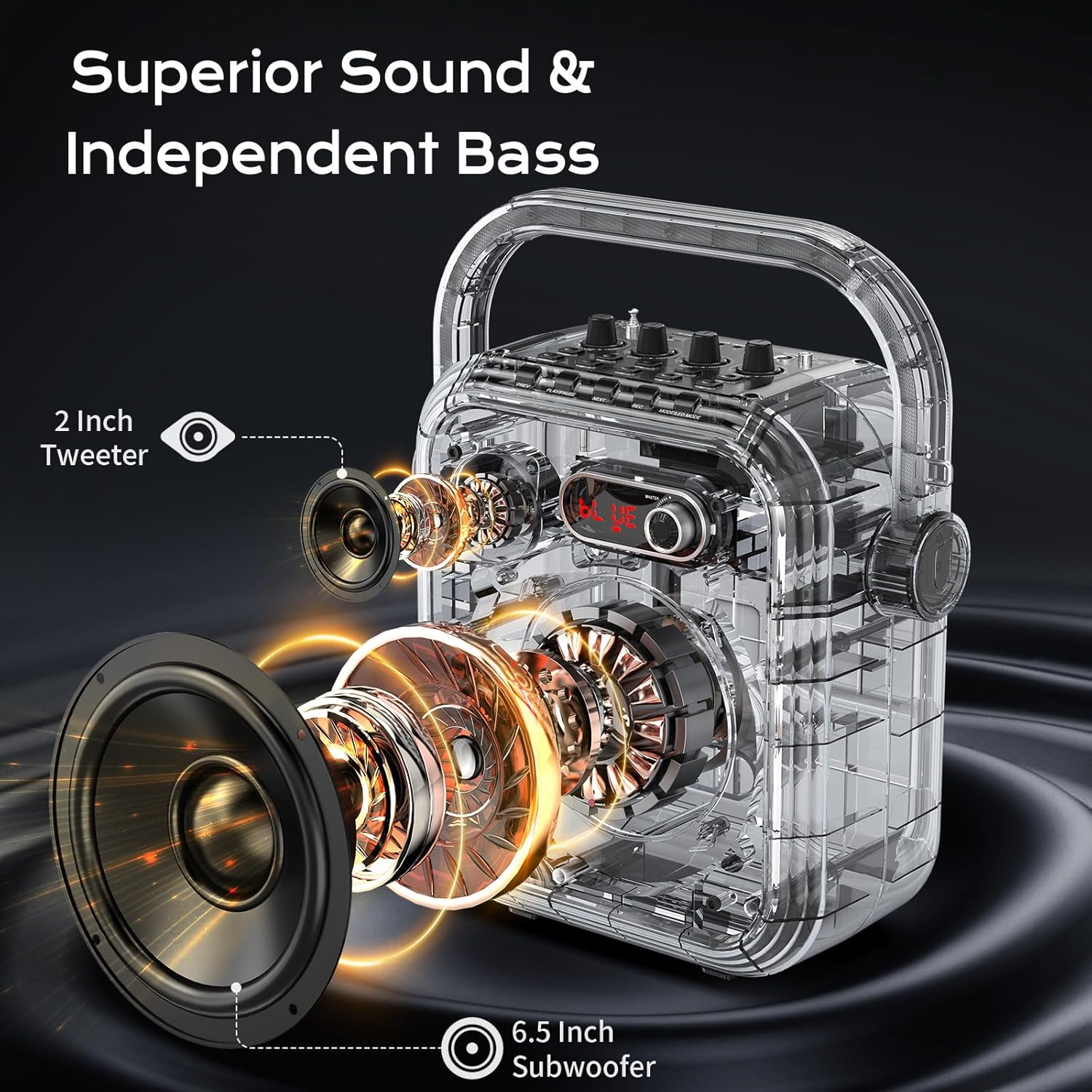
Image: The JYX 66PRO Karaoke Machine showcasing its vibrant, multi-colored RGB light display on the speaker grille.
4.5 Pilihan Konéktivitas Séjénna
- Kartu USB/TF: Selapkeun drive USB atanapi kartu TF kana slot masing-masing pikeun muterkeun audio files langsung.
- AUX In: Connect external audio devices using the provided auxiliary cable.
- Mic Dina: Additional 6.35mm input for wired microphones.
- Gitar Dina: Connect a guitar for live accompaniment.
- Live/Monitor: Dedicated ports for live broadcasting or monitoring your audio output.
5. Ngecas sareng Umur Batré
The JYX 66PRO is equipped with a powerful 5200mAh battery, offering up to 12 hours of continuous playback on a single charge. A full recharge takes approximately 6 hours.
- Connect the provided USB-C charging cable to the DC 5V port on the unit and to a suitable USB power adapter (not included).
- Ensure microphones are charged regularly.

Image: The JYX 66PRO Karaoke Machine with text overlays indicating its 12-hour playing time, 6-hour charging time, and 5200mAh battery capacity.
6. Portability
Designed for on-the-go entertainment, the 66PRO is lightweight and includes both a sturdy handle and a convenient shoulder strap. This allows for easy transport to any location, from friend's houses to outdoor events.
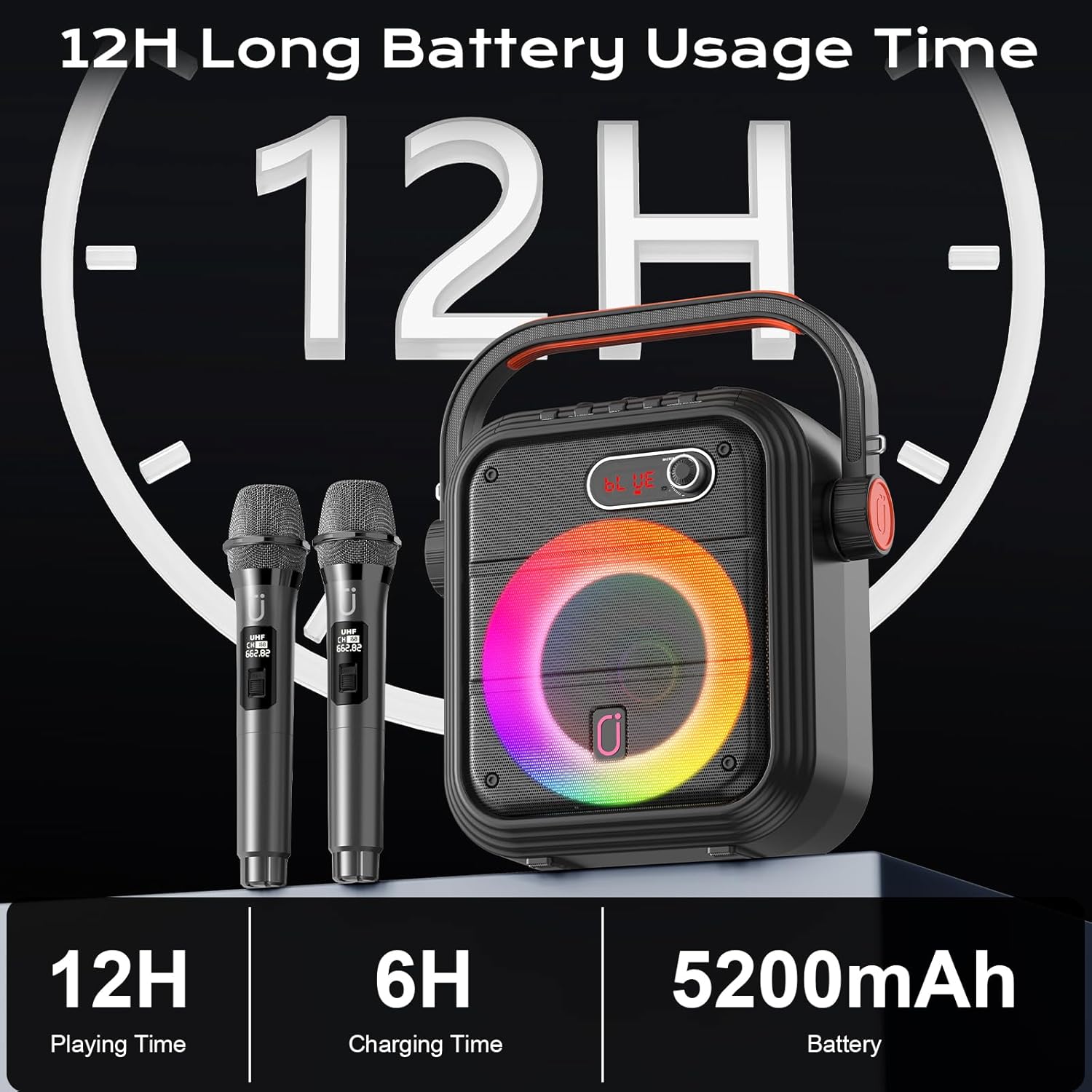
Image: A woman carrying the JYX 66PRO Karaoke Machine using its shoulder strap, demonstrating its portability.
7. Skenario pamakéan
The JYX 66PRO is versatile for various occasions:
- Karaoke Parties: Enjoy singing with friends and family.
- Live Broadcast/Monitoring: Use dedicated ports for live streaming or audio monitoring.
- Public Speaking/Meetings: Use as a PA system for clear announcements.
- Acara Luar: Its portability and long battery life make it ideal for picnics, beach trips, or outdoor gatherings.
Video: A seller-provided video demonstrating a karaoke machine's features and usage in various settings. While the video title mentions Ikarao, the content is relevant to general karaoke machine functionality and features like those found in the JYX 66PRO.
8. Pangropéa
- Jaga alat tetep bersih ku cara ngusap ku kaén anu lembut sareng garing.
- Ulah ngalaan unit ka suhu ekstrim, sinar panonpoé langsung, atawa Uap.
- Nyimpen dina tiis, tempat garing lamun teu dipaké.
- Ulah nyobian ngabongkar atawa ngalereskeun unit sorangan. Kontak rojongan customer pikeun pitulung.
9. Cara ngungkulan
- Henteu aya kakuatan: Pastikeun unitna tos dicas pinuh. Pariksa kabel ngecas sareng sumber dayana.
- Henteu aya sora: Check volume levels on both the karaoke machine and your connected device. Ensure microphones are powered on and paired.
- Mikropon Teu Gawé: Ensure microphones are charged and powered on. Re-pair if necessary. Check microphone volume.
- Pegatkeun sambungan Bluetooth: Ensure your device is within range (typically 10 meters) and there are no obstructions. Try re-pairing the device.
- Sora distort: Reduce volume levels on both the unit and connected device. Check for proper cable connections if using AUX.
10. Spésifikasi
| Modél | 66Pro |
| merek | JYX |
| Kaluaran Wattage | 60 Watt |
| Jumlah Saluran | 2 |
| Téhnologi konektipitas | AUX, Bluetooth, USB |
| Alat nu cocog | Guitar, Laptop, Smartphone, Television, iPhone |
| Bahan | Aluminium, Plastik |
| Item Beurat | 3.2 kg |
| Dimensi produk | 18.5 x 28.95 x 29.7 cm |
| UPC | 730756414607 |
11. Garansi jeung Rojongan
For warranty information and customer support, please refer to the warranty card included in your package or visit the official JYX website. Each item is verified by Transparency with a unique code for authenticity.
Pabrikan: JYX


