Bubuka
This manual provides comprehensive instructions for the installation, operation, and maintenance of your Natec Cabassu G2 Midi Tower PC Case. Please read this manual thoroughly before beginning installation to ensure proper setup and optimal performance.
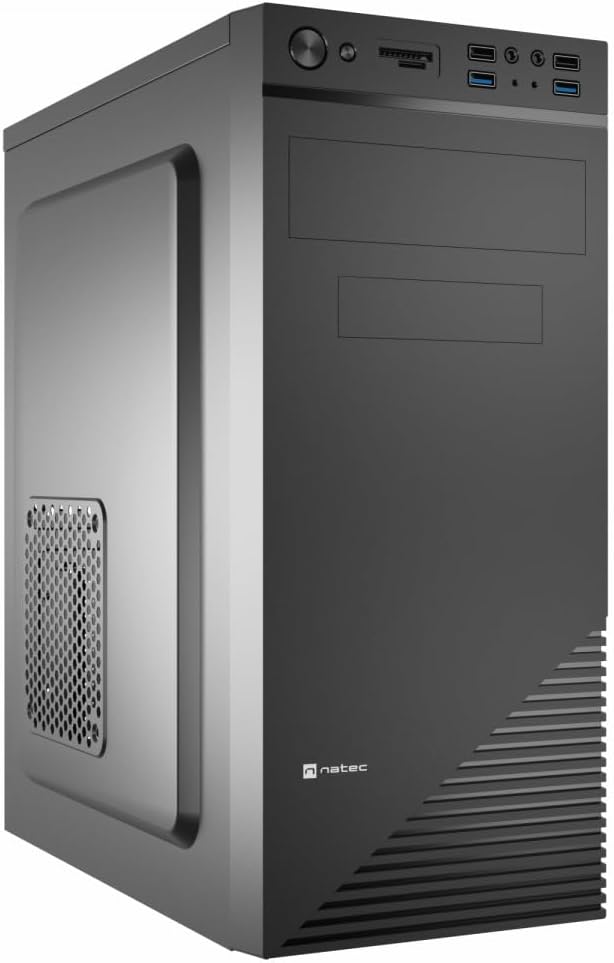
Figure 1: Natec Cabassu G2 Midi Tower PC Case. This image shows the front and left side of the black PC case, highlighting its sleek design and front panel layout.
Émbaran Kasalametan
- Salawasna pegatkeun sambungan catu daya ti stop kontak témbok saméméh masang atawa nyoplokkeun komponén nanaon.
- Handle components with care to prevent damage from static electricity.
- Jauhkeun wadahna tina cai, kalembaban, sareng suhu anu ekstrim.
- Pastikeun ventilasi ditangtoskeun pikeun nyegah overheating.
- Do not attempt to open the power supply unit.
Eusi pakét
Pastikeun yén sadaya item aya dina bungkusan:
- Natec Cabassu G2 Midi Tower PC Case
- Accessory kit (screws, standoffs, cable ties)
- Manual pangguna (dokumén ieu)
Setelan sareng Pamasangan Komponen
1. Nyiapkeun Kasus
- Tempatkeun wadahna dina permukaan anu datar sareng stabil.
- Remove the side panels by unscrewing the thumbscrews at the rear and sliding the panels backward.

Gambar 2: Interior view of the Natec Cabassu G2 case with the side panel removed, illustrating the internal layout for component installation.
2. Pamasangan motherboard
- Pasang tameng I/O kana bukaan pungkur wadahna.
- Align the motherboard with the pre-installed standoffs. The Cabassu G2 supports Mini ITX, Micro ATX, and ATX motherboards.
- Ngamankeun motherboard jeung screws disadiakeun.
3. Instalasi Power Supply
- The power supply mounts at the bottom of the case.
- Slide the power supply into its designated bay from the rear of the case.
- Secure it with screws from the rear.
4. Panyimpenan Girang Instalasi
- 2.5" Drives (SSDs/HDDs): The case features 3 x 2.5" drive bays. Mount drives using the provided screws in the designated locations.
- Drive 3.5" (HDD): The case also supports 3.5" drives.
5. Pamasangan Kartu ékspansi
- Remove the necessary expansion slot covers from the rear of the case (7 expansion slots available).
- Selapkeun kartu grafis anjeun atanapi kartu ékspansi anu sanés kana slot PCIe motherboard.
- Ngamankeun kartu kalawan screws.

Gambar 3: Tukangeun view of the Natec Cabassu G2 case, detailing the I/O shield cutout, power supply opening, and seven expansion slots.
6. Manajemén kabel
Route cables behind the motherboard tray where possible to improve airflow and aesthetics. Use the included cable ties to secure bundles.
7. Nyambungkeun Kabel Panel Hareup
Connect the front panel cables (USB 2.0, USB 3.0, audio, power switch, reset switch, HDD LED, power LED) to the corresponding headers on your motherboard. Refer to your motherboard manual for exact pin assignments.

Figure 4: Close-up of the Natec Cabassu G2 front panel, showing 2x USB 2.0 ports, 2x USB 3.0 ports, audio jacks, and power/reset buttons.
Parentah Operasi
Ngahurungkeun/Pareuman
- Daya Hurung: Pencét tombol daya anu aya dina panel hareup.
- Pareum listrik: Initiate shutdown through your operating system. For a forced shutdown, press and hold the power button for several seconds.
- Reset: Press the reset button on the front panel to restart the system.
Using Front Panel Ports
Panel hareup nyadiakeun aksés anu merenah ka:
- 2 x USB 2.0 palabuhan
- 2 x USB 3.0 palabuhan
- Audio input (microphone) and output (headphone) jacks
Connect compatible devices to these ports as needed.
Pangropéa
beberesih
- Bersihkeun bagian luar wadah sacara rutin nganggo sabun anu lemesamp lawon. Ngahindarkeun cleaners abrasive.
- Use compressed air to remove dust from fan filters and internal components. Ensure the system is powered off and unplugged before cleaning.
Saringan lebu
The case may include removable dust filters. Periodically remove and clean these filters to maintain optimal airflow and cooling performance.
Pamérésan masalah
| Masalah | Mungkin Cukang lantaranana | Solusi |
|---|---|---|
| Sistem henteu hurung. | Power cables not connected properly. Faulty power supply. | Check all power connections (motherboard, CPU, GPU, power supply to wall). Ensure power supply switch is ON. |
| Port USB panel hareup teu jalan. | Front panel USB cables not connected to motherboard. | Verify that the USB 2.0 and USB 3.0 headers are correctly connected to the motherboard. |
| Excessive fan noise. | Dust accumulation. Loose fan. | Clean dust from fans and filters. Ensure all fans are securely mounted. |
spésifikasi
| Fitur | Rincian |
|---|---|
| Ngaran modél | Cabassu G2 |
| Nomer Modél Item | S5624687 |
| Jenis Kasus | Midi Tower |
| Ukuran (L x W x H) | 19.69 x 19.69 x 11.02 inci (50 x 50 x 28 cm) |
| Beurat | 7.04 pon (3.19 kg) |
| Bahan | Acrylonitrile Butadiene Styrene (ABS), Alloy Steel |
| Motherboard kasaluyuan | Mini ITX, mikro ATX, ATX |
| Tempat Drive 2.5" | 3 |
| slot ékspansi | 7 |
| Port I / O payun | 2 x USB 2.0, 2 x USB 3.0, Audio Asup/Kaluar |
| Rojongan kipas | 120mm (rear, pre-installed if applicable) |
| Métode Cooling | Hawa |
| Pamasangan catu daya | Gunung handap |
Émbaran jaminan
Natec products are covered by a manufacturer's warranty. Specific warranty terms and conditions may vary by region and retailer. Please refer to the warranty card included with your product or visit the official Natec websitus kanggo inpormasi lengkep ngeunaan panutup garansi sareng klaim.
Ngarojong
For technical assistance, troubleshooting, or further inquiries, please visit the official Natec support websitus atanapi ngahubungi departemén layanan palangganna. Inpormasi kontak biasana tiasa dipendakan dina bungkus produk atanapi mérek resmi websitus.
Websitus: www.natec-zone.com (Kelample link, link sabenerna bisa rupa-rupa)


