1. Bubuka
This manual provides comprehensive instructions for the Maxcom Fit FW55 Aurum Pro Smartwatch. It covers essential information regarding product setup, operation, maintenance, and troubleshooting to ensure optimal performance and user experience. Please read this manual carefully before using your device.
2. Eusi Paket
Please verify that all items listed below are present in your product package:
- Maxcom Fit FW55 Aurum Pro Smartwatch
- Kabel Ngecas
- Manual pangguna (dokumén ieu)
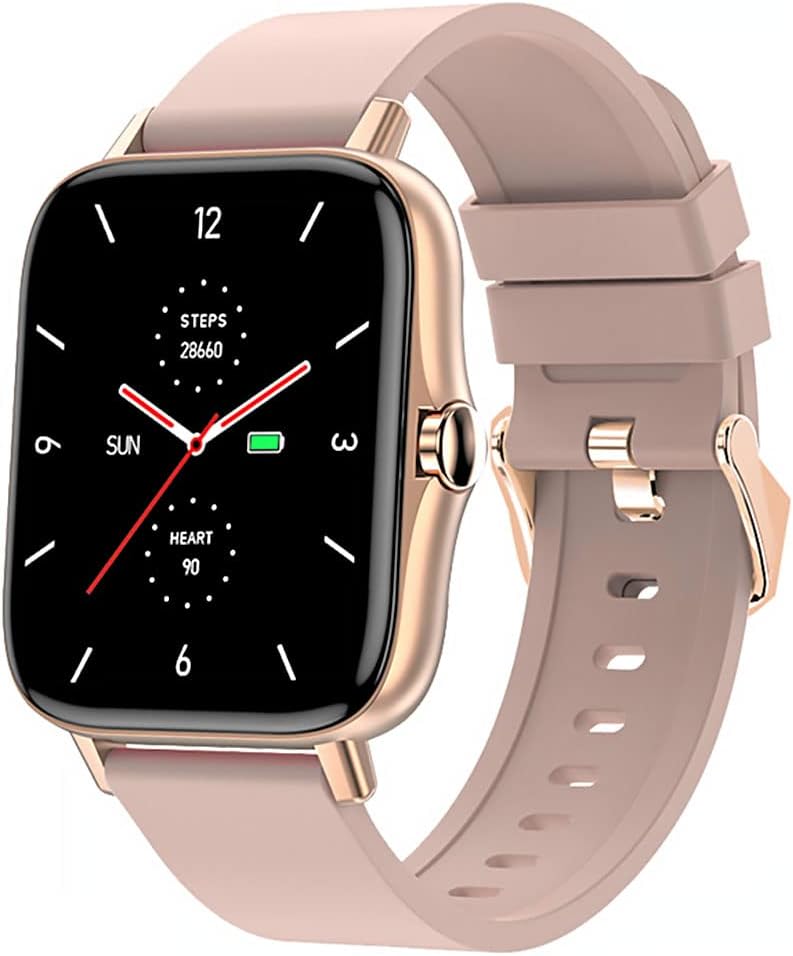
Image 1: Maxcom Fit FW55 Aurum Pro Smartwatch with a pink silicone band. The watch face displays steps, heart rate, and time.
3. Setélan
3.1. Ngecas Smartwatch
Before initial use, fully charge your Maxcom Fit FW55 Aurum Pro Smartwatch. Connect the provided charging cable to the charging port on the back of the smartwatch and plug the other end into a standard USB power adapter (not included) or a computer's USB port. The watch display will indicate charging status.
- Pastikeun pin ngecas bersih sareng sajajar sareng kontak ngecas jam tangan.
- Ngeusi batre pinuh biasana nyandak kirang langkung 2 jam.
3.2. Masangkeun jeung smartphone Anjeun
To unlock the full functionality of your smartwatch, you need to pair it with your smartphone via Bluetooth.
- Unduh Aplikasi: Milarian pikeun the official Maxcom Fit application in your smartphone's app store (iOS App Store or Google Play Store) and install it.
- Aktipkeun Bluetooth: Pastikeun Bluetooth diaktipkeun dina smartphone Anjeun.
- Buka Aplikasi: Launch the Maxcom Fit application on your smartphone.
- Tambahkeun Alat: Follow the in-app instructions to add a new device. Select "FW55 Aurum Pro" from the list of available devices.
- Konfirmasi pasangan: A pairing request may appear on both your smartphone and the smartwatch. Confirm the pairing on both devices.
Once successfully paired, the smartwatch will synchronize data with your phone, and you can customize settings through the app.
4. Ngoperasikeun Smartwatch
4.1. Daya Hurung / Pareum
- Daya Hurung: Press and hold the side button for a few seconds until the Maxcom logo appears.
- Pareum listrik: From the watch face, swipe down to access quick settings, or navigate to the 'Settings' menu. Select 'Power Off' and confirm. Alternatively, press and hold the side button and select 'Power Off'.
4.2. Napigasi Dasar
- Layar cabak: The FW55 Aurum Pro features a 1.7-inch touch screen for intuitive interaction.
- Gesek ka luhur/handap: Gulung ka bewara, menu, atanapi setelan gancang.
- Gesek Kénca/Katuhu: Access different widgets or main functions (e.g., heart rate, activity data).
- Ketok: Pilih hiji item atawa mastikeun hiji aksi.
- Tombol samping: Press to return to the watch face or wake the screen. A long press may access power options.
4.3. Fitur konci
The Maxcom Fit FW55 Aurum Pro Smartwatch offers a range of features to support your daily activities and health monitoring:
- Nyukcruk kagiatan: Ngawaskeun léngkah anu dicandak, jarak anu ditempuh, sareng kalori anu kaduruk.
- Ngawaskeun Laju haté: Nyadiakeun data denyut jantung real-time.
- Pangimeutan Saré: Ngalacak pola sareng kualitas bobo.
- Bewara: Nampi bewara pikeun telepon, pesen, sareng bewara aplikasi tina telepon pinter anjeun anu dipasangkeun.
- GPS: Integrated GPS for accurate outdoor activity tracking.
- Beungeut arloji anu tiasa disaluyukeun: Personalize your watch face through the companion app.

Image 2: Maxcom Fit FW55 Aurum Pro Smartwatch featuring a gold metal mesh band. The watch face displays digital time, steps, and heart rate.
5. Pangropéa
Proper care and maintenance will extend the lifespan of your smartwatch.
- beberesih: Regularly wipe the watch screen and body with a soft, dry, lint-free cloth. For stubborn dirt, slightly dampen lawon jeung cai. Ulah make bahan kimia kasar atawa bahan abrasive.
- Perawatan Tali: Clean the watch strap according to its material. Silicone straps can be washed with mild soap and water. Metal straps may require specific cleaning agents.
- Hindarkeun Kaayaan Ekstrim: Do not expose the smartwatch to extreme temperatures, direct sunlight for prolonged periods, or corrosive liquids.
- Tahan cai: While the watch may have some water resistance, it is not suitable for diving or high-pressure water activities. Refer to the product specifications for detailed water resistance ratings.
6. Cara ngungkulan
If you encounter issues with your Maxcom Fit FW55 Aurum Pro Smartwatch, try the following solutions:
- Lalajo teu hurung: Pastikeun arloji dicas pinuh. Sambungkeun ka carjer sahenteuna 30 menit.
- Teu tiasa dipasangkeun sareng smartphone:
- Pastikeun Bluetooth diaktipkeun dina telepon anjeun sareng jam tangan.
- Pastikeun arlojina aya dina jangkauan Bluetooth telepon anjeun.
- Balikan deui telepon anjeun sareng jam tangan pinter.
- Coba pisahkeun sareng pasangkeun deui alat liwat aplikasi.
- Data teu akurat (léngkah, denyut jantung):
- Pastikeun jam tangan dianggo pageuh dina pigeulang anjeun, sakitar hiji ramo lébarna di luhur tulang pigeulang anjeun.
- Ngabersihan sénsor dina tonggong arloji.
- Apdet aplikasi pendamping kana vérsi panganyarna.
- Bewara teu nampi:
- Check notification settings in the Maxcom Fit app.
- Pastikeun idin bewara telepon anjeun parantos dipasihkeun ka aplikasi éta.
- Verify that the watch is successfully paired and connected to your phone.
If problems persist, consult the Maxcom support websitus atanapi ngahubungan layanan palanggan.
7. Spésifikasi
Below are the technical specifications for the Maxcom Fit FW55 Aurum Pro Smartwatch:
| Fitur | Rincian |
|---|---|
| merek | Maxcom |
| Nomer modél | FW55 Aurum Pro |
| Ukuran layar | 1.7 inci |
| Téhnologi konektipitas | Bluetooth |
| Standar Komunikasi Nirkabel | Bluetooth |
| Alat nu cocog | Smartphone |
| GPS | GPS terpadu |
| Wangun | pasagi |
| Sasaran Audiens | Adult Unisex |
| Komponén Kaasup | Charger |

Gambar 3: Hareupeun view of the Maxcom Fit FW55 Aurum Pro Smartwatch with a pink silicone band, highlighting the square display.
8. Garansi jeung Rojongan
For warranty information and customer support, please refer to the documentation included with your purchase or visit the official Maxcom websitus. Simpen bukti pameseran anjeun pikeun klaim garansi.
For technical assistance or further inquiries, please contact Maxcom customer service through their official channels.


