Bubuka
Thank you for choosing the Faber 34L Double Glazed 1600W Oven Toaster Grill (OTG). This manual provides essential information for the safe and efficient operation, maintenance, and troubleshooting of your appliance. Please read these instructions thoroughly before first use and retain them for future reference.

Gambar: Hareupeun view of the Faber 34L OTG with its control panel and glass door.
Parentah Kasalametan penting
Salawasna turutan pancegahan kaamanan dasar nalika nganggo alat-alat listrik pikeun ngirangan résiko kahuruan, kejutan listrik, sareng tatu pikeun jalma.
- Read all instructions before operating the OTG.
- Ulah noél surfaces panas. Paké handles atanapi knobs. Salawasna nganggo sarung tangan oven atanapi sarung tangan nalika nanganan bahan panas.
- To protect against electrical shock, do not immerse cord, plug, or any non-removable parts of the oven in water or other liquid.
- Pengawasan anu ketat diperyogikeun nalika alat naon waé dianggo ku atanapi caket barudak.
- Cabut colokan tina stop kontak nalika henteu dianggo sareng sateuacan beberesih. Ngidinan pikeun niiskeun sateuacan dipasang atanapi nyabut bagian.
- Entong ngoperasikeun alat naon waé nganggo kabel atanapi colokan anu ruksak, atanapi saatos alatna teu tiasa dianggo atanapi parantos ruksak dina cara naon waé.
- Ulah make di luar.
- Entong ngantepkeun kabel ngagantung dina ujung méja atanapi konter, atanapi nyabak permukaan anu panas.
- Ulah nempatkeun dina atawa deukeut gas panas atawa burner listrik, atawa dina oven dipanaskeun.
- Awas pisan kedah dianggo nalika mindahkeun alat anu ngandung minyak panas atanapi cairan panas sanés.
- Entong nganggo alat pikeun tujuan anu sanés.
- Pangan anu ageung atanapi perkakas logam teu kedah diselapkeun dina oven pemanggang roti sabab tiasa nyababkeun seuneu atanapi résiko kejutan listrik.
- Seuneu bisa lumangsung lamun oven katutupan atawa noel kana bahan kaduruk, kaasup curtains, draperies, tembok, jeung sajabana, nalika operasi.
- Ulah nempatkeun salah sahiji bahan handap dina oven: kertas, kardus, plastik, atawa bahan sarupa.
- Ulah nyimpen bahan naon wae, lian ti asesoris dianjurkeun produsén urang, dina oven ieu lamun teu dipake.
- Always wear protective, heat-resistant gloves when inserting or removing items from the hot oven.
- Mastikeun ventilasi ditangtoskeun sabudeureun alat salila operasi.
Komponén produk jeung Asesoris
Your Faber OTG comes with the following components and accessories:
- Faber 34L OTG Unit
- Enamelled Bake Tray
- Baki grill
- Dulang Crumb
- Pizza Plate (9-inch)
- Rotisserie Rod
- Rotisserie Handle (Tongs)
- SS Wire Tray
- Silicon Heat Guard Glove

Image: All included accessories for the Faber 34L OTG, laid out for clear identification.
Setup jeung pamakéan munggaran
Ngabongkar bungkusan
- Taliti miceun OTG sareng sadaya asesoris tina bungkusan.
- Remove any protective films, stickers, or packaging materials from the appliance and accessories.
- Pariksa alat pikeun karusakan naon waé. Ulah make lamun ruksak.
panempatan
- Simpen OTG dina permukaan anu stabil, datar, sareng tahan panas.
- Ensure there is adequate space (at least 10-15 cm) around all sides of the oven for proper ventilation. Do not place it directly against a wall or under cabinets.
- Keep the appliance away from flammable materials like curtains, tablecloths, and paper.
Ngabersihan Awal
- Sateuacan nganggo heula, usap interior sareng luar oven nganggo iklanamp lawon.
- Wash all accessories (bake tray, grill tray, rotisserie rod, etc.) in warm, soapy water, rinse thoroughly, and dry completely.
- Lebetkeun baki remah roti di handapeun oven.
First Use Burn-in
It is recommended to run the oven empty for about 15 minutes on its highest temperature setting (250°C) with the Function Selector set to 'Top + Bottom Heating' to burn off any manufacturing residues. A slight odor or smoke may be present during this process; this is normal. Ensure the area is well-ventilated.
Parentah Operasi
The Faber OTG features intuitive controls for various cooking functions.

Gambar: Deukeut view of the control knobs on the Faber 34L OTG, indicating their respective functions.
Kontrol Panel Langkungview
- Tombol fungsi: Selects the cooking function (Off, Rotisserie, Convection, Rotisserie + Convection).
- Tombol Suhu: Nyaluyukeun suhu masak ti 100°C nepi ka 250°C.
- Tombol Pamilih: Chooses the heating mode (Defrost, Top Heating, Bottom Heating, Top + Bottom Heating).
- Tombol Timer: Sets the cooking time up to 60 minutes. Includes an auto-cutoff feature.
Cooking Functions and Modes
Your OTG supports 6 cooking functions and various heating modes:

Image: Visual representation of the various cooking modes available with the Faber 34L OTG, including baking, roasting, and grilling.
- Panggang: Ideal for cakes, cookies, and bread. Use Top + Bottom Heating with or without Convection.
- Panggang: Perfect for meats and vegetables. Use Top + Bottom Heating, often with Convection.
- Panggangan: For browning and crisping. Use Top Heating.
- Roti bakar: For bread and similar items. Use Top Heating.
- Defrosting: Thaws frozen foods. Use the Defrost setting on the Selector Knob.
- Pemanasan deui: Warms up cooked food. Use Top + Bottom Heating at a lower temperature.
Fungsi Rotisserie
The auto motorized rotisserie allows for even grilling of whole chickens or large cuts of meat.
- Skewer the food onto the rotisserie rod, securing it with the forks.
- Place the rotisserie rod into the designated slots inside the oven.
- Set the Function Knob to 'Rotisserie' or 'Rotisserie + Convection'.
- Adjust Temperature and Timer as required for your recipe.
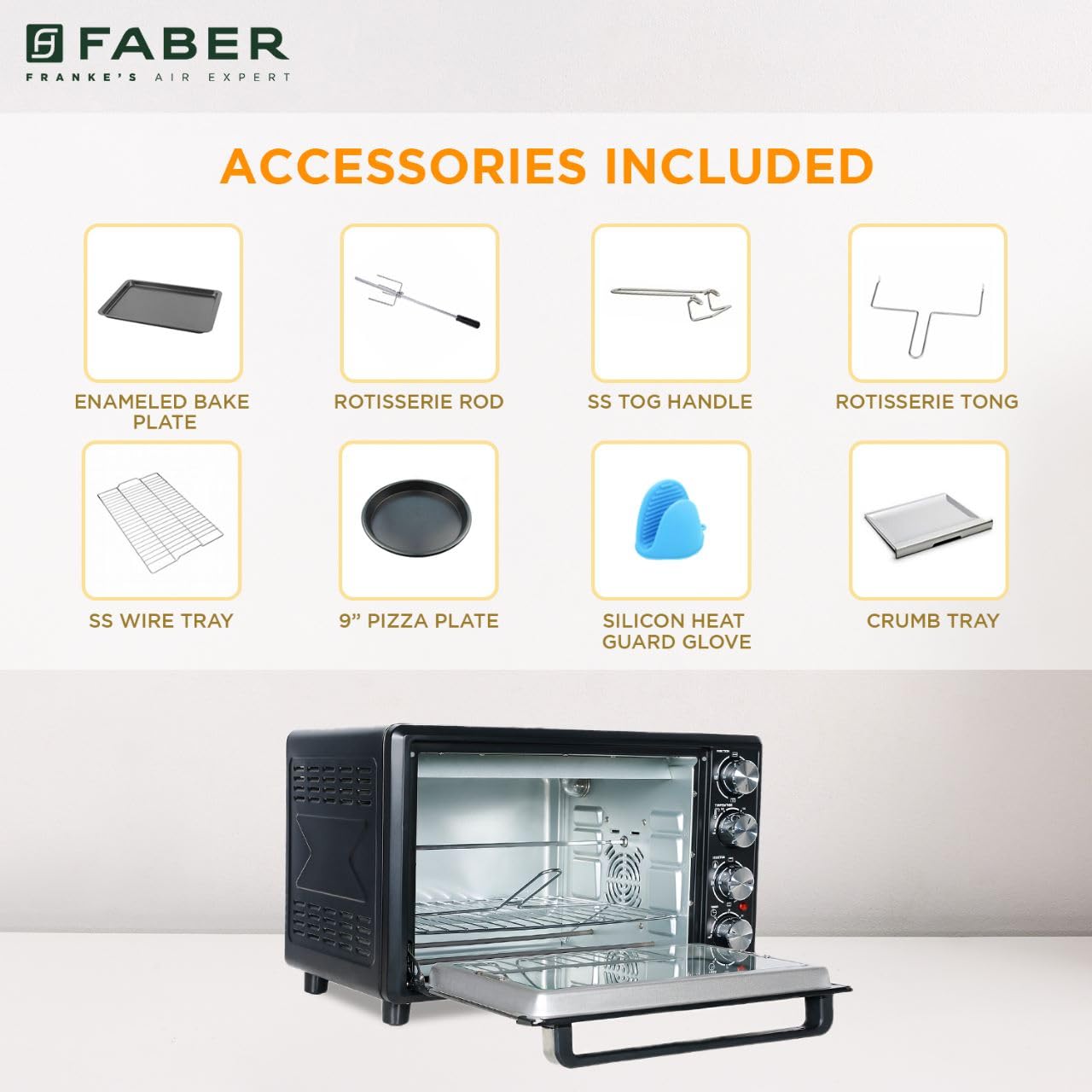
Image: The auto motorized rotisserie feature of the OTG, demonstrating two chickens being evenly grilled.
360° Convection Technology
The 360° Convection Technology ensures uniform cooking by circulating hot air throughout the oven chamber. This results in optimum browning, better crispiness, and higher nutrient retention.
- To activate convection, turn the Function Knob to 'Convection' or 'Rotisserie + Convection'.
- Convection cooking often requires slightly lower temperatures and shorter cooking times compared to conventional baking.

Image: Diagram illustrating the 360° convection technology, showing hot air circulating inside the oven for even cooking.
Timer with Auto Cut-off
The mechanical timer can be set for up to 60 minutes. Once the set time elapses, the oven will automatically switch off, indicated by a bell sound.
- Turn the Timer Knob clockwise to set the desired cooking duration.
- For shorter times (less than 10 minutes), turn the knob past 10 minutes and then back to the desired time for better accuracy.
Pangropéa jeung beberesih
Regular cleaning and maintenance will ensure the longevity and optimal performance of your OTG.
beberesih umum
- Salawasna cabut oven ti stop kontak listrik sarta ngidinan pikeun niiskeun sagemblengna saméméh beberesih.
- Ngusap permukaan luar kalayan lemes, damp lawon. Ulah make cleaners abrasive atawa hampang scouring.
- Clean the interior walls, floor, and ceiling with a damp cloth and mild detergent. For stubborn stains, a non-abrasive oven cleaner designed for OTGs can be used, following the product instructions carefully.
- The double glazed glass door can be cleaned with a glass cleaner. The double glazing helps retain heat and prevents burns from touching the outer glass.
- Remove and empty the crumb tray regularly. Wash it in warm, soapy water, rinse, and dry thoroughly.
Aksésori beberesih
- All removable accessories (bake tray, grill tray, wire rack, rotisserie rod, pizza plate, tongs, silicon glove) can be washed in warm, soapy water. Rinse well and dry completely before storing or reusing.
- Do not use metal scouring pads or abrasive cleaners on non-stick surfaces (if applicable) to avoid damage.

Gambar: Interior view of the Faber 34L OTG with the chamber light on, highlighting the clean racks and crumb tray, ready for use or after cleaning.
Pamérésan masalah
If you encounter any issues with your Faber OTG, refer to the following table for common problems and solutions.
| Masalah | Mungkin Cukang lantaranana | Solusi |
|---|---|---|
| Oven teu hurung. | Teu plugged di; kakuatan outage; stop kontak rusak; timer teu disetel. | Ensure the power cord is securely plugged into a working outlet. Check your household's circuit breaker. Set the timer knob to the desired cooking duration. |
| Dahareun teu masak merata. | Incorrect temperature/mode; overcrowding; improper rack position; convection fan issue. | Verify temperature and heating mode settings. Avoid overcrowding the oven. Use the appropriate rack position. Ensure the convection fan is not obstructed (if using convection). |
| Haseup kaleuleuwihan nalika operasi. | Food spills; grease buildup; initial burn-off. | Clean the oven interior and accessories thoroughly. Ensure the crumb tray is clean. If it's the first use, some smoke is normal. |
| Rotisserie teu muter. | Rotisserie rod not properly seated; Function Knob not set to Rotisserie. | Ensure the rotisserie rod is correctly inserted into the drive socket and support. Set the Function Knob to 'Rotisserie' or 'Rotisserie + Convection'. |
| Timer teu jalan. | Knob not turned past 10 minutes for short times; mechanical issue. | For times under 10 minutes, turn the knob past 10 and then back to the desired time. If the issue persists, contact customer support. |
Upami masalahna teras-terasan saatos nyobian solusi ieu, mangga ngahubungi dukungan palanggan Faber.
spésifikasi
Detailed technical specifications for the Faber 34L OTG:
- merek: Faber
- Jumlah modél: 131.0676.817
- Kapasitas: 34 Liter
- Wattage: 1600 Watt
- warna: Hideung
- Fitur husus: Temperature Control, 360° Convection, Rotisserie, Double Glazed Glass
- Tipe Kontrol: Kenop
- Gaya panto: Lawang Turun
- Jenis bahan panto: Kaca Tempered
- Sumber Daya: Kabel Listrik
- Beurat barang: 10 kg900g
- Item Ukuran (L x W x H): 51 x 39 x 32 cm
- Negara asal: Cina

Image: Diagram showing the physical dimensions (Length, Width, Height) of the Faber 34L OTG.
Garansi sareng Rojongan
Émbaran jaminan
Your Faber OTG is covered by a manufacturer's warranty. Please refer to the warranty card included with your product for specific terms, conditions, and duration of the warranty. Keep your purchase receipt as proof of purchase for warranty claims.
Rojongan Palanggan
For any service, repair, or technical assistance, please contact Faber customer support. You can find contact details on the warranty card or the official Faber websitus.
- Dukungan Online: Visit the official Faber websitus pikeun FAQs jeung sumber rojongan.
- Pusat Palayanan: Locate authorized service centers in your region.


