Bubuka
Thank you for choosing the Singer C7225 Computerized Sewing Machine. This manual provides comprehensive instructions for the safe operation, setup, maintenance, and troubleshooting of your new sewing machine. Please read this manual thoroughly before using the machine to ensure proper function and to maximize your sewing experience.
The Singer C7225 is designed for a wide range of sewing projects, offering advanced features and ease of use for both beginners and experienced sewers.
Parentah Kasalametan penting
Nalika nganggo alat listrik, pancegahan kaamanan dasar kedah diturutan, kalebet ieu:
- Salawasna cabut colokan mesin jahit tina stop kontak langsung saatos nganggo sareng sateuacan ngabersihkeun, nyabut panutup, atanapi ngadamel panyesuaian jasa pangguna.
- Ulah ngantep dipaké salaku cocooan. Perhatian caket diperyogikeun nalika alat ieu dianggo ku atanapi caket barudak.
- Anggo alat ieu ngan ukur pikeun panggunaan anu dimaksud sakumaha anu dijelaskeun dina manual ieu. Paké ngan kantétan dianjurkeun ku produsén sakumaha anu aya dina manual ieu.
- Entong ngoperasikeun alat ieu upami éta ngagaduhan kabel anu rusak atanapi colokan, upami éta henteu tiasa dianggo leres, upami éta murag atanapi rusak, atanapi murag kana cai.
- Never operate the appliance with any air openings blocked. Keep ventilation openings of the sewing machine and foot controller free from the accumulation of lint, dust, and loose cloth.
- Jauhkeun ramo tina sadaya bagian anu obah. Perhatosan khusus diperyogikeun di jarum mesin jahit.
- Salawasna nganggo piring jarum ditangtoskeun. Piring anu salah tiasa nyababkeun jarum rusak.
- Ulah narik atawa nyorong lawon bari stitching. Ieu bisa deflect jarum ngabalukarkeun éta megatkeun.
- Pareuman mesin jahit nalika ngalakukeun panyesuaian di daérah jarum, sapertos ngaitkeun jarum, ngarobih jarum, ngaitkeun bobbin, atanapi ngarobih suku presser.
- Always unplug the sewing machine from the electrical outlet when removing the covers, lubricating, or when making any other user servicing adjustments mentioned in the instruction manual.
Produk Leuwihview
Familiarize yourself with the main components of your Singer C7225 sewing machine.

Gambar 1: Hareupeun view of the Singer C7225 sewing machine, showcasing the main body, needle area, and control panel with various stitch patterns.

Gambar 2: Samping view of the Singer C7225, highlighting the handwheel and the power input port at the rear.
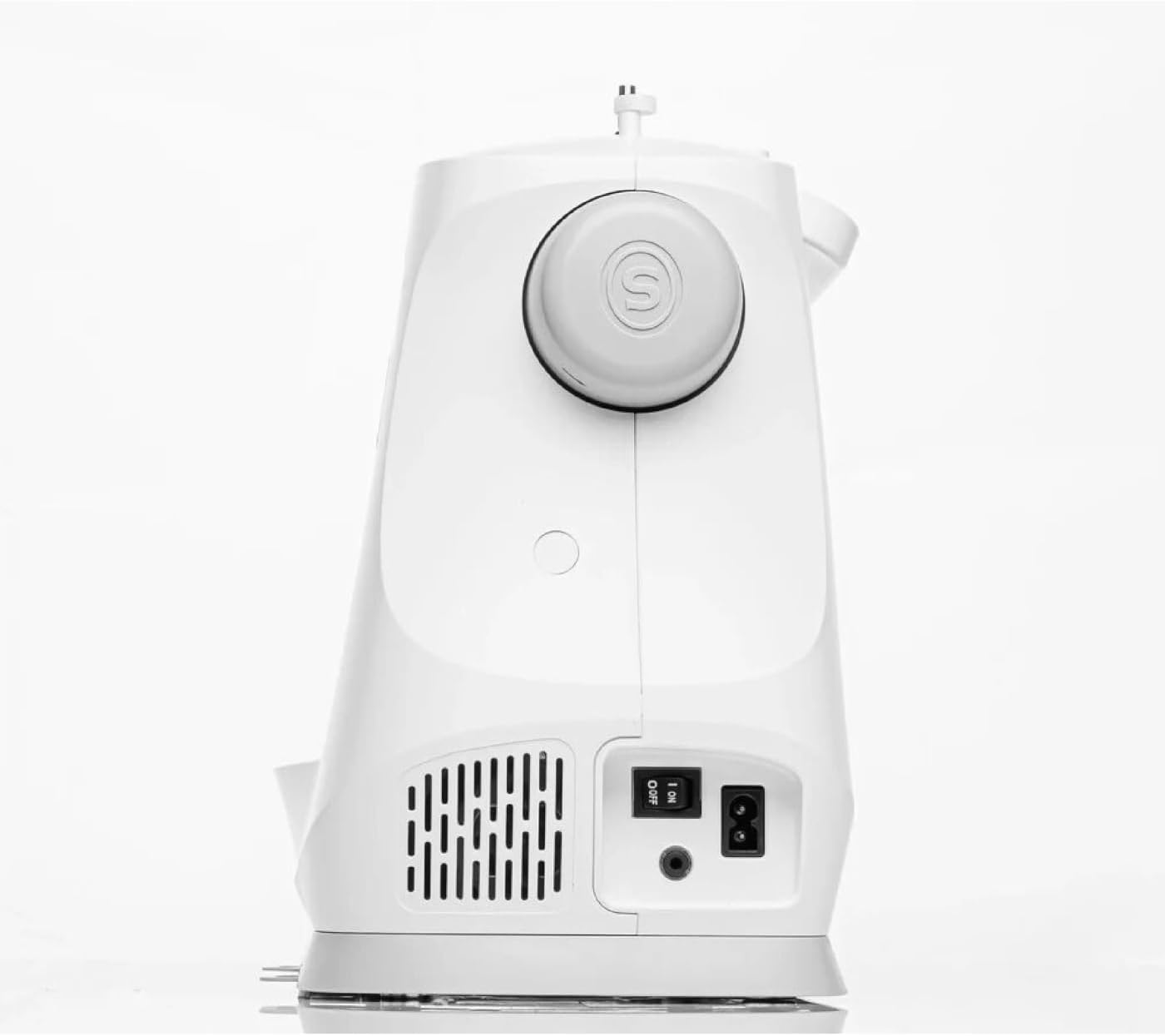
Gambar 3: Tukangeun view of the Singer C7225, showing the power switch and power cord connection point.

Gambar 4: Deukeut hareup view of the Singer C7225, focusing on the needle, presser foot, and bobbin area.
Komponén konci:
- Pelat Jarum: The metal plate under the needle, often with seam allowance guides.
- Presser Foot: Nahan lawon pageuh kana pakan anjing nalika ngaput.
- Pakan Anjing: Teeth-like mechanisms that move the fabric under the presser foot.
- Bobbin Case: Holds the bobbin, which supplies the lower thread.
- Pituduh Utas: Paths for the upper thread to follow from the spool to the needle.
- Dial tegangan: Nyaluyukeun tegangan benang luhur.
- Roda leungeun: Sacara manual naékkeun sareng nurunkeun jarum.
- Panel Kontrol/Layar LCD: For selecting stitches, adjusting settings, and viewinpormasi.
- Foot Controller Port: Where the foot pedal is connected.
- Saklar kakuatan: Ngahurungkeun sareng mareuman mesin.
Disetél
1. Ngabongkar sareng Nempatkeun:
- Carefully remove the machine from its packaging. Retain all packaging materials for future storage or transport.
- Place the machine on a stable, flat surface with adequate lighting. Ensure there is enough space around the machine for fabric handling.
2. Sambungan Daya:
- Locate the power cord and foot controller.
- Insert the foot controller plug into the foot controller port on the machine.
- Insert the power cord plug into the power input port on the machine.
- Colokkeun tungtung kabel listrik anu sanés ka stop kontak listrik anu cocog.
- Turn on the power switch, usually located on the side or rear of the machine. The LCD screen should illuminate.
3. Ngagulung Bobbin:
- Pasang spool benang dina pin spool.
- Follow the bobbin winding path indicated by the arrows on the machine.
- Teundeun gulungan bobbin kosong kana spindel lilitan bobbin.
- Dorong spindel lilitan bobbin ka katuhu.
- Pencét suku controller atawa tombol ngamimitian / eureun pikeun ngawitan pungkal. Eureun nalika bobbin pinuh.
- Potong benang sareng cabut bobbin.
4. Inserting the Bobbin:
- Buka pelat panutup bobbin.
- Selapkeun bobbin tatu kana wadah bobbin, mastikeun benang unwinds dina arah nu bener (biasana counter-jarum jam).
- Arahkan benang ngaliwatan pegas tegangan teras kana slot panduan benang.
- Ganti piring panutup bobbin.
5. Threading the Upper Thread:
- Ngangkat angkat alat presser.
- Pasang spool benang dina pin spool.
- Turutan jalur ngasupkeun benang nu dinomeran anu dituduhkeun dina mesin, pastikeun benangna nembus sadaya pituduh sareng tuas panyerep.
- Thread the needle from front to back using the automatic needle threader if available, or manually.
- Tarik kira-kira 6 inci benang ngaliwatan panon jarum.
6. Bringing Up the Bobbin Thread:
- Hold the upper thread lightly.
- Turn the handwheel towards you to lower the needle into the needle plate and then raise it again.
- Benang luhur bakal nangkep benang gulungan, ngabentuk lilitan. Tarik lilitan ka luhur ngaliwatan liang pelat jarum.
- Tarik benang luhur sareng bobbin handapeun suku presser sareng ka arah tukang mesin.
Parentah Operasi
1. Selecting a Stitch:
- Hurungkeun mesin.
- Use the stitch selection buttons or dial on the control panel to choose your desired stitch. The selected stitch will be displayed on the LCD screen.
- The C7225 offers a wide variety of utility, decorative, and alphanumeric stitches.
2. Adjusting Stitch Settings:
- Jahitan Panjang: Adjust the length of each stitch using the dedicated buttons. Longer stitches are for basting or thicker fabrics, shorter for fine details.
- Jahitan Lebar: Adjust the width for zigzag or decorative stitches.
- Tegangan Thread: The machine typically sets tension automatically, but manual adjustment may be needed for specific fabrics or threads. Refer to the tension dial.
- Posisi jarum: Adjust the needle position (left, center, right) for certain techniques like topstitching or zipper insertion.
3. Starting to Sew:
- Simpen lawon di handapeun suku presser, sejajarkeun ujungna ku pituduh kelim dina pelat jarum.
- Turunkeun suku presser.
- Pencét pangatur suku lalaunan atanapi pencét tombol Start/Stop pikeun ngamimitian ngaput.
- Guide the fabric gently with both hands, but do not push or pull it. Allow the feed dogs to move the fabric.
- To reverse stitch (for securing seams), press and hold the reverse button.
- When finished, press the Start/Stop button or release the foot controller.
- Angkat jarum ka posisi pangluhurna ngagunakeun roda leungeun.
- Angkat suku presser.
- Pull the fabric towards the back and cut the threads using the thread cutter on the machine.
4. Changing Needles and Presser Feet:
- Ngaganti Jarum: Always turn off the machine before changing the needle. Loosen the needle clamp screw, remove the old needle, insert the new needle with the flat side facing the back, and tighten the screw. Use the correct needle type and size for your fabric.
- Ngarobah Presser Feet: Raise the presser foot lifter. Press the release button on the back of the presser foot holder to detach the current foot. Position the new presser foot under the holder and lower the presser foot lifter until it snaps into place.
Pangropéa
Pangropéa rutin ngajamin umur panjang sareng kinerja optimal mesin jahit anjeun.
1. beberesih:
- Sanggeus Unggal Pamakéan: Use a small brush to remove lint and dust from the bobbin area and under the needle plate.
- rutin: Remove the needle plate and clean the feed dogs and bobbin case area thoroughly. A small vacuum attachment can be helpful.
- Luar: Ngusap bagian luar mesin kalayan lemes, damp lawon. Ulah make bahan kimia kasar.
2. Minyakan:
The Singer C7225 is largely self-lubricating. Refer to the full instruction manual for specific oiling points if necessary. Over-oiling can cause issues.
3. Panyimpenan:
When not in use, cover the machine with a dust cover to protect it from dust and debris. Store in a dry, cool place.
Pamérésan masalah
Bagian ieu ngabahas masalah umum anu anjeun tingali. Pikeun masalah nu leuwih kompleks, kontak rojongan customer.
| Masalah | Mungkin Cukang lantaranana | Solusi |
|---|---|---|
| Mesin teu ngaput / Teu aya daya | Kabel listrik teu dipasang; Saklar daya pareum; Kontroler suku teu nyambung. | Check all power connections; Turn on power switch; Ensure foot controller is securely plugged in. |
| Jahitan diléngsérkeun | Incorrect needle; Needle bent or dull; Machine not threaded correctly; Incorrect tension. | Change needle to correct type/size; Replace bent/dull needle; Re-thread machine completely; Adjust tension. |
| Pegatna utas | Improper threading; Thread tension too tight; Needle bent or wrong size; Poor quality thread. | Re-thread machine; Loosen upper tension; Replace needle; Use good quality thread. |
| Lawon teu nyoco | Suku presser teu diturunkeun; Anjing pakan diturunkeun; Serat dina handapeun pelat jarum aya. | Turunkeun suku presser; Angkat anjing pakan; Bersihkeun handapeun pelat jarum. |
| Benang kusut kusut | Bobbin incorrectly inserted; Bobbin case dirty; Upper tension too loose. | Re-insert bobbin correctly; Clean bobbin case; Tighten upper tension. |
spésifikasi
| Fitur | Rincian |
|---|---|
| merek | panyanyi |
| Modél | C7225 |
| Warna | Bodas |
| Bahan | Beusi |
| Beurat | 8 kg |
| Ukuran (L x W x H) | 20P x 28l x 22H centimeters (Approximate) |
| Sumber Daya | Kabel Listrik |
| Tipe | Mesin Jahit Komputer |
| Kasadiaan Suku Cadang (EU) | 2 Taun |
Garansi sareng Rojongan
Inpormasi Garansi: The Singer C7225 sewing machine comes with a manufacturer's warranty. Please refer to the warranty card included with your purchase for specific terms, conditions, and duration. Keep your proof of purchase for warranty claims.
Rojongan Palanggan: For technical assistance, spare parts, or service, please contact Singer customer support. Contact details can typically be found on the Singer official websitus atanapi dina kartu jaminan.
Sumberdaya Online: Visit the official Singer website for additional resources, including FAQs, video tutorials, and updated information about your C7225 model.


