1. Bubuka
Thank you for choosing the SPLITSKY NZFS Kids Alarm Clock. This device combines an alarm clock, white noise sleep aid, and an 8-mode RGB night light, designed to assist with sleep and wake-up routines for children and adults. Please read this manual thoroughly to understand its features and ensure proper operation.
Inpormasi Kasalametan:
- Jauhkeun alat tina cai sareng lingkungan kalembaban anu luhur.
- Ulah nyobian ngabongkar atawa ngalereskeun alat sorangan.
- Use only the provided USB-C power cable or a certified equivalent.
- Pastikeun ventilasi ditangtoskeun sabudeureun alat.
2. Eusi Paket
Pastikeun yén sadaya item aya dina pakét anjeun:
- SPLITSKY NZFS Kids Alarm Clock
- 1.2M (4.7 inch) USB-C Power Cable
- Manual pangguna (dokumén ieu)
- 1 x CR2032 Lithium Ion Battery (pre-installed for memory backup)
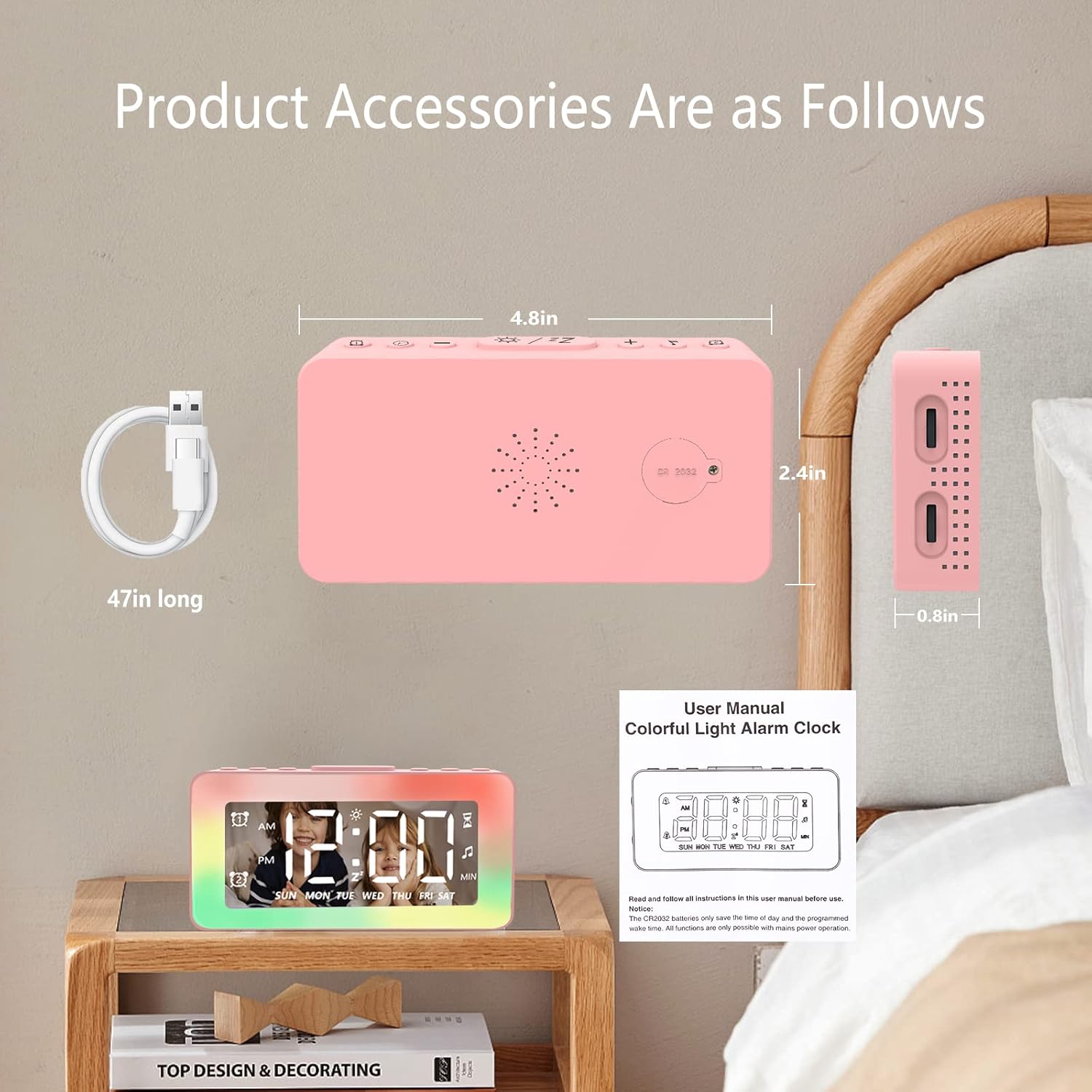
Image: The SPLITSKY NZFS Kids Alarm Clock, a USB-C power cable, and the user manual are included in the package.
3. Produk Langkungview
Familiarize yourself with the buttons and ports on your alarm clock:

Gambar: Detil view of the alarm clock's top buttons and side ports, including Alarm 1, Time Setting, Light Minus/Settings, Snooze/Light Mode Switch, Light Plus/Setup, Music Switch, Alarm 2, Volume Setting, Time Brightness Setting, USB Output Charging Port, and Type-C Input Interface.
- Tombol Alarm 1: Set and activate Alarm 1.
- Tombol Setélan waktos: Saluyukeun waktos ayeuna.
- Light Minus / Settings Button: Decrease light brightness or navigate settings.
- Snooze / Light Mode Switch Button: Activate snooze, or cycle through light modes.
- Light Plus / Setup Button: Increase light brightness or confirm settings.
- Music Switch Button: Cycle through white noise sounds.
- Tombol Alarm 2: Set and activate Alarm 2.
- Volume Setting Wheel (Side): Adjust alarm and white noise volume.
- Time Brightness Setting Wheel (Side): Saluyukeun kacaangan tampilan.
- USB Output Charging Port (Side): Charge external devices.
- Type-C Input Interface (Side): Connect power cable to the alarm clock.
4. Setélan
4.1 Sambungan Daya
- Connect the provided USB-C power cable to the Type-C Input Interface on the side of the alarm clock.
- Colokkeun tungtung kabel USB-C anu sanés ka adaptor daya USB anu cocog (teu kalebet) atanapi port USB.
- Layar bakal hurung, nunjukkeun jam keur dihurungkeun.

Image: The SPLITSKY NZFS Kids Alarm Clock is shown powered on and connected via its USB-C port, also demonstrating its capability to charge a smartphone.
4.2 Battery Installation (Memory Backup)
The alarm clock includes a pre-installed CR2032 battery. This battery serves as a memory backup to retain time and alarm settings during a power outage or when the main power is disconnected. It does not power the clock for regular operation.
- If the battery needs replacement, locate the battery compartment on the back of the unit.
- Anggo obeng leutik pikeun muka kompartemen.
- Ganti ku batré CR2032 anyar, mastikeun polaritasna bener.
- Tutup kompartemen anu aman.
5. Parentah Operasi
5.1 Setting the Time (12H/24H Format)
- Pencét jeung tahan tombol Tombol Setélan waktos until the hour digits begin to flash.
- Ngagunakeun éta Light Minus / Settings Button (turun) atanapi Light Plus / Setup Button (up) to adjust the hour.
- Pencét éta Tombol Setélan waktos again to move to minute adjustment. Adjust minutes using the Light Minus/Plus buttons.
- Pencét éta Tombol Setélan waktos a third time to select 12-hour or 24-hour format. Adjust using the Light Minus/Plus buttons.
- Pencét éta Tombol Setélan waktos sakali deui pikeun mastikeun sareng kaluar ti modeu setelan waktos.
5.2 Setting Alarms (Dual Alarm, Daily/Weekday/Weekend Mode)
Jam ieu ngadukung dua alarm anu mandiri (Alarm 1 sareng Alarm 2).
- Pencét jeung tahan tombol Alarm 1 Tombol (pikeun Alarm 1) atanapi Alarm 2 Tombol (for Alarm 2) until the alarm hour digits flash.
- Ngagunakeun éta Light Minus / Settings Button or Light Plus / Setup Button pikeun nyaluyukeun jam.
- Press the respective Alarm Button again to move to minute adjustment. Adjust minutes using the Light Minus/Plus buttons.
- Press the respective Alarm Button again to select the alarm mode:
- Modeu Sapopoé: Alarm disada unggal dinten.
- Weekday Mode: Alarm disada ti Senén dugi ka Jumaah.
- Weekend Mode: Alarm sounds Saturday and Sunday.
- Press the respective Alarm Button once more to confirm and exit alarm setting mode.
- To enable/disable an alarm, short press the Alarm 1 Tombol or Alarm 2 Tombol. Ikon alarem bakal muncul / ngaleungit dina tampilan.
5.3 Fungsi Tunda
When an alarm sounds, tap the Snooze / Light Mode Switch Button on top to activate snooze. The alarm will pause for 9 minutes and then sound again. This can be repeated multiple times.
5.4 Night Light (8 Modes RGB, 10-level dimming)
The alarm clock features 6 solid color lights and 2 ambient colorful lights.
- Pencét pondok Snooze / Light Mode Switch Button to turn on the night light and cycle through the 8 color modes.
- To adjust the brightness (10 levels), use the Light Minus / Settings Button or Light Plus / Setup Button while the night light is active.
- To turn off the night light, continue pressing the Snooze / Light Mode Switch Button nepi ka lampu pareum.

Image: Multiple SPLITSKY NZFS Kids Alarm Clocks are shown, each displaying a different color from the 8 available RGB night light modes.
5.5 White Noise Sleep Aid (8 Sounds)
The clock offers 8 soothing sounds to aid sleep.
- Pencét pondok Tombol Pindah Musik to turn on the white noise and cycle through the available sounds.
- To adjust the volume (16 levels), use the Volume Setting Wheel on the side of the clock.
- To turn off the white noise, continue pressing the Tombol Pindah Musik until the sound stops.

Image: The SPLITSKY NZFS Kids Alarm Clock is displayed on a bedside table, with icons illustrating the various white noise options such as rain, cicadas, piano, bonfire, waves, birdsong, and church bells.
5.6 Sleep Timer (10-120 minutes)
The sleep timer allows you to set a duration for the white noise and/or night light to play before automatically turning off.
- While white noise or night light is active, press and hold the Tombol Pindah Musik (for white noise timer) or Snooze / Light Mode Switch Button (for light timer).
- Ngagunakeun éta Light Minus / Settings Button or Light Plus / Setup Button to select the desired timer duration (10, 20, 30, 60, 90, 120 minutes).
- Press the respective button again to confirm the timer setting. The timer icon will appear on the display.
5.7 adjustment kacaangan tampilan
Atur kacaangan tampilan waktos LED nganggo Time Brightness Setting Wheel on the side of the clock.
5.8 Palabuhan Ngecas USB
The USB output charging port on the side of the alarm clock can be used to charge other small electronic devices, such as smartphones. Connect your device's charging cable to this port.
6. Pangropéa
6.1 beberesih
- Pastikeun alat geus cabut colokan saméméh beberesih.
- Ngusap beungeut ku kaen lemes, garing.
- Ulah make cleaners abrasive, pangleyur, atawa sprays kimiawi.
6.2 Panyimpenan
Upami henteu dianggo salami lami, simpen jam alarm di tempat anu tiis sareng garing, jauh tina sinar panonpoé langsung sareng suhu anu ekstrim.
7. Cara ngungkulan
If you encounter issues with your SPLITSKY NZFS Kids Alarm Clock, refer to the table below for common problems and solutions.
| Masalah | Mungkin Cukang lantaranana | Solusi |
|---|---|---|
| Clock display is off or dim. | Not connected to power; Time brightness set too low. | Ensure USB-C cable is securely connected to a power source. Adjust the Time Brightness Setting Wheel. |
| Alarm teu disada. | Alarm not activated; Alarm volume too low. | Check if the alarm icon is displayed. If not, short press the respective Alarm Button to activate. Adjust the Volume Setting Wheel. |
| Time/settings reset after power disconnection. | CR2032 backup battery is depleted or missing. | Replace the CR2032 battery in the battery compartment. |
| Night light or white noise not working. | Function not activated; Sleep timer active. | Pencét pondok Snooze / Light Mode Switch Button or Tombol Pindah Musik to activate. Check if a sleep timer is set. |
8. Spésifikasi
| Fitur | Rincian |
|---|---|
| merek | SPLITSKY |
| Nomer modél | NZFS |
| Tipe tampilan | LED digital |
| Dimensi produk | 3.17"W x 3.17"H (approximately 8.05 cm W x 8.05 cm H) |
| Item Beurat | 8.1 ons (kira-kira 230 gram) |
| Sumber Daya | Corded Electric (USB-C), Battery Powered (CR2032 for memory) |
| Modeu Lampu Peuting | 8 (6 solid colors, 2 ambient colorful) with 10-level dimming |
| Bodas Noise Sora | 8 sora anu pikaresepeun |
| Nada Alarm | 7 wake-up alarm tones with 16-level volume control |
| Fitur Alarm | Dual Alarm, Daily/Weekday/Weekend modes, 9-minute Snooze |
| Fungsi Timer | 10-120 minute sleep timer for sounds and lights |
| Konektipitas | USB-C Input, USB-A Output (for charging external devices) |
| Bahan | Acrylonitrile Butadiena Styrene |
9. Garansi jeung Rojongan
9.1 Émbaran jaminan
Please refer to the warranty information provided at the time of purchase or contact your retailer for details regarding the product warranty. Keep your proof of purchase for any warranty claims.
9.2 Rojongan Palanggan
For technical assistance, troubleshooting beyond this manual, or general inquiries, please contact the seller through the platform where you purchased the product. Provide your order number and a detailed description of the issue for prompt support.


