1. Bubuka
The 1Mii DS500-JP is a high-quality Bluetooth audio receiver designed to upgrade your existing home stereo systems, AV receivers, or powered speakers with advanced Bluetooth connectivity. This device allows you to stream high-fidelity audio wirelessly from your smartphone, PC, or other Bluetooth-enabled music players to your audio equipment within seconds. It features Bluetooth 5.1 technology and supports various high-resolution audio codecs for an immersive listening experience.
2. Produk Langkungview
Fitur konci
- High-Fidelity Wireless Audio: Supports advanced audio codecs including LDAC, Qualcomm aptX HD, aptX Low Latency, aptX, and AAC for superior sound quality.
- Téknologi Bluetooth 5.1: Equipped with a Qualcomm QCC5125 Bluetooth chip for faster and more stable wireless connections.
- Premium Audio DAC: Integrates an ES9018K2M DAC chip for enhanced audio performance.
- Konektipitas serbaguna: Features analog RCA, digital optical, and digital coaxial outputs, compatible with most audio equipment. Simultaneous output is supported.
- Jangkauan Wireless diperpanjang: An external booster antenna provides a stable wireless connection range of over 30 meters.
- Tampilan OLED: A clear OLED screen displays Bluetooth connection status, track name, sampling rate, and audio codec.
- Volume Control & EQ Modes: Easily adjust volume and select from multiple equalizer modes to customize your listening experience.

Image: The 1Mii DS500-JP receiver showcasing its Hi-Res Audio, LDAC, Bluetooth 5.1, and aptX HD capabilities.
Desain jeung Dimensi
The DS500-JP features a compact and sophisticated design with an all-aluminum body, anodized for high quality. Its dimensions are approximately 86mm (height with antenna) x 76mm (width) x 23mm (depth). The OLED display provides essential information at a glance.
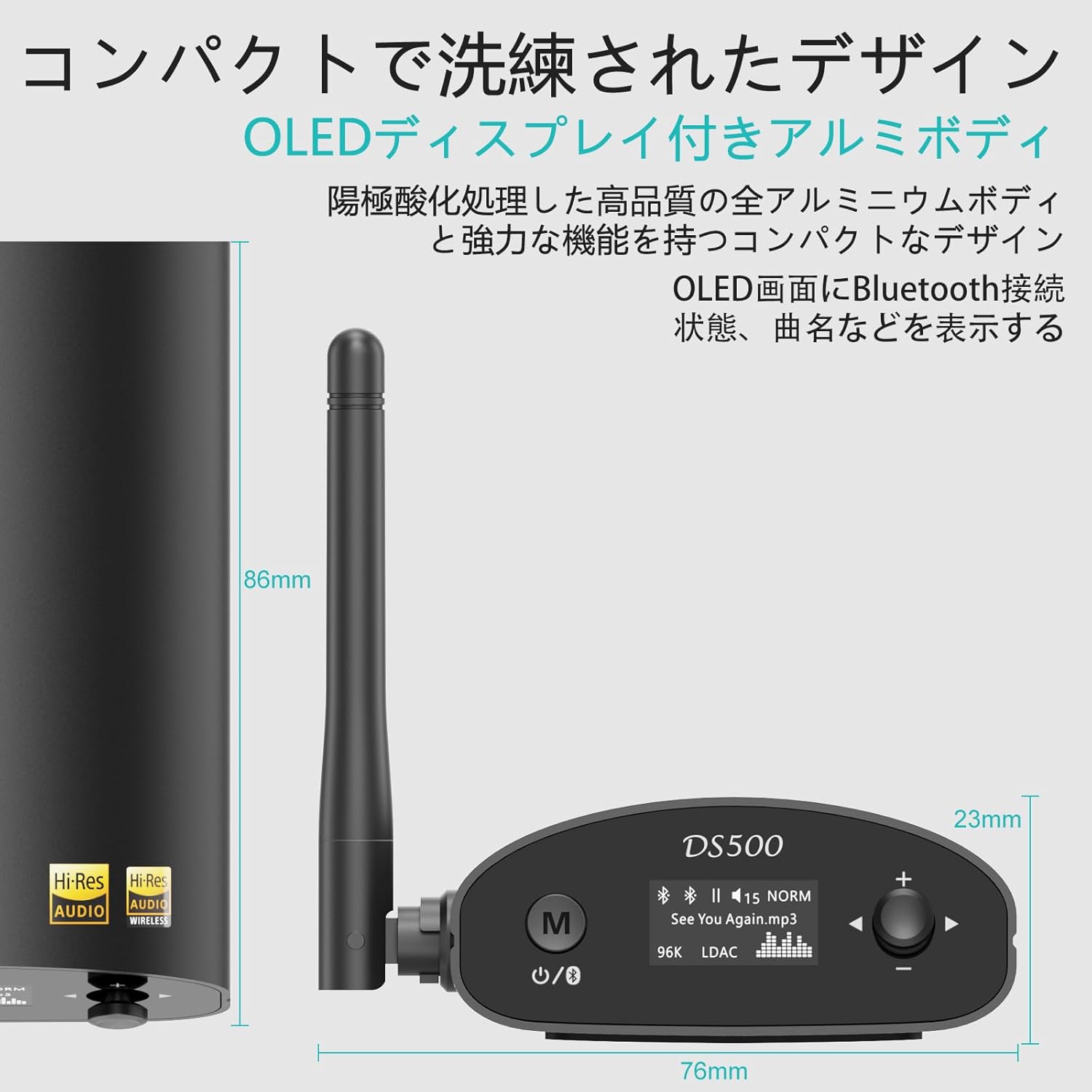
Image: Detailed dimensions of the DS500-JP receiver, highlighting its compact size.
3. Eusi Paket
Saatos muka bungkusan, pastikeun sadaya item di handap ieu aya:
- 1Mii DS500-JP Wireless Audio Adapter
- Kabel Ngecas USB
- 3.5mm Male to RCA Male Audio Cable
- RCA Male to RCA Male Audio Cable
- Kabel Optik
- Manual pamaké

Image: All items included in the 1Mii DS500-JP product package.
4. Setélan
4.1 Sambungan Daya
- Connect the provided USB charging cable to the DC 5V input port on the DS500-JP.
- Plug the other end of the USB cable into a compatible USB power adapter (not included) or a USB port on your audio equipment.
4.2 Sambungan Kaluaran Audio
The DS500-JP offers multiple output options. Choose the appropriate cable and port based on your audio system:
- Analog RCA Output: Use the RCA audio cable to connect the "ANALOG OUT" ports (red for right, white for left) on the DS500-JP to the corresponding RCA input ports on your amplifier atawa speaker aktif.
- Kaluaran optik digital: Use the optical cable to connect the "OPTICAL OUT" port on the DS500-JP to the optical input port on your digital audio receiver or DAC.
- Digital Coaxial Output: Use a coaxial cable (not included) to connect the "COAXIAL OUT" port on the DS500-JP to the coaxial input port on your digital audio receiver or DAC.

Image: The rear panel of the DS500-JP, illustrating the DC 5V, Optical Out, Analog Out (RCA), and Coaxial Out ports.
4.3 Pamasangan anteneu
Screw the external booster antenna into the antenna port on the back of the DS500-JP. Ensure it is securely tightened for optimal wireless performance.

Image: The DS500-JP with its external antenna, emphasizing enhanced Bluetooth 5.1 connectivity.
5. Parentah Operasi
5.1 Daya Hurung/Pareuman
- To power on, press the power button (usually marked with a circle and a vertical line) on the front panel. The OLED display will light up.
- Pikeun mareuman, pencét jeung tahan tombol daya nepi ka tampilan pareum.
5.2 Nyapasangkeun Bluetooth
- Ensure the DS500-JP is powered on. The OLED display will show "Pairing" or a similar indicator.
- Dina smartphone, tablet, atawa PC Anjeun, aktipkeun Bluetooth tur neangan alat nu sadia.
- Select "DS500" from the list of found devices to initiate pairing.
- Once connected, the OLED display will show the connection status, track name, and the active audio codec (e.g., LDAC, aptX HD).

Image: The OLED display of the DS500-JP, illustrating how track information and connection status are shown.
5.3 Volume Control
Use the "+" and "-" buttons on the front panel to adjust the output volume of the DS500-JP.
5.4 EQ Mode Selection
In Bluetooth connection mode, the DS500-JP supports various EQ modes. To change the EQ mode:
- Press and hold the EQ button (often integrated with the volume knob or a dedicated button) for approximately 2 seconds.
- Rotate the volume knob or press the "+" / "-" buttons to cycle through the available EQ modes (e.g., Normal, Rock, Class, Jazz, Dance, Pop, Bass).
- Release the button to select the desired EQ mode.

Image: Visual guide for selecting different EQ modes on the DS500-JP.
5.5 USB Input (Sound Card Function)
The DS500-JP can also function as a USB sound card when connected to a computer via its USB port. This allows for direct digital audio transfer from your computer to the DS500-JP for playback through your audio system.
6. Pangropéa
- Jaga alat tetep bersih ku cara ngusap ku kaén anu lembut sareng garing. Ulah make cleaners abrasive atawa pangleyur.
- Pastikeun alat disimpen di daérah anu ventilasi saé pikeun nyegah overheating.
- Hindarkeun alat ka suhu ekstrim, kalembaban, atanapi sinar panonpoé langsung.
- Ulah nyobian ngabongkar atawa ngalereskeun alat sorangan. Rujuk ka tanaga jasa anu mumpuni pikeun perbaikan naon waé.
7. Cara ngungkulan
| Masalah | Mungkin Cukang lantaranana | Solusi |
|---|---|---|
| Taya kaluaran sora. |
|
|
| Teu tiasa dipasangkeun sareng alat Bluetooth. |
|
|
| Audio quality is poor or drops out. |
|
|
8. Spésifikasi
| Fitur | Rincian |
|---|---|
| Nomer modél | DS500-JP |
| merek | 1Mii |
| Vérsi Bluetooth | 5.1 |
| Chip Bluetooth | Qualcomm QCC5125 |
| Chip DAC | ES9018K2M |
| Dirojong Audio Codecs | LDAC, aptX HD, aptX Low Latency, aptX, AAC, SBC |
| LDAC Sampling Laju | Up to 24-bit/96 kHz (990kbps) |
| aptX HD Sampling Laju | Up to 24-bit/48 kHz (576kbps) |
| Palabuhan Kaluaran | Analog RCA, Digital Optical, Digital Coaxial |
| Palabuhan Input | Bluetooth, USB (for PC sound card function) |
| Range nirkabel | Over 30 meters (with external antenna) |
| tampilan | OLED |
| Input kakuatan | DC 5V |
| Ukuran (approx.) | 14.1 x 12.6 x 6.8 cm (Ukuran Pakét) |
| Beurat (approx.) | 340 g (Beurat Pakét) |
| Batré | Not applicable (requires external power) |
9. Garansi jeung Rojongan
For warranty information and technical support, please refer to the official 1Mii websitus atanapi ngahubungi layanan palangganna sacara langsung. Rincian ngeunaan periode garansi sareng prosedur layanan biasana disayogikeun sareng dokuméntasi pameseran anjeun atanapi dina halaman dukungan produsén.
Dukungan Online: Visit the 1Mii official websitus pikeun FAQs, undeuran supir, sareng inpormasi kontak.
Palayanan palanggan: If you encounter any issues not covered in this manual, please reach out to 1Mii customer support for assistance.