1. Bubuka
Thank you for choosing the FLYLINKTECH BD10 6000A 12V Car Jump Starter and Power Bank. This device is designed to provide emergency jump-starting for vehicles and serve as a portable power bank for various electronic devices. Please read this manual thoroughly before use to ensure safe and optimal operation.

Image 1.1: The FLYLINKTECH BD10 Jump Starter unit with its smart battery clamps.
2. Émbaran Kasalametan
Salawasna perhatikeun tindakan pencegahan kaamanan ieu pikeun nyegah tatu atanapi karusakan kana alat atanapi kendaraan:
- Ulah nyobian ngahurungkeun batré anu beku.
- Pastikeun sambungan polaritas anu leres (beureum clamp mun positif, hideung clamp to negative). Reverse polarity can cause damage.
- Do not allow the smart clamps to touch each other when connected to the jump starter.
- Jauhkeun alat ti barudak.
- Do not expose the device to extreme temperatures (above 60°C / 140°F or below -20°C / -4°F) or direct sunlight for extended periods.
- Ulah ngabongkar atawa ngaropéa alat.
- Anggo ngan ukur lampu pinter anu disayogikeunamps and charging cables.
- If the device becomes excessively hot during use, disconnect it immediately.

Image 2.1: The jump starter incorporates multiple safety features such as spark-proof, reverse polarity, overvoltage, short circuit, overload, and high-temperature protection.
3. Eusi Paket
Pastikeun yén sadaya item aya dina bungkusan:
- FLYLINKTECH BD10 Jump Starter Unit
- Batré Smart Clamps
- USB-C ka USB-C Cable
- USB-A ka USB-C Cable
- 12V DC Car Charger Adapter
- Manual pamaké
- Panyimpenan Case

Image 3.1: The complete package includes the jump starter, smart clamps, various cables, user manual, and a protective storage case.
4. Setup jeung Ngecas
4.1 Muatan Awal
Before first use, fully charge the jump starter. The device features a 26800mAh battery capacity.
- Connect the provided USB-C cable to the jump starter's USB-C input port.
- Connect the other end of the cable to a compatible USB wall charger (not included). For fastest charging, use a PD 45W charger.
- Layar LED bakal némbongkeun status ngecas sareng persén batrétage.
4.2 Waktos Ngecas
| Peunteun carjer | Perkiraan Waktu Ngecas |
|---|---|
| 5W | 18 Jam |
| 18W | 7 Jam |
| 45W | 2 Jam |
Note: A 45W wall charger is not included in the package.

Image 4.1: The device supports PD 45W fast charging, significantly reducing recharge time when using a compatible charger.
5. Parentah Operasi
5.1 Luncat Mimitian Kandaraan
The FLYLINKTECH BD10 is capable of jump-starting all gas engines and diesel engines up to 12.0L.
- Pastikeun Muatan anu Cukup: Check the jump starter's LED screen to ensure it has at least 50% charge.
- Sambungkeun Smart Clamps: Pasangkeun colokan biru tina lampu pinteramps into the jump starter's 12V output port. Ensure a firm connection.
- Nyambung ka Batré Mobil:
- Gantelkeun ka beureum (+) clamp to the vehicle's positive battery terminal.
- Gantelkeun ka hideung (-) clamp to the vehicle's negative battery terminal.
- Indikator mariksa: Nu pinter clamp indicator light should turn solid green, indicating a correct connection. If it flashes or shows red, check connections and battery status.
- Press BOOST (if needed): If the vehicle battery is extremely low or completely dead, press the 'BOOST' button on the jump starter. Wait for the indicator light on the smart clamps to turn solid green.
- Mimitian Kendaraan: Attempt to start your vehicle. If it doesn't start on the first try, wait 30 seconds before trying again. Do not attempt more than 3 consecutive starts.
- Leupaskeun Clamps: Sakali kendaraan dihurungkeun, langsung cabut konci smart clamps from the car battery, then disconnect them from the jump starter.

Image 5.1: The jump starter connected to a car battery, ready for operation. It supports 6000A peak current, 12V output, and is suitable for a wide range of engines.

Image 5.2: Visual guide illustrating the four steps to jump-start a vehicle: connect the plug, attach clamps, press boost, and start the engine.
5.2 Fungsi Power Bank
The BD10 can charge multiple electronic devices via its USB-A and USB-C ports.
- Kaluaran USB1: Up to 18W (max)
- Kaluaran USB2: Up to 18W (max)
- Kaluaran USB-C: Nepi ka 45W (PD)
Connect your device using the appropriate USB cable to the desired output port. The LED screen will show 'OUT' and the wattage being drawn.

Image 5.3: The jump starter functioning as a power bank, simultaneously charging a smartphone and a tablet via its USB ports.
5.3 Senter LED
The built-in LED flashlight offers three modes: constant light, SOS signal, and strobe light.
- Press and hold the flashlight button to turn on the constant light.
- Press the button again to cycle through SOS and strobe modes.
- Pencét jeung tahan deui pikeun mareuman.

Image 5.4: The integrated LED flashlight provides illumination, an SOS signal, and a strobe function for emergency situations.
5.4 Informative LED Screen
The 6.0-inch LED screen provides real-time information about the device's status:
- Tingkat batré: Mintonkeun persén batré sésanatage.
- Indikator ASUP/KALUAR: Shows whether the device is charging (IN) or discharging (OUT).
- Wattage tampilan: Indicates the power (W) being drawn or supplied.
- Perhatosan Kasalahan: Displays specific error codes or symbols if an issue occurs.
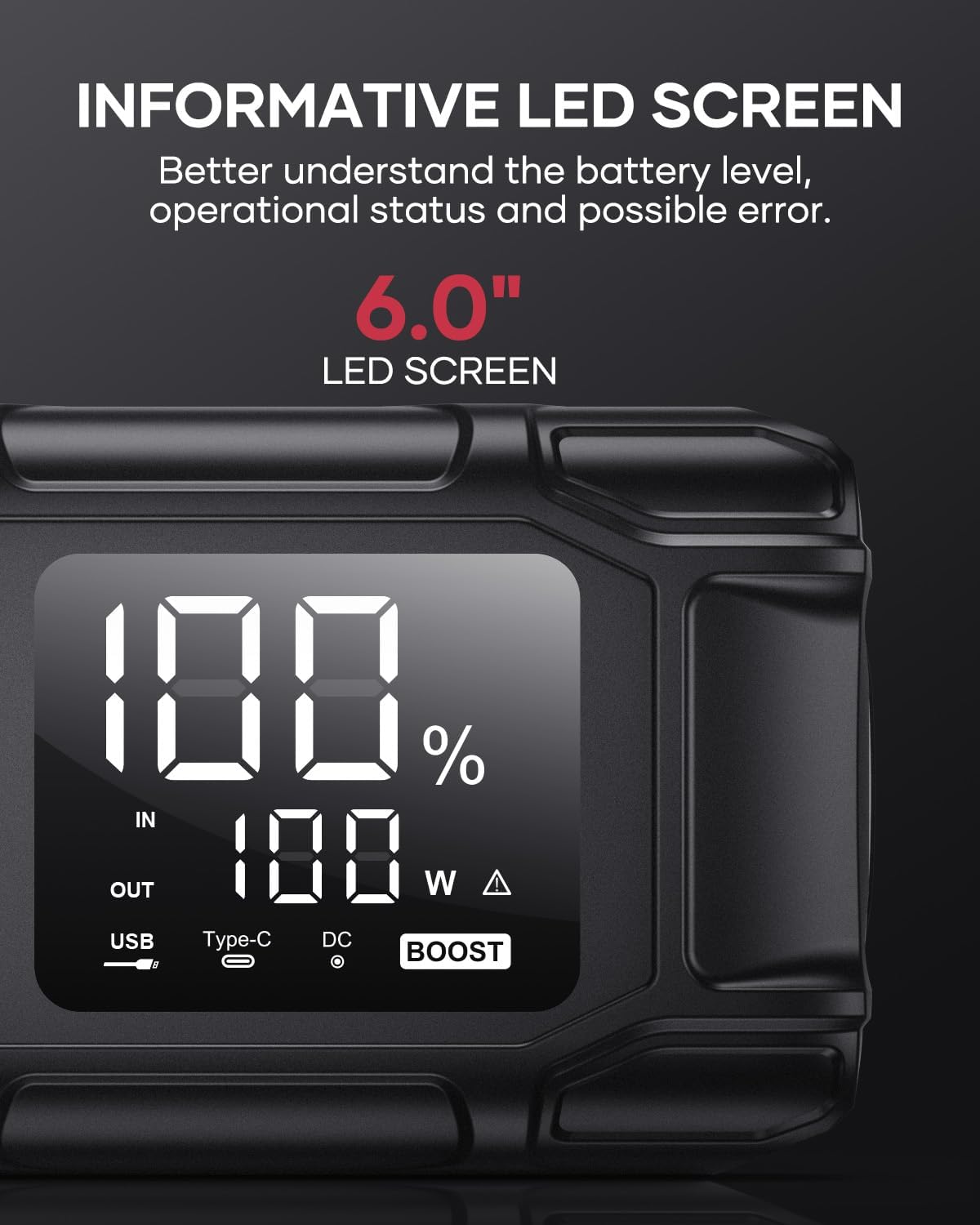
Image 5.5: The 6.0-inch LED screen provides clear information on battery percentage, input/output status, and power consumption.
6. Pangropéa
- Ngecas rutin: Pikeun manjangkeun umur batré, isi ulang jump starter unggal 3-6 bulan sakali, sanajan teu dianggo.
- Panyimpenan: Store the device in its protective case in a cool, dry place, away from direct sunlight and moisture.
- beberesih: Lap alatna ku lawon anu lemes sareng garing. Ulah nganggo bahan kimia anu kasar atanapi bahan anu kasar.
- Clamp perawatan: Pastikeun cl pinterampbersih sareng bébas tina korosi sateuacan sareng saatos dianggo.
7. Cara ngungkulan
The device features multiple alarm situations indicated by audible signals and screen displays:
- Low Voltage panyalindungan: Audible signal "3". Recharge the device.
- Éksternal Voltage Exceeds Vehicle Voltage: Audible signal "4". Check vehicle battery voltage.
- Perlindungan sirkuit pondok: Audible signal "5". Check clamp connections for short circuits.
- Safety Mode Activated: Audible signal "6". Device has entered safety mode due to an issue.
- Perlindungan arus leuwih: Audible signal "7". Reduce load or check connections.
- Alarm Suhu Tinggi/Rendah: Audible signal "8". Allow device to return to operating temperature range (-20°C to 60°C).
- Reverse Connection: Audible signal "9". Correct the clamp polaritasna.

Gambar 7.1: Leuwihview of the device's multi-alarm system, indicating various protection states with unique audible signals.
Upami masalah masih aya saatos nuturkeun léngkah-léngkah ieu, mangga ngahubungi dukungan palanggan.
8. Spésifikasi
| Fitur | Spésifikasi |
|---|---|
| merek | FLYLINKTECH |
| Modél | BD10 |
| Puncak Kaluaran Ayeuna | 6000 Ampenya |
| Kapasitas batré | 26800 mah |
| Kaluaran Voltage | 12V |
| USB-C Input / Kaluaran | PD 45W |
| USB-A Kaluaran | 18W (max) |
| Applicable Engine Types | All Gas, up to 12.0L Diesel |
| Suhu Operasi | -20°C nepi ka 60°C (-4°F nepi ka 140°F) |
| Dimensi produk | 23.95 x 10 x 5.69 cm |
| Item Beurat | 920 g |

Image 8.1: The device is designed to operate reliably in extreme climates, from -20°C (-4°F) to 60°C (140°F).
9. Garansi jeung Rojongan
FLYLINKTECH is committed to providing high-quality products. For any questions, technical assistance, or warranty claims, please refer to the contact information provided with your purchase or visit the official FLYLINKTECH websitus. Mangga simpen bukti pameseran anjeun kanggo tujuan garansi.


