1. Bubuka
Thank you for choosing the Maxcom FW36 Aurum SE Smartwatch. This manual provides detailed instructions to help you set up, operate, and maintain your device, ensuring optimal performance and longevity. Please read this manual carefully before using your smartwatch.

Gambar 1: Hareupeun view of the Maxcom FW36 Aurum SE Smartwatch, displaying time and health metrics.
2. Setélan
2.1 Unboxing sareng Inspeksi Awal
Upon opening the package, verify that all components are present: Maxcom FW36 Aurum SE Smartwatch, charging cable, and this user manual. Inspect the device for any visible damage.
2.2 Ngecas Smartwatch
Before first use, fully charge your smartwatch. Connect the charging cable to the charging port on the back of the watch and to a standard USB power adapter (not included). The battery icon on the screen will indicate charging status. A full charge typically takes approximately 2 hours.
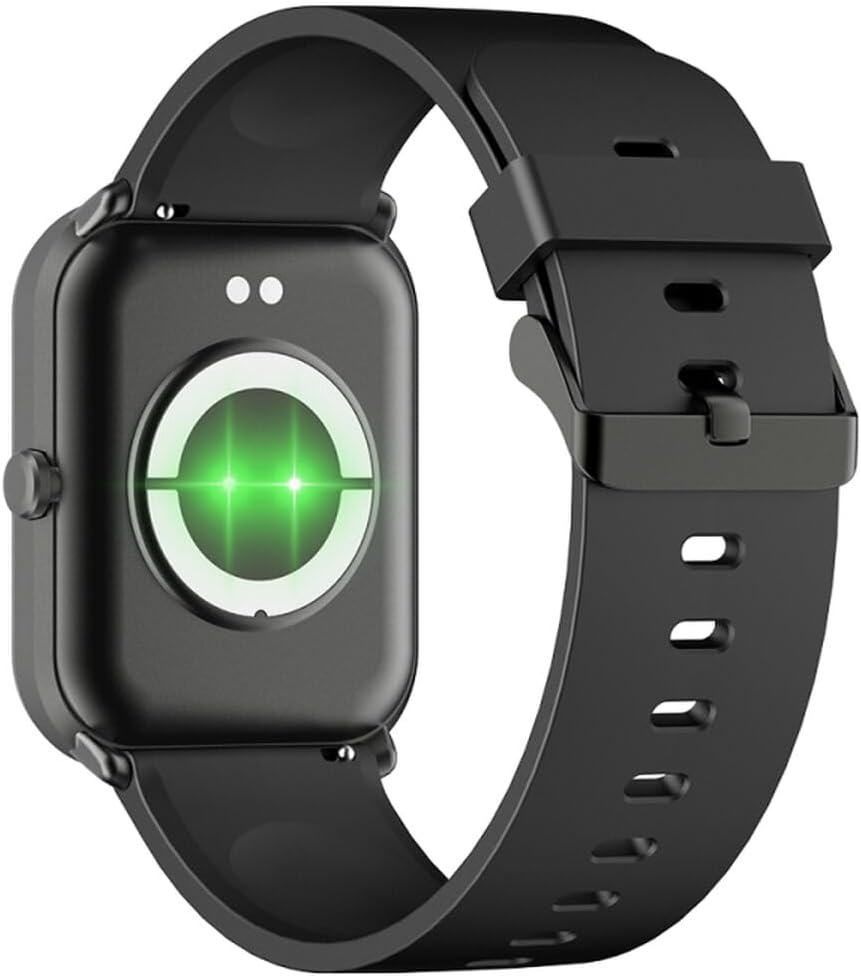
Gambar 2: Tukangeun view of the smartwatch, highlighting the charging contacts and health sensors.
2.3 Daya Hurung/Pareuman
- Daya Hurung: Pencét terus tahan tombol sisi salami sababaraha detik dugi ka layar hurung.
- Pareum listrik: From the watch face, swipe down to access quick settings, then tap the power icon, or navigate to "Settings" > "System" > "Power Off". Confirm your selection.
2.4 Pamasangan Aplikasi sareng Papasangan
- Unduh Aplikasi: Scan the QR code in the manual (if provided) or search for "GLORY FIT" in your smartphone's app store (Google Play Store for Android, Apple App Store for iOS).
- Ngadaptar / Asup: Open the GLORY FIT app and follow the on-screen instructions to create an account or log in.
- papasangan:
- Pastikeun Bluetooth diaktipkeun dina smartphone Anjeun.
- Open the GLORY FIT app, go to "Device" or "My Device", and tap "Add Device".
- The app will search for nearby devices. Select "FW36 Aurum SE" from the list.
- Konfirmasi pamundut papasangan dina smartphone Anjeun sareng smartwatch.
Once paired, the smartwatch will synchronize data with your phone, including time and date settings.
3. Parentah Operasi
3.1 Napigasi Dasar
- Layar cabak: Swipe left/right to navigate between main functions (e.g., activity, heart rate). Swipe up to view notifications. Swipe down to access quick settings.
- Tombol samping: Press once to return to the watch face or wake the screen. Press and hold for power options.

Gambar 3: Sisi view of the smartwatch, illustrating the physical button and strap design.
3.2 Pangimeutan Kaséhatan
The Maxcom FW36 Aurum SE Smartwatch features several health monitoring functions:
- Monitor Detak Jantung: Swipe to the heart rate interface and wait for the measurement to complete. Ensure the watch is snug on your wrist.
- Sénsor Oksigén Darah: Similar to heart rate, navigate to the SpO2 interface for measurement.
- Monitor Tekanan Darah: Access this function from the main menu or by swiping to its dedicated screen.
- Pangimeutan Kualitas Saré: Jam tangan ieu sacara otomatis ngalacak pola sare anjeun nalika dianggo nalika sare. View detailed reports in the GLORY FIT app.
- Pedometer: Tracks your daily steps, distance, and calories burned automatically.
penting: The health data provided by this device is for reference only and should not be used for medical diagnosis or treatment.
3.3 Mode Multi-Olahraga
Access the multi-sport mode from the main menu to select various activities such as running, walking, cycling, etc. The watch will track specific metrics relevant to your chosen activity.
3.4 Bewara
Once paired with your smartphone and notification permissions are granted in the GLORY FIT app, your smartwatch will display incoming calls, messages, and app notifications. Swipe up from the watch face to view riwayat bewara anjeun.
4. Pangropéa
4.1 beberesih
Regularly clean your smartwatch and strap with a soft, dry cloth. For stubborn dirt, use a slightly damp lawon lajeng garing tuntas. Ulah make bahan kimia kasar atawa bahan abrasive.
4.2 Cai jeung Lebu Résistansi
The Maxcom FW36 Aurum SE Smartwatch is designed to be dust resistant and water resistant. This means it can withstand splashes, rain, and brief immersion in shallow water. However, it is not suitable for hot showers, saunas, diving, or high-speed water sports. Avoid pressing buttons underwater.
4.3 Perawatan Batré
Pikeun manjangkeun umur batré, ulah sering ngosongkeun batréna. Cas alat sacara rutin, sanaos henteu dianggo kanggo waktos anu lami. Simpen alat di tempat anu tiis sareng garing.
5. Cara ngungkulan
- Smartwatch teu hurung: Ensure the device is fully charged. Press and hold the side button for an extended period (10-15 seconds).
- Teu tiasa dipasangkeun sareng smartphone:
- Ensure Bluetooth is enabled on your phone and the smartwatch is within range.
- Balikan deui smartphone anjeun sareng jam tangan pinter.
- Check if the GLORY FIT app has necessary permissions.
- Upami saacanna dipasangkeun, cobian cabut pasangan sareng pasangkeun deui alat.
- Pamacaan kaséhatan anu teu akurat: Ensure the watch is worn snugly on your wrist, not too tight or too loose. Clean the sensors on the back of the watch. Avoid excessive movement during measurement.
- Bewara teu nampi: Verify that notification permissions are enabled for the GLORY FIT app in your phone's settings. Ensure the app is running in the background.
6. Spésifikasi
| Modél | FW36 Aurum SE |
| merek | Maxcom |
| Sistem operasi | Android |
| tampilan | 1.69" (4.29 cm) Color Touchscreen, 240 x 280 pixels, Digital, Rounded Corners |
| Kapasitas batré | 220 mAh Litium-ion |
| Konektipitas | Bluetooth |
| Sénsor | Heart Rate Monitor, Blood Oxygen Sensor, Blood Pressure Monitor, Pedometer |
| Panyalindungan | Dust Resistant, Water Resistant |
| App cocog | GLORY FIT |
| Dimensions (W x T x D) | 44.6 mm x 1.04 cm x 35 mm |
| Fungsi GPS | Henteu sayogi |
7. Garansi jeung Rojongan
The Maxcom FW36 Aurum SE Smartwatch comes with a garansi dua taun against factory defects. Please retain your proof of purchase for warranty claims.
For technical support, troubleshooting assistance, or warranty inquiries, please contact Maxcom customer service through their official websitus atanapi inpormasi kontak anu disayogikeun sareng dokuméntasi pameseran anjeun.


