Bubuka
This manual provides detailed instructions for the setup, operation, and maintenance of your DOVIICO H13 Smart Watch. Please read this manual thoroughly to ensure proper use and to maximize the benefits of your device. The DOVIICO H13 Smart Watch features a 1.69-inch full touch screen, comprehensive fitness tracking, and health monitoring capabilities, compatible with both iOS and Android smartphones.

Image: The DOVIICO H13 Smart Watch, showcasing its vibrant display and user interface with various application icons.
Naon Kaasup
The DOVIICO H13 Smart Watch package contains the following items:
- 1 x DOVIICO H13 Smart Watch
- 1 x Tali pigeulang
- 1 x Kabel Ngecas
- 1 x Manual Pamaké (dokumén ieu)
Guide Setup
1. Ngecas Alat
Before first use, fully charge your DOVIICO H13 Smart Watch. Connect the provided charging cable to the charging port on the back of the watch and to a standard USB power adapter (not included). A full charge typically takes approximately 2.5 hours.
2. Pamasangan Aplikasi
To unlock the full functionality of your smart watch, download and install the companion mobile application on your smartphone. The app is compatible with iOS 9.0 and above, and Android 5.0 and above devices. Milarian pikeun the app name (usually mentioned in the quick start guide or on the watch screen during initial setup) in your phone's app store (Apple App Store for iOS, Google Play Store for Android).
3. Papasangan Parangkat
- Pastikeun jam tangan pinter anjeun dicas sareng dihurungkeun.
- Aktipkeun Bluetooth dina smartphone Anjeun.
- Open the installed companion app on your smartphone.
- Follow the in-app instructions to search for and connect to your DOVIICO H13 Smart Watch. The watch will typically appear as "H13" or "DOVIICO H13" in the list of available devices.
- Konfirmasi pamundut papasangan dina jam tangan sareng smartphone upami dipenta.
Sakali dipasangkeun, jam tangan bakal nyingkronkeun data sareng telepon anjeun, sareng anjeun tiasa ngaropea setélan ngalangkungan aplikasi.
Parentah Operasi
Napigasi Dasar
- Gesek ka luhur/handap: Gulung ka ménu sareng béwara.
- Gesek Kénca/Katuhu: Aksés pungsi gancang atanapi layar data anu béda.
- Ketok: Pilih hiji item atawa mastikeun hiji aksi.
- Tombol samping: Typically used to return to the home screen or power on/off the device (long press).
Rupa Jam Tangan Khusus
The DOVIICO H13 Smart Watch allows for extensive customization of its watch face. Through the companion mobile application, you can browse and download a variety of pre-designed dials. Additionally, you can upload your own photos to personalize the watch background.

Gambar: Examples of customizable watch faces available for the DOVIICO H13 Smart Watch, including digital and analog styles.
Pangimeutan Kaséhatan
The DOVIICO H13 Smart Watch provides comprehensive health data tracking to help you monitor your well-being.
Pangimeutan Laju Jantung
Jam tangan ieu terus-terusan ngawaskeun denyut jantung anjeun sapanjang dinten. Anjeun tiasa view real-time heart rate data directly on the watch or access historical data and trends in the companion app.
Blood Pressure and Blood Oxygen (SpO2) Tracking
The device is equipped to measure your blood pressure and blood oxygen saturation levels. For accurate readings, ensure the watch is worn snugly on your wrist. Consult the app for detailed insights and historical data.
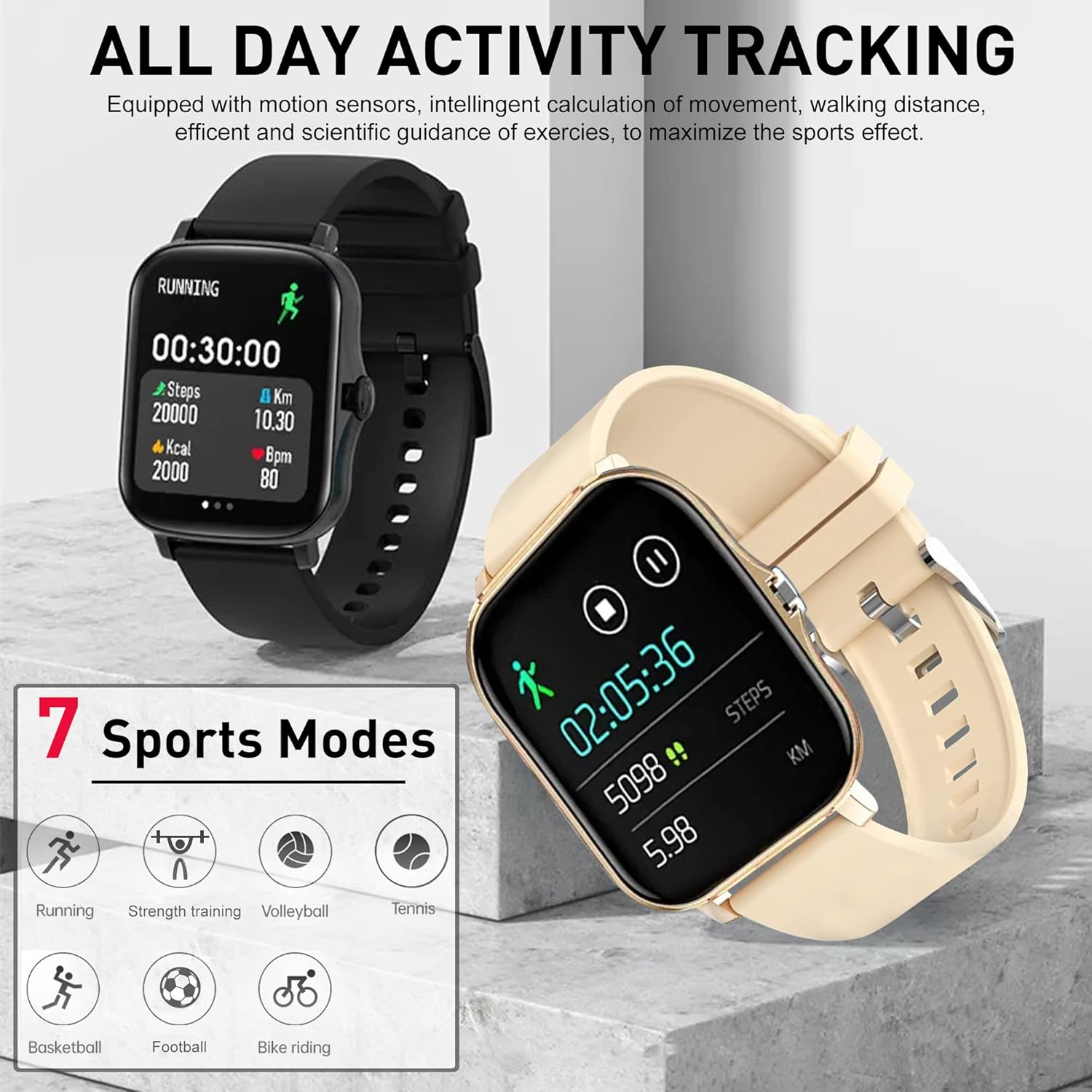
Image: The DOVIICO H13 Smart Watch showing real-time blood pressure (128/90 mmHg) and blood oxygen (98% SpO2) measurements.
Pangimeutan Saré
Wear your smart watch to bed to track your sleep patterns. It records deep sleep, light sleep, and awake times, providing a comprehensive analysis of your sleep quality in the mobile application.

Image: The DOVIICO H13 Smart Watch displaying sleep duration and a breakdown of sleep stages (deep, light, awake).
Nyukcruk kagiatan
The DOVIICO H13 Smart Watch is designed to track your daily activities and workouts, helping you stay motivated and achieve your fitness goals.
All-Day Activity Monitoring
The watch automatically tracks your steps, distance traveled, and calories burned throughout the day. This data is synchronized with the mobile app for detailed analysis and progress tracking.
Modeu Olahraga
The DOVIICO H13 supports 7 different sports modes to provide more accurate tracking for specific activities. These include:
- Lumpat
- Sapédah Tunggang
- Ténis
- Latihan Kakuatan
- Baskét
- Bola voli
- Maén bal
Select the appropriate mode before starting your workout for optimized data collection.

Image: The DOVIICO H13 Smart Watch showing a running activity screen with duration, steps, distance, calories, and heart rate, alongside icons representing the 7 supported sports modes.
Fitur pinter
Beyond health and fitness, the DOVIICO H13 Smart Watch offers a range of smart features to keep you connected and organized.
Bewara pinter
Receive alerts for incoming calls, SMS messages, and notifications from social media applications (e.g., WeChat, QQ, Facebook, Twitter, Line, WhatsApp, Instagram) directly on your wrist. The watch will vibrate to notify you, ensuring you don't miss important updates.

Image: Two DOVIICO H13 Smart Watches showing real-time message notifications from social media platforms.
Parabot tambahan
The watch includes several convenient tools for daily use:
- Timer & Stopwatch: Pikeun kagiatan timing.
- Jam alarem: Setel alarm geter jempé.
- Musik Controller: Kontrol playback musik dina smartphone Anjeun.
- Cuaca: View kaayaan cuaca ayeuna.
- Panginget Sedentary: Ngajurung anjeun pikeun mindahkeun saatos période teu aktip.
- Milarian Telepon anjeun: Ngabantosan milarian telepon pinter anu dipasangkeun.
- Fotografi Jauh: Kontrol kaméra telepon anjeun tina jarak jauh.
- Telepon Bluetooth: Make and receive calls directly from the watch.
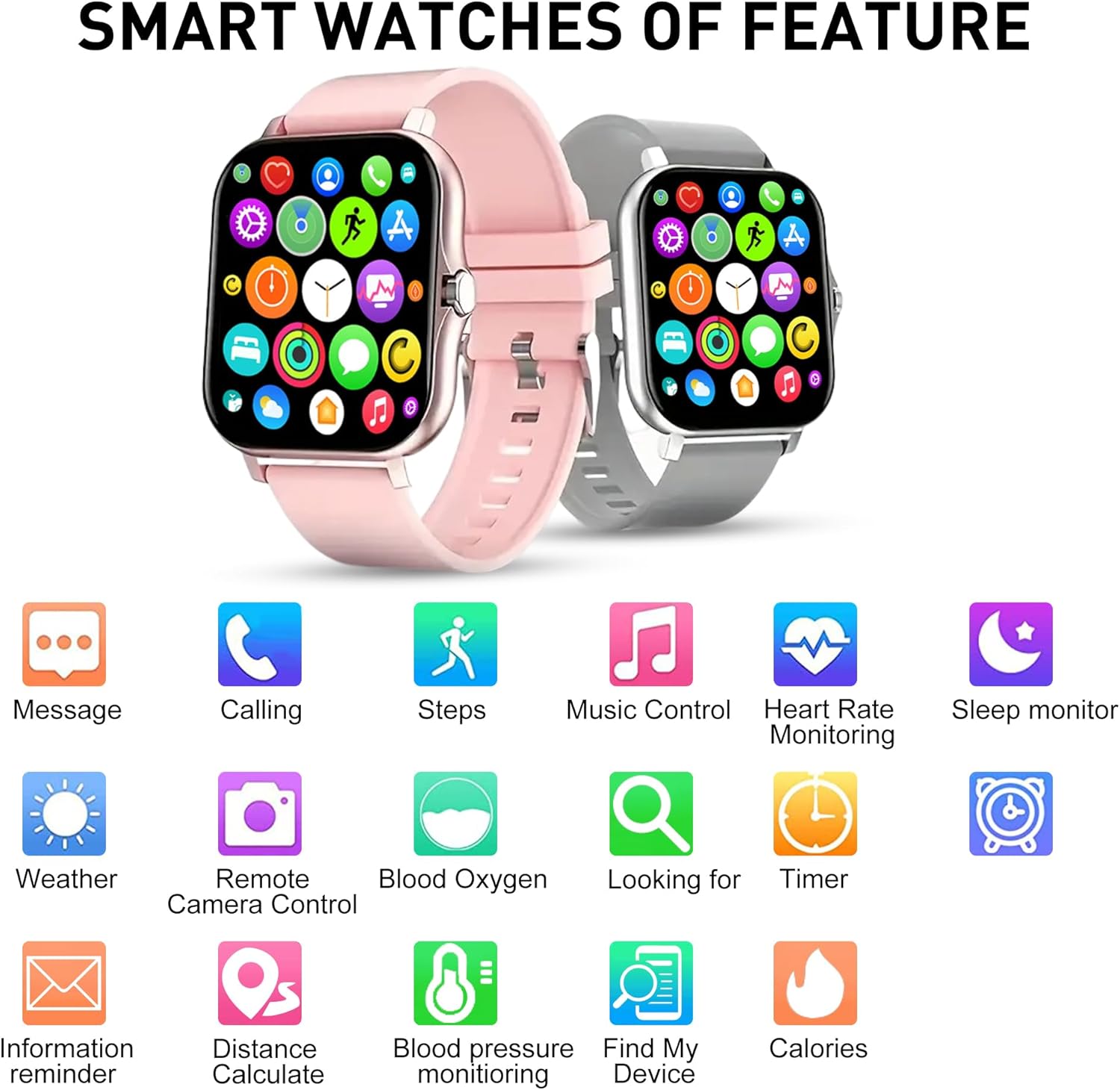
Gambar: Hiji leuwihview of the DOVIICO H13 Smart Watch's key features, represented by various icons for functions such as messaging, calling, step tracking, music control, and health monitoring.
Pangropéa
Ngabersihan Smart Watch Anjeun
- Ngusap layar arloji sareng tali sacara teratur ku lemes, damp, lawon bébas lint.
- Hindarkeun ngagunakeun bahan kimia kasar, pembersih abrasive, atanapi pangleyur, sabab ieu tiasa ngaruksak finish sareng komponén jam.
- Pastikeun kontak ngecas beresih jeung garing saméméh ngecas pikeun nyegah korosi.
Perawatan batré
- Pikeun manjangkeun umur batre, ulah miceun arloji sacara sering.
- Simpen arloji dina tempat anu tiis sareng garing upami henteu dianggo kanggo waktos anu lami.
- The watch has a battery capacity of 160 mAh and typically lasts for 7 days with normal use, with a standby time exceeding 30 days.
Perawatan Umum
- Avoid exposing the watch to extreme temperatures, direct sunlight for prolonged periods, or high humidity.
- While the watch may have some water resistance, avoid submerging it in water or exposing it to high-pressure water jets unless explicitly stated in product specifications.
Pamérésan masalah
Lalajo Teu Ngahurungkeun
- Pastikeun arloji dicas pinuh. Sambungkeun ka carjer sahenteuna 30 menit.
- Pencét terus tahan tombol sisi salami sababaraha detik pikeun ngahurungkeunana.
Teu tiasa dipasangkeun sareng Smartphone
- Pastikeun Bluetooth diaktipkeun dina smartphone Anjeun.
- Ensure the watch is within Bluetooth range of your phone (typically 10 meters).
- Balikan deui smartphone anjeun sareng jam tangan pinter.
- Pariksa naha aplikasi pendamping diapdet kana versi panganyarna.
- Upami sateuacanna parantos dipasangkeun, cobian pegatkeun pasangan alat tina setélan Bluetooth telepon anjeun teras pasangkeun deui nganggo aplikasi.
Bacaan Kaséhatan Anu Teu Akurat
- Pastikeun yén arloji dipaké pas dina pigeulang anjeun, tapi henteu ketat teuing.
- Jaga pigeulang anjeun tetep teu gerak nalika ngukur.
- Ngabersihan sénsor dina tonggong arloji sacara teratur.
- Catet yén bacaan jam tangan pinter ngan ukur kanggo rujukan sareng teu kedah dianggo pikeun diagnosis médis.
Bewara Teu Nembongan
- Pastikeun yén arloji éta hasil dipasangkeun sareng telepon anjeun.
- Pariksa idin bewara pikeun aplikasi pendamping dina setélan telepon anjeun.
- Ensure that notification alerts are enabled within the companion app settings for the specific applications you wish to receive alerts from.
- Disable "Do Not Disturb" mode on both your watch and phone.
spésifikasi
| Fitur | Rincian |
|---|---|
| merek | DOVIICO |
| Modél | H13 |
| Ukuran layar | 1.69 inci |
| Tipe tampilan | LCD |
| Resolusi | 240 x 240 |
| Kasaluyuan System Operasi | Android 5.0+, ios 9.0+ |
| Konektipitas | Bluetooth |
| Kapasitas batré | 160 Miliamp Jam (mAh) |
| Waktu Ngecas | Kurang leuwih 2.5 Jam |
| Kahirupan Batré (Pakéan Biasa) | Nepi ka 7 Dinten |
| Waktu sayaga | Over 30 Days |
| Dimensi produk | 14.99 x 7.49 x 3 cm |
| Item Beurat | 80 g |
| Fitur husus | Heart Rate, Blood Pressure, Blood Oxygen, Sleep Monitoring, Step/Distance/Calorie Tracking, 7 Sports Modes, Call/SMS/Social App Alerts, Alarm, Sedentary Reminder, Music Control, Weather, Remote Camera, Find Phone, Bluetooth Calling. |
Garansi sareng Rojongan
For information regarding warranty coverage and customer support for your DOVIICO H13 Smart Watch, please refer to the warranty card included in your product packaging or visit the official DOVIICO website. If you encounter any issues not covered in this manual, please contact DOVIICO customer service for assistance.