Bubuka
This manual provides detailed instructions for the setup, operation, maintenance, and troubleshooting of your Makeid L1 Portable Wireless Sticker Label Maker Machine. Please read this manual thoroughly before using the device to ensure proper function and longevity.
Naon dina Box
Pastikeun yén sadaya komponén aya dina bungkusan:
- Makeid L1 Label Maker Machine
- 4-meter roll of label tape
- kabel ngecas USB
- Manual pangguna (dokumén ieu)
Produk Leuwihview
Familiarize yourself with the key components of your Makeid L1 Label Maker.

Gambar: Leuwihview of the Makeid L1 Label Maker, highlighting the power button, the lid for tape replacement, and the integrated cutter for crisp labels.
- Tombol Daya: Lokasina di sisi, dipaké pikeun ngahurungkeun alat on / off.
- tutup: Opens to access the tape compartment for loading and replacing label rolls.
- Diwangun-di cutter: Ensures clean and precise cuts of printed labels.
- Label Output Slot: Dimana labél dicitak muncul.
- Port ngecas: USB port for recharging the device.
Disetél
1. Ngecas Alat
Before first use, ensure the label maker is fully charged. Connect the provided USB charging cable to the device's charging port and a compatible USB power source (e.g., computer USB port, USB wall adapter). The indicator light will show charging status (refer to device specific light indicators for full/charging status).
2. Ngamuat Label Tape
The Makeid L1 supports various label tape widths (9mm, 12mm, 16mm) and types (continuous, die-cut, transparent, white, colored, pattern). Ensure the tape is correctly oriented.
- Open the lid of the label maker.
- Insert the label roll into the compartment, ensuring the tape feeds out from the bottom and through the output slot.
- Tutup tutupna aman.
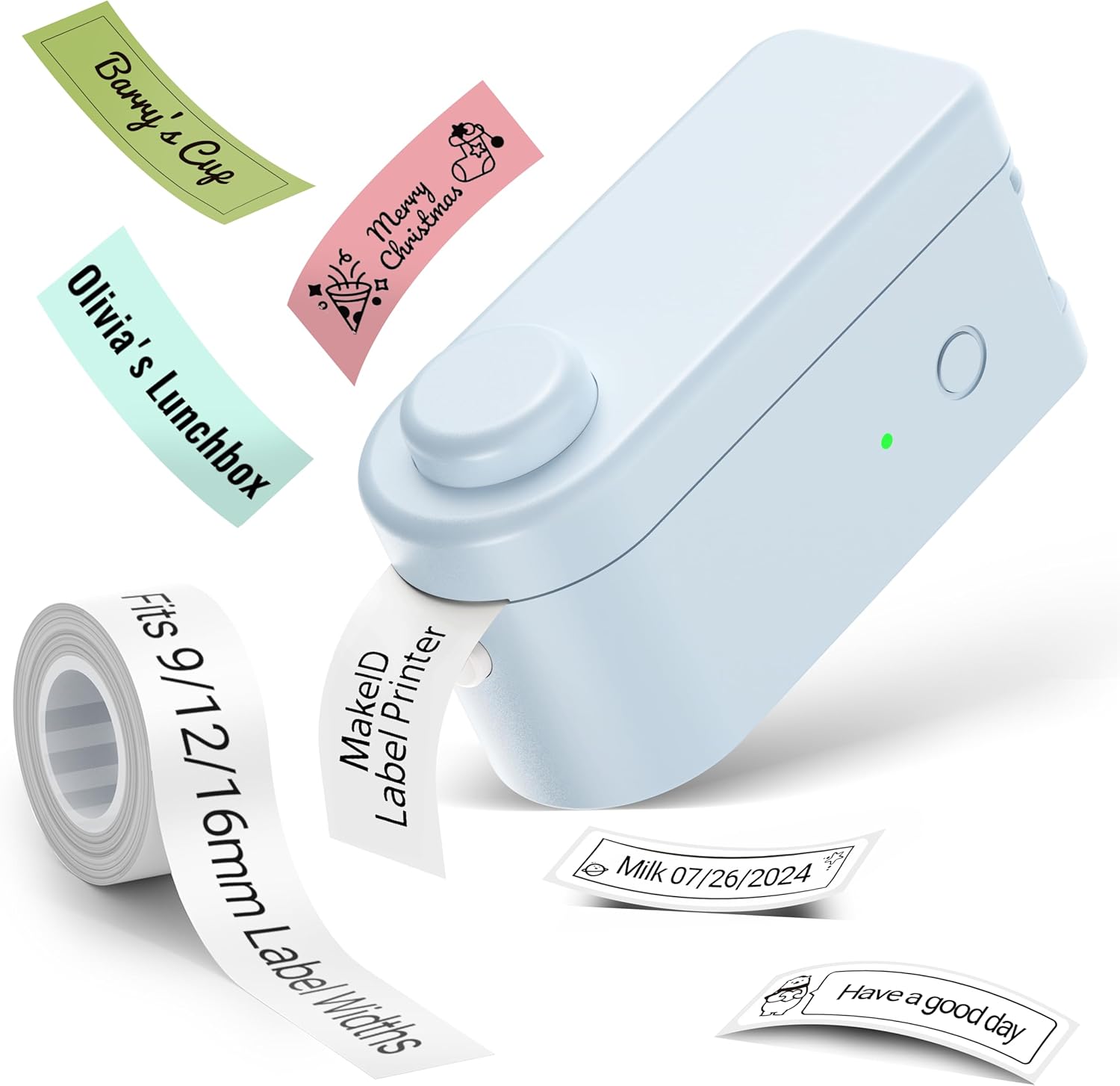
Gambar: The Makeid L1 Label Maker demonstrating the label tape roll and examples of printed labels, including continuous and die-cut types.
3. Ngundeur tur masang App
The Makeid L1 operates via a dedicated mobile application. Milarian pikeun "MakeID-Life" on your device's app store.

Gambar: Screenshots showing the "Get it on Google Play" and "Download on the App Store" buttons, indicating where to find the MakeID-Life application.
4. Papasangan Bluetooth
The label maker connects to your smartphone via Bluetooth.
- Pastikeun Bluetooth diaktipkeun dina smartphone Anjeun.
- Turn on the Makeid L1 Label Maker by pressing the power button. The indicator light will flash, indicating it's ready for pairing.
- Open the "MakeID-Life" app. The app will automatically search for nearby devices.
- Select "L1" from the list of available devices to connect. Once connected, the indicator light on the label maker will become solid.

Gambar: A visual guide demonstrating the three steps for Bluetooth connection: turning on Bluetooth, selecting the L1 model within the app, and confirming the device connection.
Parentah Operasi
1. Designing Your Label
The "MakeID-Life" app offers extensive customization options:
- Input téks: Type your desired text.
- hurup: Choose from 88 different font styles.
- Ikon & Lambang: Access over 600 icons and various symbols.
- Citakan: Utilize over 400 pre-designed templates for various purposes (e.g., kitchen, office, school).
- Borders & Frames: Add decorative borders.
- Fungsi séjén: Create barcodes, QR codes, tables, dates, and patterns.
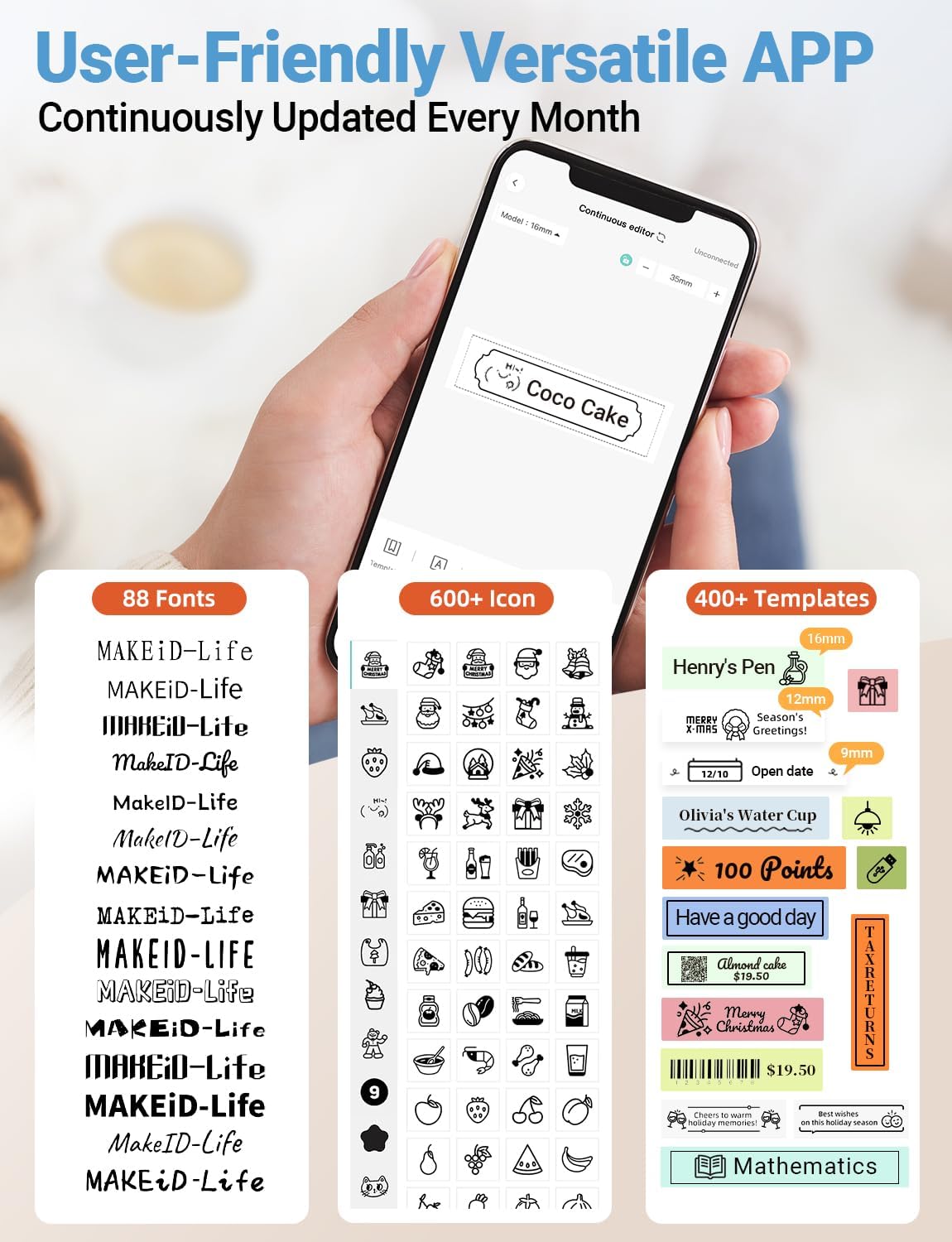
Gambar: A lengkep view of the MakeID-Life app interface, showcasing the wide selection of 88 fonts, over 600 icons, and more than 400 templates available for label customization.
2. Nyitak Label
Once your design is complete in the app:
- Review your label design on the app screen.
- Tap the "Print" button within the app.
- The label will be thermally printed and emerge from the output slot.
3. Motong Labels
The Makeid L1 features a built-in cutter for clean edges.
- After printing, gently pull the label forward slightly.
- Press the cutting button (refer to the Product Overview image for location) to cleanly cut the label.

Gambar: Illustration of the Makeid L1's built-in cutter, demonstrating how it provides professional and safe cutting of labels, eliminating messy torn edges.
4. Types of Label Printing
The L1 supports two primary types of label printing:
- Continuous Labels: Ideal for custom lengths, allowing you to print text of any length and cut it precisely.
- Die-Cut Labels: Pre-sized labels with specific shapes, perfect for consistent labeling of items like jars or files.

Gambar: Visual representation of continuous labels, which can be cut to any length, and die-cut labels, which are pre-shaped for specific applications.
Pangropéa
Ngabersihan Kepala Cetak
Pikeun mastikeun kualitas citak anu optimal, bersihan sirah citak termal sacara berkala.
- Turn off the label maker and disconnect it from the power source.
- Open the lid and remove the label tape.
- Gently wipe the print head with a soft, lint-free cloth dampened with isopropyl alcohol. Do not use water or abrasive cleaners.
- Allow the print head to dry completely before reinserting the tape and closing the lid.
Panyimpenan
Store the label maker in a cool, dry place away from direct sunlight and extreme temperatures. Remove the label tape if storing for extended periods.
Pamérésan masalah
Tingali tabel di handap pikeun masalah umum sareng solusina.
| Masalah | Mungkin Cukang lantaranana | Solusi |
|---|---|---|
| Alat henteu hurung. | batré lemah. | Ngecas alat nganggo kabel USB anu disayogikeun. |
| Teu bisa nyambung via Bluetooth. | Bluetooth is off on phone; device not in pairing mode; app issue. | Ensure Bluetooth is enabled on your phone. Turn the label maker off and on again to re-enter pairing mode. Restart the "MakeID-Life" app. |
| Kualitas citak goréng / Citak luntur. | Print head dirty; incorrect label tape; low battery. | Clean the print head. Ensure you are using Makeid compatible thermal label tape. Charge the device. |
| Label tape not feeding. | Tape incorrectly loaded; tape jammed. | Open the lid and re-insert the label tape correctly, ensuring it's not jammed. |
| Labels are not cutting cleanly. | Cutter blade dull or obstructed. | Ensure no debris is obstructing the cutter. If issues persist, contact customer support. |
spésifikasi
Detailed technical specifications for the Makeid L1 Label Maker Machine:
| Fitur | Rincian |
|---|---|
| merek | Makeid |
| Ngaran modél | L1 |
| Téhnologi konektipitas | Bluetooth |
| Téhnologi percetakan | Termal |
| Kaluaran printer | Monokrom |
| Resolusi | 203 x 203 DPI (also 300 x 300 DPI for other variants) |
| Ukuran Média Maksimum | 0.63 inci (16mm) |
| Alat nu cocog | Smartphones (Android & iOS) |
| Métode kontrol | App |
| Panganteur Hardware | USB |
| Sumber Daya | 1 batré Litium Ion (kaasup) |
| Dimensi produk | 3.93 "D x 1.6" W x 1.96" H (10 x 4.06 x 4.98 cm) |
| Item Beurat | 4.4 ons (126 gram) |
| Fitur husus | Continuous & Pre-cut Label Tapes, Waterproof, Oil-proof, Friction Resistant, Light Resistant, No Fading, Rich Font Icon Pattern, Portable, Inkless, Wireless, Rechargeable, Creative Print Functions (Barcode, Text, Picture, QR 2D Code, Table, Date, Border, Icon, Shape, Pattern, Template) |
Garansi sareng Rojongan
The Makeid L1 Label Maker comes with a Garansi saumur hirup. For technical support, warranty claims, or further assistance, please contact Makeid customer service through the official Makeid websitus atanapi inpormasi kontak anu disayogikeun dina bungkusan produk anjeun.
Pikeun sumber tambahan sarta FAQs, mangga buka Makeid Store on Amazon.
Émbaran Kasalametan
- Ulah ngabongkar atanapi nyobian ngalereskeun alat sorangan.
- Jauhkeun alat tina cai sareng kalembaban anu luhur.
- Use only original or certified compatible label tapes and charging cables.
- Jauhkeun tina jangkauan barudak.
- Hindarkeun ngalaan alat ka suhu anu ekstrim atanapi sinar panonpoé langsung.


