1. Bubuka
Hatur nuhun pikeun meuliasing the CANYON BSP-8 Bluetooth Speaker. This manual provides essential information for the safe and efficient use of your device. Please read it thoroughly before operation and retain it for future reference.
Fitur konci:
- Kaluaran Audio 10W: Nganteurkeun sora anu jelas sareng kuat.
- Bluetooth 5.2: For stable and energy-efficient wireless connection up to 10 meters.
- Lampu tukang RGB: Integrated lighting for enhanced ambiance.
- Stereo Nirkabel Sejati (TWS): Connect two BSP-8 speakers for a full stereo sound experience.
- Sababaraha Pilihan Playback: Supports Bluetooth, AUX, USB, and MicroSD card inputs.
- Desain portabel: Compact size with a convenient hanger for easy transport.
- Hirup batré anu panjang: Nepi ka 3 jam playtime dina hiji muatan.
2. Émbaran Kasalametan
- Ulah ngalaan speaker ka suhu ekstrim, sinar panonpoé langsung, atawa kalembaban luhur.
- Hindarkeun lungsur atanapi nahan panyatur kana tabrakan anu kuat.
- Do not disassemble or attempt to repair the speaker yourself. Contact qualified service personnel.
- Jauhkeun spéker tina cai sareng cairan sanés. Éta henteu tahan cai.
- Anggo ukur kabel ngecas anu disayogikeun atanapi kabel Type-C anu disertipikasi pikeun ngecas.
- Buang batré sareng spiker numutkeun peraturan lokal.
3. Eusi Paket
- CANYON BSP-8 Bluetooth Speaker
- Kabel Ngecas USB Tipe-C
- Manual pamaké
4. Produk Langkungview
Biasakeun diri sareng komponén sareng kadali speaker.
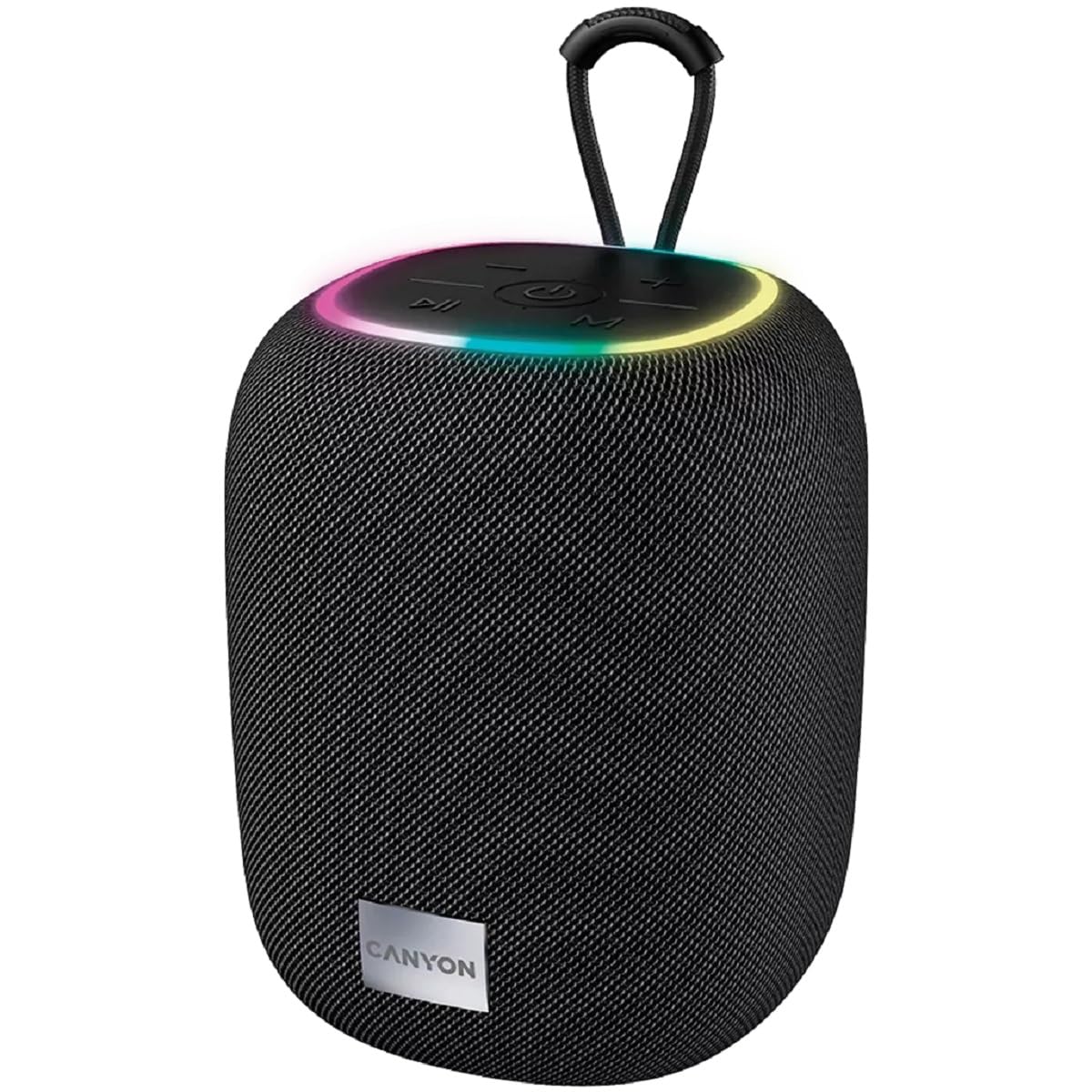
Gambar 1: Luhur view of the CANYON BSP-8 speaker, showing the control buttons, RGB backlight, and integrated hanger.
Tombol Kontrol (Panel Luhur):
- Tombol Daya: Pencét jeung tahan pikeun ngahurungkeun/pareum. Pencét pondok pikeun muter / ngareureuhkeun.
- Volume Turunkeun / Tombol Lagu Saméméhna: Pencét pondok pikeun volume handap. Pencét lila pikeun lagu saméméhna.
- Volume Kaluhur / Tombol Lagu Salajengna: Pencét pondok pikeun polumeu ka luhur. Pencét lila pikeun lagu salajengna.
- Tombol Mode (M): Short press to switch between Bluetooth, AUX, USB, and MicroSD modes.

Gambar 2: Tukangeun view of the CANYON BSP-8 speaker, illustrating the various input ports including AUX, USB, TF (MicroSD) card slot, and DC5V Type-C charging port.
Input Ports (Rear Panel):
- Pelabuhan AUX: Pikeun nyambungkeun alat audio éksternal liwat kabel audio 3.5mm.
- Port USB: Pikeun muterkeun audio tina USB flash drive.
- Slot Kartu TF (MicroSD): Pikeun muterkeun audio tina kartu MicroSD.
- DC5V (Type-C) Port: Pikeun ngecas speaker.
5. Setélan
5.1 Ngecas Speaker
- Connect the provided USB Type-C cable to the DC5V port on the speaker.
- Connect the other end of the cable to a USB power adapter (5V/1A recommended) or a computer's USB port.
- Lampu indikator ngecas bakal hurung. Lampu éta bakal pareum atanapi robih warna saatos dicas pinuh.
Catetan: Pikeun umur batre anu optimal, eusian pinuh speaker sateuacan dianggo anu munggaran.

Image 3: Illustration showing the 1800 mAh battery capacity and up to 3 hours of playtime for the CANYON BSP-8 speaker.
5.2 Powering on / Pareum
- Pikeun Ngahurungkeun: Pencét terus tahan tombol Daya salila kurang leuwih 3 detik. Anjeun bakal ngadéngé paréntah nu bisa disada.
- Pikeun mareuman: Pencét terus tahan tombol Daya salila kurang leuwih 3 detik. Anjeun bakal ngadéngé paréntah nu bisa disada.
5.3 Nyapasangkeun Bluetooth
- Hurungkeun speaker. Spiker bakal otomatis asup kana modeu pasangan Bluetooth, dituduhkeun ku lampu LED anu kedip-kedip.
- Aktipkeun Bluetooth dina alat sélulér anjeun (smartphone, tablet, komputer).
- Milarian pikeun available Bluetooth devices and select "CANYON BSP-8" from the list.
- Once paired, the LED light will stop flashing, and you will hear a confirmation sound.
Note: The speaker will automatically reconnect to the last paired device if it is within range and Bluetooth is enabled.

Image 4: Illustration highlighting the stable and energy-efficient Bluetooth 5.2 connection with an operating range of up to 10 meters.
5.4 Leres Wireless Stereo (TWS) papasangan
To connect two CANYON BSP-8 speakers for a stereo sound experience:
- Ensure both BSP-8 speakers are powered on and not connected to any Bluetooth device.
- Dina hiji spiker (ieu bakal janten spiker utama), pencét dua kali tombol Daya. Éta bakal lebet kana modeu pasangan TWS.
- Dua spiker bakal otomatis milarian sareng silih nyambung. Anjeun bakal ngadangu sora konfirmasi saatos disambungkeun.
- Once TWS is established, connect your mobile device to the primary speaker via Bluetooth as described in section 5.3.
Note: TWS mode only works with two identical CANYON BSP-8 speakers.
6. Parentah Operasi
6.1 Maén Audio
- Mode Bluetooth: Saatos pasangan suksés, audio tina alat anjeun anu nyambung bakal diputer ngalangkungan speaker.
- Mode AUX: Connect a 3.5mm audio cable from your external audio device to the AUX port on the speaker. Press the 'M' button to switch to AUX mode.
- Mode USB: Insert a USB flash drive into the USB port. The speaker will automatically switch to USB mode and begin playing audio files. If not, press the 'M' button.
- Modeu Kartu MicroSD: Insert a MicroSD card into the TF card slot. The speaker will automatically switch to MicroSD mode and begin playing audio files. If not, press the 'M' button.
6.2 Playback Control
- Puter / Reureuh: Pencét pondok tombol Daya.
- Volume Up: Pencét pondok tombol Volume Up (+).
- Volume Turun: Pencét pondok tombol Volume Turun (-).
- Lagu salajengna: Pencét lila tombol Volume Naék (+).
- Lagu Sateuacanna: Pencét lila tombol Volume Turun (-).
Lampu Latar RGB 6.3
The speaker features an integrated RGB backlight on the top panel. The backlight activates automatically when the speaker is powered on. There are no specific controls for changing the RGB pattern or turning it off/on independently of the speaker's power state.


