1. Bubuka
Hatur nuhun pikeun meuliasing the Bietrun Wireless Microphone WXM19 with Mic Stand. This user manual provides detailed instructions for the proper setup, operation, and maintenance of your new wireless microphone system and accompanying microphone stand. Please read this manual thoroughly before use to ensure optimal performance and longevity of the product.

Figure 1.1: The Bietrun Wireless Microphone WXM19 system, including two wireless microphones, a receiver, charging cables, and a microphone stand.
2. Eusi Paket
Mangga parios heula sadaya barang anu didaptarkeun di handap ieu kalebet kana pakét anjeun. Upami aya barang anu leungit atanapi ruksak, mangga ngahubungi layanan palanggan.
- Round base metal Mic Stand x 1
- Wireless Microphones x 2 (WXM19 model)
- Mic Clips x 2
- Klip Kabel x 2
- Portable Storage Box x 1
- Kabel Ngecas USB x 1
- 6.35mm to 3.5mm Converter x 1
- Buku Panduan x 1
3. Fitur konci
- Heavy Duty Metal Round Base: The microphone stand features a solid die-cast metal base with a 10.24-inch diameter and 5.64 lbs weight, ensuring stability. Non-slip pads are included on the bottom to prevent movement.
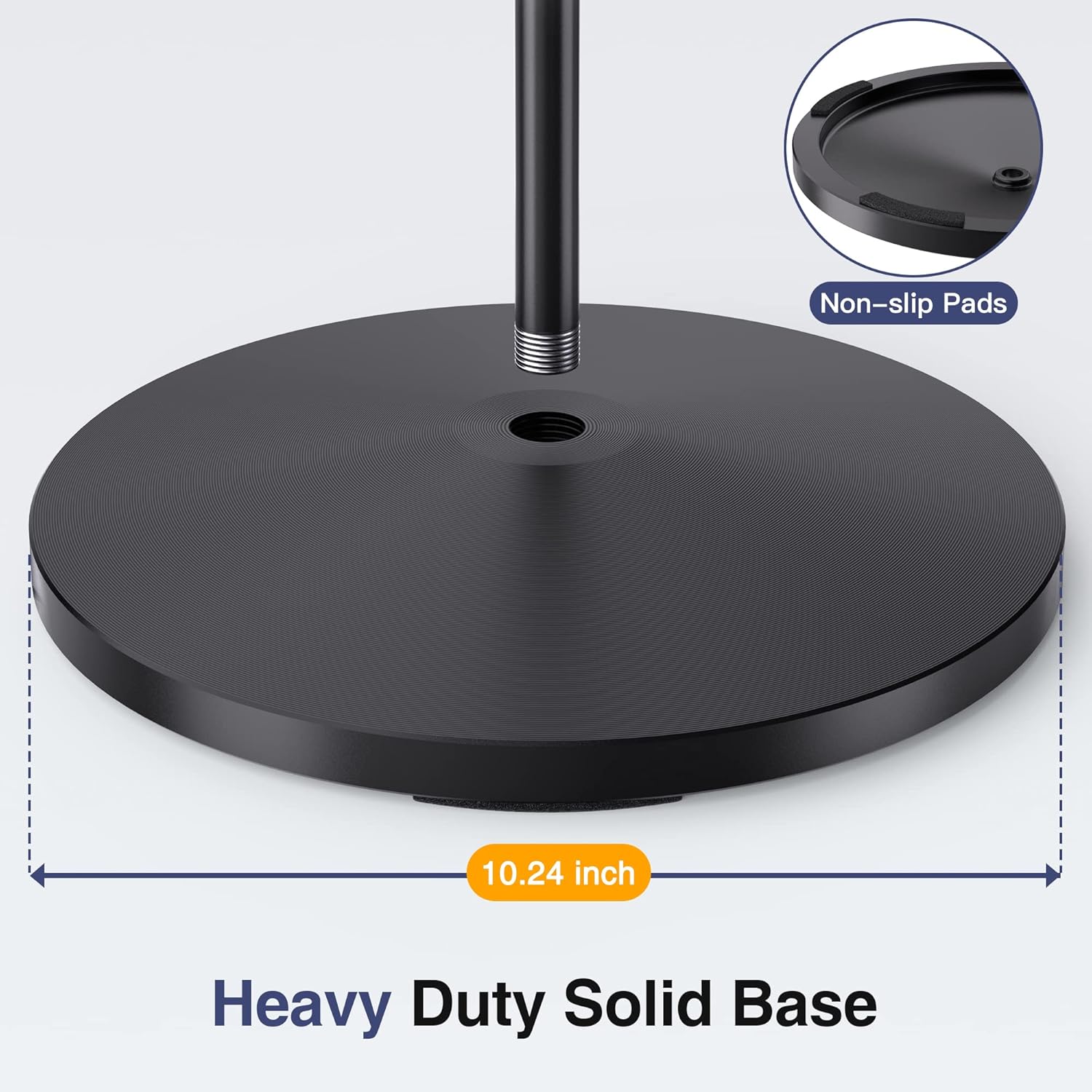
Figure 3.1: Detail of the microphone stand's heavy-duty round base, highlighting its 10.24-inch diameter and non-slip pads.
- Height & Angle Adjustable: The microphone stand's height is adjustable from 24 inches to 67 inches, easily set with an adjustable clutch. The included mic clip is 180° rotatable for flexible positioning.

Figure 3.2: Illustration of the microphone stand's adjustable height feature, ranging from 24 inches (60 cm) to 67 inches (170 cm).
- Detachable & Portable Design: The boom mic stand can be disassembled into two parts for easy transport and storage, ideal for stage, studio, concerts, and outdoor performances.
- Aplikasi lega: Comes with two styles of microphone clip holders and a standard 5/8'' thread, compatible with most handheld, wireless, and wired microphones (e.g., Shure SM58, Samson Q2U). Includes two clip-on cable holders for neat cable management.
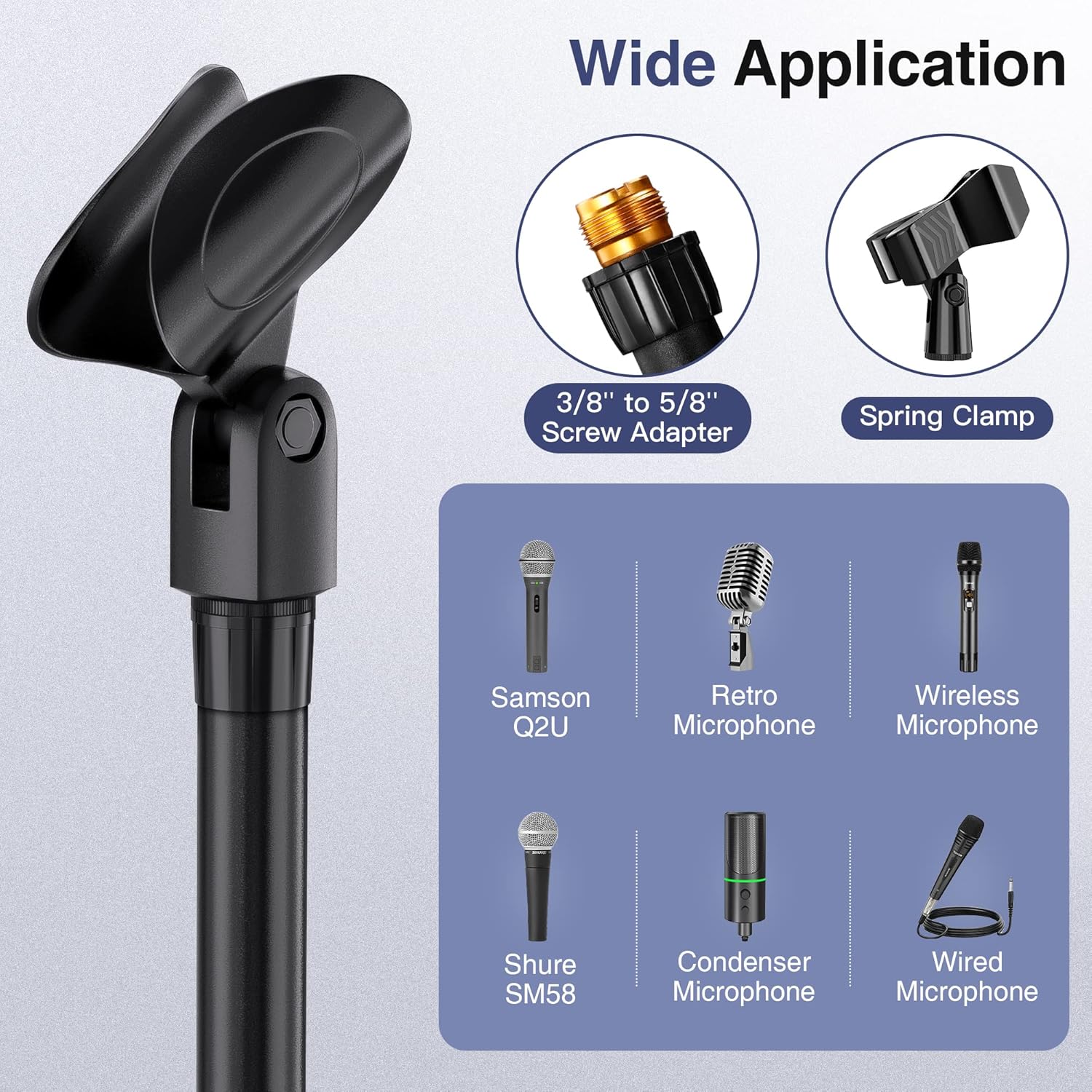
Gambar 3.3: Kelamples of various microphones, including Samson Q2U, Shure SM58, retro, condenser, wireless, and wired microphones, demonstrating compatibility with the included clips and screw adapter.
- Rechargeable Microphones & Bluetooth Receiver: The wireless microphones and receiver are rechargeable, offering 7+ hours of working time after 3-4 hours of charging.

Figure 3.4: Visual representation of the charging process for the wireless microphones and receiver, indicating a 3-4 hour charging time for 7+ hours of working time.
- Long & Stable Wireless Signal: Offers a UHF wireless distance of up to 240 feet in open spaces and Bluetooth connectivity up to 32 feet (10 meters).

Figure 3.5: Illustration of the wireless signal range, showing UHF distance up to 240 feet and Bluetooth distance up to 32 feet (10 meters).
- High-Quality Unidirectional Dynamic Microphone: Features a microphone with 95dB signal-to-noise ratio and a frequency response of 50Hz - 18kHz, designed for clear sound capture. Includes a steel meshed head, LED light ring, and clear white display.

Gambar 3.6: Detil view of the unidirectional dynamic microphone, showcasing its steel meshed head, LED light ring, and clear white display.
4. Setup Guide
4.1 Assembling the Microphone Stand
- Unpack all components of the microphone stand from the portable storage box.
- Screw the main pole into the heavy-duty metal round base until secure.
- Attach the desired microphone clip to the top of the stand. Ensure it is tightened securely.
- Adjust the height of the stand using the adjustable clutch to your preferred level (24 to 67 inches).
- If using, attach the cable clips to the stand pole to manage microphone cables neatly.
4.2 Ngecas Mikropon sareng Panarima
Before first use, fully charge both wireless microphones and the receiver.
- Connect the USB charging cable to the charging port on each microphone and the receiver.
- Colokkeun tungtung kabel USB anu sanés ka adaptor kakuatan USB standar (teu kalebet) atanapi port USB komputer.
- Charging typically takes 3-4 hours for a full charge. The indicator light will change to show charging status (refer to the device's specific indicator behavior).
4.3 Connecting the Wireless System (Plug & Play)
The Bietrun WXM19 system is designed for simple plug-and-play operation.
- Step 1: Turn on the receiver. Locate the power button on the receiver and press it to turn it on.
- Step 2: Turn on the microphone. Press the power button on each wireless microphone to turn them on. The microphones and receiver should automatically pair.
- Step 3: Plug the receiver into a speaker or audio device. Insert the receiver's 6.35mm (1/4 inch) jack directly into the "MIC IN" input port of your amplifier, mixer, or speaker. If your device has a 3.5mm (1/8 inch) MIC IN port, use the included 6.35mm to 3.5mm converter.

Figure 4.1: Visual guide for the three-step plug-and-play connection process: turning on the receiver, turning on the microphone, and plugging the receiver into an audio input.
IMPORTANT: DO NOT use the receiver with audio devices without a dedicated "MIC IN" input. Using it with "LINE IN" or "AUX IN" ports may result in no sound or poor audio quality.

Figure 4.2: Compatibility chart for the receiver, indicating that it should only be connected to MIC INPUT ports (3.5mm or 6.35mm) and not LINE IN / AUX IN ports.
4.4 Supported Multimedia Devices
The Bietrun WXM19 system can be connected to various audio devices with a 6.35mm "MIC" input port, including:
- Speaker outdoor
- Speaker stereo
- PA Speaker Systems
- Kakuatan Amplifsters
- Car Audio Systems (with appropriate input)
- Desktop Speakers (with appropriate input)
5. Parentah Operasi
5.1 Operasi Mikropon
- Hurungkeun/Pareuman: Press and hold the PWR/VOL button on the microphone to turn it on or off.
- Penyesuaian volume: Briefly press the PWR/VOL button to cycle through volume levels. The clear white display will show the current volume.
- Ngalihkeun saluran: The microphone and receiver automatically pair. If interference occurs or you need to change channels, press the CH button on the receiver to switch frequencies. The microphones will automatically follow.
- Indikator batré: The display on the microphone shows the battery level. Recharge when the battery icon is low.
5.2 Using the Microphone Stand
- Penyesuaian Jangkungna: Loosen the clutch on the stand, extend or retract the pole to the desired height, and then tighten the clutch firmly to secure.
- Mic Clip Angle: The mic clip can be rotated 180 degrees. Adjust the angle to position the microphone optimally for sound capture.
- Manajemén Kabel: Use the provided cable clips to secure microphone cables along the stand, preventing tangles and trip hazards.
6. Pangropéa
- beberesih: Use a soft, dry cloth to wipe down the microphones, receiver, and stand. Do not use abrasive cleaners or solvents.
- Panyimpenan: When not in use, store the system in the portable storage box in a cool, dry place away from direct sunlight and extreme temperatures.
- Perawatan batré: To prolong battery life, avoid fully discharging the microphones and receiver frequently. Recharge them regularly, even if not in constant use.
- Hindarkeun Uap: Keep all components away from water and high humidity to prevent damage.
7. Cara ngungkulan
| Masalah | Mungkin Cukang lantaranana | Solusi |
|---|---|---|
| Taya sora tina mikropon. |
|
|
| Sorana distort atawa intermittent. |
|
|
| Microphone stand is wobbly. |
|
|
8. Spésifikasi
| Fitur | Rincian |
|---|---|
| Nomer modél | WXM19 |
| merek | Bietrun |
| Tipe Mikropon | Dinamis Searah |
| Réspon Frékuénsi | 50Hz - 18kHz |
| Rasio Sinyal-Ka-Sora (SNR) | 95dB |
| Téhnologi nirkabel | UHF, Bluetooth |
| UHF Wireless Range | Up to 240 feet (open place) |
| Rentang Bluetooth | Nepi ka 32 suku (10 méter) |
| Waktu Ngecas | 3-4 jam |
| Waktos Gawé | 7+ jam |
| Mic Stand Base Material | Solid Die-cast Metal |
| Mic Stand Base Diameter | 10.24 inci |
| Mic Stand Base Weight | 5.64 pon |
| Mic Stand Height Adjustment | 24 inci nepi ka 67 inci |
| Warna | Hideung |
9. Jaminan & Dukungan
Bietrun provides a One Year Warranty for the WXM19 Wireless Microphone with Mic Stand. This warranty covers manufacturing defects and ensures free replacement service for eligible issues.
For any questions, technical assistance, or warranty claims, please contact Bietrun customer support through the retailer where you purchased the product or visit the official Bietrun websitus pikeun inpo kontak.
Rojongan Palanggan: Please refer to your purchase platform or the Bietrun official websitus pikeun inpo kontak paling up-to-date.


