Bubuka
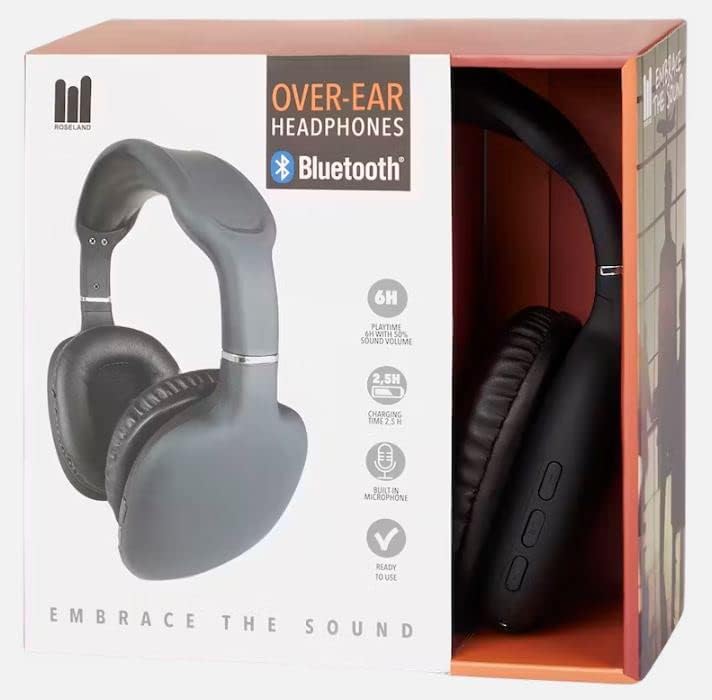
Thank you for choosing Roseland Over-Ear Bluetooth Headphones. These wireless headphones are designed to provide an optimal audio experience with comfort and convenience. Featuring soft ear cushions and an integrated microphone, they are perfect for listening to music and making calls on the go. This manual provides essential information on setting up, operating, maintaining, and troubleshooting your headphones.
Produk Leuwihview

Disetél
1. Ngecas Headphone
Before first use, fully charge your headphones. Connect the included charging cable to the charging port on the headphones and the other end to a USB power source (e.g., computer USB port, wall adapter). The charging indicator light will show the charging status. A full charge takes approximately 2.5 jam.
2. Powering on / Pareum
- Pikeun ngahurungkeun: Pencét terus tahan tombol Daya dugi ka lampu indikator kedip-kedip.
- Pikeun mareuman: Pencét jeung tahan tombol Daya nepi ka lampu indikator pareum.
3. Papasangan Bluetooth
The Roseland headphones use Bluetooth 5.0 for stable and efficient connection.
- Pastikeun headphone dipareuman.
- Pencét terus tahan tombol Daya salila kira-kira 5-7 detik nepi ka lampu indikator beureum jeung biru kedip-kedip silih genti, nunjukkeun modeu pairing.
- Dina telepon pinter anjeun atanapi alat Bluetooth anu sanés, buka setélan Bluetooth.
- Milarian pikeun "Roseland Casque Bluetooth" or a similar name in the list of available devices.
- Select the headphones to connect. Once connected, the indicator light will turn solid blue or flash slowly.
- Upami dipenta pikeun kecap akses, lebetkeun "0000".
Note: The headphones will automatically try to reconnect to the last paired device when powered on.
Parentah Operasi
Basic Controls (Buttons on the side)
- Tombol Daya: Power on/off, Play/Pause music, Answer/End calls.
- Volume Naik (+): Ningkatkeun volume, lagu salajengna (pencét panjang).
- Volume Turun (-): Turunkeun polumeu, Lagu saméméhna (pencét panjang).
Puterkeun Musik
- Puter / Reureuh: Pencét tombol Daya sakali.
- Lagu salajengna: Pencét lila tombol Volume Naék (+).
- Lagu Sateuacanna: Pencét lila tombol Volume Turun (-).
- Saluyukeun Volume: Pencét sakeudeung tombol Volume Naék (+) atawa Volume Turun (-).
Telepon Telepon
Mikropon anu terintegrasi ngamungkinkeun nelepon tanpa nganggo leungeun.
- Ngajawab Telepon: Press the Power button once when a call comes in.
- Tungtung Telepon: Pencét tombol Daya sakali nalika nelepon.
- Nolak Telepon: Pencét lila tombol Daya nalika aya telepon asup.
- Telepon deui Nomer Panungtungan: Pencét dua kali tombol Daya.
Kahirupan batré
The headphones provide approximately 6 jam waktos maén on a single charge, depending on volume level and usage.
Ngagem Nyaman
The soft, memory foam earcups are designed for superior comfort during extended listening sessions. They provide a circum-aural fit, enveloping your ears for an immersive sound experience. For optimal comfort and ear health, it is recommended to remove the headphones every 2 nepi ka 3 jam to allow your ears to rest.
Pangropéa
- beberesih: Anggo lawon anu lembut sareng garing pikeun ngabersihan headphone. Ulah make cleaners abrasive atawa pangleyur.
- Panyimpenan: Simpen headphone dina tempat anu tiis sareng garing jauh tina sinar panonpoé langsung sareng suhu anu ekstrim.
- Tahan cai: headphone ieu teu waterproof. Avoid exposure to water, rain, or excessive moisture. While they are sweat-resistant, prolonged exposure to heavy sweat should be avoided.
- Ngecas: Always use the provided charging cable or a certified equivalent.
Pamérésan masalah
- Headphone teu tiasa dihurungkeun: Pastikeun headphone dicas pinuh.
- Teu tiasa dipasangkeun sareng alat:
- Pastikeun Bluetooth diaktipkeun dina alat Anjeun.
- Pastikeun headphone aya dina modeu pairing (beureum jeung biru kedip-kedip).
- Pindahkeun headphone ngadeukeutan ka alat Anjeun.
- Pareuman sareng hurungkeun headphone sareng alat anjeun.
- Hapus sambungan Bluetooth sateuacana dina alat anjeun upami seueur teuing anu disimpen.
- Henteu aya sora atanapi volume rendah:
- Pariksa tingkat polumeu boh dina headphone sareng alat Anjeun nu disambungkeun.
- Pastikeun headphone dipasangkeun kalayan leres.
- Coba maén audio tina aplikasi atanapi sumber anu béda.
- Kualitas sora goréng:
- Pindah ngadeukeutan ka alat Anjeun nu disambungkeun pikeun nyegah gangguan.
- Pastikeun teu aya halangan fisik antara headphone sareng alat.
- Check if the audio source quality is good.
- Masalah ngecas:
- Pastikeun kabel ngecas disambungkeun aman.
- Coba port USB atawa adaptor kakuatan béda.
spésifikasi
| merek | Roseland |
| Nomer modél | GE015877 |
| Téhnologi konektipitas | Nirkabel (Bluetooth 5.0) |
| Gaya | Luhureun Ceuli (Sirkum-Aural) |
| Panempatan Ceuli | Supra-Aural |
| Warna | Hideung |
| Bahan | palastik |
| Kahirupan Batré (Waktu Play) | Kira-kira. 6 jam |
| Waktu Ngecas | Kira-kira. 2.5 jam |
| Rentang Frékuénsi | 20 Hz - 20,000 Hz |
| Tipe Kontrol | Volume Control |
| Fitur husus | Lightweight, Sweat-resistant, Built-in Microphone |
| Tingkat Résistansi Cai | Teu waterproof |
| Alat nu cocog | Smartphone |
| Dianjurkeun Mangpaat | Sport, Running, Calls, Music Listening |
| Komponén Kaasup | Kabel Ngecas |
Garansi sareng Rojongan
Specific warranty information for the Roseland Over-Ear Bluetooth Headphones (Model: GE015877) is not available in the provided product details. Please refer to the product packaging or the retailer's website for any applicable warranty terms.
For technical support or further assistance, please contact the manufacturer, ZD Trading, or your point of purchase. Contact details are typically found on the product packaging or the manufacturer's official websitus.