1. Bubuka
Thank you for choosing the DOOMAY Digital Alarm Clock. This compact and modern alarm clock is designed for convenience and reliability, featuring an LCD display, adjustable volume, snooze function, weekend mode, and indoor temperature display. This manual provides detailed instructions to help you set up and operate your new alarm clock effectively.

Gambar 1: Hareupeun view of the DOOMAY Digital Alarm Clock.
2. Eusi Paket
- DOOMAY Digital Alarm Clock (1 unit)
- Batré AAA (2 unit)
- Pitunjuk Pitunjuk (Dokumén ieu)
3. Setélan
3.1 Pamasangan batré
The DOOMAY Digital Alarm Clock is powered by two AAA batteries. These batteries are included in the package.
- Panggihan panutup kompartemen batréna di tukang jam alarm.
- Geser panutup ka handap pikeun muka kompartemen.
- Selapkeun dua batré AAA, mastikeun polaritasna bener (+ jeung -) sakumaha dituduhkeun di jero kompartemen.
- Ganti panutup kompartemen batré ku cara ngageser ka luhur nepi ka ngaklik kana tempatna.

Gambar 2: Balik view with battery compartment and control buttons.
Catetan: When the display flashes '8888' and the clock beeps, it indicates that the batteries are low and need to be replaced.
4. Parentah Operasi
The DOOMAY Digital Alarm Clock offers various functions for timekeeping, alarming, and environmental monitoring. Refer to the buttons on the back of the clock for settings.
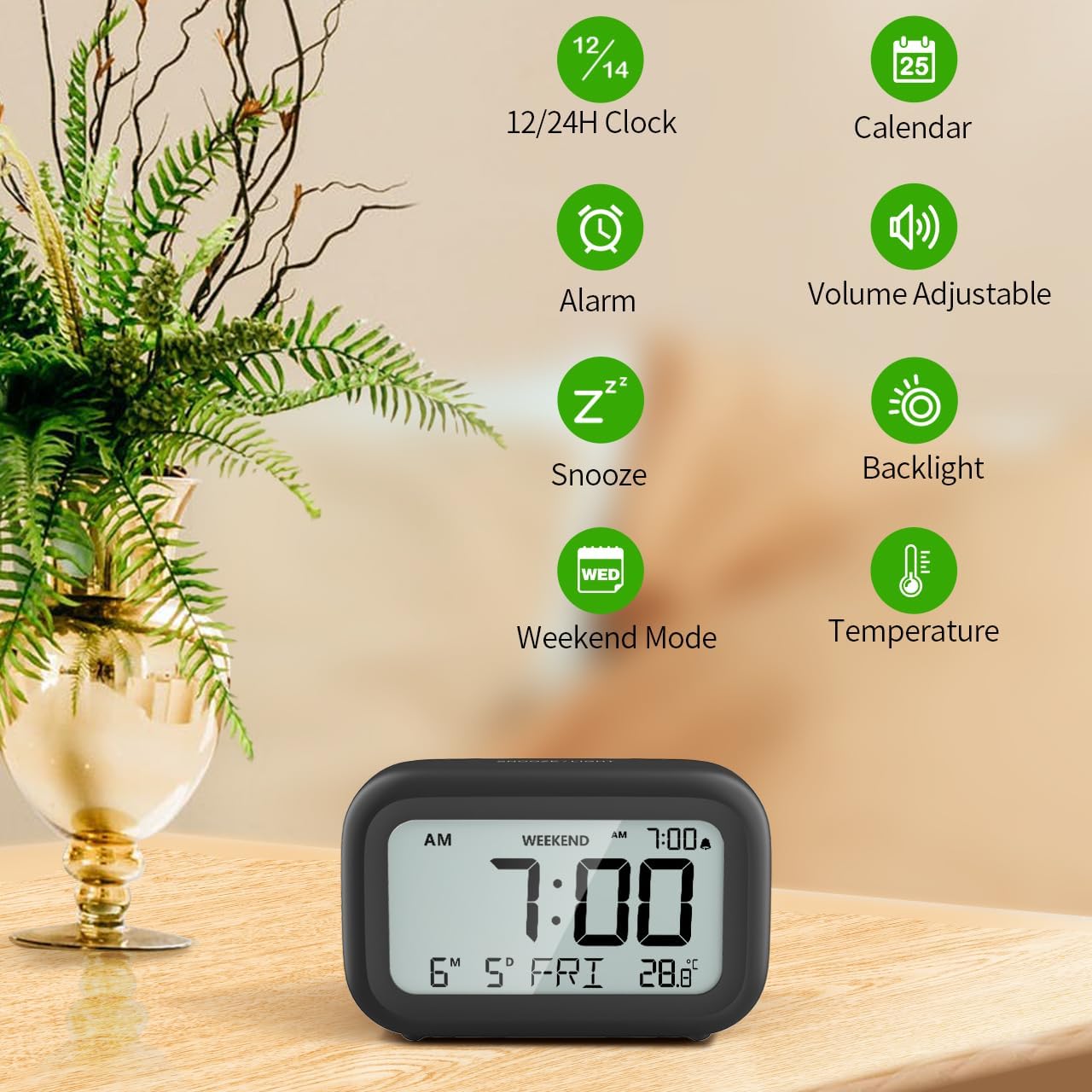
Gambar 3: Leuwihview of clock features.
4.1 Setélan Waktos sareng Tanggal
To set the current time and date:
- Pencét jeung tahan tombol SET button (usually represented by a clock icon or '12/24H' button) on the back of the clock until the numbers on the display begin to flash.
- Ngagunakeun éta + jeung - buttons to adjust the flashing value (Year, Month, Day, Hour, Minute).
- Pencét éta SET button again to confirm the setting and move to the next value.
- Once all values are set, the display will stop flashing. The day of the week will automatically update based on the date.
For a visual guide, refer to the video below, specifically from 0:18 for Date Setting jeung 0:32 for Time Setting.
4.2 Setélan alarem
To set your alarm time:
- Pencét éta alarem button (bell icon) on the back of the clock. The alarm time will appear and flash.
- Ngagunakeun éta + jeung - buttons to adjust the desired alarm hour and minute.
- Pencét éta alarem button again to confirm the alarm setting.
- To turn the alarm ON or OFF, simply press the alarem tombol sakali. Ikon alarm bakal muncul dina tampilan nalika alarm aktip.
For a visual guide, refer to the video below, specifically from 0:13 for turning alarm ON/OFF jeung 0:37 for Alarm Setting.
4.3 Fungsi Tunda
When the alarm sounds, gently touch the SNOOZE / CAHAYA button located on the top of the clock. This will activate the snooze function, providing an additional 9 minutes of sleep before the alarm sounds again. You can repeat this process multiple times.

Figure 4: Activating the snooze function.
To turn off the alarm completely after it sounds, press any button on the back of the clock.
For a visual guide, refer to the video below, specifically from 0:46 for Snooze function.
4.4 Weekend Mode
The Weekend Mode allows you to set the alarm to only sound from Monday to Friday, preventing it from disturbing you on weekends.
- Pencét éta MINGGU button (calendar icon) on the back of the clock to toggle Weekend Mode ON or OFF.
- When Weekend Mode is active, 'WEEKEND' will be displayed on the screen, and the alarm will be automatically disabled on Saturday and Sunday.

Figure 5: Weekend Mode and Alarm Volume Levels.
For a visual guide, refer to the video below, specifically from 0:50 for Weekend Mode ON/OFF.
4.5 Fungsi lampu tukang
The clock features a convenient 5-second on-demand backlight for viewing the time in low-light conditions.
- Simply touch the SNOOZE / CAHAYA button on the top of the clock to activate the backlight.
- The backlight will illuminate for approximately 5 seconds and then automatically turn off to conserve battery life.

Figure 6: Backlight in use.
For a visual guide, refer to the video below, specifically from 0:54 for 5 Seconds Backlight.
4.6 Témbongkeun Suhu
The clock displays the indoor temperature. You can switch between Celsius (°C) and Fahrenheit (°F) units.
- Pencét éta ° C / ° F button on the back of the clock to toggle between Celsius and Fahrenheit.

Figure 7: Indoor Temperature Display.
4.7 12/24 Hour Time Format
You can switch the time display between 12-hour (with AM/PM indicator) and 24-hour formats.
- Pencét éta 12/24H button on the back of the clock to switch between the two formats.
For a visual guide, refer to the video below, specifically from 0:58 for 12/24Hr Time Format Switchable.
4.8 Pangaturan Volume Alarm
The alarm clock offers two volume levels for the alarm sound: LOW (70dB) and HIGH (85dB).
- While setting the alarm, or when the alarm is sounding, you can cycle through the volume levels by pressing the appropriate button (often the + or - button, or a dedicated volume button if available). Refer to the icons on the back of your clock.
For a visual guide, refer to the video below, specifically from 0:42 for 2 Levels of Volume Adjustable.
Operating Instructions Video Guide
Video 1: Comprehensive guide on setting up and operating the DOOMAY Digital Alarm Clock. This video demonstrates battery installation, setting time and date, alarm functions, snooze, weekend mode, backlight, and volume adjustment.
5. Pangropéa
- beberesih: Lap jam ku lawon anu lemes sareng garing. Entong nganggo pembersih atanapi pelarut anu abrasif.
- Ngagantian batré: Replace batteries when the low battery indicator appears (flashing '8888' and beeping). Always use new AAA batteries.
- Panyimpenan: Upami nyimpen jam kanggo waktos anu lami, cabut batréna pikeun nyegah bocor.
6. Cara ngungkulan
| Masalah | Mungkin Cukang lantaranana | Solusi |
|---|---|---|
| Clock display is blank or dim. | Batré pareum atawa salah dipasang. | Ganti batré ku batré AAA anyar, mastikeun polaritasna bener. |
| Alarm teu disada. | Alarm is not activated or Weekend Mode is ON. | Press the ALARM button to activate. Check if Weekend Mode is active and disable if necessary. |
| Waktos/Tanggal lepat. | Not set correctly or batteries were removed. | Follow instructions in Section 4.1 to reset time and date. |
| Backlight does not stay on. | Ieu operasi normal. | The backlight is designed to illuminate for 5 seconds to conserve battery life. It is not a continuous backlight. |
7. Spésifikasi
- model: 5293B
- Jenis tampilan: LCD Digital
- Sumber Daya: 2 x Batré AAA (kaasup)
- Ukuran produk: 4.29"W x 2.72"H (approx. 10.9cm x 6.9cm)
- Bahan: Acrylonitrile Butadiene Styrene (ABS)
- Fitur: Alarm, Snooze, Weekend Mode, Indoor Temperature (°C/°F), 12/24H Time Format, 5-second Backlight
- Volume alarem: 2 levels (70dB, 85dB)
- Beurat barang: 4.48 ons (kira-kira 127g)
8. Garansi jeung Rojongan
DOOMAY products are manufactured with high-quality materials and craftsmanship. For any questions, concerns, or technical support regarding your DOOMAY Digital Alarm Clock, please contact the seller or refer to the product listing on the platform where it was purchased. Please retain your proof of purchase for warranty claims.


